
PERFASCIN BN59-01385A-VOICE-GAI
Instruction Manual for PERFASCIN BN59-01385A Replacement Remote Control
Model: BN59-01385A-VOICE-GAI
Brand: PERFASCIN
Introduction
This manual provides comprehensive instructions for setting up, operating, and troubleshooting your PERFASCIN BN59-01385A Replacement Remote Control. This remote is designed to be compatible with various Samsung Smart TV models, offering Bluetooth connectivity and voice command functionalities.

Image: Front view of the PERFASCIN BN59-01385A Replacement Remote Control, showcasing its sleek black design and button layout.

Image: A visual comparison showing the PERFASCIN replacement remote on the left and an original Samsung remote on the right, indicating it serves as a direct replacement.
Setup
1. Battery Installation
The PERFASCIN BN59-01385A remote control requires two (2) AAA batteries for operation. Batteries are not included with the remote.
- Locate the battery compartment cover on the back of the remote control.
- Slide the cover downwards to open the compartment.
- Insert two AAA batteries, ensuring the positive (+) and negative (-) terminals align correctly with the indicators inside the compartment.
- Slide the battery compartment cover back into place until it clicks securely.

Image: The remote control shown from the front and side, with dimensions indicated. The side view clearly shows the battery compartment area, emphasizing the need for 2 AAA batteries.
2. Pairing the Remote Control
This remote control utilizes Bluetooth for enhanced functionality, including voice commands. To pair the remote with your Samsung Smart TV:
- Ensure your TV is powered on.
- Point the remote control directly at the remote control sensor of your TV.
- Simultaneously press and hold the Return button (curved arrow) and the Play/Pause button (triangle and two vertical lines) for 3 seconds or more.
- A pairing message should appear on your TV screen, indicating successful connection.
Once paired, the remote will function via Bluetooth, allowing for more flexible control without needing direct line-of-sight to the TV sensor.
Operating Instructions
Remote Control Layout and Functions
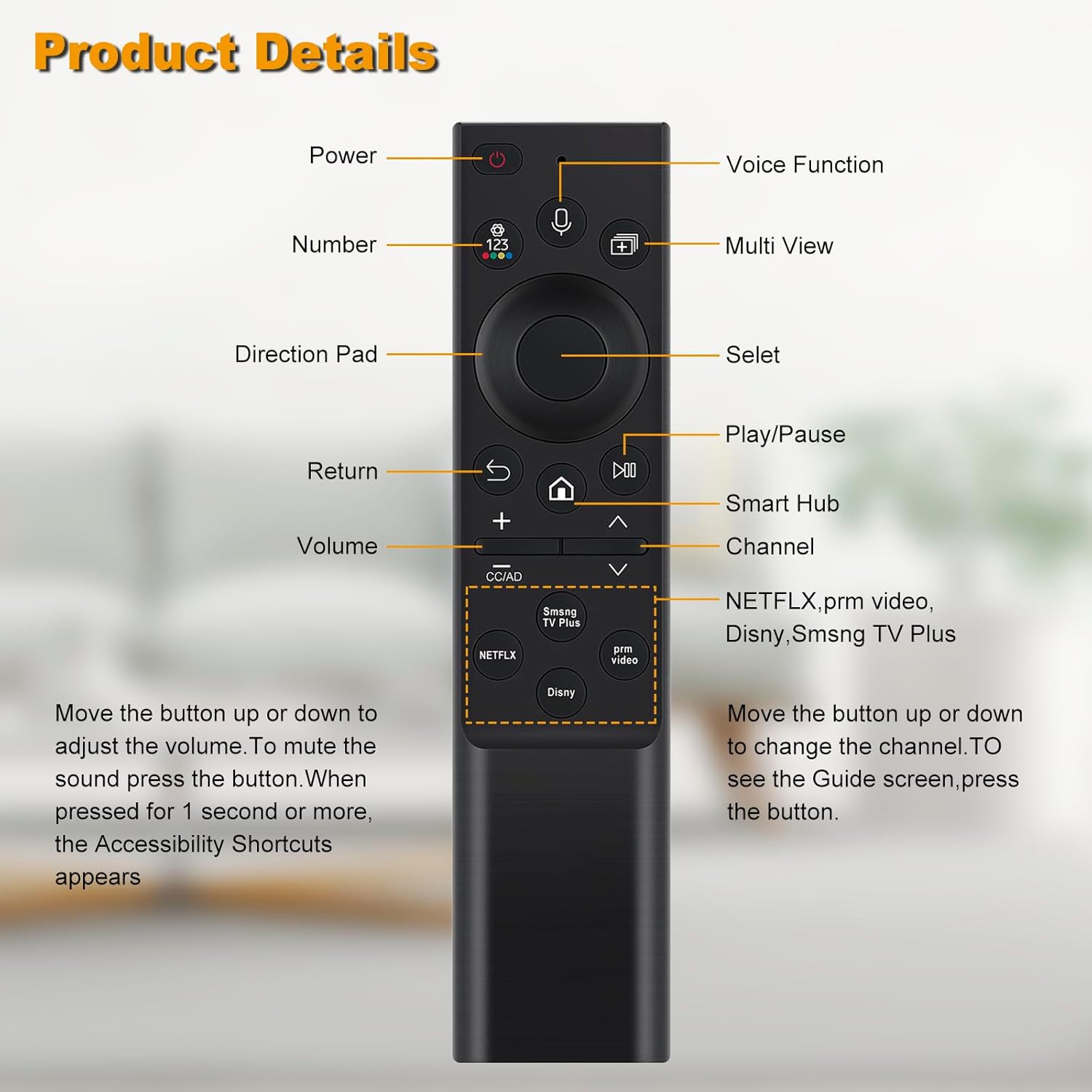
Image: A detailed diagram labeling each button on the remote control and describing its primary function, including Power, Voice Function, Number, Multi View, Direction Pad, Select, Play/Pause, Return, Smart Hub, Volume, Channel, and dedicated app buttons.
- Power Button: Turns the TV on or off.
- Voice Function Button: Activates voice commands for TV control and search.
- Number Button (123): Displays a virtual number pad on the screen for direct channel input.
- Multi View Button: Accesses the Multi View feature on compatible TVs.
- Direction Pad: Navigates menus and selections (Up, Down, Left, Right).
- Select Button: Confirms selections or opens items.
- Play/Pause Button: Controls media playback.
- Return Button: Goes back to the previous screen or menu.
- Smart Hub Button (Home icon): Opens the Smart Hub for apps, streaming services, and TV settings.
- Volume Buttons (+/-):
- Move the button up or down to adjust the volume level.
- To mute the sound, press the volume button.
- When pressed for 1 second or more, the Accessibility Shortcuts menu appears.
- Channel Buttons (Up/Down arrows):
- Move the button up or down to change the TV channel.
- To see the Guide screen, press the channel button.
- Dedicated App Shortcut Buttons: Quick access to popular streaming services.
- NETFLIX
- Smsng TV Plus (Samsung TV Plus)
- prm video (Prime Video)
- Disny (Disney+)

Image: The remote control displayed next to a large microphone icon, highlighting its voice command capability.

Image: The remote control shown with circles highlighting the dedicated shortcut buttons for Netflix, Samsung TV Plus, Prime Video, and Disney+.
Compatibility
This replacement remote control is compatible with a wide range of Samsung Smart TV models, including but not limited to:
- Samsung 6 series, 7 series, 8 series, QLED Q60T, Q70T, Q80T series Smart TVs.
- Specific models such as RU9000, TU8000, TU8300, Q60T, Q70T, Q80T, Q90T, Q800T, Q900TS, Q950TS, LST7, LS05, RU8000, Q50, Q60, Q70, Q80, Q900, NU8000, NU8500, Q6F, Q7F, Q7C, Q8F, Q9F Series.
- Additional compatible models: QN50QN90BAFXZA, QN55Q60BAFXZA, QN55Q60BDFXZA, QN55Q80BAFXZA, QN55Q80BDFXZA, QN55QN85BAFXZA, QN55QN85BDFXZA, QN55QN90BAFXZA, QN65QN90BAFXZA, QN65S95BAFXZA, QN70Q60BAFXZA, QN70Q60BDFXZA, QN75Q60BAFXZA, QN75Q60BDFXZA, QN75Q80BAFXZA, QN75Q80BDFXZAQN85QN90BD, QN55Q60BD, QN50Q60BD, QN55S95BD, QN50Q80BAFZXA, QN43Q60BAFXZA, QN43Q60BDFXZA, QN50Q60BAFXZA, QN50Q60BDFXZA, QN50Q80BDFXZA, QN55QN95BAFXZA, TM2280E, QN55S95BAFXZA, QN60Q60BAFXZA, QN65Q60BAFXZA, QN65Q60BDFXZA, RMCSPB1EP1, QN65Q80BAFXZA, QN65Q80BDFXZA, QN65QN800BFXZA, QN65QN85BAFXZA, QN65QN85BDFXZA, QN65QN900BFXZA.

Image: The remote control positioned alongside multiple Samsung Smart TVs, illustrating its broad compatibility with different models.

Image: The remote control displayed with a list of compatible Samsung TV sizes (32", 40", 43", 48", 49", 50", 55", 65", 75"), indicating its suitability for various screen dimensions.
Maintenance
To ensure the longevity and optimal performance of your remote control, follow these maintenance guidelines:
- Keep the remote clean by wiping it with a soft, dry cloth. Avoid using liquid cleaners or abrasive materials.
- Do not expose the remote to extreme temperatures, direct sunlight, or high humidity.
- If the remote will not be used for an extended period, remove the batteries to prevent leakage and potential damage.
- Handle the remote with care to avoid dropping it or subjecting it to strong impacts.
Troubleshooting
If you encounter issues with your PERFASCIN BN59-01385A remote control, please refer to the following common troubleshooting steps:
Remote Not Responding
- Check Batteries: Ensure the batteries are inserted correctly with the correct polarity (+/-) and are not depleted. Replace with fresh AAA batteries if necessary.
- Re-pair the Remote: If the remote loses connection, try re-pairing it with your TV by pointing it at the TV sensor and holding the Return and Play/Pause buttons simultaneously for 3 seconds or more.
- Clear Obstructions: Ensure there are no objects blocking the line of sight between the remote and the TV's sensor, especially during the initial pairing process.
Voice Command Issues
- Ensure Pairing: Voice commands require a successful Bluetooth pairing. Confirm the remote is paired as described in the Setup section.
- Internet Connection: Some voice command features may require an active internet connection on your Samsung Smart TV.
- Speak Clearly: Speak clearly and directly into the microphone on the remote control.
Compatibility Concerns
While this remote is broadly compatible, verify your TV model against the list provided in the "Operating Instructions > Compatibility" section. If your TV model is not listed, some functions may not be fully supported.
Important Notice: If the package you receive does not match the product images or description, please contact customer support for a free exchange.
Specifications
| Feature | Detail |
|---|---|
| Model Number | BN59-01385A-VOICE-GAI |
| Product Dimensions | 6 x 3 x 0.5 inches |
| Item Weight | 1.76 ounces |
| Batteries Required | 2 AAA batteries (not included) |
| Connectivity Technology | Bluetooth |
| Compatible Devices | Television |
| Special Feature | Ergonomic design |
| Max Number of Supported Devices | 15 (for universal remote capabilities, though primarily for Samsung TVs) |
Warranty and Support
For any questions, concerns, or support regarding your PERFASCIN BN59-01385A Replacement Remote Control, please contact the manufacturer or seller directly through your purchase platform.
As noted in the troubleshooting section, if the product received does not match the images or description, please reach out for a free exchange. Specific warranty details may vary by retailer or region; please refer to your purchase documentation for precise warranty information.
Ask a question about this manual
Ask about setup, troubleshooting, compatibility, parts, safety, or missing instructions. Manuals+ will review the question and use this page’s manual context to help answer it.