
1. Introduction
Thank you for choosing the Ecoey Carbon Monoxide Detector. This device is designed to provide early warning of carbon monoxide (CO) gas presence, helping to protect you and your family from the dangers of CO poisoning. Featuring an advanced electrochemical sensor and a clear digital LCD display, this detector offers reliable and accurate monitoring. Please read this manual thoroughly before installation and use, and keep it for future reference.

Image 1.1: Front view of the Ecoey Carbon Monoxide Detector, showing the LCD screen and LED indicators.
2. Important Safety Information
This carbon monoxide alarm is designed to detect carbon monoxide gas from any source of combustion. It is not designed to detect smoke, fire, or other gases. Please adhere to the following safety guidelines:
- Never ignore the alarm. Responding to the alarm quickly can save lives.
- Do not paint the alarm. Paint can clog the sensing vents and interfere with the alarm's ability to detect CO.
- Do not block the vents on the alarm. Ensure proper airflow around the device.
- Test the alarm weekly. Refer to the 'Testing the Alarm' section for instructions.
- Replace batteries as indicated by the low battery warning.
- This device should be installed by a competent person.
- Carbon monoxide is a colorless, odorless, and tasteless gas, making it impossible to detect with human senses.
3. Product Features
- Advanced Electrochemical CO Sensor: Quickly and accurately detects dangerous CO levels from 23 ppm to 999 ppm.
- Digital LCD Display: Provides real-time CO concentration readings and peak CO levels.
- Audible Alarm: Emits a loud 85 dB alarm sound to warn of CO presence.
- 3-Color LED Indicator: Green for power, yellow for fault, and red for alarm, providing clear status indication.
- 10-Year Lifespan: Designed for long-term reliability.
- 3-Year Replaceable Batteries: Ensures continuous protection with easy battery replacement.
- Peak CO Concentration Memory: Records and saves the highest CO level detected, useful for post-alarm analysis.
- Mute Mode: Allows temporary silencing of the alarm during testing or non-emergency situations.
- Minimalistic & Portable Design: Suitable for wall-mounted or desktop placement in various environments.
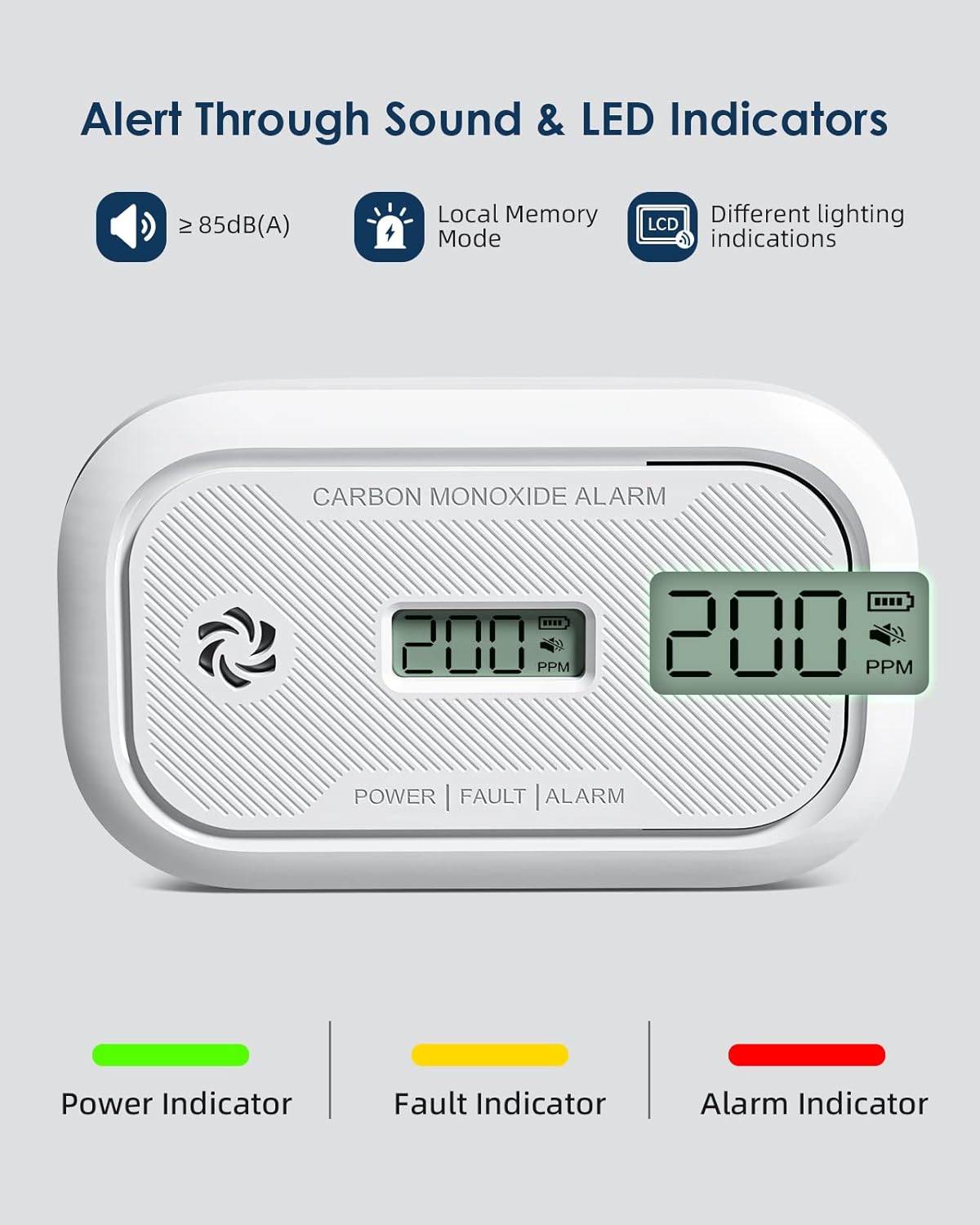
Image 3.1: The detector alerts users through an 85dB sound and distinct LED indicators for power, fault, and alarm states.
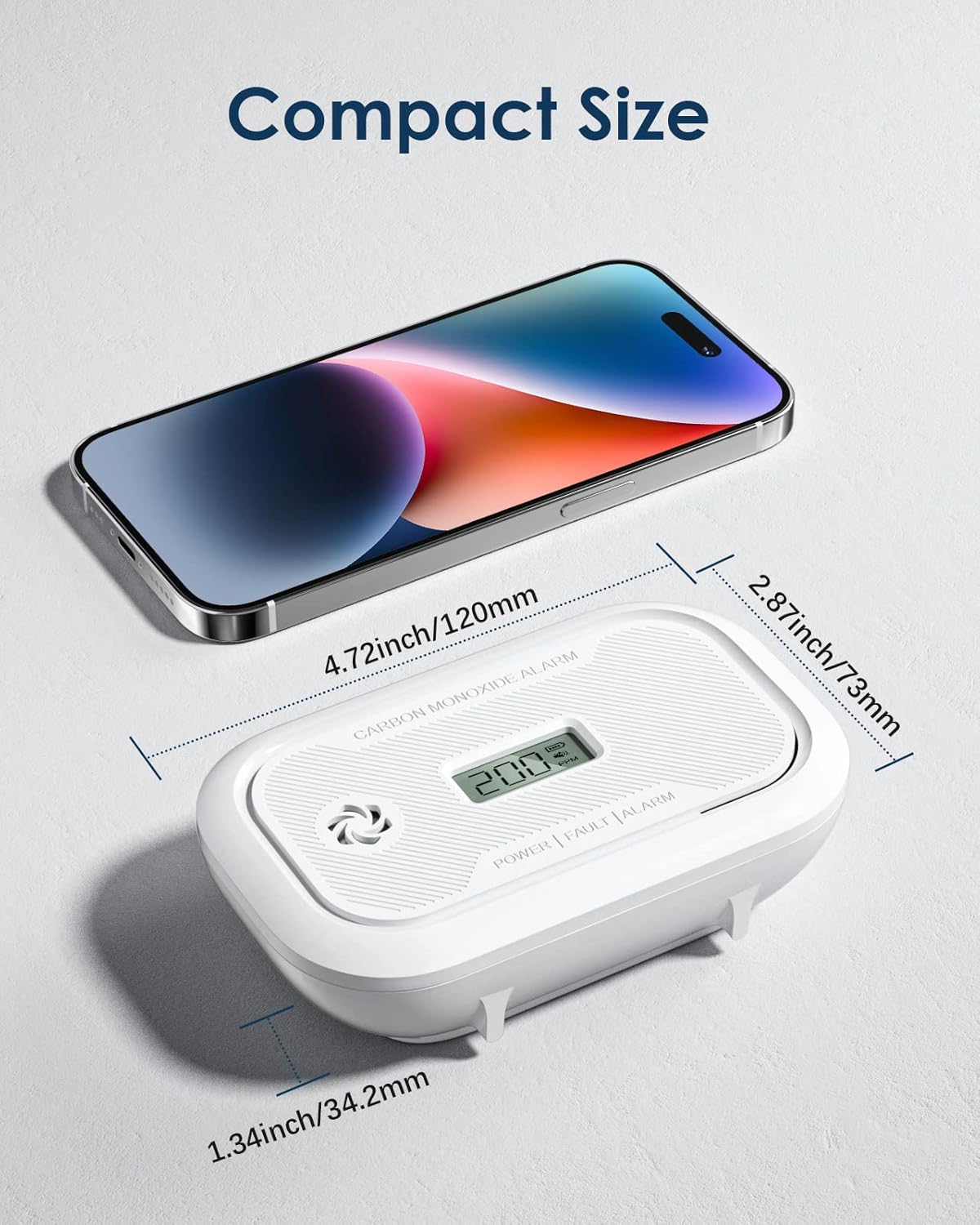
Image 3.2: The compact size of the detector, measuring approximately 4.72 inches (120mm) in length and 2.87 inches (73mm) in width.

Image 3.3: Internal components of the detector, highlighting the electrochemical sensor, intelligent chipset, and fire-retardant materials.

Image 3.4: Illustration of high-sensitivity CO concentration monitoring, showing alarm thresholds and response times (e.g., 30 PPM without alarm before 120 minutes, 300 PPM within 3 minutes).
4. Package Contents
Please check the package contents upon opening to ensure all items are present:
- Ecoey Carbon Monoxide Detector (1 unit)
- AA Batteries (2 units)
- Mounting Plate (1 unit)
- Fixing Screws and Wall Plugs (set)
- User Manual (1 copy)
5. Setup and Installation
5.1 Battery Installation
- Remove the mounting plate from the back of the detector by twisting it counter-clockwise.
- Locate the battery compartment.
- Insert the two AA batteries, ensuring correct polarity (+ and -).
- The detector will emit a short beep and the LCD will light up, indicating it is powered on.

Image 5.1: The detector's battery compartment, showing the placement of two AA batteries for its 3-year replaceable battery life.
5.2 Mounting Options
The Ecoey Carbon Monoxide Detector can be installed in two ways: wall-mounted or freestanding.
Wall-Mounted Installation:
- Choose a suitable location (refer to local regulations for CO alarm placement, generally near sleeping areas and on every level of the home). Avoid dead air spaces, direct sunlight, or areas near combustion appliances.
- Use the mounting plate as a template to mark two drill holes on the wall.
- Drill the holes and insert the wall plugs.
- Secure the mounting plate to the wall using the provided screws.
- Attach the detector to the mounting plate by aligning the grooves and twisting clockwise until it clicks into place.
Freestanding Placement:
The detector can also be placed on a flat surface such as a table, shelf, or nightstand. Ensure it is stable and not easily knocked over. Maintain proper distance from walls and other objects to allow for air circulation.

Image 5.2: Visual representation of the two installation methods: wall-mounted and freestanding on a surface.

Image 5.3: Examples of multi-application use, demonstrating the detector's portability and suitability for different environments like hotels, living rooms, offices, and travel luggage.
5.3 Initial Test
After installation, perform an initial test to ensure the alarm is functioning correctly:
- Press and hold the 'Test/Silence' button on the front of the detector for approximately 3 seconds.
- The alarm will sound a loud, pulsating tone, and the red LED will flash.
- Release the button. The alarm should stop, and the detector will return to normal monitoring mode.
- If the alarm does not sound, refer to the 'Troubleshooting' section.
6. Operation
6.1 LCD Display and LED Indicators
The detector features a digital LCD display and three LED indicators to communicate its status:
- LCD Display: Shows the current CO concentration in parts per million (PPM) and battery level. In normal operation, it may show '0 PPM' or fluctuate slightly.
- Green LED (POWER): Flashes once every 30 seconds, indicating normal operation and sufficient power.
- Yellow LED (FAULT): Flashes when a fault is detected (e.g., sensor malfunction) or when the battery is low. Refer to troubleshooting.
- Red LED (ALARM): Flashes rapidly along with the audible alarm when CO levels exceed safe thresholds.
6.2 Testing the Alarm
It is recommended to test your CO alarm weekly to ensure proper function.
- Press and hold the 'Test/Silence' button until the alarm sounds.
- The alarm will sound for a few seconds, and the red LED will flash.
- Release the button. The alarm should cease.
6.3 Mute Mode
If the alarm sounds due to a known, temporary CO source (e.g., a car running briefly in an attached garage), you can temporarily silence the alarm:
- Press the 'Test/Silence' button once during an alarm.
- The audible alarm will be silenced for a period (typically 5-10 minutes), but the red LED will continue to flash.
- If CO levels remain high after the mute period, the alarm will reactivate.
- Note: Do not use mute mode to ignore a persistent alarm. Always investigate the source of CO.
6.4 Peak CO Concentration Memory
The detector automatically records the highest CO concentration detected since the last reset or power cycle. To view the peak level:
- In normal standby mode, briefly press the 'Test/Silence' button.
- The LCD will display the peak CO concentration recorded.
- The display will return to current CO levels after a few seconds.
- This feature is useful for confirming if an alarm was triggered while you were away from home.
7. Maintenance
Regular maintenance ensures the longevity and proper functioning of your CO detector.
- Cleaning: Dust the detector regularly with a soft, damp cloth. Do not use cleaning solvents or chemicals, as they may damage the sensor. Do not spray air fresheners, hair spray, or other aerosols near the alarm.
- Battery Replacement: When the yellow LED flashes and the LCD shows a low battery indicator, replace the two AA batteries immediately. Refer to section 5.1 for battery installation.
- Regular Testing: Test the alarm weekly as described in section 6.2.
- End of Life: The detector has a 10-year lifespan. After 10 years from the date of manufacture (indicated on the back of the unit), the unit should be replaced, even if it appears to be working.
8. Troubleshooting
If you encounter issues with your Ecoey Carbon Monoxide Detector, refer to the table below:
| Problem | Possible Cause | Solution |
|---|---|---|
| Alarm sounds continuously (Red LED flashing) | High CO concentration detected. | Immediately move to fresh air. Call emergency services (911 or local equivalent). Do not re-enter the premises until it has been aired out and checked by professionals. |
| Yellow LED flashing and/or chirping sound | Low battery or fault detected. | Replace batteries. If the issue persists, the unit may have a fault and needs replacement. |
| No display on LCD or unit does not power on | Batteries incorrectly installed or dead. | Check battery polarity. Replace with new AA batteries. |
| Alarm does not sound during test | Unit malfunction or dead batteries. | Ensure batteries are fresh and correctly installed. If still no sound, the unit is faulty and must be replaced. |
| False alarms | Interference from strong chemicals, paint fumes, or excessive dust. | Relocate the detector away from sources of interference. Clean the detector as per maintenance instructions. |
9. Technical Specifications
| Feature | Specification |
|---|---|
| Model Number | ZA327A |
| Sensor Type | Electrochemical |
| Power Source | 2 x AA Batteries (included) |
| Alarm Loudness | ≥ 85 dB at 1 meter |
| CO Detection Range | 23 ppm to 999 ppm |
| Operating Temperature | 40°F to 100°F (4.4°C to 37.8°C) |
| Operating Humidity | 10% to 95% RH (non-condensing) |
| Product Lifespan | 10 Years |
| Dimensions | 5.2 x 3.62 x 2.05 inches (approx.) |
| Weight | 6.4 ounces (approx.) |
| Material | Plastic |
| Installation Method | Wall-Mounted / Freestanding |
10. Warranty and Support
Ecoey products are manufactured to the highest quality standards. For specific warranty details and duration, please refer to the warranty card included with your product or contact Ecoey customer support.
If you have any questions, require technical assistance, or need to report a fault, please contact Ecoey customer support through the contact information provided on the product packaging or the official Ecoey website. Please have your model number (ZA327A) and purchase details ready when contacting support.

