
1. Introduction
Thank you for choosing the Costzon 12V Licensed Chevrolet Tahoe Electric Ride-On Car. This manual provides essential information for the safe operation, assembly, maintenance, and troubleshooting of your new electric vehicle. Please read this manual thoroughly before initial use and retain it for future reference.

Figure 1.1: The Costzon 12V Licensed Chevrolet Tahoe Electric Ride-On Car in yellow.
2. Safety Information
Your child's safety is paramount. This ride-on car is designed with multiple safety features and is certified by ASTM & CPSIA standards. Always ensure adult supervision during operation.
- Adult Supervision Required: Never leave a child unattended while operating the vehicle.
- Safety Belt: Always ensure the child is securely fastened with the provided safety belt.
- Slow Start and Stop: The vehicle features a slow start and stop technology to prevent sudden jerks, ensuring a smooth and safe ride.
- Emergency Brake: The 2.4G remote control includes an emergency brake function for immediate stopping by a supervising adult.
- Door Locks: The openable doors are equipped with safety locks to keep children securely inside during operation.
- Appropriate Age and Weight: This vehicle is recommended for children aged 3-6 years with a maximum weight capacity of 55 lbs (25 kg).
- Operating Environment: Use on flat, dry surfaces away from traffic, swimming pools, or steep inclines. Avoid driving on wet or uneven terrain.

Figure 2.1: Key safety and design features including soft start/brake and secure doors.
3. Setup and Charging
3.1 Initial Charging
Before first use, fully charge the 12V rechargeable battery for 8-12 hours. Subsequent charges should also be 8-12 hours. Do not overcharge the battery.
- Locate the hidden charging socket, typically near the accelerator pedal or under the seat.
- Connect the charger to the charging socket and then plug the charger into a standard wall outlet.
- The charging indicator light (if present on the charger) will show the charging status.
- Disconnect the charger once charging is complete.
3.2 Assembly (Refer to separate assembly guide for detailed steps)
While this manual focuses on operation, basic assembly is required. Ensure all components are securely attached, including wheels, steering wheel, and seat, before charging or operation. Verify all screws and fasteners are tightened.

Figure 3.1: The 12V battery system powers the vehicle.
4. Operating Instructions
4.1 Vehicle Controls
- One-Key Start Button: Press to power on the vehicle.
- Accelerator Pedal: Press to move forward. Release to brake.
- Steering Wheel: Turn left or right to steer the vehicle.
- Forward/Reverse Lever: Select desired driving direction.
- High/Low Speed Switch: Adjust the speed setting for the child's driving mode.
- Light Switch: Controls the headlights and taillights.
- Horn Sound: Press the button on the steering wheel for horn sound.

Figure 4.1: Driver's cockpit and media player controls.
4.2 2.4G Remote Control Operation
The 2.4G remote control allows parents to safely guide the vehicle, especially for younger children or in situations requiring immediate intervention.
- Pairing: Follow the instructions in the separate remote control manual to pair the remote with the vehicle.
- Forward/Reverse: Use the corresponding buttons to move the car forward or backward.
- Left/Right: Use the corresponding buttons to steer the car.
- Speed Selection (S): Choose between High, Mid, or Low speeds.
- Emergency Brake (P): Press this button to immediately stop the vehicle. Press again to release.

Figure 4.2: Parent remote control and its functions.
4.3 Media Player Functions
The built-in multifunctional media player offers various entertainment options:
- Pre-loaded Content: Enjoy several dynamic songs and absorbing stories.
- FM Radio: Tune into FM radio stations.
- Aux Input: Connect external audio devices via the Aux port.
- USB Port: Play audio files from a USB drive.
- TF Slot: Play audio files from a TF (MicroSD) card.
- Wireless Connection: Connect wirelessly to compatible devices for audio playback.
- Volume Adjustment: Control the audio volume.

Figure 4.3: Dual driving modes for enhanced control.
5. Maintenance
- Cleaning: Wipe the vehicle with a soft, damp cloth. Do not use abrasive cleaners or solvents. Avoid spraying water directly onto electrical components.
- Battery Care:
- Recharge the battery after each use.
- If storing for extended periods, charge the battery once a month to prolong its lifespan.
- Do not allow the battery to completely drain before recharging.
- Storage: Store the vehicle in a dry, cool place away from direct sunlight and moisture. Protect it from extreme temperatures.
- Inspection: Regularly check for loose screws, damaged wires, or worn parts. Replace any damaged components immediately.
6. Troubleshooting
| Problem | Possible Cause | Solution |
|---|---|---|
| Vehicle does not move. | Battery low or dead; Loose wire connection; Overload protection activated. | Charge the battery; Check all connections; Reduce load/wait for reset. |
| Remote control not working. | Remote batteries dead; Remote not paired. | Replace remote batteries; Re-pair remote control. |
| Vehicle moves slowly. | Low battery; Overloaded; Operating on rough terrain. | Charge battery; Reduce weight; Move to smoother surface. |
| Lights or music not working. | Loose connection; Media player off; Volume too low. | Check connections; Turn on media player; Increase volume. |
7. Specifications
- Model: Licensed Chevrolet Tahoe Electric SUV
- Brand: Costzon
- Product Dimensions: 40.9 x 26 x 20.8 inches (L x W x H)
- Item Weight: 34 pounds (15.4 kg)
- Recommended Age: 3 - 6 years
- Maximum Weight Capacity: 55 lbs (25 kg)
- Speed: 1.9 - 2.2 mph (3 - 3.5 km/h)
- Battery: 12V/7Ah x 1
- Motors: 2 x 35W
- Charging Time: 8 - 12 hours
- Material: Durable PP and sturdy metal
- Safety Certifications: ASTM & CPSIA
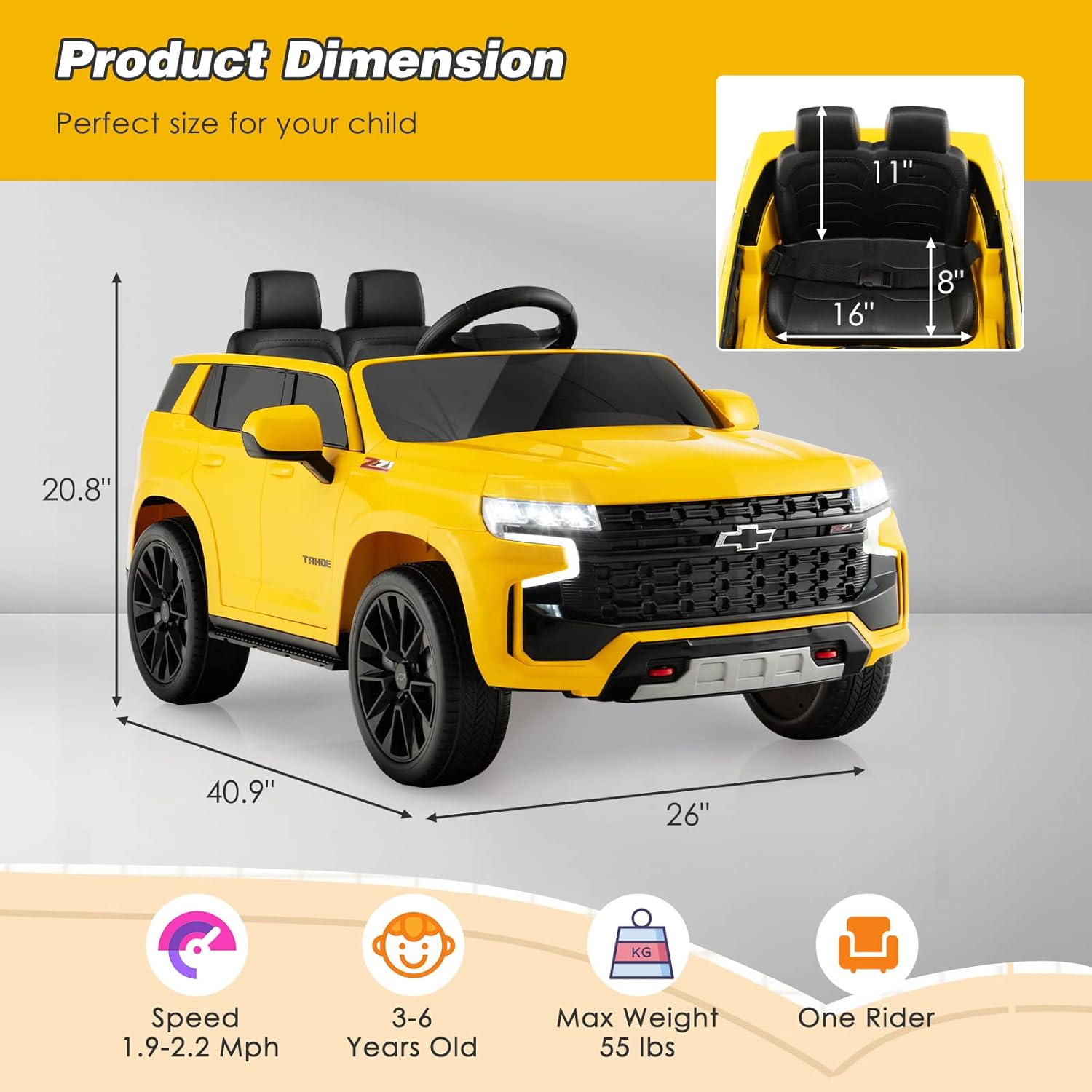
Figure 7.1: Product dimensions and key specifications.

Figure 7.2: The vehicle's suitability for various terrains due to shock-absorbing wheels.
8. Warranty and Support
For warranty information, technical support, or replacement parts, please contact Costzon customer service directly. Refer to your purchase documentation for specific warranty terms and contact details.
You can also visit the official Costzon store for more information and product updates: Costzon Official Store