
Introduction
Thank you for choosing the ADDplus ESS-01 Electric Spin Scrubber. This cordless, rechargeable cleaning tool is designed to make your cleaning tasks easier and more efficient. Featuring a powerful motor, multiple brush heads, and a waterproof design, it is ideal for various surfaces in your home. Please read this manual thoroughly before first use to ensure proper operation and maintenance.
Package Contents
Your ADDplus ESS-01 Electric Spin Scrubber package includes:
- 1 x Electric Spin Scrubber Unit
- 1 x Flat Brush Head
- 1 x Corner Brush Head
- 1 x Scouring Pad
- 1 x Sponge Brush Head
- 1 x USB Charging Cable
- 1 x User Manual (this document)
Product Overview
Familiarize yourself with the main components of your Electric Spin Scrubber:

Figure 1: The Electric Spin Scrubber unit, highlighting its IPX7 waterproof design and integrated LCD screen for battery status.

Figure 2: Detailed view of the scrubber's features, including the dual-speed motor, 360-degree rotating brush head, and cordless operation for powerful cleaning.
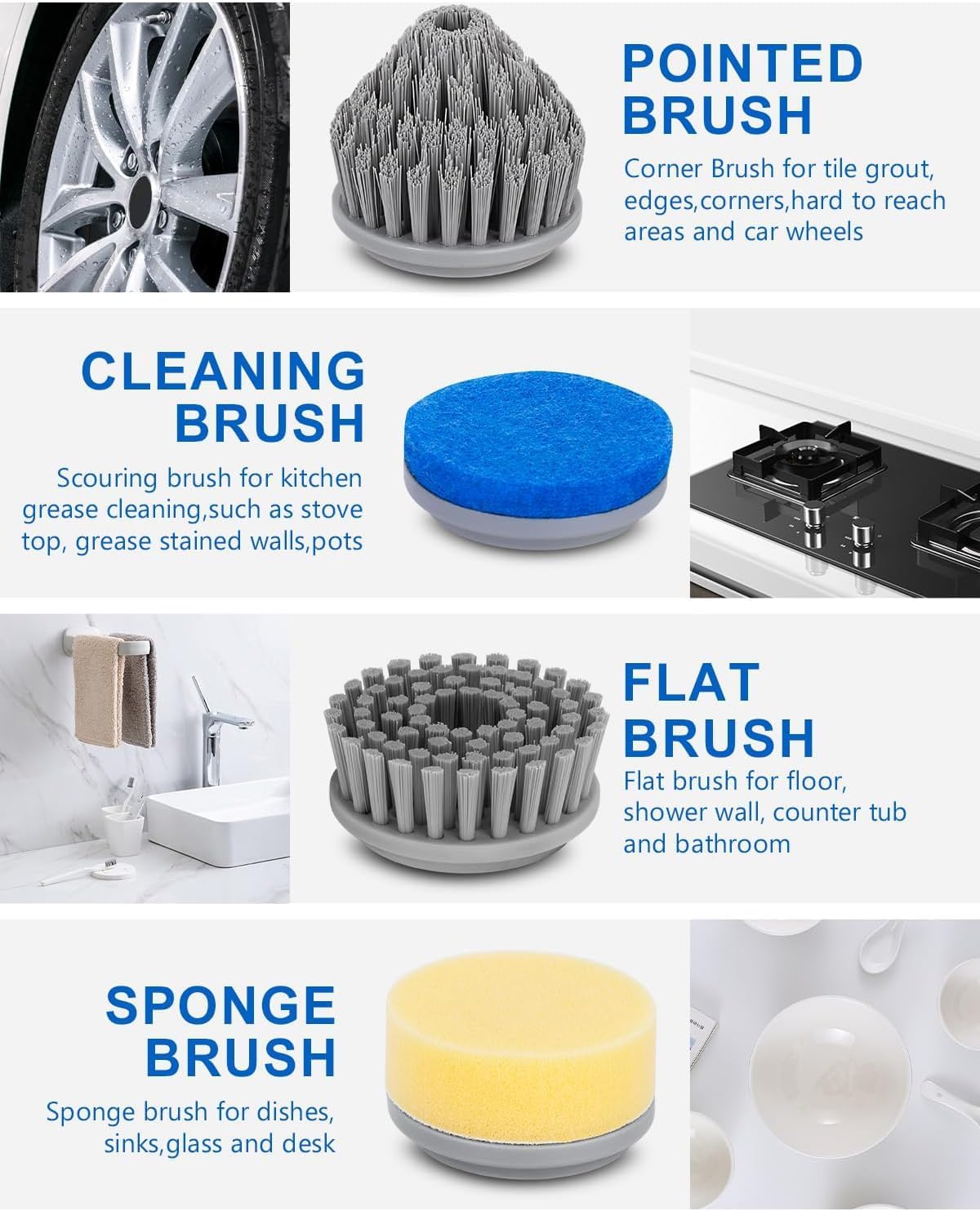
Figure 3: An illustration of the four versatile brush heads: a pointed brush for corners, a general cleaning brush, a flat brush for large surfaces, and a sponge brush for delicate areas.
Setup
1. Charging the Device
Before first use, fully charge the Electric Spin Scrubber. The device is equipped with an 1800 mAh rechargeable battery.
- Locate the charging port on the handle of the scrubber.
- Connect the provided USB charging cable to the port and plug the other end into a compatible USB power adapter (not included) or a USB port.
- The LCD screen will display the charging status. A full charge typically takes 2-3 hours.
- Once fully charged, the device provides up to 120 minutes of continuous working time.
2. Attaching Brush Heads
The scrubber comes with four different brush heads for various cleaning tasks. To attach a brush head:
- Align the desired brush head with the rotating spindle on the main unit.
- Gently push and twist the brush head clockwise until it clicks securely into place.
- To remove, twist counter-clockwise and pull off.

Figure 4: Demonstrating how to attach a brush head to the main unit.
Operating Instructions
1. Power On/Off and Speed Modes
- Press the power button once to turn on the scrubber in Normal Wash Mode (low speed). The LCD screen will display the remaining battery percentage.
- Press the power button a second time to switch to Super Wash Mode (high speed), offering up to 400 rotations per minute for deep cleaning.
- Press the power button a third time to turn off the device.
2. Using the Scrubber
The Electric Spin Scrubber is IPX7 waterproof, making it safe for use in wet environments. Apply your preferred cleaning solution to the surface or directly to the brush head.
- Flat Brush Head: Ideal for large flat surfaces like floors, shower walls, and bathtubs.
- Corner Brush Head: Designed for reaching tight spaces such as grout lines, edges, corners, and even car wheels.
- Scouring Pad: Best for tackling tough grime and stubborn stains, especially in the kitchen.
- Sponge Brush Head: Suitable for delicate surfaces like glass, mirrors, and desks.
Gently guide the rotating brush over the surface to be cleaned. Allow the scrubber to do the work; excessive pressure is not required. After cleaning, rinse the surface and the brush head thoroughly.
Video 1: An official seller video demonstrating the Electric Spin Scrubber in action with various brush heads, showcasing its versatility for different cleaning tasks.
Maintenance
1. Cleaning the Scrubber
- After each use, remove the brush head and rinse it under running water to remove any soap residue or debris.
- Wipe the main unit with a damp cloth. Do not submerge the entire unit in water, despite its IPX7 rating, to prolong its lifespan, especially the charging port area.
- Ensure all parts are dry before storing.
2. Storage
Store the Electric Spin Scrubber and its attachments in a cool, dry place away from direct sunlight and extreme temperatures. Keep out of reach of children.
Troubleshooting
| Problem | Possible Cause | Solution |
|---|---|---|
| Device does not turn on. | Low battery or not charged. | Charge the device fully (2-3 hours). Check the LCD screen for battery status. |
| Brush head stops spinning or slows down significantly. | Low battery or excessive pressure applied. | Recharge the device. Reduce pressure on the brush head; let the motor do the work. |
| Brush head is difficult to attach/remove. | Incorrect alignment or debris. | Ensure correct alignment with the spindle. Clean any debris from the attachment mechanism. |
If you encounter any issues not listed here, please contact customer support.
Specifications
| Feature | Detail |
|---|---|
| Brand | ADDplus |
| Model Number | ESS-01 |
| Color | White |
| Material | ABS (Acrylonitrile Butadiene Styrene) |
| Handle Material | Acrylonitrile Butadiene Styrene |
| Special Features | Cordless, Durable, Lightweight, IPX7 Waterproof, LCD Screen |
| Battery Capacity | 1800 mAh |
| Charging Time | 2-3 hours |
| Continuous Working Time | Up to 120 minutes |
| Rotation Speed | Up to 400 RPM (Super Wash Mode) |
| Product Dimensions | 3.3 x 1.2 x 7.2 inches |
| Item Weight | 15.2 ounces |
| Surface Recommendation | Shower, Floor, Sink, Tile, Window |
| Included Components | Electric Scrubber, 4 Brush Heads, USB Cable |
Warranty and Support
For warranty information or customer support, please refer to the contact details provided on the product packaging or visit the official ADDplus website. Keep your purchase receipt for warranty claims.