1. Introduction
This manual provides detailed instructions for the assembly, operation, and maintenance of your FITUEYES Universal TV Stand. Designed for televisions ranging from 27 to 55 inches, this stand offers height adjustability and a stable tempered glass base. Please read this manual thoroughly before assembly and use to ensure safe and proper installation.
The stand is compatible with various TV brands including Samsung, Sony, and LG, supporting VESA patterns from 100x100mm up to 400x400mm.
2. Safety Information
- Ensure all parts are present and undamaged before assembly. Do not use if any parts are missing or defective.
- Do not exceed the maximum weight capacity of 88 lbs (40 kg).
- Ensure your TV's VESA pattern is compatible with the stand (100x100mm to 400x400mm).
- Assemble the stand on a soft, clean surface to prevent scratches.
- Always use two people to lift and place the TV onto the stand.
- Do not allow children to climb on or play with the TV stand.
- Periodically check all screws and connections to ensure they remain tight and secure.
- Place the stand on a stable, level surface to prevent tipping.
3. Package Contents
Please verify that all components listed below are included in your package. If any parts are missing or damaged, contact customer support.

Image: Exploded view of the FITUEYES TV stand showing all individual components and hardware for assembly.
All nuts, bolts, and tools are typically provided in separately labeled packets for ease of assembly.
4. Specifications
| Feature | Detail |
|---|---|
| Product Dimensions (L x W x H) | 17.5 x 9.5 x 25.5 inches (approximate assembled) |
| Item Weight | 8.5 pounds |
| Material | Metal, Tempered Glass |
| Maximum Compatible TV Size | 55 Inches |
| Minimum Compatible TV Size | 27 Inches |
| Maximum Weight Capacity | 88 lbs (40 kg) |
| VESA Compatibility | 100x100, 200x100, 200x200, 300x200, 300x300, 400x200, 400x300, 400x400 mm |
| Height Adjustment | 4 adjustable height options (11.1" min to 17.2" max from center of mount to floor) |
| Base Dimensions | 15.1" x 9.5" (Tempered Glass) |
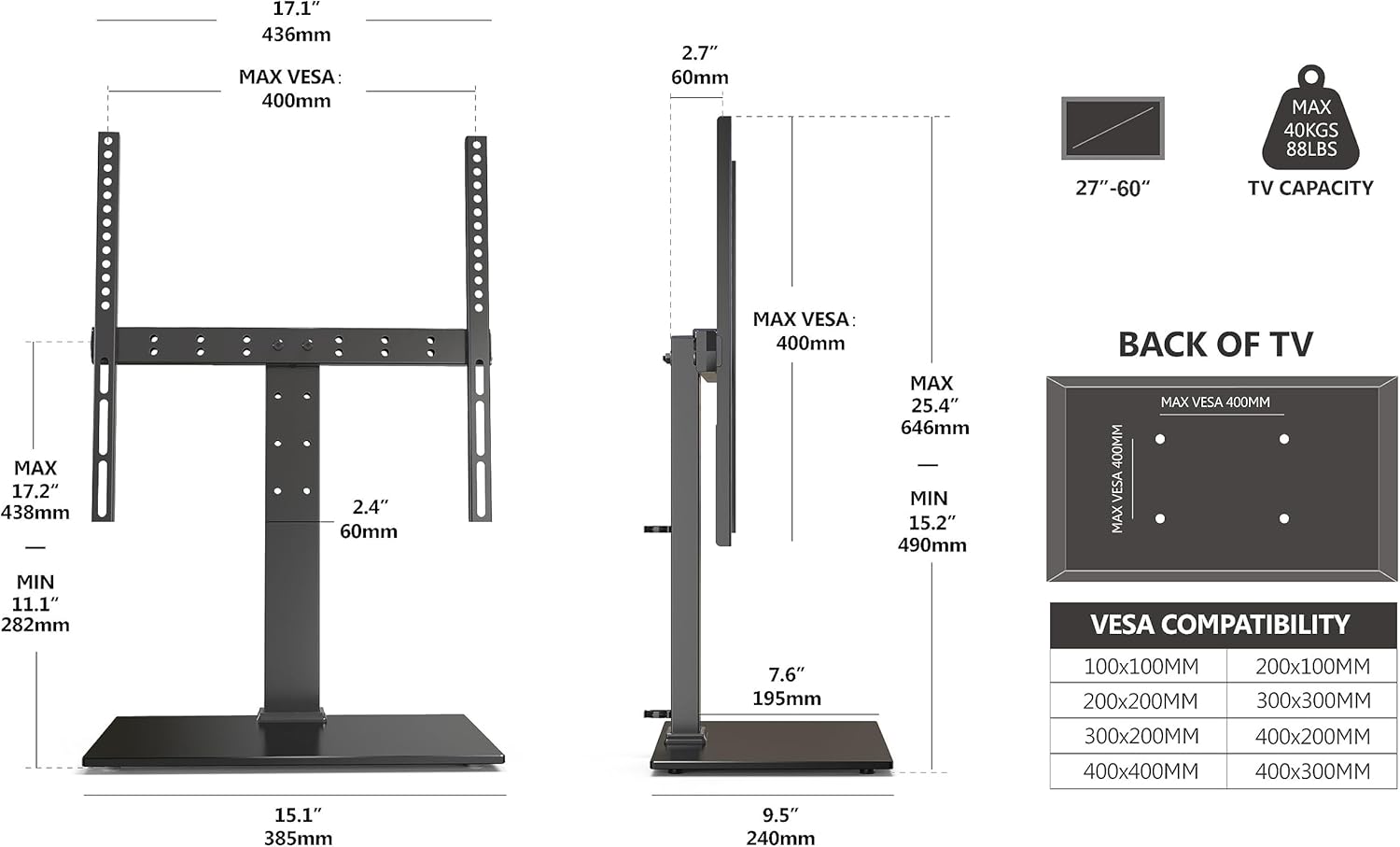
Image: Technical diagram illustrating the dimensions and VESA mounting patterns supported by the TV stand.
5. Setup and Assembly
Follow these steps carefully for proper assembly. It is recommended to have a second person assist during the TV mounting process.
- Unpack and Identify Parts: Lay out all components on a soft, flat surface. Refer to the parts list (if provided in your physical manual) and the exploded view image to identify each piece.
- Assemble the Base: Attach the main support pole to the tempered glass base using the provided screws. Ensure it is securely fastened.
- Attach TV Brackets to TV: Identify the correct screws for your TV's VESA mounting holes. Attach the two vertical TV brackets to the back of your television. Ensure they are securely tightened and evenly spaced.
- Mount TV to Stand: With assistance, carefully lift the television and hook the TV brackets onto the horizontal mounting plate of the stand.
- Secure with Safety Locks: Once the TV is hooked onto the stand, engage the safety locks (typically located at the bottom of the TV brackets) to prevent accidental dislodgement.
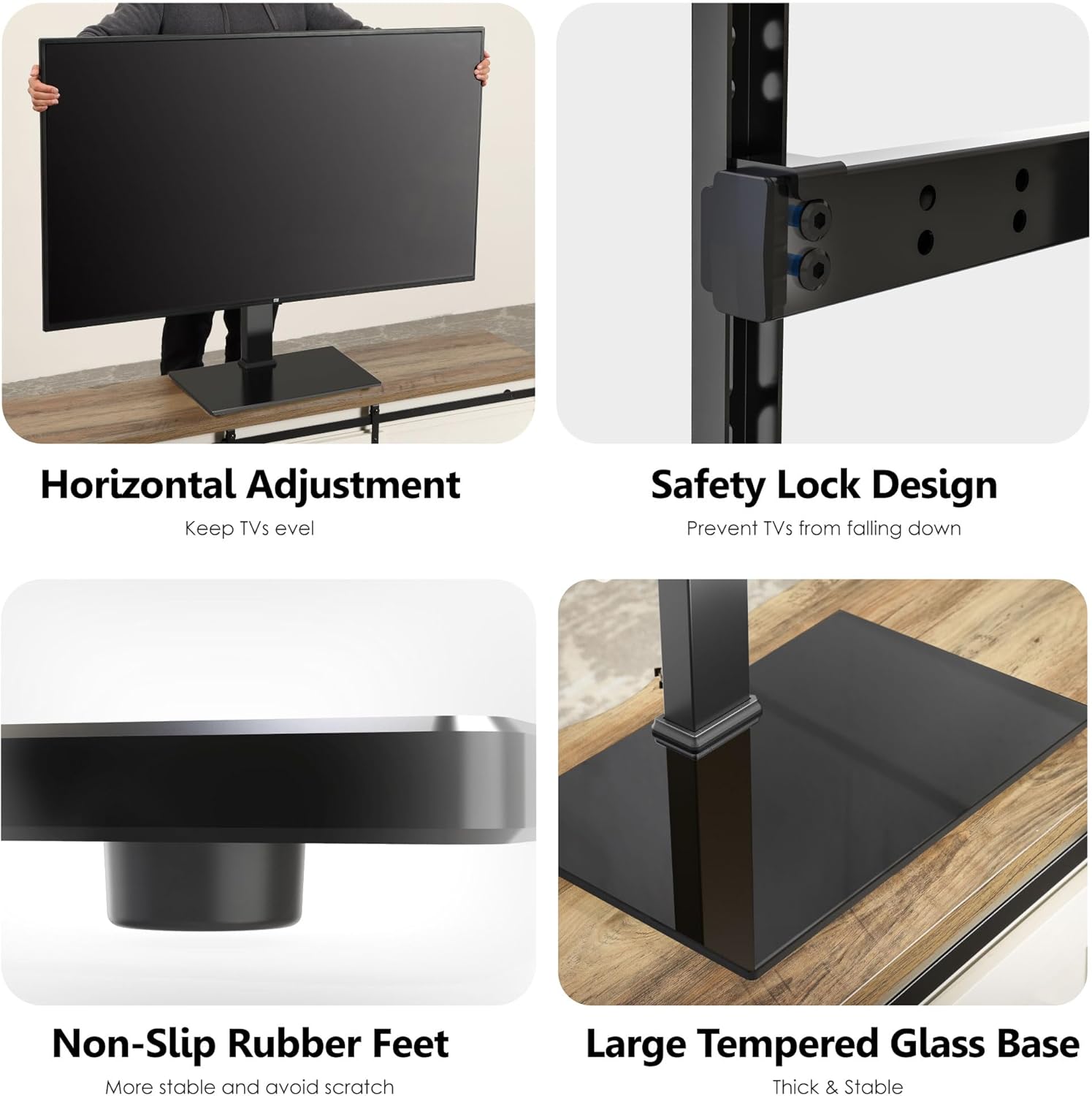
Image: Details of the stand's features, including the safety lock mechanism for securing the TV.
- Cable Management: Utilize the integrated cable ties or clips on the stand's pole to organize and conceal cables for a tidy appearance.
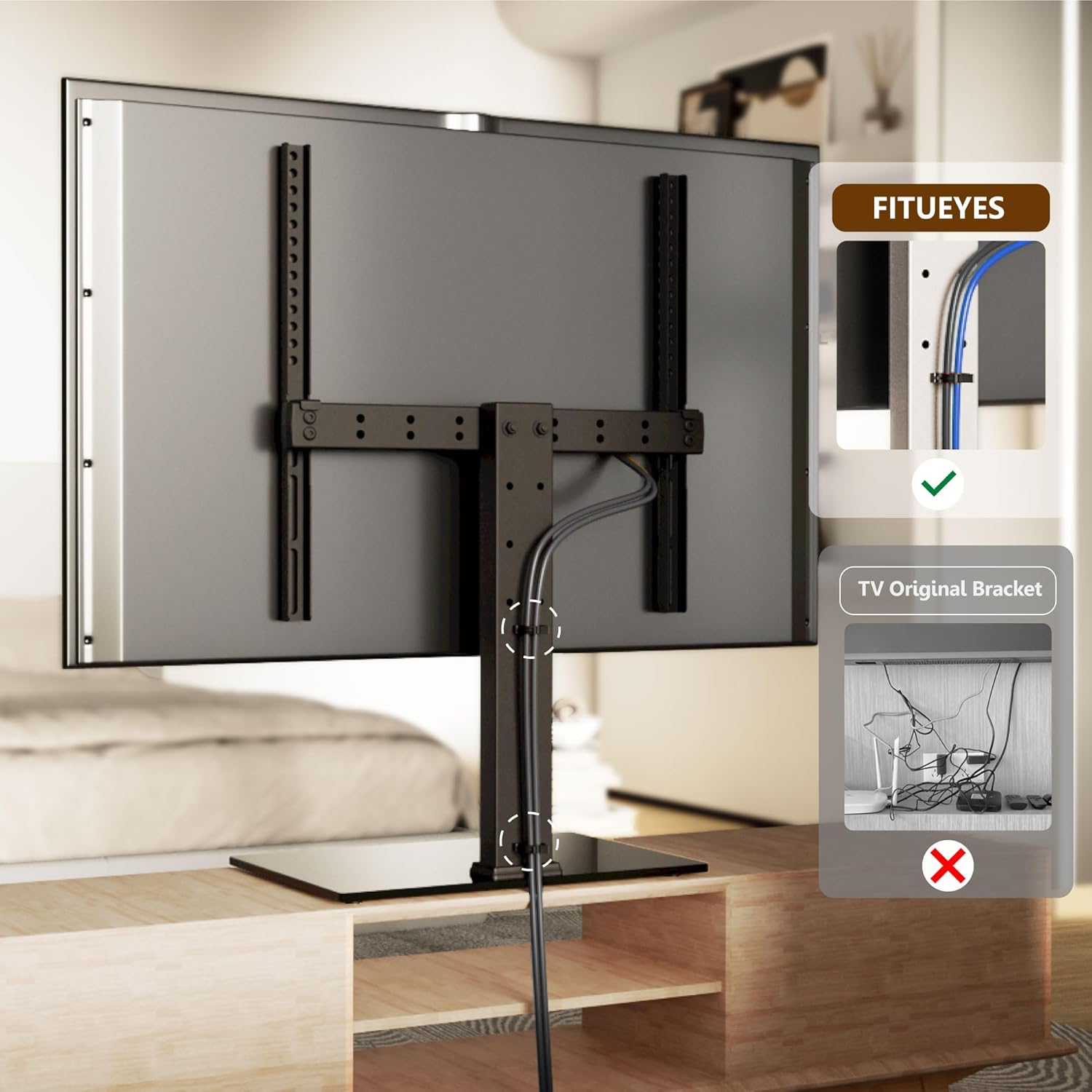
Image: Demonstration of the integrated cable management system on the TV stand.
For a visual guide on the product's stability and features, please refer to the video below:
Video: A comparison demonstrating the structural integrity, stability, and safety features of the FITUEYES TV stand compared to other products.
6. Operating Instructions
6.1 Height Adjustment
The FITUEYES TV stand offers 4 levels of height adjustment to optimize your viewing experience. Both the TV bracket and the supporting pole can be adjusted. The center of the mount can be set from a minimum of 11.1 inches to a maximum of 17.2 inches from the floor.
- To adjust the height, carefully remove the TV from the stand (with assistance).
- Loosen the screws on the main support pole or TV brackets that secure the height.
- Slide the components to the desired height setting.
- Re-tighten all screws securely before re-mounting the TV.

Image: Visual representation of the four available height settings for the TV stand.
6.2 Horizontal Adjustment
The design allows for horizontal adjustment to ensure the TV is perfectly level on the stand.
- After mounting the TV, gently slide the TV left or right along the horizontal mounting plate until it is centered and level.
- Ensure the safety locks are engaged after any adjustment.
7. Maintenance
- Cleaning: Use a soft, dry cloth to wipe down the metal and glass surfaces. For stubborn marks on the tempered glass, a mild glass cleaner can be used, applied to the cloth first, not directly to the glass. Avoid abrasive cleaners or solvents.
- Inspection: Periodically check all screws and connections to ensure they are tight. Over time, vibrations or movement can cause screws to loosen.
- Weight Limit: Do not place items on the stand that exceed its stated weight capacity.
8. Troubleshooting
| Problem | Possible Cause | Solution |
|---|---|---|
| TV is not level. | TV not horizontally adjusted or stand not on a level surface. | Adjust the TV horizontally on the mounting plate. Ensure the stand is placed on a flat, level surface. |
| Stand feels wobbly. | Screws are loose or stand is not on a stable surface. | Check and tighten all assembly screws. Relocate the stand to a firm, level surface. Ensure TV weight is within limits. |
| TV does not fit the stand. | Incorrect TV size or VESA pattern. | Verify your TV size is between 27-55 inches and its VESA pattern matches the supported range (100x100mm to 400x400mm). |
| Missing parts. | Packaging error. | Contact FITUEYES customer support with your purchase details. |
9. Warranty and Support
FITUEYES offers up to a 10-year warranty on its products, ensuring long-term reliability and customer satisfaction. For any inquiries, technical assistance, or warranty claims, please contact FITUEYES customer support.
You can typically find contact information on the FITUEYES official website or through your purchase platform. Please have your model number (B0BNB34THX) and purchase date ready when contacting support.
FITUEYES provides 24-hour global service and local warehouse delivery for parts and support.


Image: Icons representing customer care features: 24-hour global service, local warehouse delivery, and up to 10-year warranty.