Introduction
The Greenblue GB350 E Energy Cost Meter is designed to help you monitor and control the energy consumption of your electronic devices. This wattmeter provides comprehensive data on power usage, current, voltage, frequency, and allows you to calculate energy costs, making it an essential tool for identifying and reducing standby consumption from entertainment electronics such as televisions, radios, stereo systems, and satellite receivers.
This device offers high convenience and safety for your household. It complies with Protection Class I and features memory storage for your settings. Simply plug the meter between your appliance and the wall socket. After entering your electricity tariff, you can begin monitoring. A simple button press allows you to switch between various display modes to view the measurement data that interests you, such as current consumption in kWh, current power draw, or energy costs.

Figure 1: Front view of the Greenblue GB350 E Energy Cost Meter, showing the display and control buttons.
Product Overview
Components
- LCD Display: Shows various measurement data and settings.
- FUNC Button: Cycles through different display modes.
- COST Button: Used for setting the electricity tariff and viewing cost-related data.
- UP Button: Navigates up or increases values during settings.
- DOWN Button: Navigates down or decreases values during settings.
- Power Plug: Connects to the wall socket.
- Appliance Socket: Where the device to be measured is plugged in.
- Reset Button: (Located on the side) Resets all data and settings to factory defaults.


Figure 2: Angled view of the meter (left) and side view showing the reset button (right).
Setup
- Initial Connection: Plug the Greenblue GB350 E meter into a standard wall socket. The display will illuminate.
- Set Current Time (Optional): If the device has a clock function, use the UP/DOWN buttons to set the current time. Refer to the display for time indicators.
- Set Electricity Tariff:
- Press the COST button.
- Use the UP and DOWN buttons to adjust the unit cost per kWh. This allows the meter to calculate total energy expenses accurately.
- Press COST again to confirm and save the setting.
- Connect Appliance: Plug the appliance you wish to monitor into the socket on the front of the Greenblue GB350 E meter.
- Begin Monitoring: The meter will immediately begin displaying real-time data for the connected appliance.
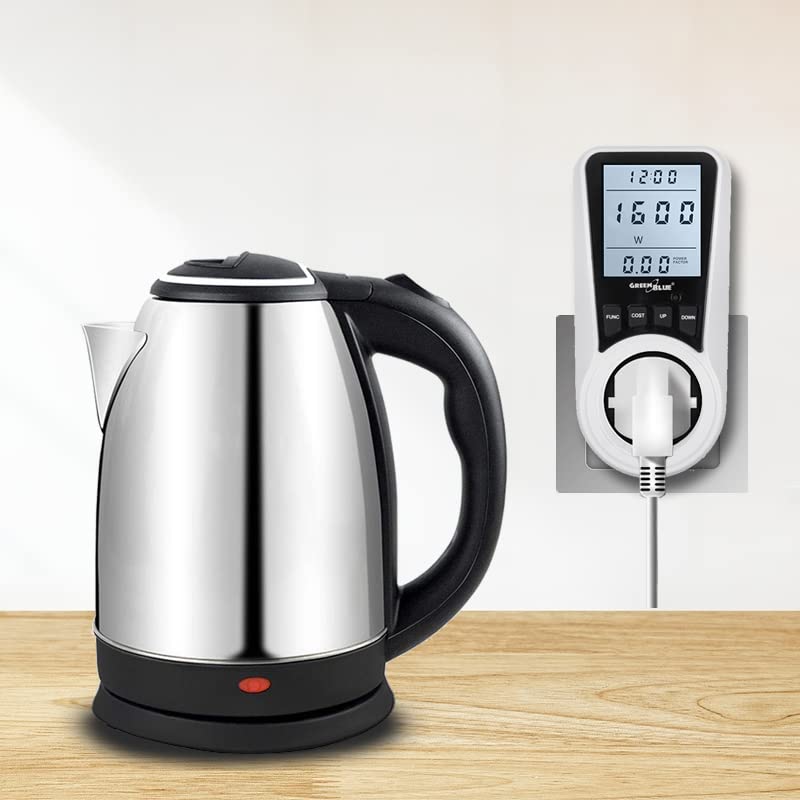
Figure 3: The energy cost meter connected to a wall socket with an appliance (kettle) plugged in.
Operating Instructions
The Greenblue GB350 E features 7 distinct display modes, accessible by pressing the FUNC button. Each mode provides specific information about the connected appliance's energy consumption.
Display Modes:
- Mode 1:
- Cumulative operating time of the device.
- Actual power of the connected device (Watts).
- Cumulative energy costs per operating time.
- Mode 2:
- Total operating time of the device.
- Cumulative energy consumption in kWh.
- Total operating time in days.
- Mode 3:
- Operating time.
- Current voltage in V.
- Actual frequency in Hz.
- Mode 4:
- Operating time.
- Current in A.
- Ratio of active to apparent power (Power Factor).
- Mode 5:
- Operating time.
- Minimum power value recorded during operation.
- Mode 6:
- Operating time.
- Maximum power value recorded during operation.
- Mode 7:
- Operating time.
- Unit cost per kWh.
To reset all accumulated data and settings, locate the small reset button on the side of the device (refer to Figure 2) and press it using a thin, pointed object (e.g., a paperclip).
Maintenance
- Cleaning: Wipe the device with a soft, dry cloth. Do not use abrasive cleaners or solvents.
- Storage: Store the meter in a cool, dry place away from direct sunlight and extreme temperatures.
- Battery: The device contains a built-in NiMH battery (3.6V 20mAh) for memory retention. This battery is not user-replaceable. If the device loses settings frequently, the battery may need professional servicing.
- Avoid Moisture: The device has an IP20 rating, meaning it is protected against solid objects larger than 12.5mm but has no protection against water. Keep it away from liquids.
Troubleshooting
| Problem | Possible Cause | Solution |
|---|---|---|
| Display is blank. | No power from the wall socket. | Check the wall socket with another appliance. Ensure the meter is fully plugged in. |
| Readings are incorrect or fluctuating. | Loose connection; appliance malfunction; electrical interference. | Ensure both the meter and the appliance are securely plugged in. Test with a different appliance. |
| Settings are not saved after unplugging. | Internal battery issue. | The internal NiMH battery may be depleted or faulty. Contact customer support for assistance. |
| Cannot change unit cost. | Incorrect mode; button malfunction. | Ensure you are in the correct mode for setting the cost (Mode 7 or specific cost setting mode). Try pressing the COST button firmly. |
Specifications
| Parameter | Value |
|---|---|
| Operating Voltage | 180-250 V AC |
| Frequency | 50/60 Hz |
| Protection Class (Electric Shock) | I |
| IP Rating | IP20 |
| Wattmeter Power Consumption | <0.5W |
| Operating Temperature | 0-40 °C |
| Measurement Accuracy | +/- 2 % |
| Built-in Battery | NiMH 3.6V 20mAh |
| Max. Power | 3680W |
| Voltage Measurement Range | 0.0-9999V |
| Current Measurement Range | 0.000-65.00A |
| Power Measurement Range | 0.0-9999W |
| Frequency Measurement Range | 0-9999Hz |
| Consumption (kWh) Range | 0.000-9999 kWh |
| Unit Cost Range | 0.00-99.99 (per kWh) |
| Total Cost Range | 0.00-9999 |
| Product Dimensions (L x W x H) | 6.5 x 7.5 x 13 cm |
| Item Weight | 208 g |

Figure 4: Dimensions of the Greenblue GB350 E Energy Cost Meter.
Warranty and Support
Greenblue products are designed for reliability and performance. For warranty information and technical support, please refer to the documentation included with your purchase or visit the official Greenblue website. Keep your purchase receipt as proof of purchase for any warranty claims.
For further assistance, please contact Greenblue customer service. When contacting support, please have your product model number (GB350 E) and purchase details ready.