
1. Introduction
This manual provides detailed instructions for the safe and effective use of your Telawah Quran Speaker 515. Please read this manual thoroughly before operating the device and retain it for future reference. This portable device combines a Bluetooth speaker, MP3 player, and a touch-controlled LED night light, designed to enhance your listening and learning experience.
2. Product Overview
2.1 Key Features
- Multifunctional device: Bluetooth speaker, wireless music player, LED night light.
- Touch control for light color changes (1 white, 6 rainbow colors).
- Adhan function with customizable Azan times based on city codes.
- Built-in 8GB TF card with 18 famous reciters and 17 language translations of the Quran.
- Remote control for convenient operation.
- Mobile application control for advanced settings.
- Rechargeable battery for portability.
2.2 Package Contents
The package includes the following items:
- Telawah Quran Bluetooth Speaker (Model 515)
- Charging Cable
- Remote Control
- Instruction Manual (this document)
- City Code Manual (for Azan settings)
2.3 Product Diagram and Controls
Familiarize yourself with the speaker's components and controls:
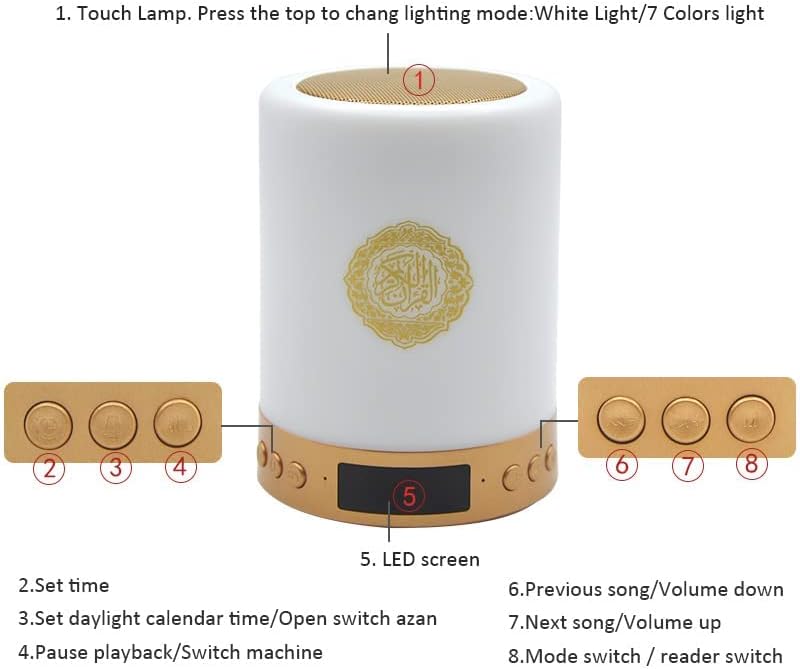
Image: Telawah Quran Speaker with labeled control buttons and LED display.
- Touch Lamp: Press the top to change lighting mode (White Light / 7 Colors light).
- Set Time Button: Used to set the current time.
- Set Daylight Calendar Time / Open Switch Azan Button: Used to adjust daylight saving time or activate/deactivate the Azan function.
- Pause Playback / Switch Machine Button: Controls playback (play/pause) and powers the device on/off.
- LED Screen: Displays time, mode, and other information.
- Previous Song / Volume Down Button: Navigates to the previous track or decreases volume.
- Next Song / Volume Up Button: Navigates to the next track or increases volume.
- Mode Switch / Reader Switch Button: Changes operating modes (e.g., Bluetooth, Quran, FM) or switches between Quran reciters.

Image: Telawah Quran Speaker and its remote control, showing their respective dimensions.
3. Setup
3.1 Charging the Speaker
Before first use, fully charge the speaker. Connect the provided charging cable to the speaker's charging port and a standard USB power adapter (not included). The LED indicator will show charging status. A full charge typically takes approximately 6 hours.
3.2 Powering On/Off
To power on the speaker, press and hold the Pause Playback / Switch Machine Button (button 4 in the diagram) until the LED screen illuminates. To power off, press and hold the same button again.
3.3 Bluetooth Pairing
- Ensure the speaker is powered on and in Bluetooth mode. The LED screen may display "BT" or a Bluetooth icon.
- On your smartphone or Bluetooth-enabled device, navigate to the Bluetooth settings.
- Search for available devices and select "SQ-515" or a similar name.
- Once connected, the speaker will emit an audible confirmation, and the LED screen may indicate a successful connection.

Image: The Telawah Quran Speaker shown alongside its remote control and a smartphone displaying the companion application interface.
4. Operating Instructions
4.1 Light Control
The top surface of the speaker functions as a touch lamp.
- Short Press: Tap the top surface to cycle through white light brightness levels (low, medium, high).
- Long Press: Press and hold the top surface to switch from white light to color light mode.
- Short Press (Color Mode): Once in color light mode, tap the top surface to cycle through the 6 rainbow colors.

Image: A hand demonstrating the touch control feature on the top of the speaker to adjust lighting.
4.2 Quran Playback
The speaker comes with a pre-installed 8GB TF card containing Quran recitations and translations.
- Switching Modes: Use the Mode Switch / Reader Switch Button (button 8) to enter Quran mode.
- Selecting Reciters/Translations: In Quran mode, use the remote control or the mobile app to select from 18 reciters and 17 language translations.
- Navigation: Use the Previous Song / Volume Down Button (button 6) and Next Song / Volume Up Button (button 7) to navigate between Surahs or verses.
- Volume Control: Adjust volume using the Volume Down (button 6) and Volume Up (button 7) buttons, or via the remote/app.
4.3 Azan Function
The speaker can be configured to play Azan (call to prayer) at specified times.
- Refer to the included City Code Manual to find the appropriate code for your location.
- Use the remote control or the mobile app to enter the Azan settings menu.
- Input your city code and set the prayer times according to the manual.
- Activate the Azan function using the Set Daylight Calendar Time / Open Switch Azan Button (button 3) or through the app.

Image: A series of smartphone screenshots illustrating the process of setting Azan times and preferences within the companion mobile application.
4.4 Remote Control Usage
The included remote control provides convenient access to all speaker functions. Point the remote directly at the speaker for optimal response.
- Power: Turn the speaker on or off.
- Mode: Switch between Bluetooth, Quran, FM, and other modes.
- Volume: Adjust volume up or down.
- Navigation: Skip tracks, Surahs, or verses.
- Reciter/Translation Selection: Directly select specific reciters or translations.
- Light Control: Adjust light brightness and color.
- Azan Settings: Access and modify Azan configurations.
4.5 Mobile Application Control
For enhanced control and customization, download the dedicated mobile application. Scan the QR code provided on the product packaging or in the manual to access the app.
- App Compatibility: Compatible with both iOS and Android devices.
- Features: The app allows for comprehensive control over Quran reciters, languages, light colors, Azan settings, and more.
- Connection: Ensure Bluetooth is enabled on your smartphone and the speaker is paired with the app.
5. Maintenance
- Cleaning: Wipe the speaker with a soft, dry cloth. Do not use abrasive cleaners or liquids.
- Storage: Store the speaker in a cool, dry place away from direct sunlight and extreme temperatures.
- Battery Care: To prolong battery life, avoid fully discharging the battery frequently. Charge the speaker regularly, even if not in use for extended periods.
- Water Exposure: This device is not waterproof. Avoid exposure to water or high humidity.
6. Troubleshooting
| Problem | Possible Cause | Solution |
|---|---|---|
| Speaker does not power on. | Low battery or no charge. | Charge the speaker fully using the provided cable. |
| Cannot connect via Bluetooth. | Bluetooth not enabled on device, speaker not in pairing mode, or too far. | Ensure Bluetooth is on, speaker is in Bluetooth mode, and devices are within 10 meters. Try restarting both devices. |
| Azan function not working or incorrect. | Incorrect city code or settings. | Verify the city code using the City Code Manual. Re-enter Azan settings via remote or app. |
| Remote control not responding. | Low battery in remote, obstruction, or out of range. | Replace remote batteries. Ensure direct line of sight to the speaker. Move closer to the speaker. |
| Sound quality is poor or distorted. | Volume too high, interference, or source audio quality. | Reduce volume. Move speaker away from other electronic devices. Check the audio source. |
7. Specifications
| Feature | Detail |
|---|---|
| Brand | Telawah |
| Model | 515 |
| Product Dimensions | 5.4"D x 3.9"W x 3.9"H (approx. 13.7cm D x 9.9cm W x 9.9cm H) |
| Item Weight | 0.49 Kilograms (1.08 pounds) |
| Speaker Type | Multimedia, Portable |
| Connectivity Technology | Bluetooth, Auxiliary |
| Wireless Communication Technology | Bluetooth |
| Bluetooth Range | 10 Meters |
| Power Source | Battery Powered (1 Lithium Polymer battery included) |
| Battery Capacity | 2200 mAh |
| Charging Time | 6 Hours |
| Speaker Maximum Output Power | 3 Watts |
| Frequency Response | 50 Hz |
| Control Method | App, Remote |
| Includes MP3 Player | Yes |
| Waterproof | No |
8. Warranty and Support
The Telawah Quran Speaker 515 comes with a limited warranty. Please refer to the warranty card included in your package for specific terms and conditions. For technical support or customer service inquiries, please contact your retailer or visit the official Telawah website.