
1. Introduction
Thank you for choosing the JustNow JNB600 Portable Power Station. This device is designed to provide reliable power for your outdoor adventures, emergency backup, and various portable power needs. It features a durable LiFePO4 battery, multiple output ports, and efficient charging capabilities. Please read this manual thoroughly before operating the device to ensure safe and optimal performance.
2. Important Safety Instructions
To prevent injury, property damage, or damage to the unit, observe the following safety precautions:
- Do not disassemble, repair, or modify the unit.
- Do not place the unit near heat sources or in direct sunlight for extended periods.
- Do not use or store the unit in a bathroom or in areas exposed to water or high humidity.
- Use only original or certified cables and accessories.
- Keep the unit away from children and pets.
- Do not drop, strike, or subject the unit to strong impacts.
- In case of fire, use a dry powder fire extinguisher.
- Ensure proper ventilation during use and charging.
- Do not insert foreign objects into the ports.
3. Product Overview
3.1 Package Contents
- 1x JustNow JNB600 Portable Power Station (460Wh)
- 1x AC Power Adapter
- 1x Car Charger Cable
- 1x User Manual
3.2 Components and Features
The JustNow JNB600 is equipped with various ports and indicators for versatile use.

Image 3.2.1: Front view of the JustNow JNB600 Portable Power Station, showing the DC input, SOC display, USB-A and USB-C ports, DC power button, AC power button, AC output socket, and 12V output knob.

Image 3.2.2: Detailed view of the power station's ports, including DC input, battery indicator, two USB-A outputs (15W), one USB-C output (30W), AC output port, and 12V cigarette lighter output (120W).
- DC Input: For charging the power station via AC adapter or solar panel.
- SOC Display: Shows the State of Charge (battery level). Each segment represents 20% battery.
- USB-A Outputs (x2): 5V/3A (15W total) for charging smartphones, tablets, and other USB devices.
- USB-C Output (x1): 30W for faster charging of compatible devices.
- DC Power Button: Activates/deactivates DC outputs.
- AC Power Button: Activates/deactivates AC output.
- AC Output Socket (x1): 230V, 630W continuous (900W surge) pure sine wave output for household appliances.
- 12V Output (Cigarette Lighter Socket): 12V/10A (120W) for car appliances.
- Integrated Flashlight: For emergency lighting, includes an SOS mode.

Image 3.2.3: Diagram illustrating the advantages of LiFePO4 batteries (Lithium Iron Phosphate) used in the JustNow power station, highlighting 2000+ cycles, 10-year lifespan, excellent thermal stability, and minimal voltage change during discharge, compared to other lithium-ion batteries (NMC).
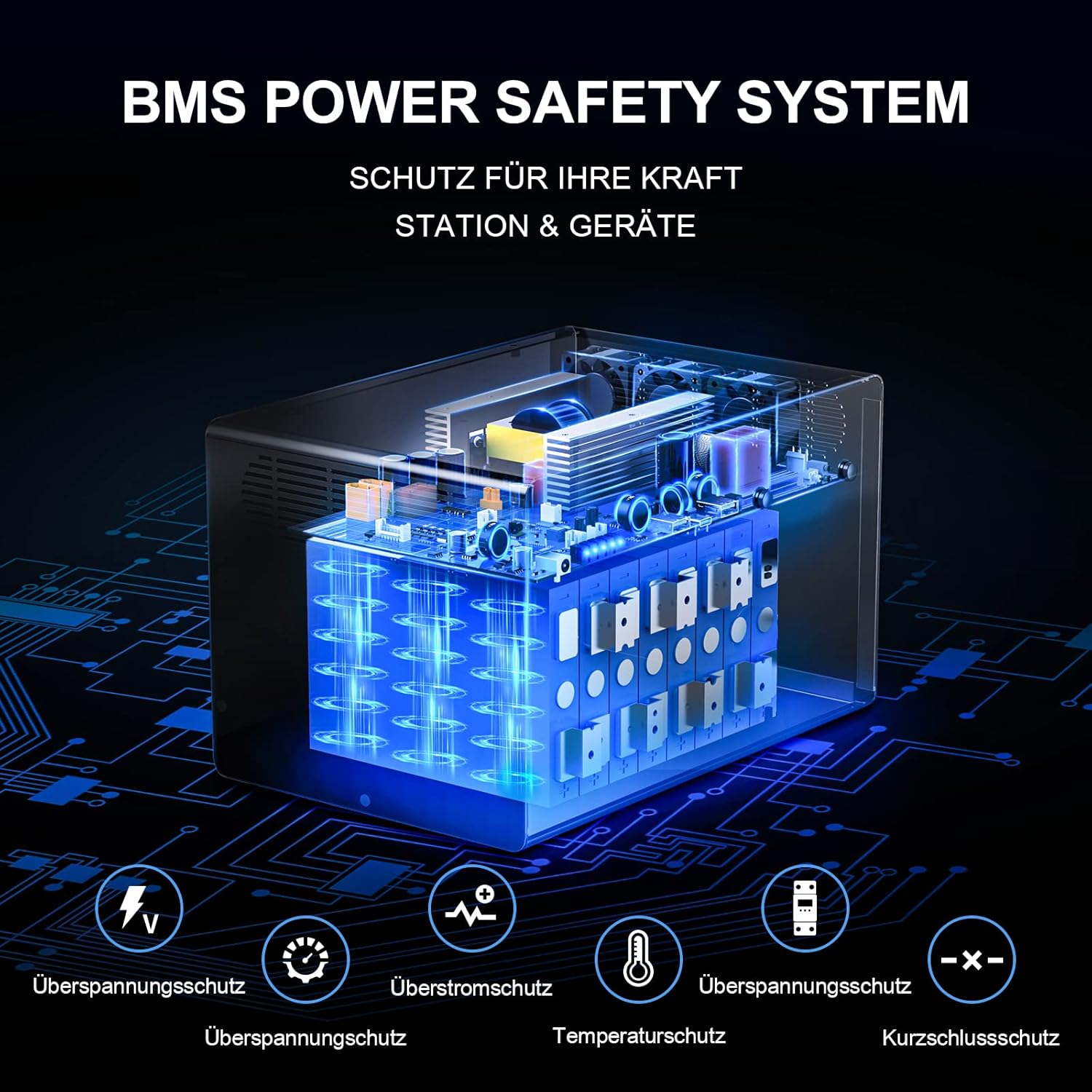
Image 3.2.4: Illustration of the Battery Management System (BMS) power safety system, showing protections against overvoltage, overcurrent, overcharge, over-discharge, temperature, and short-circuit.
4. Setup
4.1 Initial Charge
Before first use, fully charge the power station. This ensures the battery is calibrated and ready for optimal performance.
- Connect the AC power adapter to the DC Input port on the power station.
- Plug the AC adapter into a wall outlet.
- The SOC display will indicate charging progress. The unit is fully charged when all segments are lit.
Initial charging typically takes 3-6 hours using the AC adapter.
5. Operating Instructions
5.1 Charging the Power Station
The JNB600 offers multiple charging methods:

Image 5.1.1: Visual representation of the three charging methods: from a wall outlet (3-6 hours), from a car outlet (5 hours), and from a solar panel (6.4 hours, depending on conditions).
- AC Wall Outlet: Connect the AC adapter to the DC Input port and a wall outlet. (Approx. 3-6 hours)
- Car Charger: Connect the car charger cable to the DC Input port and your vehicle's 12V cigarette lighter socket. (Approx. 5 hours)
- Solar Panel: Connect a compatible solar panel (12V-26V, 6A max) to the DC Input port. The integrated MPPT technology optimizes solar charging efficiency. (Approx. 6.4 hours with optimal sunlight)
Note: The power station can be charged and used simultaneously.
5.2 Using the Output Ports
To use any output port, first press the corresponding power button (DC Power for USB/12V, AC Power for AC outlet).
- USB-A / USB-C: Connect your USB-powered devices. Press the "DC POWER" button to activate.
- AC Output: Plug in your AC appliances (ensure total power consumption is below 630W). Press the "AC POWER" button to activate. The AC output provides a pure sine wave, suitable for sensitive electronics.
- 12V Output: Connect your 12V car appliances. Press the "DC POWER" button to activate.

Image 5.2.1: The power station in use, simultaneously charging a laptop via USB-C, a camera, and powering a mini-fridge, demonstrating its versatility for outdoor activities.
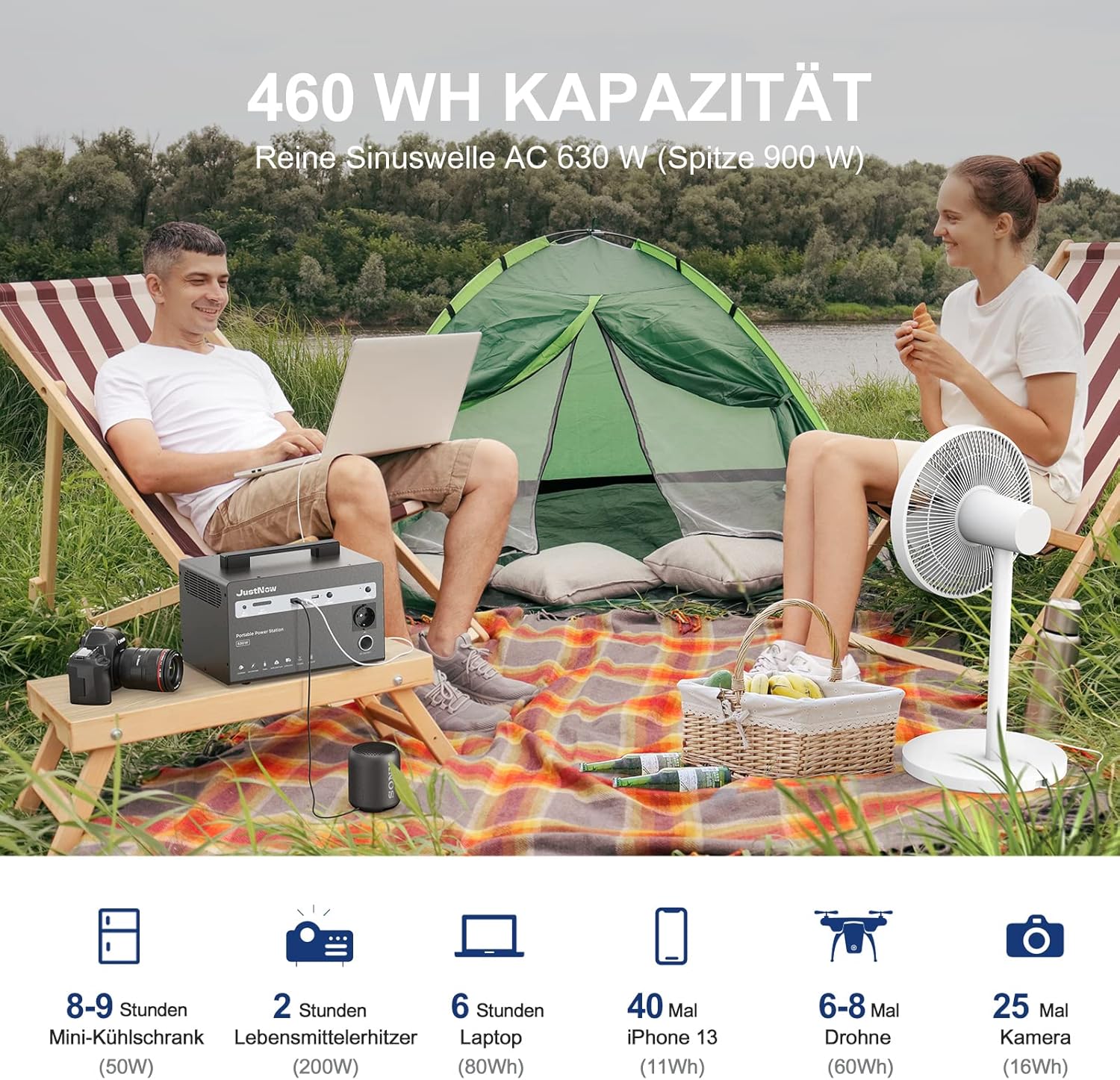
Image 5.2.2: Examples of how long the 460Wh capacity can power various devices: 8-9 hours for a mini-fridge (50W), 2 hours for a food warmer (200W), 6 hours for a laptop (80W), 40 times for an iPhone 13 (11Wh), 6-8 times for a drone (60Wh), and 25 times for a camera (16Wh).
5.3 Emergency Flashlight
The unit includes an integrated flashlight. Press the dedicated flashlight button to cycle through modes: On, SOS, Off.
6. Maintenance
- Storage: Store the power station in a cool, dry place, away from direct sunlight and extreme temperatures.
- Long-Term Storage: If storing for extended periods, charge the unit to 50-80% every 3-6 months to prolong battery life.
- Cleaning: Use a dry, soft cloth to clean the exterior. Do not use abrasive cleaners or solvents.
- Battery Life: The LiFePO4 battery is designed for 2000+ full charge cycles to 80% of its original capacity.
7. Troubleshooting
| Problem | Possible Cause | Solution |
|---|---|---|
| Unit not charging | Charging cable not properly connected; AC adapter faulty; Solar panel not receiving enough sunlight or incompatible. | Ensure all connections are secure. Try a different outlet or charging method. Check solar panel placement and specifications. |
| No output from ports | Output function not activated; Device power consumption exceeds unit's capacity; Unit is in protection mode. | Press the corresponding DC or AC power button. Check device's power requirements. Disconnect all devices, restart the unit, and try again. |
| Unit overheats | Poor ventilation; Overload. | Ensure adequate airflow around the unit. Reduce the load on the power station. If overheating persists, contact support. |
| SOC display not working | Unit off; Malfunction. | Turn on the unit. If the issue persists, contact customer support. |
8. Specifications
| Model Name | JNB600 |
| Battery Type | LiFePO4 (Lithium Iron Phosphate) |
| Capacity | 460 Wh (144000 mAh) |
| AC Output | 230V, 630W (900W Peak), Pure Sine Wave |
| USB-A Output | 2x 5V/3A (15W total) |
| USB-C Output | 1x 30W |
| 12V Car Output | 1x 12V/10A (120W) |
| DC Input (Charging) | 12V-26V, 6A max (supports solar charging) |
| Dimensions (L x W x H) | 19 x 18 x 27 cm |
| Weight | 9.5 kg |
| Lifecycles | 2000+ cycles to 80% capacity |
| Special Features | MPPT Controller, BMS Protection System, Emergency Flashlight (SOS mode) |
9. Warranty and Support
The JustNow JNB600 Portable Power Station comes with a 12-month warranty from the date of purchase. This warranty covers manufacturing defects and workmanship under normal use.
For technical support, warranty claims, or any questions regarding your product, please contact JustNow customer service. We offer 7x24 hour customer service.
Please retain your proof of purchase for warranty service.