
1. Introduction
This manual provides essential information for the safe and effective operation, maintenance, and troubleshooting of your HONE Sim-Stick 120 Stick Welder. Please read this manual thoroughly before using the equipment to ensure proper function and personal safety. Keep this manual for future reference.
2. Safety Information
WARNING: Welding can be dangerous. Always follow safety precautions to prevent injury or death.
2.1 Personal Protective Equipment (PPE)
- Always wear a welding helmet with appropriate shade filter to protect eyes and face from arc rays and sparks.
- Wear flame-resistant clothing, such as leather gloves, long-sleeved jackets, and heavy pants, to protect against burns and radiation.
- Use safety glasses under your welding helmet.
- Wear steel-toed boots to protect feet from falling objects and electrical hazards.
2.2 Electrical Safety
- Ensure the welding machine is properly grounded.
- Never operate the welder in wet conditions or damp environments.
- Inspect all cables and connections for damage before each use. Replace damaged parts immediately.
- Do not touch live electrical parts or electrodes with bare skin or wet gloves.
- Disconnect power before performing any maintenance or service.
2.3 Fume and Gas Safety
- Work in a well-ventilated area to avoid inhaling welding fumes and gases.
- If ventilation is poor, use an approved respirator.
2.4 Fire and Burn Prevention
- Keep flammable materials away from the welding area.
- Have a fire extinguisher readily available.
- Be aware that sparks and hot slag can travel considerable distances.
- Allow welded materials to cool completely before handling.
3. Package Contents
Verify that all items are present and undamaged upon unpacking:
- HONE Sim-Stick 120 Welder Unit
- Electrode Holder with Cable
- Earth Clamp with Cable
- Shoulder Strap
- Wire Brush/Hammer
- Power Cord
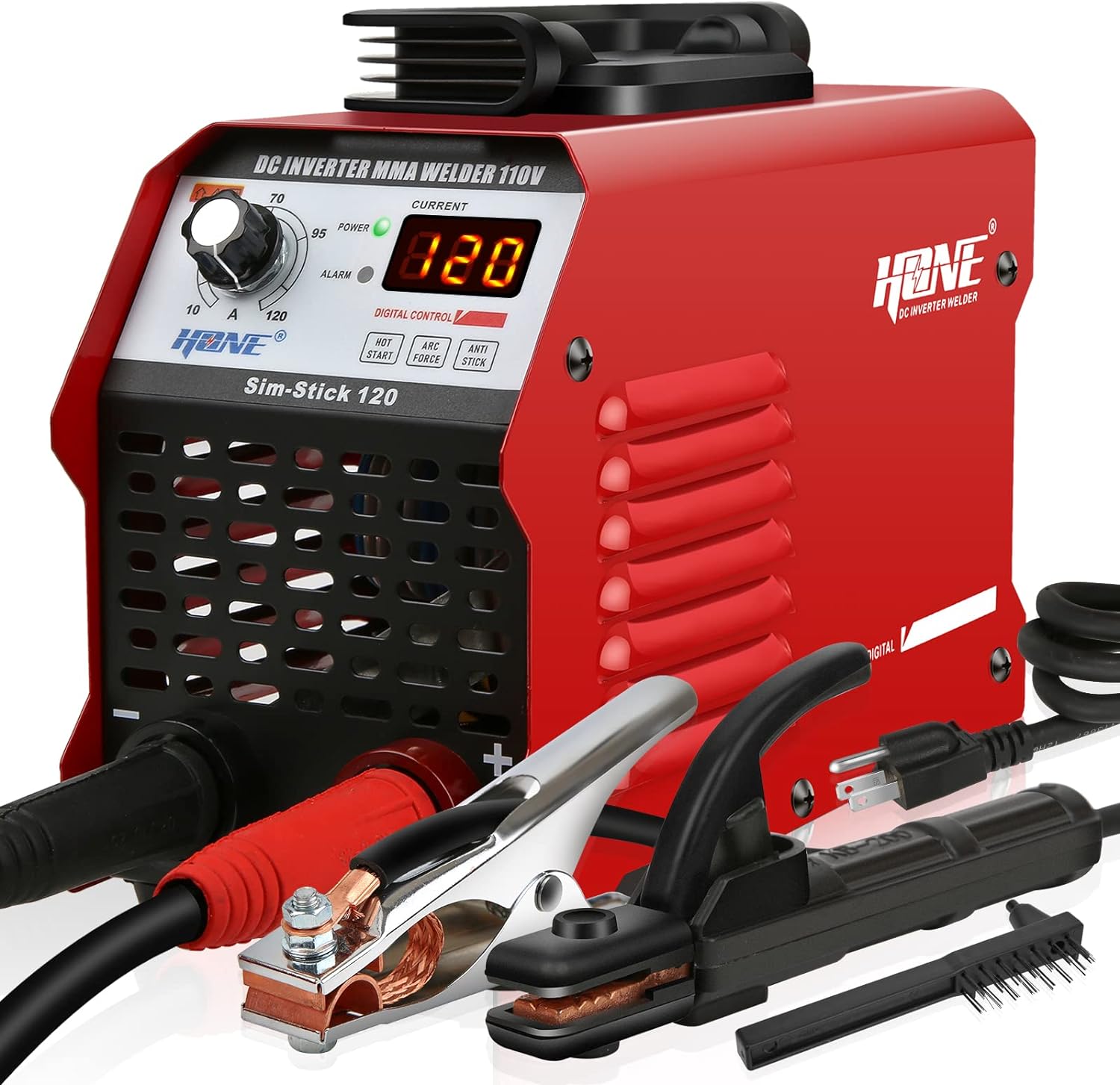
Image: The HONE Sim-Stick 120 welder unit shown with its electrode holder, earth clamp, power cord, and wire brush/hammer accessories.
4. Product Overview
Familiarize yourself with the components of your HONE Sim-Stick 120 welder:

Image: Front panel diagram of the HONE Sim-Stick 120, highlighting the folding handle, power indicator light, welding current adjustable knob, current meter, protection indicator light, negative output terminal (earth clamp), and positive output terminal (electrode holder).
- Folding Handle: For portability and carrying.
- Power Indicator Light: Illuminates when the unit is powered on.
- Welding Current Adjustable Knob: Used to set the desired welding amperage (10A to 120A).
- Current Meter (LCD Display): Shows the set welding current.
- Protection Indicator Light: Illuminates if the unit enters a protection state (e.g., over-temperature, over-current).
- (-) Negative Output Terminal: Connects to the earth clamp.
- (+) Positive Output Terminal: Connects to the electrode holder.
- Smart Control Buttons: Indicators for Hot Start, Arc Force, and Anti-Stick features.
5. Setup
5.1 Connecting Welding Cables
- Connect the electrode holder cable to the positive (+) output terminal.
- Connect the earth clamp cable to the negative (-) output terminal.
- Ensure connections are tight and secure.
- Attach the earth clamp firmly to the workpiece or a clean, bare metal part of the welding table, ensuring good electrical contact.
5.2 Power Connection
- Ensure the welder's power switch is in the OFF position.
- Plug the power cord into a standard 110V AC power outlet. Ensure the outlet is properly grounded and can supply sufficient current for welding (e.g., a dedicated 20A circuit is recommended for higher amperage welding).
6. Operation
6.1 Powering On/Off
- To power on, flip the power switch located on the rear of the unit to the ON position. The power indicator light on the front panel will illuminate.
- To power off, flip the power switch to the OFF position.
6.2 Adjusting Welding Current
- Rotate the Welding Current Adjustable Knob on the front panel to set the desired amperage. The digital display will show the selected current.
- The appropriate current setting depends on the electrode diameter and the type and thickness of the material being welded. Refer to electrode manufacturer guidelines for recommended settings.
6.3 Smart Features
The HONE Sim-Stick 120 incorporates smart features for enhanced welding performance:
- Hot Start: Provides an initial boost of current to make arc striking easier and more reliable.
- Arc Force: Automatically adjusts the welding current to prevent the electrode from sticking during welding, maintaining a stable arc.
- Anti-Stick: Reduces the current if the electrode sticks to the workpiece, allowing for easier removal without damaging the electrode or the machine.

Image: Visual representation of the welder's multi-function protection features (voltage fluctuation compensation, over current, over heat, over/under-voltage, short circuit damage, fault locking) and the three core operational upgrades: Hot-Start, Arc-Force, and Anti-Stick.
6.4 Electrode Compatibility
This welder is compatible with various electrode types, including:
- E6013
- E6011
- E6010
- E7018
- E308-16
It is designed for welding rods from 1/16-inch to 1/8-inch (1.6mm to 3.2mm).

Image: A visual guide to different electrode types and examples of successful welding beads on various materials, demonstrating the machine's versatility.
6.5 Applicable Materials
The HONE Sim-Stick 120 is suitable for welding various ferrous metals, including:
- Carbon Steel
- Medium Carbon Steel
- Mild Steel
- Stainless Steel
- Cast Iron

Image: A person wearing a welding helmet and protective gear operating the HONE Sim-Stick 120 welder, producing sparks during the welding process.
7. Maintenance
7.1 Cleaning and Cooling System
- Regularly clean the welder's exterior and ventilation openings to prevent dust and debris buildup. Use compressed air to clear internal components if necessary, ensuring the unit is powered off and unplugged.
- The unit features a fast air cooling system with a large fan to ensure stable operation and extend component life. Keep the air inlets and outlets unobstructed.

Image: Rear view of the HONE Sim-Stick 120 welder, illustrating the large cooling fan and the power switch, emphasizing the fast air cooling system for prolonged operation.
7.2 Storage
- Store the welder in a dry, clean environment, away from direct sunlight and extreme temperatures.
- Coil cables neatly to prevent damage.
8. Troubleshooting
If you encounter issues with your HONE Sim-Stick 120 welder, refer to the following common problems and solutions:
8.1 Common Issues
- No Power: Check power cord connection, wall outlet, and circuit breaker. Ensure the power switch is ON.
- Arc Not Striking: Ensure the workpiece is clean and has good earth clamp contact. Check electrode type and condition. Adjust current setting.
- Unstable Arc: Verify proper current setting for the electrode and material. Ensure good earth clamp connection. Check for proper electrode angle and travel speed.
- Electrode Sticking: Increase current slightly. Utilize the Anti-Stick feature by pulling the electrode away from the workpiece. Ensure proper arc length.
- Protection Light On: The welder has built-in protection features. If the protection light illuminates, it indicates an issue such as over-current, over-heat, or over/under-voltage. Turn off the machine, allow it to cool down (if over-heat), and check for any obstructions or improper settings before restarting.
8.2 Protection Features
The HONE Sim-Stick 120 is equipped with multiple safety and stability features:
- Voltage fluctuation compensation
- Over current protection
- Over heat protection
- Over and under-voltage protection
- Short circuit damage protection
- Fault locking
These features help ensure safe operation and extend the lifespan of the welding machine.
9. Specifications
| Feature | Specification |
|---|---|
| Model | Sim-Stick 120 |
| Input Voltage | 110V AC |
| Max Current Output | 120 Amp |
| Power Source | AC |
| Wattage | 4.8 KW |
| Item Weight | 5.8 Pounds (approx. 2.65 kg) |
| Dimensions (L x W x H) | 9.8" x 4.1" x 6.1" (approx. 24.9cm x 10.4cm x 15.5cm) |
| Special Features | Portable, Smart Hot-Start, Arc-Force, Anti-Stick, Digital IGBT Inverter |
| Compatible Rods | E6013, E6011, E6010, E7018, E308-16 (1/16" - 1/8" diameter) |
| Included Components | IGBT transistor, Diode, Main transformer, Fan, etc. |
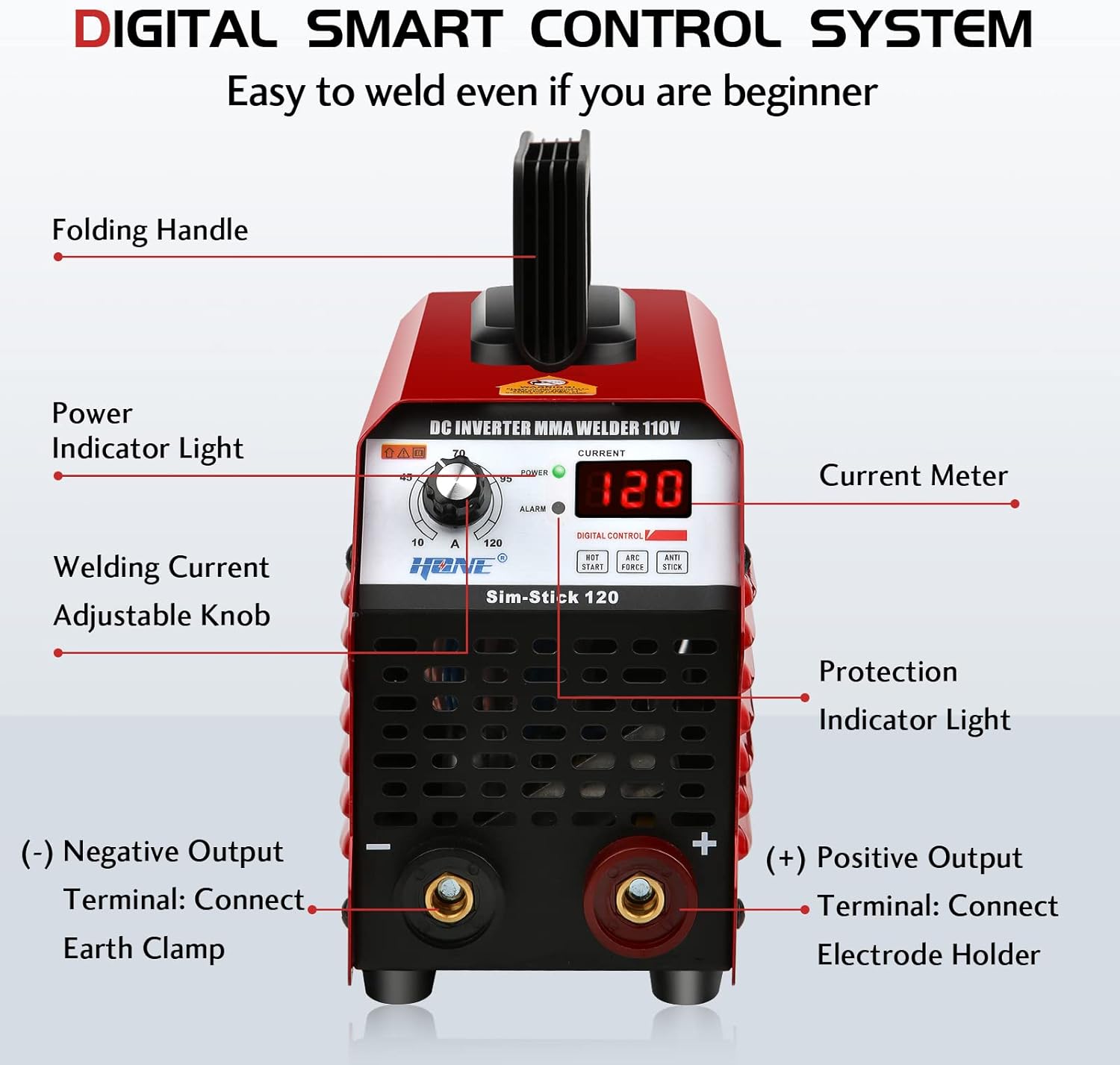
Image: The HONE Sim-Stick 120 welder's compact size and light weight (5.8 lbs) are illustrated, emphasizing its portability with a built-in handle and optional shoulder strap.
10. Warranty and Support
For warranty information, technical support, or service inquiries, please contact HONE customer service directly. Refer to the product packaging or the official HONE website for the most current contact details.