
1. Product Overview
The Perlegear PGTVS20 Universal Tabletop TV Stand is designed to securely support most flat or curved televisions ranging from 37 to 86 inches, with a maximum load capacity of 132 lbs. This stand features height adjustability and a stable base suitable for accommodating soundbars, providing an optimal viewing experience and efficient space utilization.

Image: The Perlegear PGTVS20 TV Stand installed, showing its compatibility with large TVs and space for a soundbar.
Key Features:
- Wide Compatibility: Supports 37-86 inch TVs, including 37", 40", 43", 50", 55", 60", 65", 70", 77", 75", 82", 85", 86" flat or curved models.
- Robust Construction: Features 15-inch heavy-duty reinforced steel feet and a support pillar, ensuring a maximum load capacity of 132 lbs.
- Height Adjustment: Offers 8 levels of height adjustment, ranging from 26.38" to 32.28" (67cm to 82cm), for an ergonomically comfortable viewing angle.
- Soundbar Integration: Designed with ample space and isolation pads to minimize soundbar vibration and enhance stability.
- Cable Management: Includes wire clips to organize cables for a tidy setup.
2. Important Safety Information
Please read and understand all instructions before installation and use. Failure to follow these instructions may result in property damage, serious injury, or death. If you have any questions, please contact customer support.
- Weight Capacity: Do not exceed the maximum weight capacity of 132 lbs (60 kg). This stand is intended for use only with the maximum weights indicated. Use with products heavier than the maximum weights indicated may result in instability causing possible injury.
- TV Size: Ensure your TV's screen size is within the recommended range of 37-86 inches.
- VESA Compatibility: Verify your TV's VESA mounting pattern is compatible with the stand (200x200mm to 800x500mm).
- Stability: Always ensure the stand is placed on a stable, level surface. Do not place the stand on uneven or unstable surfaces.
- Children and Pets: Keep children and pets away from the TV stand during assembly. Do not allow children to climb on or play with the TV stand or mounted TV.
- Assembly: Assemble the product exactly as described in this manual. Incorrect assembly can lead to instability and potential hazards.
- Inspection: Periodically check all screws and connections to ensure they are secure.
3. Package Contents
Before installation, please verify that all components are present and undamaged. If any parts are missing or defective, contact Perlegear customer service.
- TV Stand Legs (2 units)
- TV Brackets (2 units)
- Support Pillar
- Anti-slip Pads
- Wire Clips
- Full Hardware Kit (various screws, washers, spacers, and tools)

Image: Detail of the cable management system, showing a wire clip securing a cable along the stand's pillar.
4. Product Specifications
| Feature | Specification |
|---|---|
| Model Number | PGTVS20 |
| Brand | Perlegear |
| Compatible TV Sizes | 37 - 86 inches |
| Maximum Load Capacity | 132 lbs (60 kg) |
| VESA Compatibility | 200x200mm to 800x500mm |
| Height Adjustment Range | 26.38" - 32.28" (8 levels) |
| Material | Alloy Steel |
| Color | Black |
| Product Dimensions | 16 x 4 x 2 inches (packaged) |
| Item Weight | 7.59 pounds |

Image: Visual representation of the TV stand's compatibility with various TV sizes and VESA patterns.
5. Setup and Installation
The Perlegear PGTVS20 TV stand is designed for quick and easy assembly, typically within 10 minutes, with no drilling required. Follow these steps carefully:
Step 5.1: Verify VESA Pattern
Before assembly, identify your TV's VESA mounting pattern. VESA refers to the distance (in mm) between the four screw holes on the back of your TV. The PGTVS20 supports VESA patterns from 200x200mm to 800x500mm.

Image: Explanation of VESA mounting patterns on a TV back panel.

Image: Examples of compatible VESA patterns for the TV stand.
Step 5.2: Assemble the TV Brackets
Attach the TV brackets to the support pillars using the provided hardware. Ensure they are oriented correctly for your desired TV height.
Step 5.3: Attach TV Brackets to TV
Carefully place your TV face down on a soft, clean surface. Attach the assembled TV brackets to the VESA mounting holes on the back of your TV using the appropriate screws, washers, and spacers from the hardware kit. Ensure all connections are tight and secure.
Step 5.4: Attach TV Legs to Brackets
Connect the TV legs to the bottom of the TV brackets. Secure them firmly with the provided screws. The anti-slip pads should be placed on the bottom of the TV legs for enhanced stability.

Image: Visual guide for the three main installation steps.
Step 5.5: Verify Fitment
Before placing the TV stand in its final location, verify that its dimensions (height and footprint) will fit your intended space. The stand offers height adjustments from 28.44" to 36.71" and a base footprint of 15" x 1.97" per leg.

Image: Dimensions of the TV stand for fitment verification.
6. Operating Instructions
6.1 Height Adjustment
The Perlegear PGTVS20 allows for 8 levels of height adjustment to achieve an optimal viewing angle. To adjust the height:
- Carefully lift the TV slightly to relieve pressure on the mounting screws.
- Loosen the screws securing the TV brackets to the support pillars.
- Slide the TV brackets up or down to the desired height setting.
- Ensure both sides are adjusted to the same height.
- Tighten all screws firmly to secure the TV at the new height.

Image: Illustration of the TV stand's height adjustment capabilities for ergonomic viewing.

Image: Detailed view of the 8 height adjustment options.
6.2 Cable Management
Utilize the included wire clips to route and secure cables along the support pillar of the TV stand. This helps maintain a neat and organized appearance, preventing cable clutter.
7. Maintenance
- Cleaning: Wipe the stand with a soft, dry cloth. Avoid using abrasive cleaners or solvents that could damage the finish.
- Periodic Inspection: Regularly check all mounting screws and connections to ensure they remain tight and secure. Loose connections can lead to instability.
- Damage: If any part of the stand becomes damaged, discontinue use and contact customer support for replacement parts or advice.
8. Troubleshooting
Problem: TV stand feels wobbly or unstable.
- Solution 1: Ensure all screws and bolts are tightened securely. Refer to the installation steps to re-check each connection.
- Solution 2: Verify the TV stand is placed on a flat, level, and stable surface. Uneven surfaces can cause instability.
- Solution 3: Confirm that the TV's weight does not exceed the maximum load capacity of 132 lbs.
- Solution 4: Check that the anti-slip pads are correctly positioned under the stand's feet.
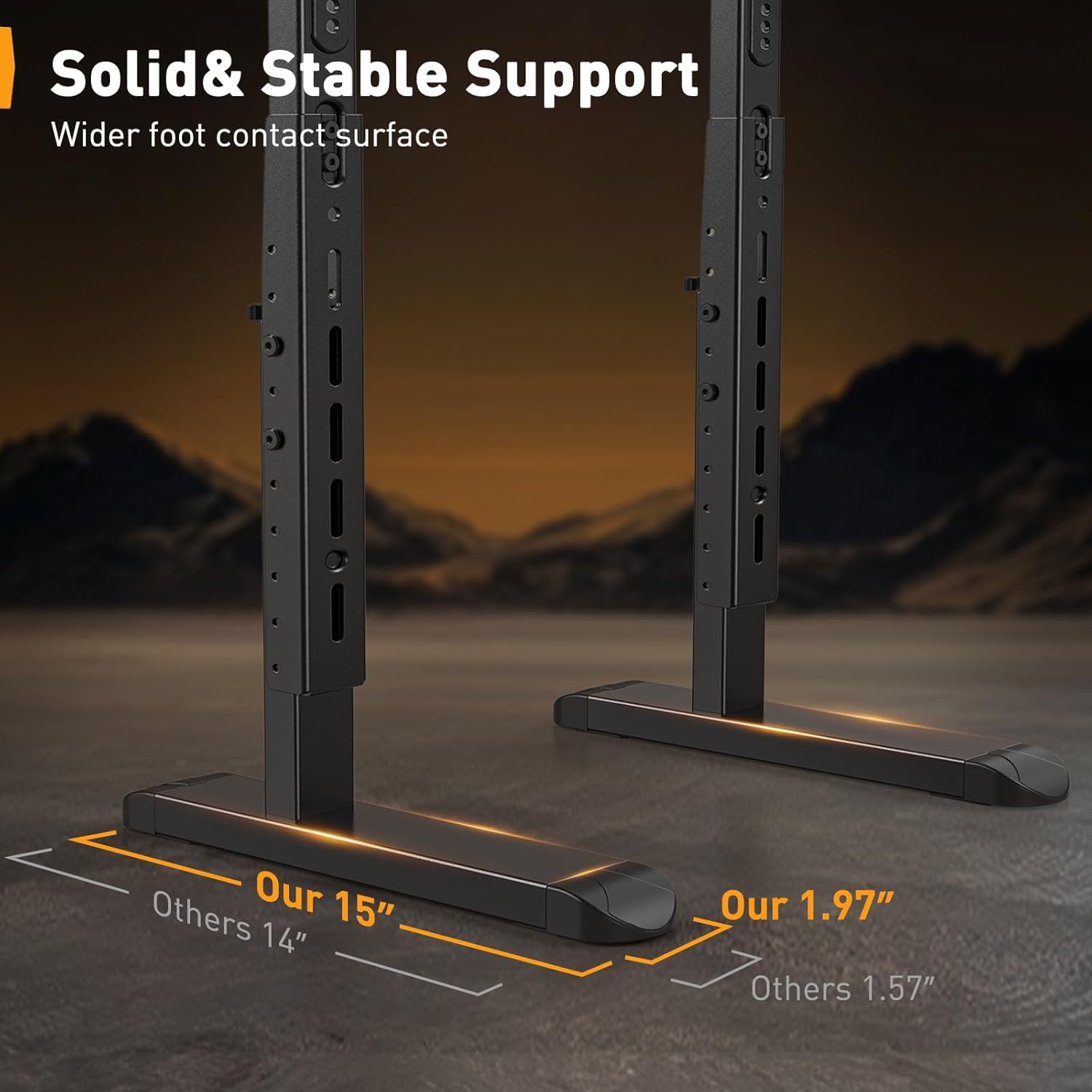
Image: Detail of the solid and stable support feet, highlighting their wider contact surface for enhanced stability.
Problem: TV does not fit the stand.
- Solution 1: Re-check your TV's VESA mounting pattern against the stand's compatibility (200x200mm to 800x500mm).
- Solution 2: Ensure your TV's screen size is within the 37-86 inch range.
- Solution 3: Confirm your TV's weight is within the 132 lbs limit.
9. Warranty and Customer Support
Perlegear is committed to providing high-quality products and customer satisfaction. If you encounter any issues or have questions regarding your PGTVS20 TV stand, please do not hesitate to contact our U.S.-based product support team. They are available to assist with installation, troubleshooting, or any other inquiries.
For support, please refer to the contact information provided with your product packaging or visit the official Perlegear website.


