
Introduction
This instruction manual provides essential information for the setup, operation, and maintenance of your Generic IR replacement remote control. This remote is designed to be compatible with specific Saba SA43K67A9 and AWIA Smart HDTV models, including AW-D01, AWA650US, AWA550US, AWA500US, and AWA400S. It functions as a direct replacement and typically requires no programming.
Important Note: This remote control is not universal. Please verify compatibility with your TV model before use. Refer to your television's original manual for specific remote control requirements if you are unsure.
Setup
1. Battery Installation
The remote control requires two (2) AAA batteries (not included). Follow these steps to install them:
- Locate the battery compartment cover on the back of the remote control.
- Press down on the tab and slide the cover downwards to open the compartment.
- Insert two new AAA batteries, ensuring the positive (+) and negative (-) terminals align correctly with the markings inside the compartment.
- Slide the battery compartment cover back into place until it clicks securely.
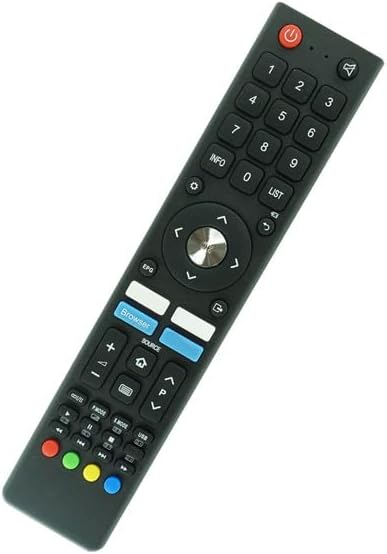
Image: Rear view of the remote control with the battery compartment open, illustrating the correct orientation for AAA battery insertion.
2. Initial Use
This IR replacement remote control is designed for immediate use with compatible TV models without requiring any programming or code setup. Once batteries are installed, point the remote directly at your television and press the Power button to test functionality.
Operating Instructions
The remote control features a standard layout for easy navigation and control of your television. Below is a general guide to the main functions:

Image: Front view of the remote control, displaying the button layout for various functions.
- Power Button (●): Turns the television on or off.
- Number Buttons (0-9): Directly select channels.
- Volume Up/Down (+/-): Adjusts the audio volume.
- Channel Up/Down (▲/▼): Changes the television channel.
- Mute Button (🔇): Mutes or unmutes the television audio.
- Navigation Pad (Up, Down, Left, Right, OK): Used to navigate menus and confirm selections.
- Source Button: Cycles through available input sources (HDMI, AV, etc.).
- Browser Button: Accesses the TV's web browser function.
- EPG Button: Displays the Electronic Program Guide.
- Info Button: Shows information about the current program or input.
- List Button: Accesses channel lists or other stored lists.
- Colored Buttons (Red, Green, Yellow, Blue): These buttons typically correspond to specific functions within smart TV applications or menus, as indicated on the TV screen.
For detailed functions of specific buttons within your TV's operating system, please refer to your television's user manual.
Maintenance
Battery Replacement
Replace batteries when the remote control's response becomes sluggish or stops working. Always replace both AAA batteries simultaneously with new ones. Do not mix old and new batteries, or different types of batteries.
Cleaning
To clean the remote control, gently wipe its surface with a soft, dry cloth. For stubborn dirt, slightly dampen the cloth with water. Avoid using harsh chemicals, abrasive cleaners, or excessive moisture, as these can damage the remote's finish or internal components.
Storage
When not in use for extended periods, it is recommended to remove the batteries to prevent leakage, which can damage the remote control. Store the remote in a cool, dry place away from direct sunlight and extreme temperatures.
Troubleshooting
- Remote not responding:
- Ensure batteries are correctly installed with the proper polarity (+/-).
- Replace old batteries with new AAA batteries.
- Check for any obstructions between the remote control and the TV's IR receiver.
- Ensure you are within the maximum operating range of 8 meters.
- Point the remote directly at the TV's IR sensor.
- Some buttons not working:
- This remote is an IR replacement. Ensure your TV uses an IR remote.
- Verify that your TV model is listed as compatible. This remote is not universal and may not support all functions on non-listed models.
- Clean the remote control as described in the Maintenance section to ensure no debris is interfering with button contacts.
- Short operating range:
- Replace batteries with fresh ones.
- Ensure there are no strong light sources (like direct sunlight) interfering with the IR signal.
Specifications
| Brand | Generic |
| Model Number | Easytry16335 |
| Connectivity Technology | Infrared (IR) |
| Compatible Devices | Saba SA43K67A9, AWIA AW-D01, AWA650US, AWA550US, AWA500US, AWA400S Smart HDTVs |
| Controller Type | Button Control |
| Maximum Range | 8 Meters |
| Number of Supported Devices | 1 |
| Batteries Required | 2 x AAA (not included) |
Warranty and Support
Warranty Information
This product comes with a 90-day warranty from the date of purchase. This warranty covers manufacturing defects. It does not cover damage caused by misuse, accidents, unauthorized modifications, or normal wear and tear. Please retain your proof of purchase for warranty claims.
Customer Support
For any questions, issues, or warranty claims, please contact the seller or retailer from whom you purchased this remote control. Provide your purchase details and a clear description of the issue for efficient assistance.