1. Product Overview
The ISolderStore 4x4x4 3D LED Light Cube is a DIY soldering practice kit designed for enthusiasts and students to learn basic electronics and soldering skills. This kit, once assembled, forms a 3D cube display composed of 64 red and green square LED lights. It is capable of displaying over 50 dynamic flashing patterns, providing an engaging and educational experience.
Note: This is an electronic kit that requires assembly and soldering. It is not a pre-built product.
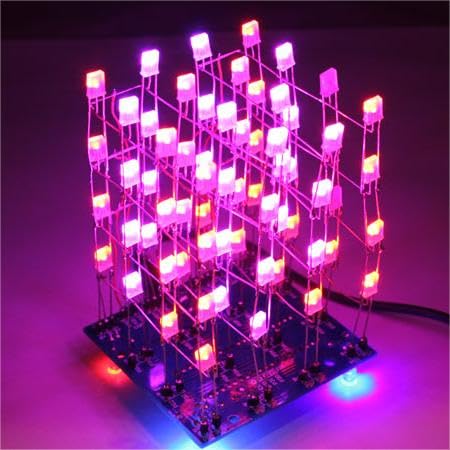
Image 1: The fully assembled ISolderStore 4x4x4 3D LED Light Cube, illuminated and displaying various light patterns.
2. Safety Information
Please read and understand all safety instructions before beginning assembly. Soldering involves high temperatures and can produce fumes. Always exercise caution.
- Ventilation: Work in a well-ventilated area to avoid inhaling solder fumes.
- Eye Protection: Always wear safety glasses to protect your eyes from solder splashes or flying debris.
- Hot Surfaces: Soldering irons become very hot. Avoid touching the tip or recently soldered components. Allow components to cool before handling.
- Electrical Safety: Ensure your soldering iron is in good working condition and properly grounded. Disconnect power before making any adjustments or repairs.
- Children: This kit is recommended for ages 12 and up. Adult supervision is strongly advised for younger users due to the use of hot tools and small components.
- Component Handling: Some electronic components can be sensitive to static electricity. Handle them carefully.
3. Package Contents
Upon opening your ISolderStore 4x4x4 3D LED Light Cube kit, please verify that all components are present. The kit includes:
- Printed Circuit Board (PCB)
- 64 Red and Green Square LED Lights
- Various electronic components (resistors, capacitors, integrated circuits, etc.)
- Connecting wires
- Power cable/connector
- English Installation Instructions (typically via QR code on packaging)
If any components are missing, please contact ISolderStore customer support for replacements.
4. Setup and Assembly
Assembly of the 4x4x4 3D LED Light Cube requires basic soldering tools and skills. Refer to the detailed instructions provided with your kit (often accessible via a QR code) for step-by-step guidance.
4.1 Tools Required (Not Included)
- Soldering Iron
- Solder (preferably lead-free)
- Wire Cutters / Nippers
- Wire Strippers
- Safety Glasses
- Desoldering Braid or Pump (optional, for corrections)
4.2 Assembly Steps
- Preparation: Unpack all components and organize them. Identify each component by referring to the kit's instructions.
- PCB Familiarization: Examine the Printed Circuit Board (PCB). Component locations are clearly mapped and labeled on the board.
- Component Soldering: Solder each component onto the PCB according to the markings and the provided instructions. Pay close attention to component orientation (e.g., polarity of LEDs, diodes, and electrolytic capacitors; notch/dot on ICs).
- LED Cube Construction: Assemble the 4x4x4 LED matrix by carefully soldering the LEDs together to form layers, and then connecting these layers to the main PCB. Ensure all connections are secure and free of short circuits.
- Wiring: Connect any necessary wires as indicated in the instructions. The provided images show examples of wired connections.
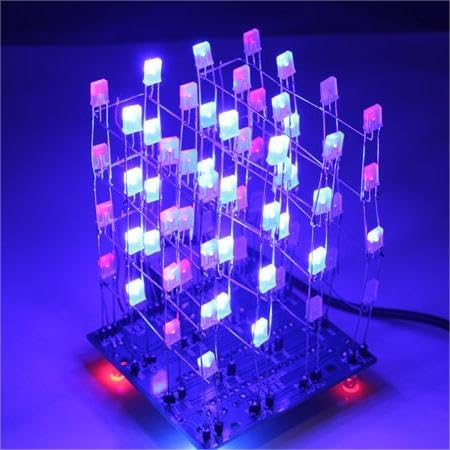
Image 2: A partially assembled 3D LED Light Cube, showing the LEDs soldered onto the circuit board before final wiring and enclosure.

Image 3: A detailed view of the circuit board for the 3D LED Light Cube, highlighting the soldered connections and red wiring.
5. Operating Instructions
Once the 4x4x4 3D LED Light Cube is fully assembled and all connections are verified, it is ready for operation.
- Power Connection: Connect the provided power cable to the designated port on the PCB and then to a suitable power source.
- Power On: The cube should automatically power on and begin displaying its dynamic flashing patterns.
- Pattern Selection: Refer to the specific instructions included with your kit for details on how to change or select different display patterns, if applicable. Some kits may have buttons or jumpers for this purpose.
6. Maintenance
The ISolderStore 4x4x4 3D LED Light Cube requires minimal maintenance once assembled.
- Cleaning: Keep the cube free from dust and debris. Use a soft, dry cloth for cleaning. Avoid using liquids or abrasive cleaners.
- Handling: Handle the assembled cube with care to avoid bending or breaking the LED leads or other components.
- Storage: Store the cube in a dry, cool environment away from direct sunlight and extreme temperatures.
7. Troubleshooting
If your 4x4x4 3D LED Light Cube does not function correctly after assembly, consider the following troubleshooting steps:
- No Power/Lights:
- Check the power connection and ensure the power source is functional.
- Inspect the power input jack and associated solder joints on the PCB.
- Some LEDs Not Lighting:
- Examine the solder joints for the non-working LEDs. Cold joints or bridges can prevent them from lighting.
- Verify the polarity of the LEDs. LEDs are diodes and must be installed in the correct orientation.
- Check for any broken LED leads or faulty LEDs.
- Incorrect Patterns/Erratic Behavior:
- Review all solder joints for bridges (solder connecting two points that should not be connected) or poor connections.
- Ensure all integrated circuits (ICs) and other polarized components are inserted in the correct orientation.
- Check for any missing components or incorrect component values.
- General Malfunction:
- Carefully re-read the assembly instructions to ensure no steps were missed or performed incorrectly.
- Visually inspect the entire PCB for any signs of damage, short circuits, or incorrect wiring.
If you continue to experience issues, please contact ISolderStore customer support for assistance.
8. Specifications
| Product Name | ISolderStore 4x4x4 3D LED Light Cube Soldering Practice Kit |
| Model Number | 4x4x4 3D LED Light Cube Kit |
| ASIN | B0BN35MML7 |
| Manufacturer | ISolderStore |
| Kit Dimensions (Package) | 7.4 x 4.33 x 0.78 inches (18.8 x 11 x 2 cm) |
| Item Weight (Package) | 8.1 ounces (230 grams) |
| LED Type | Red and Green Square LEDs |
| LED Quantity | 64 (4x4x4 matrix) |
| Recommended Age | 12 years and up |
9. Warranty and Support
ISolderStore is committed to providing excellent customer service. If you encounter any issues or have questions regarding your 4x4x4 3D LED Light Cube Soldering Practice Kit, please do not hesitate to contact us.
- Missing Components: If any components are missing from your kit upon arrival, please contact us immediately for replacements.
- Technical Support: For assembly assistance, troubleshooting, or any other technical inquiries, please reach out to our support team.
- Contact Information: Please refer to the contact details provided on the product packaging or the seller's information page where you purchased the kit.