
1. Product Overview
The Camojojo Trace is a robust 4G LTE cellular trail camera designed for outdoor monitoring, security, and wildlife observation. It features high-resolution imaging, rapid trigger speed, and seamless mobile connectivity.

Figure 1: Camojojo Trace Trail Camera highlighting LTE video sending, 0.2s trigger speed, IP66 waterproof rating, 850nm night vision, 80° detection angle, and 65FT detection range.
2. Package Contents
Upon unboxing your Camojojo Trace Trail Camera, ensure all the following items are present:
- Camojojo Trace Trail Camera
- Mounting Stand
- Mounting Strap
- USB-C Cable
- Built-in SIM Card
- Converter Cable
- Instruction Manual

Figure 2: All items included in the Camojojo Trace package, including the camera, mounting accessories, cables, and manuals.
3. Setup Guide
3.1. Battery Installation
The Camojojo Trace camera requires up to 12 AA batteries for operation. The battery compartment is designed for extended use.
- Locate the battery compartment latch on the side of the camera.
- Open the latch and pull out the battery tray.
- Insert 12 AA batteries into the tray, ensuring correct polarity.
- Slide the battery tray back into the compartment until it clicks securely into place.
3.2. SIM Card and SD Card
The camera comes with a built-in SIM card for 4G LTE connectivity and a 32GB SD card for storage. These are pre-installed.
- The built-in SIM card enables mobile transmission of photos and videos.
- The 32GB SD card provides ample storage for captured media.
3.3. App Download and Pairing
To fully utilize the camera's features, download the Camojojo app on your iOS or Android smartphone.
- Scan the QR code located inside the camera's front panel or use the NFC function on your smartphone to quickly download the Camojojo app.
- Follow the in-app instructions to pair your camera. This typically involves scanning a QR code on the camera or using NFC.
- A 7-day free trial for mobile transmission features is available upon initial setup.

Figure 3: Adding the camera to your smartphone using NFC or QR code via the Camojojo app.

Figure 4: The Camojojo app interface showing camera compatibility and location tracking.
3.4. Mounting the Camera
The camera can be mounted using the provided strap or mounting stand.
- Using the Mounting Strap: Thread the strap through the designated loops on the back of the camera and secure it around a tree or post.
- Using the Mounting Stand: Attach the mounting stand to the tripod mount on the back or bottom of the camera. Secure the stand to a desired surface.

Figure 5: Camojojo Trace camera securely mounted on a tree, blending into the natural environment.
4. Operating Instructions
4.1. Powering On/Off
To power on the camera, press and hold the power button located inside the front panel. The indicator lights will confirm activation. To power off, repeat the process.
4.2. Modes of Operation
The camera offers three distinct power modes to optimize battery life:
- Eco Mode: Maximizes battery life, ideal for long-term monitoring with less frequent activity.
- Auto Mode: Balances battery life and performance, suitable for general use.
- Boost Mode: Prioritizes performance for rapid capture and transmission, consuming more power.
4.3. Capturing Photos and Videos
The camera automatically captures images and videos when motion is detected within its 80° detection angle and up to 65 feet distance, with a rapid 0.2-second trigger speed.
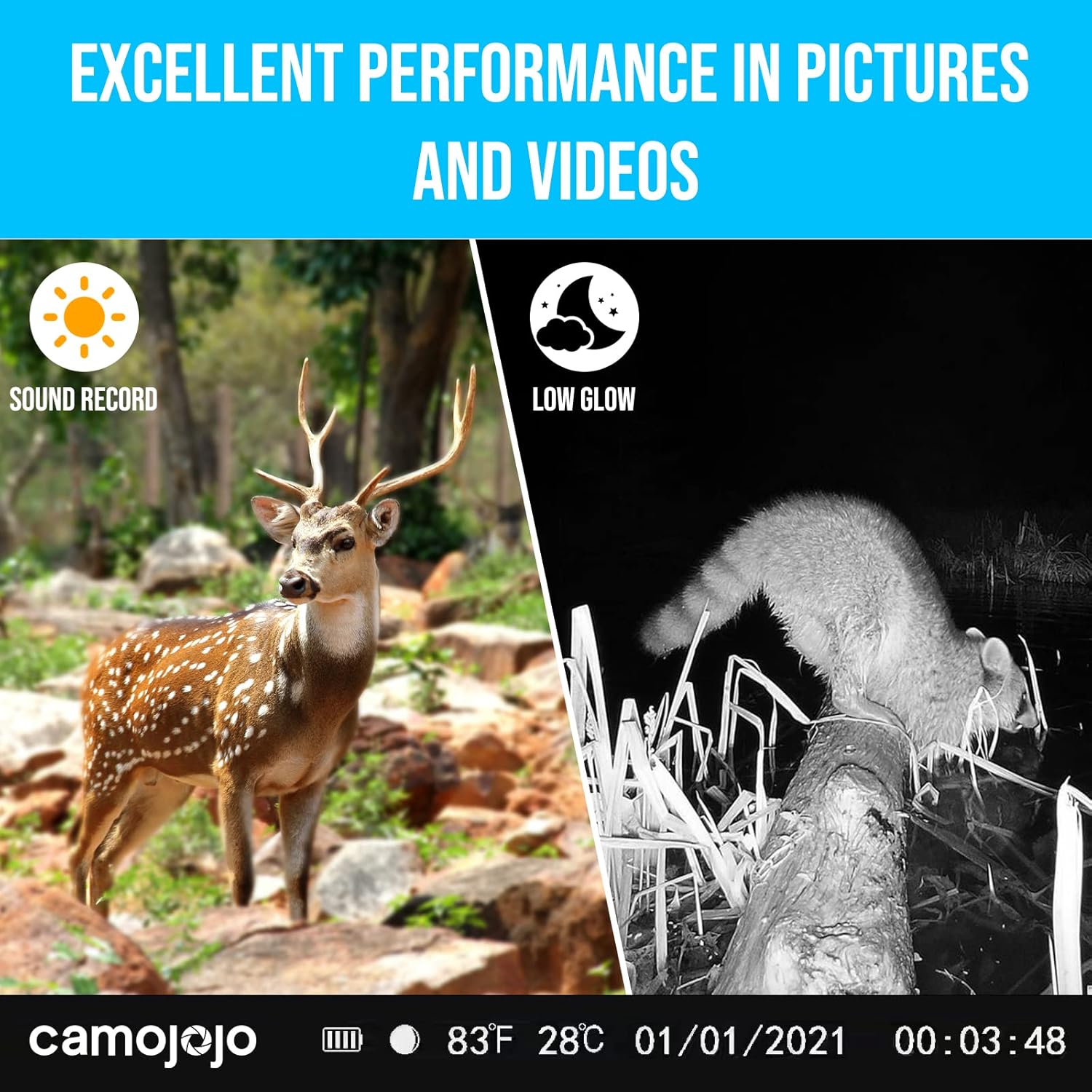
Figure 6: Day and night vision capabilities of the Camojojo Trace, featuring 850nm low glow infrared LEDs for clear night images.
4.4. Live Streaming and Remote Viewing
Access real-time footage and captured media directly from your smartphone via the Camojojo app.
- Live-Stream: View real-time scenes from your camera directly on your phone.
- Picture Sharing: Share captured images and videos with others or on social media platforms.
- Animal Tracing Analysis: Utilize the app's features for analyzing animal movements and patterns.

Figure 7: Real-time live streaming from the Camojojo Trace camera to a smartphone.

Figure 8: Viewing and sharing real-time HD videos captured by the camera through the app.

Figure 9: The camera's AI animal recognition feature in action.

Figure 10: Examples of high-quality wildlife captures from the Camojojo Trace camera.
5. Maintenance
5.1. Cleaning
- Gently wipe the camera lens and sensors with a soft, clean cloth to remove dust and debris.
- Ensure the waterproof seals are free from dirt to maintain IP66 rating.
5.2. Battery Replacement
Replace all 12 AA batteries simultaneously to ensure optimal performance and prevent power issues.
5.3. Firmware Updates
Check the Camojojo app regularly for any available firmware updates to ensure your camera has the latest features and bug fixes.
6. Troubleshooting
- Camera not powering on: Ensure batteries are correctly installed and fully charged.
- No signal/connectivity: Check the SIM card installation and ensure the camera is within 4G LTE coverage.
- Poor image/video quality: Clean the lens and sensors. Ensure the camera is positioned correctly for optimal lighting.
- App pairing issues: Re-scan the QR code or use NFC. Ensure your phone's Bluetooth and location services are enabled.
7. Specifications
| Feature | Specification |
|---|---|
| Brand | Camojojo |
| Model Name | Trace |
| Connectivity Technology | Wireless (4G LTE) |
| Video Capture Format | 1080p |
| Image Resolution | Up to 3K |
| Trigger Speed | 0.2 seconds |
| Waterproof Rating | IP66 |
| Night Vision | 850nm Low Glow Infrared LEDs |
| Motion Detection Angle | 80° |
| Motion Detection Distance | 65 feet |
| Internal Storage | 32GB SD Card (built-in) |
| Power Source | 12x AA Batteries |
| Dimensions | 5.71 x 3.9 x 2.9 inches |
8. Official Product Videos
Camojojo Trace Ttail Camera Overview
Video 1: An official overview of the Camojojo Trace Trail Camera, showcasing its design, features, and ease of use. This video highlights the camera's compact size, integrated antenna, and various mounting options.
Camojojo Trace Hunting Camera Features
Video 2: This video provides a detailed look at the Camojojo Trace's features, including its battery compartment, SIM card slot, and the process of connecting it to the mobile app for live viewing and data management.
9. Warranty and Support
Camojojo is committed to providing high-quality products and excellent customer service.
- Warranty: The Camojojo Trace Trail Camera comes with a 24-month guarantee.
- Customer Service: For any issues or inquiries, please contact our 24-hour after-sale customer service.