
1. Introduction
Thank you for choosing the MZ M419SP Portable Bluetooth Speaker. This manual provides essential information for the safe and efficient use of your speaker. Please read it carefully before operating the device and retain it for future reference. The MZ M419SP offers dynamic sound with high bass, integrated RGB lighting, and multiple connectivity options for a versatile audio experience.
2. What's in the Box
Upon unpacking, please ensure all items listed below are present and in good condition:
- MZ M419SP Portable Bluetooth Speaker
- USB Charging Cable
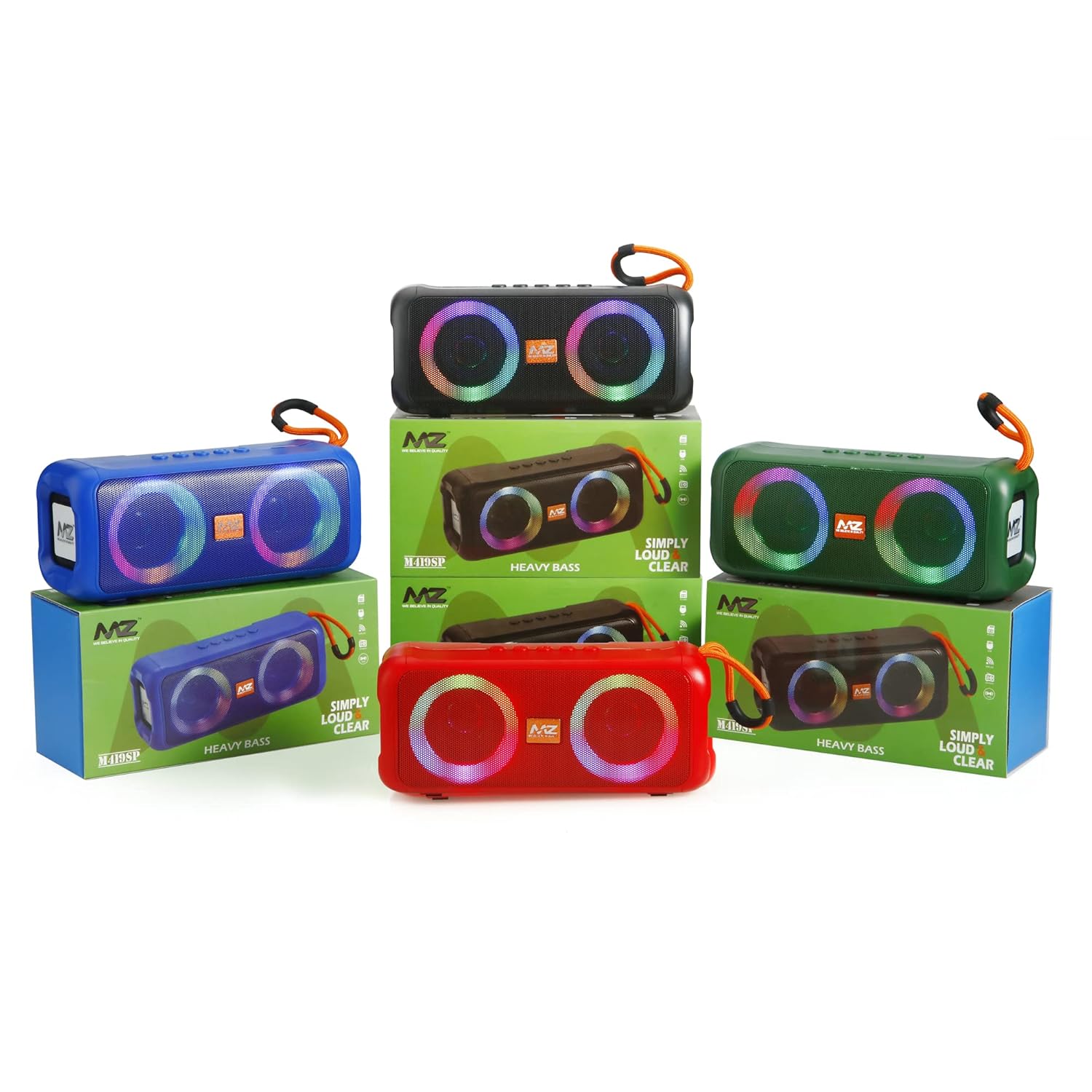
Image: MZ M419SP speakers in different colors, shown with their retail packaging.
3. Product Overview
The MZ M419SP speaker features a robust design with dual speakers, integrated RGB lighting, and intuitive controls. It is designed for portability and durability, including splash-proof capabilities.
3.1 Physical Dimensions

Image: A red MZ M419SP speaker displaying its dimensions: 19.5 cm (length), 8.5 cm (height), and 7.5 cm (depth).
3.2 Controls and Ports
The speaker is equipped with large volume and play/pause buttons for easy access. Connectivity ports include Bluetooth, USB, AUX, and a TF (Micro SD) Card slot.

Image: A display of four MZ M419SP speakers in red, green, black, and blue, showcasing their design and active RGB lighting.
4. Setup
Before first use, it is recommended to fully charge the speaker. Refer to the 'Charging the Speaker' section for instructions.
5. Operating Instructions
5.1 Power On/Off
To power on the speaker, press and hold the power button until the indicator lights illuminate. To power off, press and hold the power button again.
5.2 Bluetooth Pairing
- Ensure the speaker is powered on and in Bluetooth pairing mode (indicated by a flashing LED).
- On your device (smartphone, tablet, computer), enable Bluetooth and search for available devices.
- Select "MZ M419SP" from the list of devices.
- Once connected, the speaker will emit an audible confirmation, and the LED indicator will become solid.
5.3 Multiple Connectivity Options
The MZ M419SP supports various input sources:
- Bluetooth: Connect wirelessly to your Bluetooth-enabled devices.
- USB: Insert a USB drive with audio files.
- AUX: Use a 3.5mm audio cable to connect to devices without Bluetooth.
- TF Card: Insert a TF (Micro SD) card with audio files.
5.4 RGB Lights
The speaker features built-in RGB lights that can synchronize with the music or be set to a single color. Use the dedicated light button (if available) or refer to the touch controls for cycling through light modes or turning them off.
Video: A demonstration of the MZ M419SP speaker's RGB lighting effects, showcasing various color changes and patterns.
5.5 Hands-Free Phone Calls
When connected via Bluetooth to a smartphone, the speaker can be used for hands-free calls. Press the play/pause button to answer or end a call.
6. Charging the Speaker
The MZ M419SP is equipped with a 2400mAh rechargeable battery. Use the provided USB charging cable to charge the speaker.
- Connect the small end of the USB cable to the charging port on the speaker.
- Connect the larger end of the USB cable to a USB power adapter (not included) or a computer's USB port.
- The charging indicator light will illuminate during charging and turn off or change color when fully charged.
7. Maintenance
To ensure the longevity and optimal performance of your speaker, follow these maintenance guidelines:
- Cleaning: Use a soft, dry cloth to clean the speaker. Do not use abrasive cleaners or solvents.
- Water Resistance: The speaker features splash-proof capabilities. However, do not submerge it in water or expose it to heavy rain.
- Storage: Store the speaker in a cool, dry place away from direct sunlight and extreme temperatures.
- Battery Care: To preserve battery life, avoid fully discharging the battery frequently. Charge it regularly, even if not in use for extended periods.
8. Troubleshooting
If you encounter issues with your MZ M419SP speaker, please refer to the following common solutions:
| Problem | Possible Solution |
|---|---|
| Speaker does not power on | Ensure the battery is charged. Connect the speaker to a power source using the USB cable. |
| Cannot pair via Bluetooth | Make sure the speaker is in pairing mode. Disable and re-enable Bluetooth on your device. Ensure no other devices are connected to the speaker. Move closer to the speaker. |
| No sound | Check the volume level on both the speaker and your connected device. Ensure the correct input source (Bluetooth, AUX, USB, TF Card) is selected. |
| Sound distortion | Reduce the volume on both the speaker and your device. Ensure the audio source is of good quality. |
9. Specifications
Below are the technical specifications for the MZ M419SP Portable Bluetooth Speaker:
| Feature | Specification |
|---|---|
| Model Name | MZ-M419SP |
| Speaker Type | Coaxial |
| Connectivity Technology | Bluetooth, USB, Auxiliary |
| Wireless Communication Technology | Bluetooth |
| Speaker Maximum Output Power | 10 Watts |
| Power Source | Battery Powered |
| Battery Capacity | 2400mAh |
| Product Dimensions | 7.5D x 19.5W x 8.5H Centimeters |
| Item Weight | 500 g |
| Is Waterproof | TRUE (Splash-proof) |
| Control Method | Touch |
| Compatible Devices | Personal Computer, Smartphone, Tablet, Television |
| Included Components | Speaker, USB Charging Cable |
10. Warranty and Support
For warranty information and customer support, please refer to the documentation provided at the time of purchase or contact your retailer. Keep your proof of purchase for any warranty claims.