
Leelbox P160-Plus-NEW
Leelbox P160-Plus-NEW 20000 Lumens LED Rechargeable Flashlight User Manual
Model: P160-Plus-NEW | Brand: Leelbox
1. Introduction
Thank you for choosing the Leelbox P160-Plus-NEW LED Rechargeable Flashlight. This powerful and versatile flashlight is designed for various outdoor and indoor activities, offering high brightness, multiple lighting modes, and convenient charging features. Please read this manual carefully before use to ensure proper operation and maintenance.
2. Package Contents
Verify that all items listed below are included in your package:
- 1 x Leelbox P160 LED Flashlight
- 1 x 26650 Rechargeable Battery (5000 mAh)
- 1 x USB Charging Cable
- 1 x AAA Battery Casing (for optional AAA battery use, batteries not included)
- 1 x Lanyard
- 1 x Instruction Manual
3. Product Features
- Ultra-Bright Illumination: Equipped with XHP160 LED beads and a COB chip, delivering up to 20000 lumens.
- 7 Lighting Modes:
- Main LED: High, Medium, Strobe
- COB Side Light: High, Medium, Red, Red Flashing
- Zoomable Function: Adjustable focus for spotlight (distance viewing) and floodlight (large area illumination).
- Rechargeable & Power Bank: Integrated USB charging port and a 5000mAh 26650 battery. Can also function as a power bank to charge mobile devices.
- Durable & Waterproof: Constructed from aerospace-grade aluminum alloy with an IP65 waterproof rating, resistant to scratches, wear, and drops.
- Battery Indicator: LED display shows battery level (25%, 50%, 75%, 100%).

Figure 3.1: Overview of the flashlight and its 7 light modes.
4. Setup
4.1 Battery Installation
- Unscrew the tail cap of the flashlight.
- Insert the provided 26650 rechargeable battery with the positive (+) end facing towards the head of the flashlight.
- Alternatively, if using AAA batteries (not included), place them into the AAA battery casing and insert the casing into the flashlight.
- Screw the tail cap back on securely.
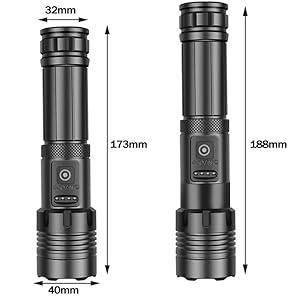
Figure 4.1: Correct battery insertion for the Leelbox P160-Plus-NEW flashlight.
5. Operating Instructions
5.1 Power On/Off and Mode Selection
- Main LED Modes: Press the power button once to turn on the main LED. Subsequent presses will cycle through High, Medium, and Strobe modes.
- COB Side Light Modes: Double-press the power button to activate the COB side light. Subsequent presses will cycle through High, Medium, Red, and Red Flashing modes.
- Power Off: Press and hold the power button for approximately 2 seconds to turn off the flashlight from any mode.
Video 5.1: Demonstration of the Leelbox P160-Plus-NEW flashlight's brightness and mode switching in an indoor environment.
5.2 Zoom Function
The flashlight features a zoomable head. To adjust the beam:
- Spotlight: Extend the head of the flashlight forward to narrow the beam for long-distance illumination.
- Floodlight: Retract the head of the flashlight backward to widen the beam for broad area illumination.

Figure 5.2: Illustrates the zoom function for adjusting between spotlight and floodlight modes.
5.3 Charging the Flashlight
The Leelbox P160-Plus-NEW flashlight is equipped with a built-in USB charging port.
- Locate the USB charging port on the flashlight body (usually under a protective cover).
- Connect the provided USB charging cable to the flashlight's port.
- Connect the other end of the USB cable to a power source such as a computer, power bank, car charger, or wall adapter.
- The LED battery indicator will show the charging progress. All four lights will be solid when fully charged.

Figure 5.3: Charging options for the Leelbox P160-Plus-NEW flashlight.
5.4 Using as a Power Bank
The flashlight can also serve as a portable power bank to charge other devices.
- Open the protective cover to access the USB output port.
- Connect your device's charging cable to the flashlight's USB output port.
- The flashlight will begin charging your device.

Figure 5.4: The flashlight can be used to charge mobile devices.
6. Maintenance
- Cleaning: Wipe the flashlight with a clean, soft cloth. Do not use abrasive cleaners or solvents.
- Storage: Store the flashlight in a cool, dry place away from direct sunlight and extreme temperatures. If storing for extended periods, remove the battery.
- Battery Care: Recharge the battery regularly, even if not in use, to maintain its lifespan.
7. Troubleshooting
| Problem | Possible Cause | Solution |
|---|---|---|
| Flashlight does not turn on. | Low battery or incorrect battery installation. | Charge the battery or ensure it is inserted correctly with the positive end facing forward. |
| Light is dim. | Low battery. | Recharge the battery. |
| Flashlight not charging. | Faulty cable, power source, or connection. | Try a different USB cable or power source. Ensure the cable is securely connected. |
| Zoom function is stiff. | Dirt or debris in the mechanism. | Clean the exterior of the flashlight. Avoid forcing the zoom mechanism. |
8. Specifications
| Feature | Detail |
|---|---|
| Model Number | P160-Plus-NEW |
| Light Source Type | LED (XHP160 main, COB side) |
| Maximum Luminous Flux | 20000 Lumens |
| Power Source | Battery Powered (Rechargeable) |
| Battery Type | 1 x 26650 Lithium-ion (5000 mAh) |
| Material | Aerospace-grade Aluminum |
| Waterproof Rating | IP65 |
| Dimensions (Length x Width) | Approx. 172mm x 43mm |
| Color | Black (Note: Product specifications list 'Blue', but product images show black.) |
Note: The product color is listed as "Blue" in some specifications, but the product images display a black flashlight. Please refer to your specific product for actual color.

Figure 8.1: The flashlight's IP65 waterproof and durable construction.
9. Safety Information
- Do not shine the flashlight directly into eyes, as the intense light can cause temporary vision impairment.
- Keep out of reach of children.
- Do not disassemble the flashlight or attempt to modify its components.
- Avoid exposing the flashlight to extreme heat or open flames.
- Use only the recommended battery type (26650) or AAA batteries with the provided casing.
- Dispose of batteries according to local regulations.
10. Warranty and Support
Leelbox is committed to providing high-quality products. If you encounter any issues or have questions regarding your P160-Plus-NEW flashlight, please contact our customer service. Our support team aims to respond to all inquiries within 24 hours.
For further assistance, please refer to the contact information provided with your purchase or visit the official Leelbox website.
Related Documents - P160-Plus-NEW
 |
Leelbox BQH2800II/BQH2800EII/BQH3300II/BQH3300Ell Inverter Generator Operator's Manual Comprehensive operator's manual for Leelbox BQH2800II, BQH2800EII, BQH3300II, and BQH3300Ell inverter generating sets. Covers safety, operation, maintenance, and troubleshooting for reliable power generation. |
 |
Leelbox High Definition Digital Terrestrial Receiver User Manual Comprehensive user manual for the Leelbox High Definition Digital Terrestrial Receiver, covering setup, remote control operation, channel management, picture settings, system configurations, and USB features like recording and timeshift. |
 |
Leelbox High Definition Digital Terrestrial Receiver User Manual User manual for the Leelbox High Definition Digital Terrestrial Receiver, detailing installation, remote control operation, channel management, settings, USB features, and recording capabilities. |
 |
Leelbox Inverter Generator User Manual - FG4500ioL-B, FG5400ioL-B, FG5500ioL-B, FG6000ioL-B This user manual provides essential safety instructions, operation guidelines, maintenance procedures, and troubleshooting tips for Leelbox Inverter Generators, including models FG4500ioL-B, FG5400ioL-B, FG5500ioL-B, and FG6000ioL-B. |
 |
POCKETMAN P160 LED Flashlight Product Overview Detailed product overview of the POCKETMAN P160 LED flashlight, highlighting its zoomable focus, USB rechargeable capabilities, IPX6 waterproof rating, and available package configurations. |
 |
Aqua Master P160 Pro Combo Pen - pH, EC, TDS, Temperature Meter Specifications Detailed technical specifications for the Aqua Master P160 Pro Combo Pen, a multi-parameter meter for measuring pH, EC, TDS, and temperature. Features include IP67 waterproofing and automatic power-off. |
Ask a question about this manual
Ask about setup, troubleshooting, compatibility, parts, safety, or missing instructions. Manuals+ will review the question and use this page’s manual context to help answer it.