
Introduction
This manual provides detailed instructions for the setup, operation, maintenance, and troubleshooting of your XiaoR Geek AI Robot Kit ROS SLAM Smart Car. This robot is designed for learning and exploring robotics, featuring advanced AI functions like Lidar mapping, navigation, gesture control, and human tracking.
The XR ROS MINI Robot Car is a Mecanum wheel ROS robot developed by XiaoR and Horizon. It integrates the popular ROS system, supports ROS2, and offers video transmission, mapping, navigation, gesture recognition control, and visual human body tracking. It is recommended for users with programming skills due to its Python development capabilities.
Product Overview
The XiaoR Geek AI Robot Kit is a sophisticated platform for robotics enthusiasts. Key features include:
- ROS Intelligent Robot Kit: Based on the Horizon X3 Pi development version, with built-in ROS system (supports ROS1 Melodic/Noetic and ROS2 Foxy).
- Lidar Scanning 2D Mapping and Navigation: Equipped with XR-Lidar S1 for indoor 2D scanning, mapping, navigation, and automatic obstacle avoidance via mobile APP (Android only).
- Omni-directional Movement: Features 360° Mecanum wheels for versatile movement (front, back, left, right, diagonal, rotation) with adjustable low, medium, and high speeds.
- Rich AI Functions: Includes gesture recognition control and visual human body tracking via PC.
- Python Programmable: Comes with courses and open-source code for Python development.
- Durable Design: Adopts a piano paint film fully enclosed shell for enhanced durability.
Components and Structure
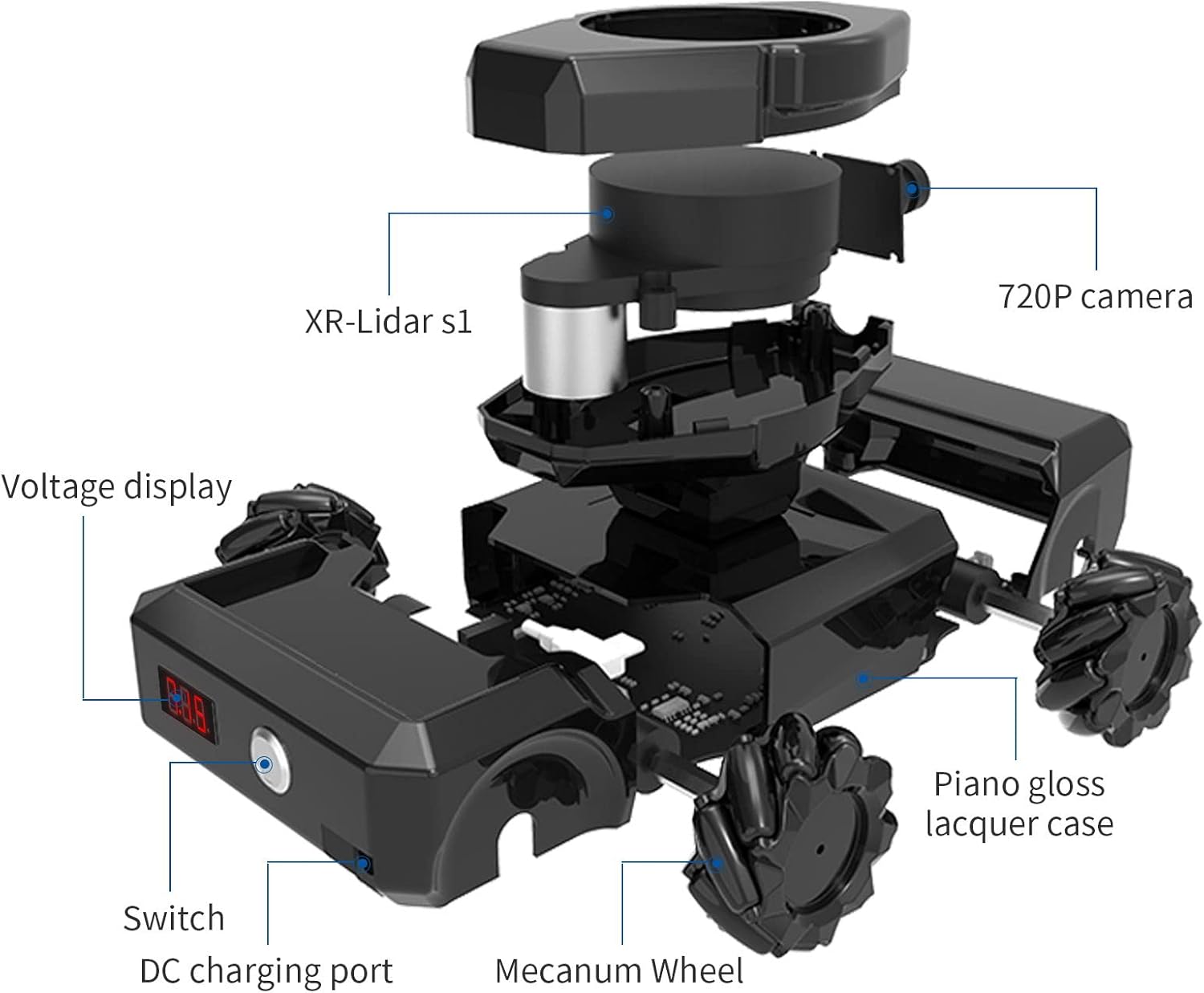
The robot car is designed with several integrated components for its advanced functionalities.

Exploded view illustrating the robot's internal components, including the XR-Lidar S1, 720P camera, voltage display, power switch, DC charging port, and Mecanum wheels.

The XR Humanoid Robot with its dimensions (190x131x74mm) and a display of included accessories: a card reader, a paper manual, and a charger.
Setup
The robot is assembled and shipped, requiring minimal setup before first use. Ensure the robot is fully charged before operation.
Initial Power-On
- Locate the power switch on the side of the robot.
- Press the power switch to turn on the robot. The voltage display will illuminate, indicating power is on.
- Observe the robot's initial boot sequence.

The robot's power button and voltage display for easy monitoring.
Connecting to the Robot
The robot can be controlled via a mobile application (Android only) or a PC. Refer to the included paper manual for detailed instructions on connecting to the robot's Wi-Fi network and installing the necessary software/applications.
Official product video demonstrating the XiaoR Geek AI Robot Kit's features, including power-on, omnidirectional movement, radar mapping, navigation, obstacle avoidance, human body tracking, and gesture control.
Operating Instructions
Omni-directional Movement
The robot utilizes 360° Mecanum wheels, allowing for highly flexible movement. You can control its movement in various directions (forward, backward, left, right, diagonal, rotation) and adjust its speed (low, medium, high) via the mobile APP or PC interface.

Illustration of the robot's omni-directional movement, enabled by its Mecanum wheels, allowing for versatile navigation.
Lidar Mapping and Navigation
The integrated XR-Lidar S1 enables the robot to perform 2D mapping of its environment and navigate autonomously. This includes point navigation, multi-point navigation, and automatic obstacle avoidance.
- Mapping: Use the mobile APP to initiate 2D scanning and create a map of the indoor environment.
- Navigation: Once a map is created, you can set target points for the robot to navigate to.
- Obstacle Avoidance: The Lidar system allows the robot to detect and avoid obstacles in real-time during navigation.

Visual representation of the robot's advanced functions, including map building, various navigation modes, obstacle avoidance, real-time video feed, human body tracking, and gesture control.

The robot actively mapping its environment and navigating, with the corresponding map displayed on a connected smartphone.
AI Functions: Gesture Control and Human Tracking
The robot supports advanced AI functions through its camera and processing unit, allowing for interactive control and tracking.
- Gesture Control: Control the robot's movements using specific hand gestures, recognized by its camera system.
- Human Body Tracking: The robot can visually track human bodies, following individuals or maintaining a relative position.
Demonstration of the robot's human body tracking and gesture control capabilities, showing how it interacts with users.

The robot responding to hand gestures and actively tracking a person, showcasing its interactive AI features.
ROS System Support
The robot fully supports both ROS1 (Melodic and Noetic versions) and ROS2 (Foxy version). ROS2 is developed based on the Foxy version, enabling functions such as keyboard control, radar mapping, and radar navigation. More functions for ROS2 are continuously under development.

Overview of ROS system support, detailing ROS1 Noetic Ninjemys and ROS2 Foxy Fitzroy versions, their recommended use, and supported platforms.
Maintenance
To ensure the longevity and optimal performance of your XiaoR Geek AI Robot Kit, follow these maintenance guidelines:
- Cleaning: Regularly wipe the robot's exterior with a soft, dry cloth. Avoid using harsh chemicals or abrasive materials.
- Lidar Sensor: Keep the Lidar sensor lens clean and free from dust or obstructions to ensure accurate mapping and navigation.
- Battery Care: Charge the battery fully before long periods of storage. Avoid completely draining the battery frequently.
- Software Updates: Periodically check for and install software and firmware updates to benefit from new features and performance improvements.
- Storage: Store the robot in a cool, dry place away from direct sunlight and extreme temperatures.
Troubleshooting
If you encounter issues with your robot, refer to the following common troubleshooting steps:
| Problem | Possible Cause | Solution |
|---|---|---|
| Robot does not power on. | Low battery or power switch off. | Ensure the battery is charged. Press the power switch firmly. |
| APP cannot connect to the robot. | Incorrect Wi-Fi connection or APP issues. | Verify the robot's Wi-Fi is active and your phone is connected to it. Restart the APP and robot. (Note: ROS Robot APP only supports Android phones). |
| Navigation/Mapping errors. | Lidar sensor obstructed or poor lighting conditions. | Clean the Lidar sensor. Ensure adequate lighting in the operating environment. |
| Robot movement is erratic. | Obstacles on the wheels or uneven surface. | Check Mecanum wheels for debris. Operate on a flat, clear surface. |
For further assistance, please contact XiaoR Geek customer service.
Specifications
Detailed technical specifications for the XiaoR Geek AI Robot Kit ROS SLAM Smart Car:

Visual table summarizing the robot's key parameters.
| Parameter Name | Details |
|---|---|
| Model | X3 Pi ROS MINI |
| Size | 190 x 131 x 74 mm |
| Weight | 0.6 kg |
| Coprocessor | STM32F103RCTR6 |
| Supply Voltage | DC 8V |
| Working Current | 1.5A |
| Fastest Speed | 35 cm/sec |
| Battery Life | 2 hours |
| Charging Time | 3-4 hours |
| Camera Resolution | 480P |
| Pixel Camera | 5,000,000 pixels |
| Control Distance | 20M |
| Control Method | WiFi wireless 802.11b/g/n |
| Control Terminal | Mobile phone (Android), PAD, PC computer |
| Brand Name | XiaoR Geek |
| Manufacturer | WiFi Robots |
| Age Range Description | Adult |
| Is Assembly Required | Yes (initial setup, robot is pre-assembled) |
| Number of Batteries | 1 Lithium Polymer (included) |
Warranty and Support
XiaoR Geek is committed to providing professional, reliable, and timely pre-sales and after-sales service. While a specific manufacturer warranty description is listed as "NO" in the product specifications, customer support is available for any questions or problems regarding the product or program learning.
If you have any inquiries or require assistance, please feel free to contact XiaoR Geek customer service.

