
Introduction
Welcome to the user manual for your Bitmore Carbon Neutral Aural Buds. These Bluetooth 5.0 in-ear headphones are designed for wireless audio enjoyment and hands-free communication. Crafted with sustainability in mind, they feature BPA-free recycled plastic and 35% wheat straw. This manual provides essential information for setup, operation, maintenance, and troubleshooting to ensure optimal performance and longevity of your Aural Buds.
The Aural Buds offer a 10-meter wireless range, built-in volume control, and a microphone for clear calls. A 75cm joining cable allows for comfortable wear around the neck. With a quick 1.5-hour charge, you can enjoy up to 4 hours of audio playback.
Product Overview
The Bitmore Aural Buds are compact and lightweight, designed for portability and comfort. They deliver clear sound reproduction with immersive bass, suitable for music, podcasts, gaming, and phone calls. The inline control unit provides easy access to essential functions.
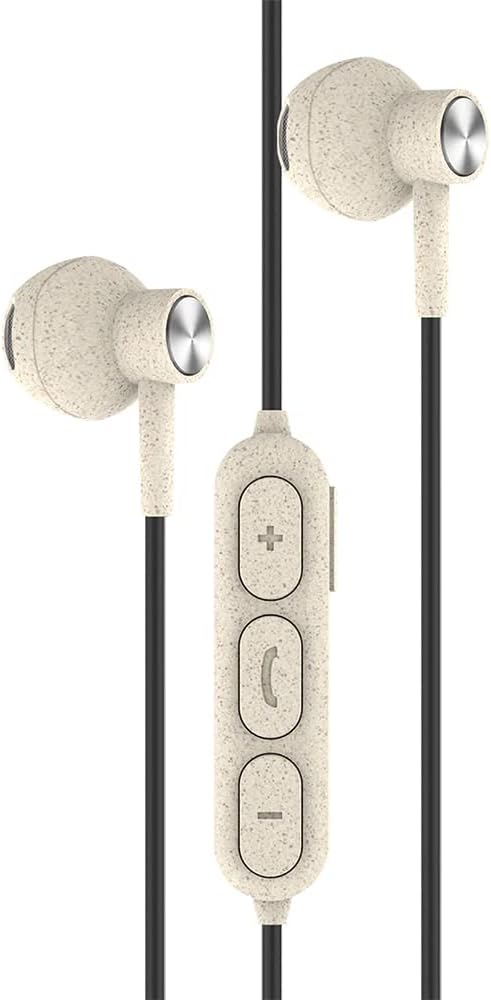
This image displays the Bitmore Aural Buds, featuring the two in-ear earbuds connected by a black cable. An inline control unit is visible on the cable, equipped with '+' (volume up), a call/multi-function button, and '-' (volume down) buttons. The earbuds and control unit have a speckled, light beige finish, indicative of their recycled material composition.
Package Contents
Upon opening your Bitmore Aural Buds package, please ensure all items are present:
- Bitmore Aural Buds Bluetooth Wireless In-Ear Headphones
- USB Charging Cable (Micro USB)
- Multiple sizes of ear tips (for comfortable fit)
- User Manual (this document)
Note: The packaging is FSC Certified and designed for easy recycling.
Setup
1. Charging the Aural Buds
- Locate the Micro USB charging port on the inline control unit.
- Connect the provided Micro USB cable to the charging port.
- Connect the other end of the USB cable to a compatible USB power source (e.g., computer USB port, USB wall adapter).
- The indicator light on the control unit will illuminate to show charging status.
- A full charge takes approximately 1.5 hours. The indicator light will change or turn off once charging is complete.
Ensure the device is fully charged before first use for optimal battery performance.
2. Pairing with a Bluetooth Device
- Power On: Press and hold the multi-function button (center button with phone icon) on the inline control unit until the indicator light flashes red and blue, indicating pairing mode. You may hear an audible prompt "Power On" followed by "Pairing".
- Activate Bluetooth: On your smartphone, tablet, or other Bluetooth-enabled device, go to the Bluetooth settings and ensure Bluetooth is turned on.
- Select Device: In the list of available Bluetooth devices, locate and select "Bitmore Aural Buds" (or similar name like "bitmore aurol pro").
- Confirm Connection: Once successfully paired, the indicator light will stop flashing red and blue, and you may hear an audible prompt "Connected".
- If pairing is unsuccessful, turn off the Aural Buds, disable Bluetooth on your device, and repeat the steps.
The Aural Buds will automatically attempt to reconnect to the last paired device when powered on.
Operating Instructions
Power On/Off
- Power On: Press and hold the multi-function button until the indicator light flashes blue and you hear "Power On".
- Power Off: Press and hold the multi-function button until the indicator light flashes red and you hear "Power Off".
Music Playback
- Play/Pause: Press the multi-function button once.
- Next Track: Press and hold the '+' (volume up) button for approximately 2 seconds.
- Previous Track: Press and hold the '-' (volume down) button for approximately 2 seconds.
Call Management
- Answer/End Call: Press the multi-function button once during an incoming call or an active call.
- Reject Call: Press and hold the multi-function button for approximately 2 seconds during an incoming call.
- Redial Last Number: Double-press the multi-function button when not on a call.
Volume Control
- Volume Up: Press the '+' button.
- Volume Down: Press the '-' button.
Maintenance
- Cleaning: Gently wipe the earbuds and cable with a soft, dry, lint-free cloth. Do not use harsh chemicals or abrasive materials.
- Storage: When not in use, store the Aural Buds in a clean, dry place away from extreme temperatures and direct sunlight. Avoid tangling the cable.
- Water Exposure: These earbuds are not waterproof. Avoid exposure to water, moisture, or excessive humidity.
- Ear Tips: Regularly check and clean the ear tips to prevent wax buildup, which can affect sound quality. Replace ear tips if they become damaged or worn.
Troubleshooting
| Problem | Possible Cause | Solution |
|---|---|---|
| Cannot power on | Low battery | Charge the Aural Buds fully. |
| Cannot pair with device | Bluetooth not enabled; Aural Buds not in pairing mode; Device too far | Ensure Bluetooth is on. Put Aural Buds in pairing mode (flashing red/blue). Move device closer (within 10m). Forget device and re-pair. |
| No sound or poor sound quality | Volume too low; Earbuds not properly seated; Obstruction in ear tips; Device not connected | Increase volume on Aural Buds and connected device. Adjust earbuds for a secure fit. Clean ear tips. Reconnect Bluetooth. |
| Microphone not working | Microphone obstructed; Device settings | Ensure microphone is clear. Check audio input settings on your connected device. |
| Intermittent connection | Interference; Device too far; Low battery | Move away from other wireless devices. Ensure device is within 10m. Charge Aural Buds. |
Specifications
| Feature | Detail |
|---|---|
| Brand | Bitmore |
| Model Name | Aural Buds |
| Item Model Number | BM-IEBTEC-B, BM-IEBTEC-G, BM-IEBTEC-R |
| Connectivity Technology | Wireless (Bluetooth 5.0) |
| Wireless Communication | Bluetooth |
| Ear Placement | In Ear |
| Form Factor | In Ear |
| Noise Control | None |
| Frequency Response | 2.4 GHz |
| Battery Type | 1 Lithium Polymer (included) |
| Charge Time | Approx. 1.5 hours |
| Playback Time | Up to 4 hours |
| Wireless Range | 10 meters |
| Materials | BPA-free recycled plastic, 35% wheat straw |
| Package Dimensions | 16 x 6.2 x 2.4 cm |
| Item Weight | 40 g |
Safety Information
- Do not disassemble, repair, or modify the product.
- Keep the product away from water, moisture, and high temperatures.
- Avoid prolonged listening at high volumes to prevent hearing damage.
- Do not use the earbuds in situations where inability to hear ambient sounds could be dangerous (e.g., driving, cycling, walking in traffic).
- Keep out of reach of children and pets.
- Dispose of the product and its battery responsibly according to local regulations.
Warranty and Support
Specific warranty details and customer support contact information are not provided within this manual. Please refer to the product packaging or the manufacturer's official website for warranty claims and technical assistance.