
Oacvien RT01
Oacvien Bluetooth 5.0 2-in-1 Audio Adapter User Manual
Model: RT01
Introduction
The Oacvien Bluetooth 5.0 2-in-1 Audio Adapter is a versatile device designed to enhance your audio experience. It functions as both a transmitter (TX) and a receiver (RX), allowing you to wirelessly stream audio to and from various devices. With Bluetooth 5.0 technology and aptX Low Latency support, it ensures stable connections and high-quality sound with minimal delay. This manual provides comprehensive instructions for setting up, operating, and maintaining your device.

Image: The Oacvien Bluetooth 5.0 2-in-1 Audio Adapter, showcasing its compact design and the various audio cables (3.5mm AUX, RCA) included for versatile connectivity.
What's in the Box
Please check the package contents upon unboxing to ensure all items are present:
- Bluetooth Adapter (Main Unit)
- USB Power Cable
- 3.5mm Audio Cable
- 3.5mm to RCA Cable
- User Manual
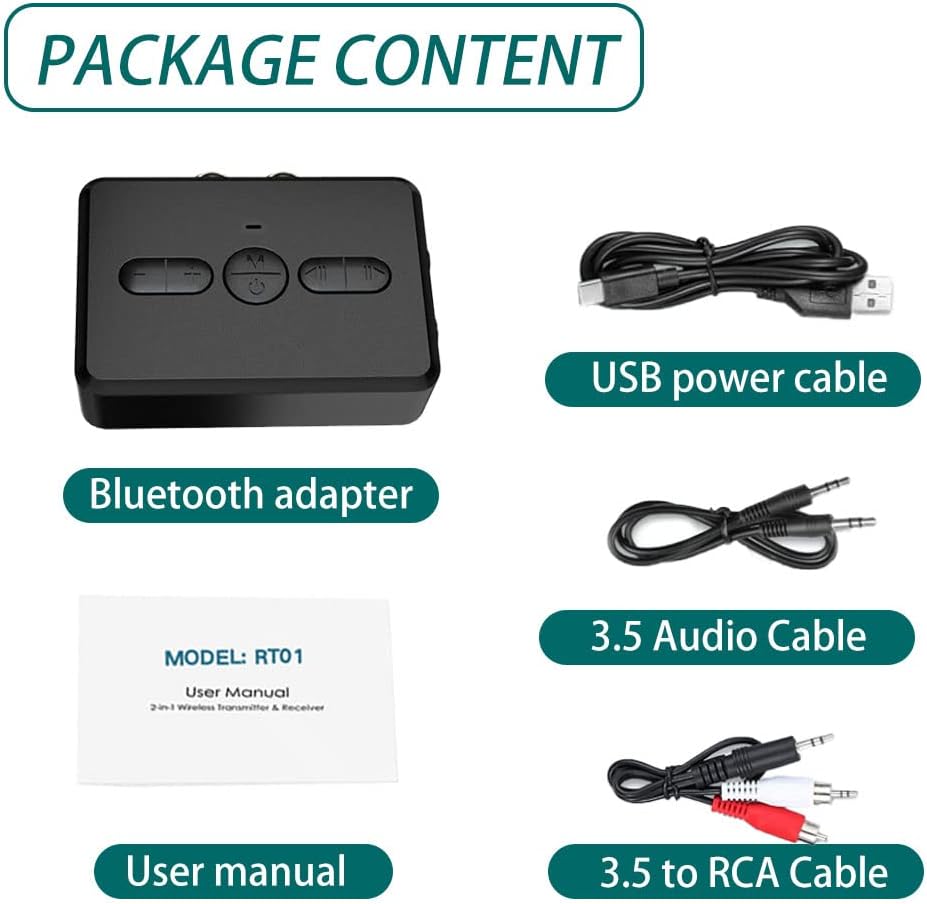
Image: A visual representation of the package contents, including the Bluetooth adapter, USB power cable, 3.5mm audio cable, 3.5mm to RCA cable, and the user manual.
Setup
Charging the Device
Before first use, fully charge the adapter. Connect the provided USB power cable to the adapter's charging port and the other end to a USB power source (e.g., computer USB port, USB wall adapter). A full charge takes approximately 2 hours and provides up to 12 hours of playtime.

Image: Illustration indicating a 2-hour charging time for 12 hours of playtime, highlighting the device's battery efficiency.
Connecting Audio Cables
The adapter supports both 3.5mm AUX and RCA audio connections. Choose the appropriate cable based on your audio source or receiving device.
- For 3.5mm AUX: Use the 3.5mm audio cable to connect the adapter's AUX port to your device's 3.5mm audio output/input.
- For RCA: Use the 3.5mm to RCA cable to connect the adapter's RCA ports to your device's RCA audio output/input.
Operating Instructions
Power On/Off
- To power on, press and hold the Power button until the indicator light turns on.
- To power off, press and hold the Power button until the indicator light turns off.
Mode Switching (TX/RX)
The adapter can operate in two modes: Transmitter (TX) and Receiver (RX). The mode is indicated by the color of the LED light.
- Transmitter Mode (TX): Red LED. In this mode, the adapter transmits audio wirelessly from a non-Bluetooth device (e.g., TV, CD player) to Bluetooth headphones or speakers.
- Receiver Mode (RX): Blue LED. In this mode, the adapter receives audio wirelessly from a Bluetooth-enabled device (e.g., smartphone, tablet, computer) and outputs it to wired speakers, headphones, or car stereo systems.

Image: A visual guide illustrating the two operational modes: Transmitter (TX) mode, indicated by a red LED, for connecting to TVs and PCs; and Receiver (RX) mode, indicated by a blue LED, for connecting to car audio systems and home stereo setups.
Button Functions

Image: A detailed diagram labeling all buttons and ports on the Oacvien Bluetooth adapter, including Power, Mode Switching, M key, Volume +/-, Previous/Next, Indicator light, AUX, RCA, and Charge port.
- M Key:
- In RX mode: Press to answer/end calls.
- In both TX/RX modes: Press to play/pause audio.
- Volume +/- Buttons: Press to adjust the volume up or down.
- Previous/Next Buttons: Press to skip to the previous or next track.
- Mode Switching Button: Press to switch between TX (Transmit) and RX (Receive) modes.
Bluetooth Pairing
Once powered on, the adapter will automatically enter pairing mode. Search for "RT01" or "Oacvien" on your Bluetooth-enabled device and connect. The indicator light will change to a solid color (red for TX, blue for RX) once successfully paired.
The device supports a transmission range of up to 10 meters (approximately 33 feet) in open conditions.

Image: A diagram showing the Bluetooth adapter transmitting audio wirelessly to headphones, emphasizing a 10-meter transmission range in an open environment.
Maintenance
To ensure the longevity and optimal performance of your Oacvien Bluetooth Adapter, follow these maintenance guidelines:
- Keep the device dry. Avoid exposure to water or excessive humidity.
- Clean the device with a soft, dry cloth. Do not use harsh chemicals or abrasive cleaners.
- Store the device in a cool, dry place when not in use.
- Avoid dropping or subjecting the device to strong impacts.
- Do not attempt to disassemble or repair the device yourself. This will void the warranty.
Troubleshooting
If you encounter issues with your Oacvien Bluetooth Adapter, please refer to the following common troubleshooting steps:
| Problem | Possible Solution |
|---|---|
| Device does not power on. | Ensure the device is fully charged. Connect it to a power source using the USB cable. |
| Cannot pair with a Bluetooth device. |
|
| No audio or poor audio quality. |
|
| Hands-free calling not working. | Ensure the adapter is in RX (Receiver) mode. The hands-free calling feature is only available in RX mode. |
Specifications
| Feature | Detail |
|---|---|
| Model | RT01 |
| Bluetooth Version | 5.0 |
| Operating Modes | Transmitter (TX) / Receiver (RX) |
| Audio Interfaces | 3.5mm AUX, RCA |
| Charging Time | Approx. 2 hours |
| Playtime | Up to 12 hours |
| Transmission Distance | Up to 10 meters (33 feet) without barriers |
| Dimensions | 12 x 9 x 2.5 cm (Packaging) |
| Weight | 200 Grams (Packaging) |
| UPC | 739240799497 |
Warranty and Support
Specific warranty information for this product is not provided in the available data. For warranty claims or technical support, please refer to the contact information provided by the retailer or the manufacturer, Oacvien, at the point of purchase.
Ask a question about this manual
Ask about setup, troubleshooting, compatibility, parts, safety, or missing instructions. Manuals+ will review the question and use this page’s manual context to help answer it.