
1. Introduction
This manual provides essential information for the safe and efficient operation, maintenance, and troubleshooting of your Philips 3200 Series EP3241/74 Fully Automatic Espresso Machine with LatteGo. Please read this manual thoroughly before using the appliance and retain it for future reference.
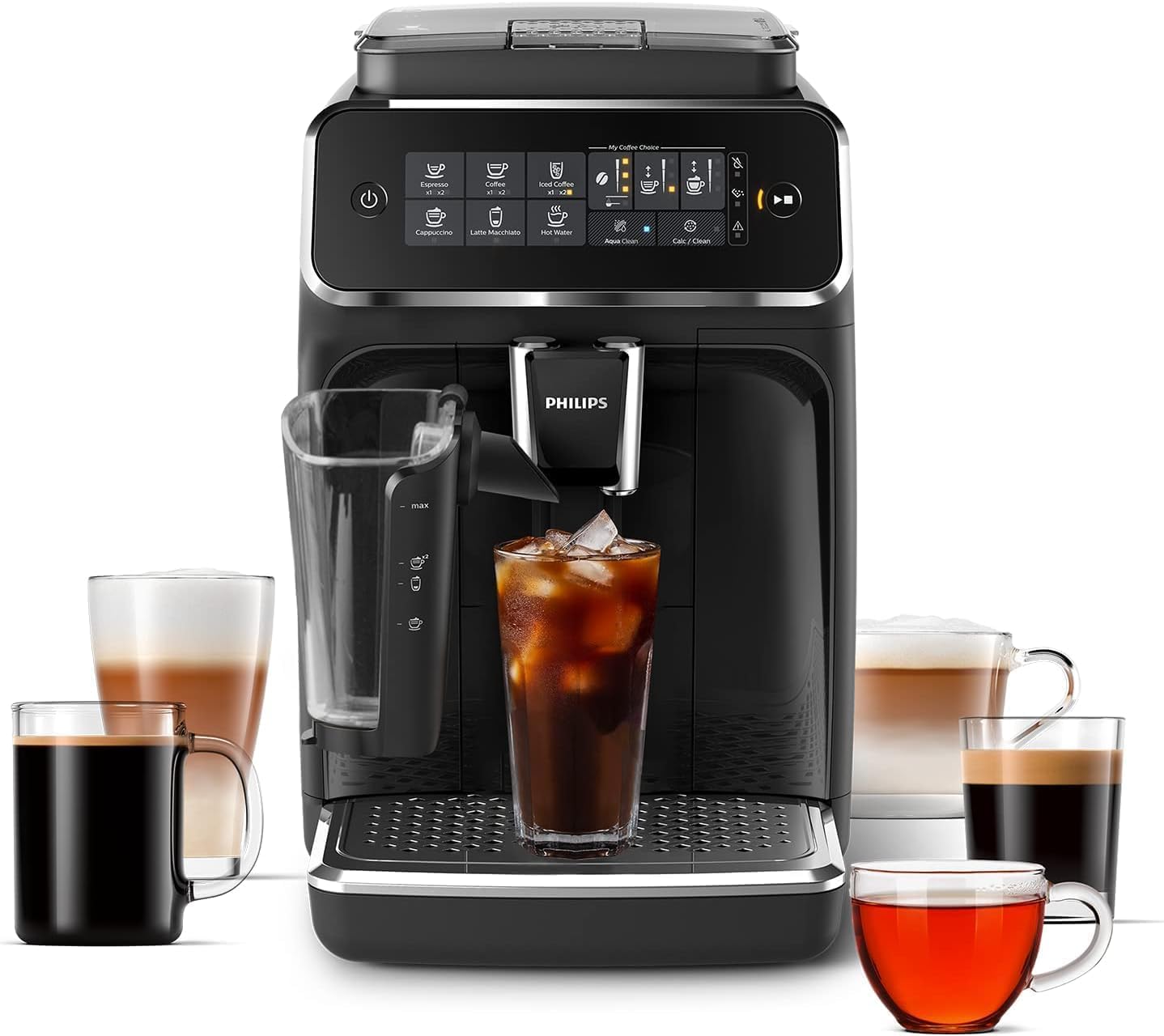
This image shows the Philips 3200 Series machine, highlighting its ability to prepare a range of coffee drinks, including espresso, iced coffee, and milk-based beverages, served in different types of cups.
2. Setup
2.1 Unboxing and Initial Placement
- Carefully remove all packaging materials from the machine.
- Place the machine on a stable, level surface, away from heat sources and direct sunlight. Ensure adequate ventilation around the appliance.
- Remove the water tank, drip tray, and grounds container. Wash them with warm water and a mild detergent.
2.2 Filling the Water Tank
- Remove the water tank from the machine.
- Fill the water tank with fresh tap water up to the MAX indication.
- Insert the AquaClean filter into the water tank as per the filter instructions.
- Place the water tank back into the machine.

The image displays the water tank of the Philips 3200 Series, featuring the AquaClean filter, which ensures clear and purified water for optimal coffee taste and machine longevity.
2.3 Filling the Bean Hopper
- Open the lid of the bean hopper.
- Pour fresh coffee beans into the hopper. Do not fill above the MAX level.
- Close the lid securely.

This image demonstrates the process of adding pre-ground coffee to the machine, indicating the 'My Coffee Choice' feature for customizing coffee strength and quantity.
2.4 Initial Rinse Cycle
After initial setup, the machine will prompt you to perform a rinse cycle. Follow the on-screen instructions to complete this process. This prepares the internal system for brewing.
3. Operating Instructions
3.1 Control Panel Overview
The Philips 3200 Series features an intuitive touch display for selecting and customizing your beverages. Icons represent different coffee types, strength settings, and maintenance functions.
3.2 Making Espresso and Coffee
- Place a cup under the coffee spout.
- Select your desired drink (e.g., Espresso, Coffee, Americano) from the display.
- Adjust the coffee strength and volume using the 'My Coffee Choice' settings if desired.
- Press the start button. The machine will grind the beans and brew your coffee.

A visual guide to the five distinct coffee types the machine can produce: Espresso, Coffee, Americano, Latte Macchiato, and Cappuccino, demonstrating the versatility of the Philips 3200 Series.
3.3 Making Milk-Based Drinks with LatteGo
- Attach the LatteGo milk system to the machine.
- Fill the LatteGo container with fresh milk up to the desired level.
- Place a cup under the milk spout and coffee spout.
- Select your desired milk-based drink (e.g., Cappuccino, Latte Macchiato).
- Adjust the milk volume and coffee strength/volume as needed.
- Press the start button. The machine will froth the milk and then brew the coffee.
3.4 Making Iced Coffee
The Philips 3200 Series can prepare iced coffee. For optimal results, use cold water and add ice to your cup before brewing. The unique brewing system extracts flavors at a lower temperature to prevent dilution.
3.5 Customizing Your Drink
Use the 'My Coffee Choice' function on the display to adjust various parameters for your drink, including:
- Coffee Strength: Adjust the amount of coffee used per serving.
- Coffee Volume: Change the amount of coffee dispensed.
- Milk Volume: For LatteGo drinks, adjust the amount of frothed milk.
3.6 Instructional Videos
This video demonstrates the Philips 3200 Series machine's capability to prepare various coffee drinks, including espresso, lattes, and even coffee-based cocktails, showcasing its ease of use for different beverage types.
An introductory video providing an overview of the Philips 3200 Series Fully Automatic Espresso Machine, highlighting its features and user-friendly operation for potential buyers.
This video illustrates how the Philips 3200 Series machine can deliver cafe-quality coffee beverages directly in your home, emphasizing the rich taste and convenience of the automatic brewing process.
A comprehensive video showcasing the Philips 3200 Series Fully Automatic Coffee Machine, detailing its design, features, and the process of making various coffee drinks.
4. Maintenance
4.1 Cleaning the Brew Group
The brew group should be cleaned regularly to ensure optimal performance and taste. It is fully removable for easy cleaning.
- Turn off the machine and unplug it.
- Open the service door and remove the brew group by pressing the 'PUSH' button and pulling it out.
- Rinse the brew group thoroughly under lukewarm running water until no coffee residue is visible.
- Allow the brew group to air dry completely before reinserting it.
4.2 Cleaning the LatteGo System
The LatteGo system is designed for quick and easy cleaning.
- After each use, detach the LatteGo system from the machine.
- Rinse the LatteGo container and milk spout under running water or place them in the dishwasher.
- Ensure all milk residue is removed to prevent blockages.
4.3 Descaling with AquaClean Filter
The AquaClean filter reduces the need for descaling. When the AquaClean light on the display turns orange, it indicates that the filter needs to be replaced. If you do not use an AquaClean filter, the machine will prompt you to descale based on water hardness and usage. Follow the on-screen instructions for the descaling procedure.
4.4 Emptying Drip Tray and Grounds Container
The drip tray and grounds container should be emptied daily or when the machine indicates they are full. Remove, empty, rinse, and replace these components.
5. Troubleshooting
If you encounter issues with your Philips 3200 Series machine, refer to the following common solutions:
- No Coffee Dispensed: Check if the water tank is filled, the brew group is correctly inserted, and the coffee beans are present in the hopper.
- Weak Coffee: Adjust the coffee strength setting to a higher level via 'My Coffee Choice'. Ensure fresh beans are used.
- Milk Not Frothing: Ensure the LatteGo system is clean and correctly assembled. Use fresh, cold milk. Check for blockages in the milk spout.
- Error Message on Display: Consult the machine's display for specific error codes or messages and refer to the full online manual for detailed solutions.
6. Specifications
| Feature | Specification |
|---|---|
| Brand | Philips |
| Model Name | EP3241/74 |
| Coffee Maker Type | Espresso Machine |
| Operation Mode | Fully Automatic |
| Coffee Input Type | Beans |
| Included Components | Milk Frother (LatteGo) |
| Special Feature | LatteGo Carafe, AquaClean Filter, Removable Brew Group |
| Product Dimensions | 17"D x 10"W x 15"H |
| Item Weight | 21.6 pounds |
| Color | Black |
7. Warranty and Support
For warranty information and customer support, please refer to the documentation included with your product or visit the official Philips website. Keep your proof of purchase for warranty claims.


