
Introduction
The Qiumi Smart ZigBee 3.0 Radiator Thermostatic Valve is designed to provide intelligent control over your home heating system. This device allows for precise temperature regulation in individual rooms, enhancing comfort and energy efficiency. It features an LCD digital display for easy monitoring and adjustment. This valve operates in conjunction with a heating radiator system, primarily used in floor heating systems to manage pipe closure and opening. For full smart functionality, this valve requires a Tuya ZigBee Wireless Gateway Hub.
Product Features
- LCD Digital Display: Clear display for temperature and settings.
- ZigBee 3.0 Connectivity: Requires a Tuya ZigBee Wireless Gateway Hub for smart home integration and remote control.
- Programmable Scheduling: Supports 5+2, 6+1, and 7-day programming with 6 optional periods for customized heating schedules.
- Multiple Operating Modes: Includes Holiday mode, Automatic mode, and Boost mode for various situations.
- Voice Control: Compatible with Alexa and Google Assistant for hands-free operation.
- Remote Control: Manage settings via your smartphone through the smart life application.
- Open Window Detection: Automatically closes the valve for 15 minutes if a sudden temperature drop is detected, saving energy.
- Child Lock: Prevents unintended adjustments.
Specifications
| Power Supply | 2 x 1.5V AA Alkaline Batteries (not included) |
| Maximum Current | 90 mA |
| Operating Temperature | -10 ~ 60 °C |
| Display Accuracy | 0.5 ℃ |
| Default Temperature Setting Range | 5 ~ 35 °C |
| Probe Sensor | NTC (10k) 1% |
| Temperature Display Range | 1 ~ 70 °C |
| Thread Size | M30 x 1.5 |
| Dimensions (L x W x H) | 53 x 53 x 89.5 mm |
| Maximum Distance | 4.5 mm |
| Manufacturer | Xiehe |
Setup and Installation
1. Battery Installation
The thermostatic valve requires two AA 1.5V alkaline batteries. Ensure correct polarity when inserting the batteries.
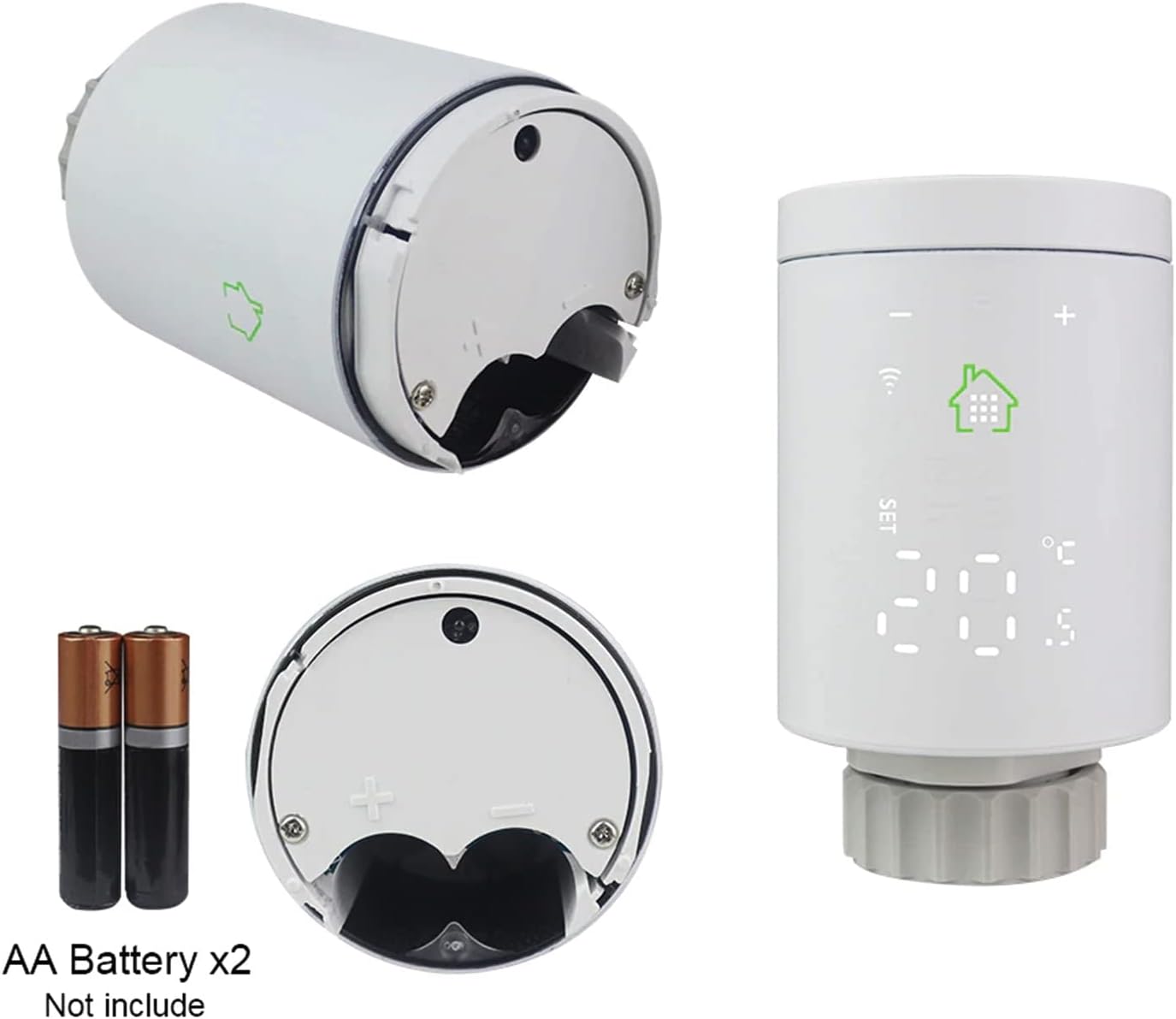
Figure 1: Battery compartment and AA batteries (not included).
2. Mounting the Valve
Attach the thermostatic valve to your radiator. The valve is compatible with various radiator valve adapters (RA, RAVL, RAV). Select the appropriate adapter for your radiator type and securely fasten the valve.

Figure 2: Connector compatibility with RA, RAVL, and RAV adapters.
3. Pairing with Tuya ZigBee Wireless Gateway Hub
To enable smart features, the valve must be connected to a Tuya ZigBee Wireless Gateway Hub. Follow the instructions provided with your ZigBee hub to add new devices. Once connected, you can control the valve via the smart life application on your smartphone.

Figure 3: Overview of the smart heating system components.
Operating Instructions
1. LCD Display Elements
The LCD screen displays various icons and information. Familiarize yourself with these indicators for effective operation.

Figure 4: Labeled diagram of the valve's LCD display and dimensions.
- Decreasing Key (-): Reduces temperature or navigates settings.
- Increasing Key (+): Increases temperature or navigates settings.
- Set Key: Enters settings menu or confirms selections.
- WiFi Mode Icon: Indicates connection status to the ZigBee hub.
- Low Battery Icon: Appears when batteries need replacement.
- Open Window Icon: Indicates open window detection is active.
- Child Lock Icon: Shows when child lock is engaged.
- Comfortable Temperature Icon: Indicates a comfortable temperature setting.
2. Manual Temperature Adjustment
Press the '+' or '-' buttons on the valve to manually adjust the desired temperature. The new setting will be displayed on the LCD screen.
Programming Schedule
The valve supports flexible weekly programming to suit your lifestyle. You can configure schedules for 5+2 days (weekdays + weekend), 6+1 days (Monday-Saturday + Sunday), or 7 days (every day) with up to 6 time periods per day.

Figure 5: Weekly programmable schedule settings via the app.
To set up a schedule:
- Open the smart life application on your smartphone.
- Select the radiator valve device.
- Navigate to the scheduling or programming section.
- Choose your preferred programming type (5+2, 6+1, or 7 days).
- Set the desired temperature and time for each period.
- Save your settings.
Special Modes
1. Holiday Mode
Holiday mode allows you to set a specific temperature for a defined period, ideal for when you are away from home. This helps save energy while preventing pipes from freezing.

Figure 6: Holiday mode settings in the smart life app.
2. Boost Mode
Boost mode provides a temporary increase in heating to quickly reach a desired temperature. This can be activated manually or through the app for a set duration.
3. Open Window Detection
When the ambient room temperature suddenly drops below a set threshold, the valve will automatically close for 15 minutes. This prevents heat loss when a window or door is opened. If the temperature remains below the threshold after 15 minutes, the valve will maintain this closed state.
Voice Control and Remote Access
Once connected to your Tuya ZigBee Wireless Gateway Hub, the valve can be controlled remotely via the smart life app and through voice commands using Amazon Alexa or Google Assistant.

Figure 7: Remote control via the smart life application.
1. Using the Smart Life App
Download the Smart Life app from your device's app store. After pairing the valve with your ZigBee hub, you can monitor the current temperature, adjust settings, and manage schedules from anywhere with an internet connection.
2. Voice Commands
Integrate the Smart Life app with your Alexa or Google Assistant account. You can then use voice commands such as:
- "Alexa, set [Room Name] temperature to 22 degrees."
- "Hey Google, what is the temperature in [Room Name]?"
- "Alexa, turn off heating in [Room Name]."
Maintenance
To ensure optimal performance and longevity of your Qiumi Smart ZigBee 3.0 Radiator Thermostatic Valve, follow these maintenance guidelines:
- Cleaning: Wipe the device with a soft, dry cloth. Do not use abrasive cleaners or solvents.
- Battery Replacement: Replace batteries promptly when the low battery indicator appears on the LCD screen. Use only AA 1.5V alkaline batteries.
- Firmware Updates: Regularly check the Smart Life app for any available firmware updates for your device to ensure you have the latest features and bug fixes.
Troubleshooting
If you encounter issues with your Qiumi Smart ZigBee 3.0 Radiator Thermostatic Valve, refer to the following common troubleshooting steps:
- Device Not Responding:
- Check if the batteries are correctly installed and have sufficient charge. Replace if necessary.
- Ensure the valve is within range of the Tuya ZigBee Wireless Gateway Hub.
- Verify that the ZigBee hub is powered on and connected to your network.
- Incorrect Temperature Readings:
- Ensure the valve is not exposed to direct sunlight or drafts, which can affect temperature sensing.
- Check for any obstructions around the valve that might impede airflow.
- App Connectivity Issues:
- Confirm your smartphone has an active internet connection.
- Restart the Smart Life app.
- Ensure your ZigBee hub is connected to the internet.
- Valve Not Opening/Closing:
- Check if the valve is securely mounted and not obstructed.
- Verify that the schedule or manual setting is correctly configured.
If problems persist, consult the Smart Life app's help section or contact customer support.
Warranty and Support
For warranty information and customer support, please refer to the documentation provided with your purchase or visit the official Qiumi website. Keep your proof of purchase for any warranty claims.