
Introduction
Thank you for choosing the Ledwood Apollo S TWS Earphones. This manual provides detailed instructions on how to set up, operate, maintain, and troubleshoot your new wireless earbuds. Please read this manual carefully before use to ensure optimal performance and longevity of your device.
Package Contents
- Ledwood Apollo S TWS Earphones (Left and Right)
- Wireless Charging Case
- USB Charging Cable
- User Manual
Product Overview
The Ledwood Apollo S TWS Earphones feature a sleek design and provide a seamless wireless audio experience. The compact charging case not only protects your earbuds but also provides additional battery life on the go. The case includes a digital screen to display the current battery level.
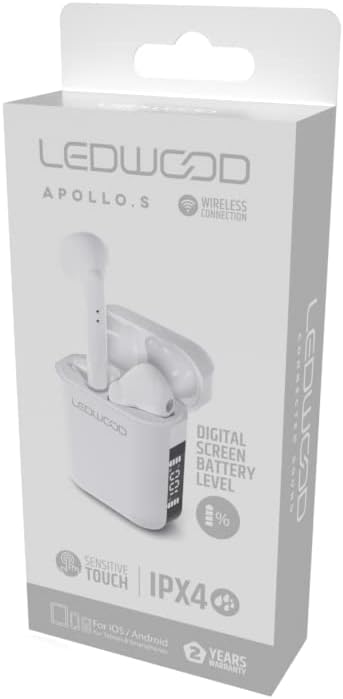
Image showing the Ledwood Apollo S TWS Earphones inside their charging case, highlighting the compact design and in-ear style.
Setup
1. Charging the Earphones and Case
- Place both earphones into the charging case. Ensure they are properly seated.
- Connect the USB charging cable to the charging port on the case and plug the other end into a USB power adapter (not included) or a computer's USB port.
- The digital screen on the charging case will display the current battery level during charging.
- Allow the earphones and case to fully charge before first use. The earphones will indicate full charge (e.g., LED indicator changes color or turns off).
2. Pairing with Your Device
- Ensure the earphones are charged and placed in the charging case.
- Open the charging case. The earphones will automatically enter pairing mode (indicated by flashing LED lights on the earbuds).
- On your smartphone or Bluetooth-enabled device, go to the Bluetooth settings.
- Search for available devices and select "Ledwood Apollo S" from the list.
- Once connected, the earphones will provide an audio confirmation, and the LED indicators will stop flashing.
- If pairing fails, turn off Bluetooth on your device, place the earphones back in the case, close the case, then repeat the steps.
Operating Instructions
The Ledwood Apollo S earphones feature sensitive touch controls for easy management of calls and music playback.
Touch Controls
- Play/Pause: Single tap on either earbud.
- Next Track: Double tap on the right earbud.
- Previous Track: Double tap on the left earbud.
- Answer/End Call: Single tap on either earbud during an incoming call or active call.
- Reject Call: Press and hold either earbud for 2 seconds during an incoming call.
- Activate Voice Assistant: Triple tap on either earbud.
- Volume Up: Press and hold the right earbud.
- Volume Down: Press and hold the left earbud.
Maintenance
Cleaning
- Regularly clean the earphones and charging case with a soft, dry, lint-free cloth.
- Do not use abrasive cleaners, alcohol, or chemical solvents.
- Ensure charging contacts on both the earphones and the case are clean and free of debris to maintain proper charging.
Storage
- When not in use, store the earphones in their charging case to protect them and keep them charged.
- Store the device in a cool, dry place, away from extreme temperatures and direct sunlight.
Troubleshooting
- Earphones not pairing: Ensure both earphones are charged. Place them back in the case, close it, then reopen to re-enter pairing mode. Check your device's Bluetooth settings.
- No sound from one earbud: Try resetting the earphones by placing them in the case, closing it, and then taking them out again. Re-pair with your device.
- Charging issues: Clean the charging contacts on both the earphones and the case. Ensure the charging cable is securely connected and the power source is functional.
- Low volume: Adjust the volume on both your connected device and using the earbud touch controls.
Specifications
| Model Name | Apollo S |
| Model Number | LD-APOLLO-S-BLK |
| Connectivity Technology | Wireless (Bluetooth) |
| Control Method | Touch, Volume Control |
| Style | In-ear |
| Water Resistance Level | IPX4 (Splash Resistant) |
| Special Features | Fast Charging, Digital Screen Battery Level |
| Material | Wood |
| Manufacturer | Ledwood |
Warranty and Support
The Ledwood Apollo S TWS Earphones come with a 2-year warranty from the date of purchase, covering manufacturing defects. Please retain your proof of purchase for warranty claims.
For technical support, troubleshooting assistance, or warranty inquiries, please contact Ledwood customer service through their official website or the retailer where the product was purchased.
For more information, visit the official Ledwood website: www.ledwood.com (Note: This is a placeholder URL as no specific support link was provided).