
Introduction
This manual provides detailed instructions for the safe operation, installation, and maintenance of your Benrocks 60'' WiFi-Enabled Electric Fireplace Insert. Please read this manual thoroughly before use and retain it for future reference. This electric fireplace offers a stunning visual centerpiece with customizable flame effects and efficient heating for your home.
Important Safety Information
Always follow basic safety precautions when using electrical appliances to reduce the risk of fire, electric shock, and injury to persons.
- Read all instructions before using this fireplace.
- Do not operate any fireplace with a damaged cord or plug, or if the heater has malfunctioned, been dropped, or damaged in any manner.
- Do not use outdoors. This fireplace is intended for indoor use only.
- Keep combustible materials, such as furniture, pillows, bedding, papers, clothes, and curtains at least 3 feet (0.9 m) from the front of the fireplace and away from the sides and rear.
- Extreme caution is necessary when any heater is used by or near children or invalids and whenever the fireplace is left operating and unattended.
- To disconnect the fireplace, turn controls to off, then remove the plug from the outlet.
- Do not insert or allow foreign objects to enter any ventilation or exhaust opening as this may cause an electric shock or fire, or damage the fireplace.
Package Contents
Ensure all items are present and in good condition before installation.
- Benrocks 60'' Electric Fireplace Unit
- Remote Control
- Log Set
- Crystal Media
- Wall Mount Bracket
- Mounting Screws (ST4*8-Screws)
- User Manual
Specifications
| Feature | Detail |
|---|---|
| Brand | Benrocks |
| Model Name | BR01BIZ60A |
| Product Dimensions | 6.3"D x 60"W x 16.86"H |
| Insert Size | 58.49"W x 15.75"H x 5.91"D |
| Material | Glass, Resin |
| Power Source | Corded Electric |
| Heat Output | 5100 British Thermal Units (BTU) |
| Wattage | 750W / 1500W |
| Heating Coverage | Up to 400 sq ft |
| Flame Colors | 13 options |
| Fuel Bed Colors | 13 options |
| Top Light Colors | 3 options |
| Timer | 1-9 Hours |
| Control Methods | Remote Control, Touchscreen, APP (Wi-Fi Enabled) |
Overall dimensions: 60"W x 16.87"H x 6.31"D. Insert dimensions: 58.49"W x 15.75"H x 5.91"D.

Figure 1: Product Dimensions
Installation
Your Benrocks electric fireplace can be installed as a recessed unit or wall-mounted. Choose the method that best suits your space.
Recessed Installation
For recessed installation, ensure you have a suitable opening in your wall. The required opening dimensions are approximately 58.88" (width) x 16.1" (height) x 6.25" (depth). Refer to the diagram below for detailed steps.
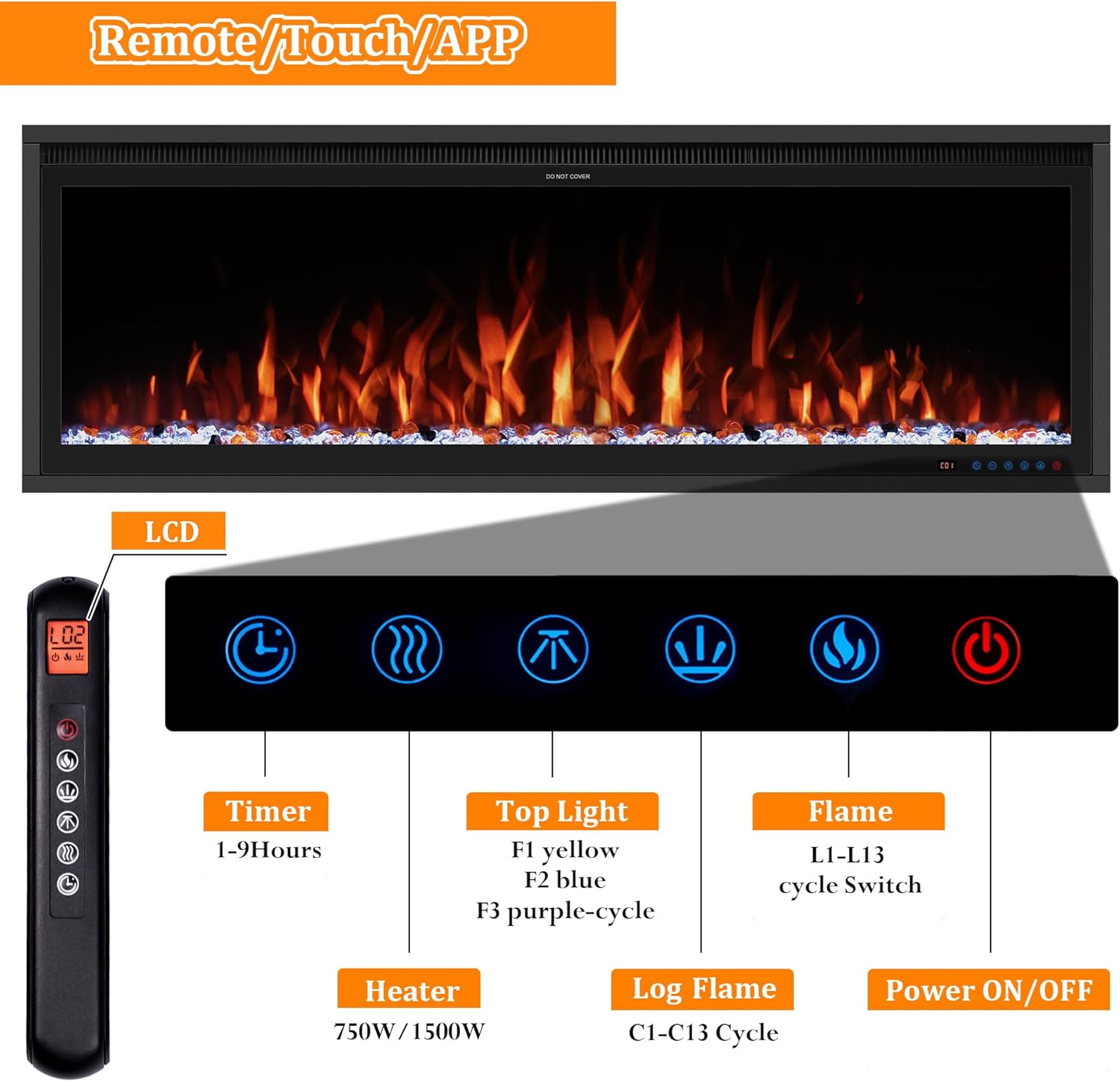
Figure 2: Recessed or Wall Mounted Installation Overview
Wall-Mounted Installation
To wall-mount the fireplace, attach the wall mount bracket securely to a stud in your wall using the provided screws. Then, carefully lift and hang the fireplace unit onto the bracket. Ensure it is level and secure.

Figure 3: Detailed Wall Mounted and Insert Style Installation
Setup
Power Connection
Plug the fireplace's 6-foot power cord into a standard 120V electrical outlet. Ensure the outlet is properly grounded and can support the fireplace's wattage (750W/1500W).
Wi-Fi and App Control Setup
Your Benrocks fireplace is Wi-Fi enabled for convenient control via a smartphone app.
- Download the "Xaralyn Smart" app from your device's app store. You can scan the QR code below for direct access.
- Open the app and follow the on-screen instructions to register or log in.
- To connect the fireplace to Wi-Fi, ensure your phone is connected to a 2.4GHz Wi-Fi network.
- On the fireplace, hold down the flame button for approximately ten seconds to activate Wi-Fi pairing mode. The display may show a pairing indicator.
- In the app, select "Add Device" or the equivalent option and follow the prompts to connect your fireplace.

Scan to download Xaralyn Smart App: https://smartapp.tuya.com/xaralynsmart

Figure 4: Xaralyn Smart App Interface

Figure 5: App Control for Temperature
Operating Instructions
Your fireplace offers multiple ways to control its features.
Control Methods
You can operate the fireplace using the included remote control, the integrated touchscreen panel on the unit, or the "Xaralyn Smart" app on your smartphone.

Figure 6: Remote Control and Touchscreen Panel
Flame and Light Settings
Customize your ambiance with a wide range of color options:
- Flame Colors: 13 adjustable flame colors (L1-L13 cycle switch).
- Fuel Bed Colors: 13 fuel bed flame colors (C1-C13 cycle).
- Top Light Colors: 3 top light colors (F1 yellow, F2 blue, F3 purple-cycle).
These options allow for up to 507 color combinations to suit any mood or decor.

Figure 7: Realistic Flame Effect in Different Colors

Figure 8: Up to 507 Color Combinations
Heating Function
The fireplace provides supplemental heat for areas up to 400 sq ft. Select between two heat settings:
- 750W: Lower heat output for smaller spaces or milder warmth.
- 1500W: Higher heat output for larger spaces or quicker heating.
The heating function can be operated independently of the flame effects.
Timer Function
Set the automatic shut-off timer for convenience. The timer can be set from 1 to 9 hours.
Maintenance
Regular maintenance ensures the longevity and optimal performance of your electric fireplace.
- Cleaning: Always unplug the fireplace before cleaning. Use a soft, damp cloth to wipe down the exterior surfaces. Do not use abrasive cleaners or sprays.
- Glass Panel: Clean the glass panel with a soft cloth and a glass cleaner. Do not scratch the surface.
- Air Vents: Periodically check and clean the air vents to ensure proper airflow and prevent overheating. Use a vacuum cleaner with a brush attachment to remove dust.
- Storage: If storing the fireplace for an extended period, unplug it and store it in a dry, dust-free location.
Troubleshooting
Refer to this section for common issues and their solutions.
| Problem | Possible Cause | Solution |
|---|---|---|
| Fireplace does not turn on. | No power, power cord not plugged in, circuit breaker tripped. | Ensure the power cord is securely plugged into a working outlet. Check your home's circuit breaker. |
| No flame effect. | Flame function is off, LED lights malfunction. | Press the flame button on the remote/touchscreen/app to activate. If problem persists, contact support. |
| No heat output. | Heater function is off, thermostat setting too low, overheat protection activated. | Ensure heater function is on. Increase thermostat setting. Unplug unit for 15 minutes to reset overheat protection. |
| Remote control not working. | Batteries are dead, remote not aimed correctly, obstruction. | Replace batteries. Point remote directly at the fireplace's sensor. Remove any obstructions. |
| Wi-Fi connection issues. | Incorrect Wi-Fi password, 5GHz network, fireplace not in pairing mode. | Ensure correct password. Connect to a 2.4GHz network. Hold flame button for 10 seconds to enter pairing mode. |
Warranty and Support
Benrocks is committed to providing high-quality products and customer satisfaction.
This product comes with Lifetime Technical Support under normal use and proper care. For any technical assistance, questions, or concerns, please contact Benrocks customer support. We aim to provide feedback and replies within 24 hours.
For further details on warranty claims or to reach customer service, please visit the official Benrocks store on Amazon or refer to the contact information provided with your purchase documentation.