
1. Introduction
This multifunctional inverter/charger combines the functions of an inverter, solar charger, and battery charger, providing an uninterrupted power supply in a portable size. It is designed for various applications including home energy storage systems, RVs, and sheds. The integrated LCD display offers user-configurable button functions for easy access to settings such as battery charging current, AC/solar charger priority, and input voltage ranges.
Key features include pure sine wave output, a 1.0 output power factor, and compatibility with WiFi & GPRS for iOS and Android systems. It boasts dual MPPT inputs and dual AC outputs, along with an integrated 160A MPPT solar charge controller. The inverter supports a high PV input voltage range (120 ~ 500 VDC) and includes built-in protection for harsh environments. A smart battery charger optimizes battery life, and RGB indicators automatically display the machine's operating mode. It supports both on-grid and off-grid operations via a touch screen interface and can function without batteries.
2. Safety Information
Please read all instructions and warnings carefully before installation and operation. Failure to follow these instructions may result in electric shock, fire, or severe injury.
- Installation must be performed by qualified personnel.
- Ensure all connections are secure and correct before powering on.
- Do not expose the inverter to rain, snow, spray, or any liquids.
- Do not disassemble the unit. There are no user-serviceable parts inside.
- Ensure proper ventilation around the inverter to prevent overheating.
- Keep children away from the unit.
- Avoid installing the unit near bedrooms, as the cooling fan may generate noise during operation.
3. Product Overview and Components
The PMSUN Hybrid Inverter is designed with user-friendly interfaces and robust construction.

Figure 3.1: Front view of the inverter, showing the main display and control buttons.

Figure 3.2: Rear view of the inverter, highlighting the connection ports.
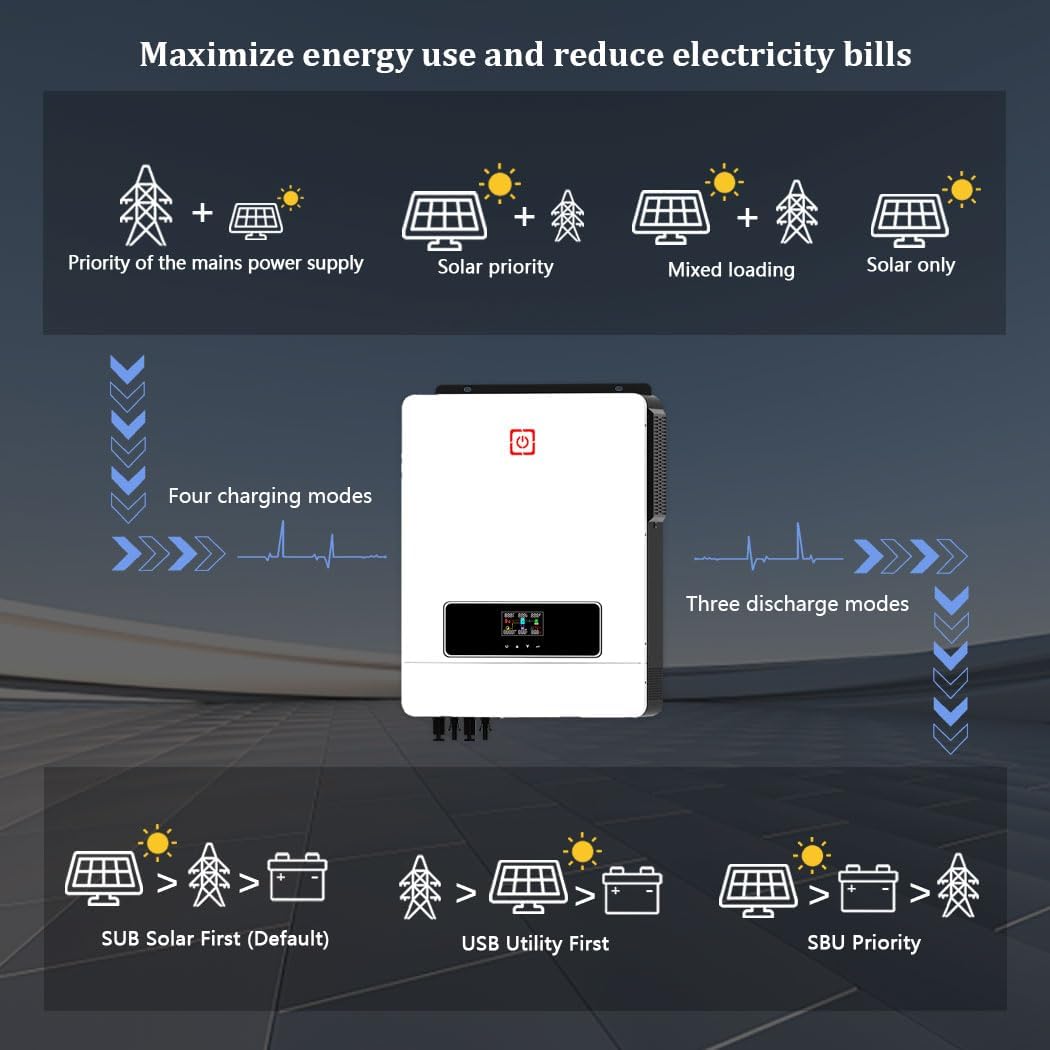
Figure 3.3: Port Introduction: (1) LCD display, (2) Status indicator, (3) Charging indicator, (4) Fault indicator, (5) Touch Function buttons, (6) AC input, (7) Main output, (8) Second output, (9) PV1 and PV2 input, (10) RS-232/WiFi/Remove LCD communication port, (11) Battery input.
4. Specifications
| Feature | Specification |
|---|---|
| Brand | PMSUN |
| Model Number | MPS-MAX 10.2KW-48V-M180A |
| Recommended Uses | Vehicle, Home, Office |
| Power Source | Battery |
| Rated Power | 10200 Watts |
| Voltage | 48 Volts |
| Total Power Outlets | 2 |
| Input Voltage | 230 Volts AC |
| Output Power | 10200 Watts |
| Item Weight | 15.9 Kilograms |
| Max. PV Input Power | 10200 W |
| PV Voltage Range | 90-450 VDC |
| Max. PV Open Circuit Voltage (VOC) | 500 V DC |
| Starting Voltage | > 150 V |
| Optimal Operating Voltage | 300-360 V |
| Recommended PV Cable Size | 10 AWG |
| Max. Charge Current | 160 A |
| Output Frequency | 60 Hz |
| Surge Power | 20400 W |
| Compatible Batteries | 48V Lead-acid (sealed, AGM, gel, submersible) and Lithium |
5. Setup and Installation
Proper installation is crucial for the safe and efficient operation of your PMSUN Hybrid Inverter. The battery capacity should be determined based on the specific load requirements and application scenario to avoid insufficient capacity or excessive power generation waste.
5.1 Wiring Diagram
Refer to the following diagram for typical wiring connections. Ensure all cables are of appropriate gauge and connections are secure.
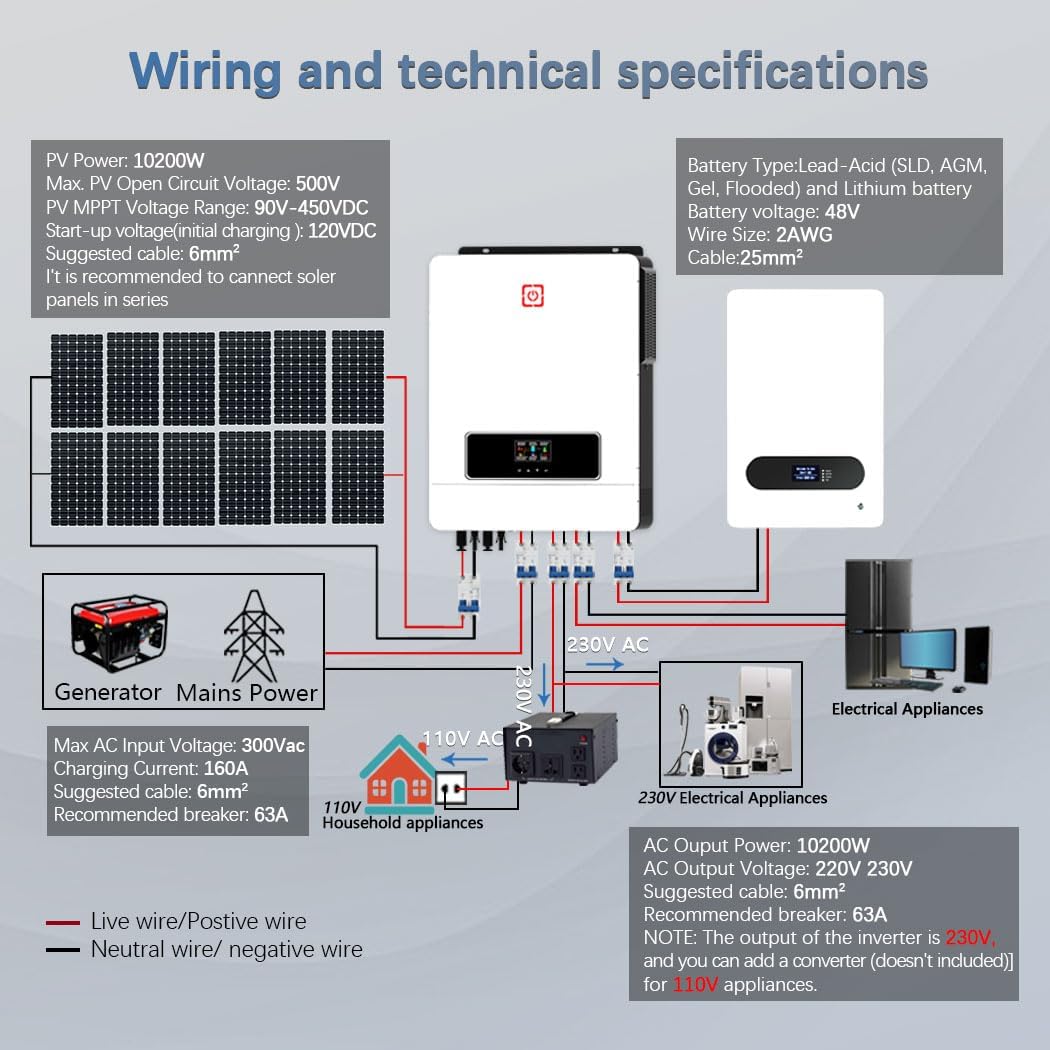
Figure 5.1: Wiring and Technical Specifications. This diagram illustrates the connections for PV panels, battery bank, generator/mains power, and both 230V AC and 110V AC household appliances (with an optional converter).
5.2 Battery Compatibility
The inverter is compatible with various 48V battery types, including Lead-Acid (sealed, AGM, gel, submersible) and Lithium batteries. It features an integrated BMS function and a lithium battery activation function to wake up dormant lithium batteries. For operation without batteries, the solar module voltage should exceed 200V DC.

Figure 5.2: Compatible Battery Types. The inverter supports AGM, GEL, FLD (Flooded), LI (Lithium), and SLD (Sealed Lead-Acid) battery chemistries.
6. Operating Modes and Functions
The PMSUN Hybrid Inverter offers flexible operating modes to optimize energy usage and reduce electricity bills.
6.1 Charging Modes
The inverter supports four distinct charging modes:
- Solar Only: Charges batteries exclusively from solar power.
- Grid Period: Charges batteries from the utility grid.
- Hybrid Grid and Solar: Utilizes both grid and solar power for charging.
- Solar Priority: Prioritizes solar charging, using grid power only when solar is insufficient.
6.2 Output Modes
Three output modes are available to meet different application needs, ensuring uninterrupted power supply:
- Solar Priority (SUB Solar First - Default): Prioritizes solar power for loads, switching to battery or grid as needed.
- Utility Priority (USB Utility First): Prioritizes utility grid power for loads, using solar or battery as backup.
- SBU Priority: Solar first, then Battery, then Utility.

Figure 6.1: Energy Flow and Priority Modes. This graphic shows how the inverter manages power from different sources to maximize energy use and reduce electricity bills.
6.3 Dual MPPT Inputs
The inverter features dual MPPT inputs, allowing for two independent solar panel arrays. This optimizes power harvesting from solar panels, especially when panels are oriented differently or experience varying shading conditions throughout the day.

Figure 6.2: Dual MPPT Inputs. This setup allows for efficient power generation from solar panels even with varying sun exposure.
6.4 RGB Indicators
The inverter features RGB lighting that automatically changes color based on the operating mode:
- Purple: PV Mode (Solar power is active).
- Red: Battery Mode (Operating from battery power).
- Blue: Utility Mode (Operating from grid power).
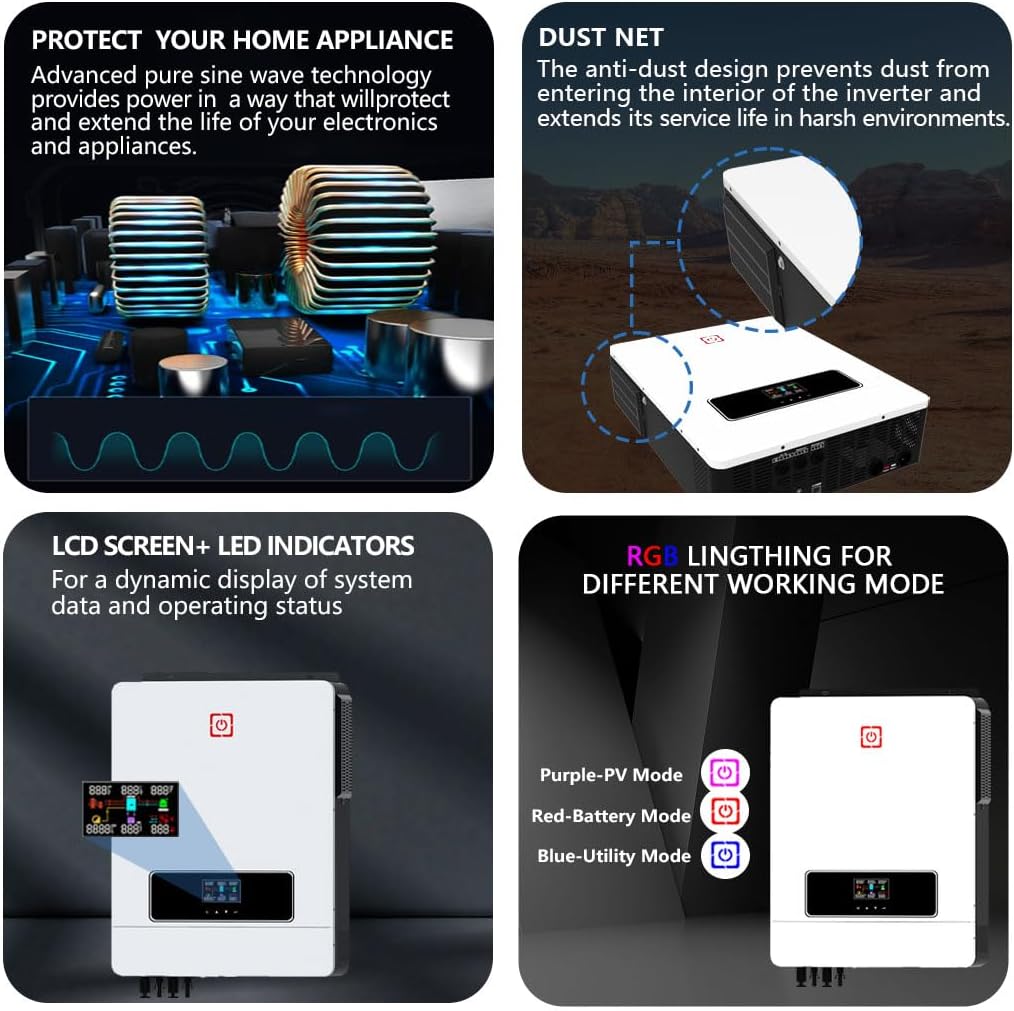
Figure 6.3: Additional Features: Pure sine wave output, dust net for protection, LCD screen with LED indicators, and RGB lighting for mode indication.
7. Maintenance
Regular maintenance ensures the longevity and optimal performance of your PMSUN Hybrid Inverter.
- Cleaning: Periodically clean the exterior of the inverter with a dry cloth. Ensure the dust net is clear of debris to maintain proper airflow and prevent dust from entering the interior, which extends service life in harsh environments.
- Ventilation: Ensure that the ventilation openings are not blocked. Adequate airflow is essential to prevent overheating.
- Connections: Regularly check all electrical connections for tightness and signs of corrosion. Loose connections can lead to poor performance or safety hazards.
- Battery Health: Monitor battery health and charge levels. Follow the battery manufacturer's guidelines for maintenance.
- Firmware Updates: Check the manufacturer's website for any available firmware updates to ensure your inverter operates with the latest features and improvements.
8. Troubleshooting
This section provides solutions to common issues you might encounter with your inverter.
8.1 Common Issues and Solutions
- Inverter Not Powering On:
- Check battery connections and ensure batteries are charged.
- Verify AC input connection if operating in grid mode.
- Ensure the main power switch is in the 'ON' position.
- No Output Power:
- Check for overload conditions. Reduce the connected load.
- Verify output circuit breaker status.
- Check battery voltage; if too low, the inverter may shut down.
- Battery Not Charging:
- Ensure PV panels are connected correctly and receiving sufficient sunlight.
- Check PV input voltage and current.
- Verify grid connection if charging from AC.
- Check battery type settings on the inverter's display.
- Excessive Fan Noise:
- The fan operates to cool the inverter, especially under heavy load. This is normal.
- Ensure adequate ventilation space around the unit.
- If noise is unusually loud or persistent without load, contact support.
- Error Codes on LCD:
- Refer to the specific error code displayed on the LCD screen. Consult the full manual (if available) or contact customer support with the error code for detailed guidance.
8.2 Comprehensive Protection
The inverter is equipped with comprehensive 360° protection features to ensure safe and reliable operation:
- Short Circuit Protection
- Over Charge Protection
- Over Current Protection
- Backfill Protection
- Under Voltage Protection
- Over Voltage Protection
- Over-Load Protection
- Over-Temperature Protection

Figure 8.1: Comprehensive 360° Protection features of the inverter.
9. Support
For further assistance, technical support, or warranty claims, please contact PMSUN customer service through your point of purchase or the official PMSUN website. Please have your model number (MPS-MAX 10.2KW-48V-M180A) and purchase details ready when contacting support.