
1. Introduction
Thank you for choosing the LETING L-338 Portable FM Radio. This compact and versatile device allows you to enjoy FM radio broadcasts, play MP3 music from TF cards or USB flash drives, and even record audio. Please read this manual carefully to ensure proper use and maintenance of your device.
This manual provides detailed instructions for setting up, operating, and troubleshooting your L-338 radio. Keep it for future reference.
2. Safety Information
- Do not expose the device to water, moisture, or extreme temperatures.
- Avoid dropping or subjecting the device to strong impacts.
- Do not attempt to disassemble or repair the device yourself. Refer to qualified service personnel.
- Keep out of reach of children.
- Use only the provided charging cable or a compatible 5V USB charger.
- Dispose of batteries responsibly according to local regulations.
3. Package Contents
- LETING L-338 Portable FM Radio
- USB Charging Cable
- Wrist Strap
- Owner's Manual
4. Product Overview
The LETING L-338 features a compact design with an intuitive button layout for easy operation.

Figure 1: Front view of the LETING L-338 Portable FM Radio.
4.1. Controls and Ports

Figure 2: Key features and ports of the LETING L-338.
- Power Switch: ON/OFF slider switch.
- Volume Control: Rotary dial on the side.
- Headphone Jack (3.5mm): For private listening.
- USB-A Port: For playing music from USB flash drives.
- TF Card Slot: For playing music from TF (MicroSD) cards.
- Mini USB Charging Port: For charging the internal battery.
- Hidden Antenna: Extendable for improved FM reception.
- Numeric Keypad: For direct frequency input and track selection.
- Mode Button: Switches between USB/TF/AUX/FM modes.
- REC Button: Initiates audio recording.
- Play/Pause, Skip, Scan Buttons: Standard media controls.
5. Setup
5.1. Charging the Battery
The LETING L-338 is equipped with a built-in 500mAh rechargeable battery. Before first use, fully charge the device.
- Connect the provided USB charging cable to the Mini USB charging port on the side of the radio.
- Connect the other end of the USB cable to a 5V USB power adapter (not included) or a computer's USB port.
- The charging indicator light will illuminate during charging. It will turn off or change color when charging is complete.
- A full charge typically provides 6-8 hours of playback at 70% volume.
5.2. Inserting TF Card or USB Flash Drive
To play MP3 files, insert a TF (MicroSD) card or a USB flash drive (up to 32GB) into the respective slots.
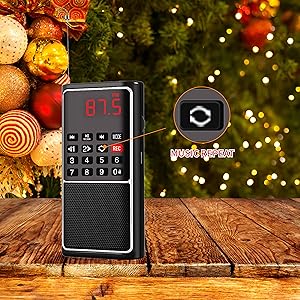
Figure 3: The radio supports music playback from USB flash drives and TF cards.
- Ensure the TF card or USB drive contains MP3 audio files.
- Insert the TF card into the TF slot until it clicks into place.
- Insert the USB flash drive into the USB-A port.
6. Operating Instructions
6.1. Powering On/Off
Slide the ON/OFF switch to the 'ON' position to power on the radio. Slide it to 'OFF' to power off.
6.2. Adjusting Volume
Rotate the volume dial on the side of the radio to increase or decrease the volume.
6.3. FM Radio Operation
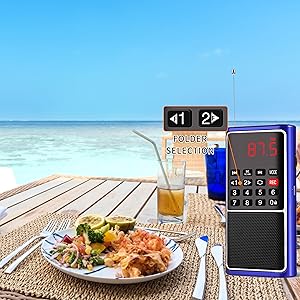
Figure 4: Extendable antenna for optimal FM reception.
- Extend the hidden antenna for better reception.
- Press the 'MODE' button until 'FM' is displayed.
- Auto Scan: Press and hold the 'SCAN' button (often labeled with a play/pause icon and 'SCAN' text) for over 3 seconds. The radio will automatically scan and save available FM channels (76-108MHz).

Figure 5: Auto scan and memory function for FM stations.
- Manual Tuning/Direct Input: Use the numeric keypad to directly enter the desired FM frequency. For example, for 89.5 MHz, press '8', '9', '.', '5'.
- Use the 'Previous' and 'Next' track buttons to navigate between saved stations or to fine-tune the frequency.
6.4. MP3 Playback (TF Card/USB)

Figure 6: The radio offers multiple functions including MP3 playback.
- Insert a TF card or USB flash drive with MP3 files. The radio will automatically switch to MP3 playback mode. If not, press the 'MODE' button to select the correct source (USB or TF).
- Press the 'Play/Pause' button to start or pause playback.
- Use the 'Previous' and 'Next' track buttons to skip tracks.
- Repeat Function: When playing MP3 files, press the 'Repeat' button (often labeled with a circular arrow icon):
- First press: Repeat current music.
- Second press: Repeat folder files.
- Third press: Repeat all.
6.5. Audio Recording
The radio supports voice recording from music or radio broadcasts.
- Ensure a TF card or USB flash drive is inserted to save recordings.
- Tune to the desired FM station or start MP3 playback.
- Press the 'REC' button to start recording.
- Press the 'REC' button again to stop recording. Recordings will be saved as audio files on the inserted storage device.
6.6. AUX Mode
The radio can be used as a speaker by connecting it to a computer or mobile phone via an AUX cable (not included).
- Connect one end of a 3.5mm AUX cable to the headphone jack of the radio.
- Connect the other end to the audio output of your external device.
- The radio will automatically switch to AUX mode. If not, press the 'MODE' button to select AUX.
7. Maintenance
- Clean the device with a soft, dry cloth. Do not use abrasive cleaners or solvents.
- Keep the device away from dust and direct sunlight.
- When not in use for extended periods, store the device in a cool, dry place.
- Charge the battery periodically (e.g., once every 3 months) to maintain battery health, even if not in use.
8. Troubleshooting
| Problem | Possible Cause | Solution |
|---|---|---|
| No power | Battery is depleted. | Charge the battery fully. |
| Poor FM reception | Antenna not extended or weak signal. | Fully extend the antenna. Try moving to a different location. |
| No sound from MP3 playback | Volume too low; incorrect mode; corrupted files; unsupported file format. | Increase volume. Ensure correct mode (USB/TF). Check if files are MP3 format and not corrupted. |
| Device not recognized by computer (for file transfer) | Incorrect cable; driver issue; device not in correct mode. | Ensure you are using a data transfer cable (not just charging). Try a different USB port or computer. |
| Recording not saving | No TF card/USB drive inserted; storage full. | Insert a TF card or USB drive. Delete old files to free up space. |
9. Specifications
- Model: L-338
- Brand: LETING
- Product Dimensions: 7 x 10 x 13 inches (approximate, based on product data)
- Item Weight: 2.68 ounces
- Battery: 1 Lithium Ion battery (included, rechargeable)
- FM Frequency Range: 76-108 MHz
- Speaker: Built-in 36mm 3W speaker
- Connectivity: USB, TF Card, 3.5mm Headphone Jack, AUX
- Special Features: Music Recording, Portable, Rechargeable
10. Warranty and Support
LETING products are manufactured to high-quality standards. For specific warranty details and support inquiries, please refer to the warranty card included with your purchase or contact LETING customer service through the retailer where you purchased the product.
We offer 2 years after-sales service for quality problems. Please retain your proof of purchase for warranty claims.