
Lumineo 781815
Lumineo Compact 500 LED Christmas Lights User Manual
Model: 781815
Introduction
Thank you for choosing Lumineo Compact 500 LED Christmas Lights. This product is designed to provide a beautiful and festive lighting effect for your indoor and outdoor decorations. Featuring 500 soft multi-color LED lights on a green wire, this set offers 8 different functions and a convenient timer. Please read this manual carefully before installation and use to ensure safe and optimal performance.
Safety Information
Always follow basic safety precautions when using electrical products to reduce the risk of fire, electric shock, and personal injury.
- Read all instructions: Before installation and use, carefully read and understand all instructions provided in this manual.
- Indoor/Outdoor Use: This product is suitable for both indoor and outdoor applications. Ensure the plug adapter is protected from direct exposure to water when used outdoors.
- Power Source: Use only with the provided UL Certified plug adapter. Do not connect to another power source or modify the plug.
- Electrical Overload: Do not overload electrical outlets. Ensure the total wattage of connected devices does not exceed the outlet's capacity.
- Damage Inspection: Before each use, inspect the product for any damage to the wire, bulbs, or plug. Do not use if any part is damaged.
- Installation: Do not secure the wiring with staples or nails, or place it on sharp objects that could damage the insulation.
- Connection: This light set cannot be connected to another set of lights. Do not attempt to link multiple sets together.
- Bulb Replacement: The LED bulbs are not replaceable. However, the set is designed to remain lit even if one bulb goes out.
- Children and Pets: Keep the product out of reach of small children and pets to prevent entanglement or ingestion of small parts.
- Storage: When not in use, store the product in a cool, dry place away from direct sunlight.
Package Contents
Verify that all components are present in the package:
- 1 x Lumineo Compact 500 LED Light String (Model 781815)
- 1 x UL Certified Plug Adapter

Image: Front view of the Lumineo Compact 500 LED Christmas Lights product box, showing the brand, number of lights, functions, and timer.
Setup Instructions
Follow these steps to set up your Lumineo LED Christmas Lights:
- Unpack: Carefully remove the light string and plug adapter from the packaging. Untangle the wire gently to avoid damage.
- Placement: Determine the desired location for your lights. Ensure the location is within reach of a suitable power outlet. The total length of the light string is 52.5 feet, with a 16.4-foot lead wire and 36.1 feet of lights.
- Secure Lights: Drape or secure the light string as desired. Use appropriate fasteners that will not damage the wire insulation. Avoid sharp edges or abrasive surfaces.
- Connect Power: Plug the light string into the UL Certified plug adapter.
- Power On: Insert the plug adapter into a standard electrical outlet. The lights should illuminate.
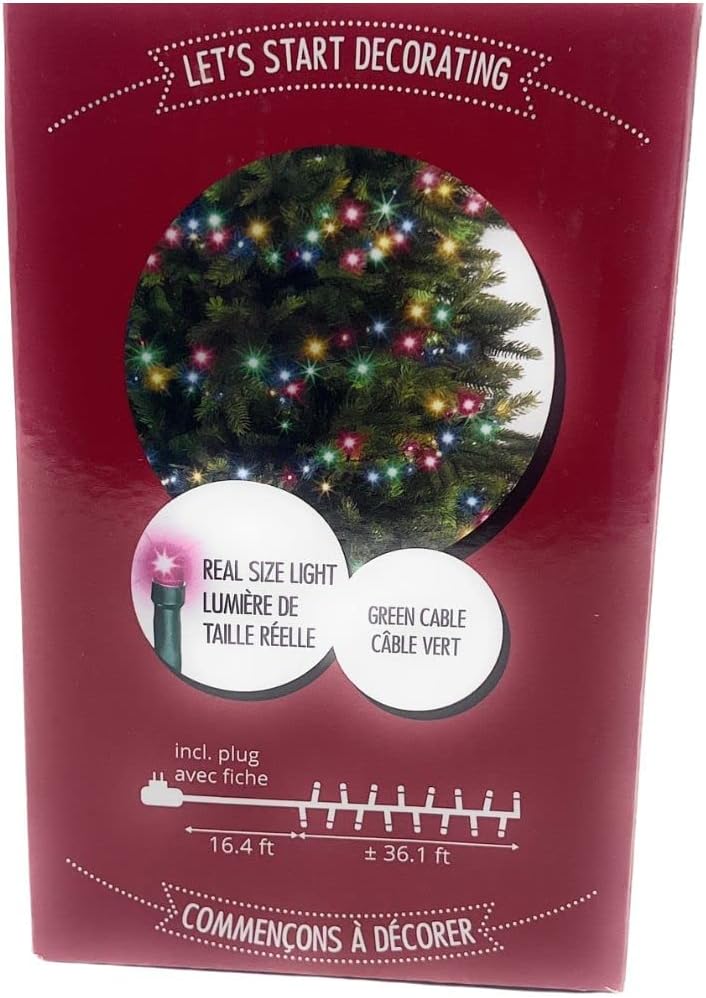
Image: Side view of the product box illustrating the light string length (36.1 ft of lights, 16.4 ft lead wire) and the included plug.

Image: A close-up view of the Lumineo Compact 500 LED light string, showing the individual soft multi-color bulbs on a green wire.
Operating Instructions
Your Lumineo LED lights offer 8 different lighting functions and a built-in timer. The control button is typically located on the plug adapter.
Changing Lighting Functions
Press the button on the plug adapter repeatedly to cycle through the 8 available lighting functions:
- Steady
- In Waves
- Sequential
- Slo Glow
- Chasing/Flash
- Slow Fade
- Twinkle/Flash
- Combination (cycles through all functions)
The lights will remember the last selected function when powered off and on again.
Using the Timer Function
The integrated timer allows the lights to operate for 8 hours ON and then automatically turn OFF for 16 hours, repeating the cycle daily.
- Activate Timer: To activate the timer, select your desired lighting function. The timer will automatically start from the moment you plug in the lights or select a function if the timer is enabled.
- Timer Cycle: Once activated, the lights will stay ON for 8 hours, then turn OFF for 16 hours. This cycle will repeat daily until the lights are unplugged or the timer is manually reset.
- Deactivate/Reset Timer: To deactivate or reset the timer, simply unplug the lights from the power source for a few seconds and then plug them back in. The timer will restart its 8-hour ON cycle from that moment.
Maintenance
Proper maintenance ensures the longevity and performance of your Lumineo LED lights.
- Cleaning: Disconnect the lights from the power source before cleaning. Wipe the lights and wire gently with a soft, dry cloth. Do not use harsh chemicals or abrasive cleaners.
- Storage: When not in use, especially during off-season, carefully coil the light string to prevent tangling. Store in the original packaging or a suitable container in a cool, dry place, away from direct sunlight and extreme temperatures.
- Inspection: Before storing and before each use, inspect the entire light string, including the wire, bulbs, and plug adapter, for any signs of damage, cuts, or frayed insulation.
- Bulb Lifespan: The LED bulbs have a minimum lifespan of 50,000 hours and are not designed for replacement.
Troubleshooting
If you encounter any issues with your Lumineo LED lights, refer to the following common problems and solutions:
| Problem | Possible Cause | Solution |
|---|---|---|
| Lights do not turn on. | No power to the outlet. Plug not fully inserted. Damaged wire or plug adapter. | Check if the outlet is working by plugging in another device. Ensure the plug adapter is fully inserted into the outlet. Inspect the wire and plug for damage. If damaged, discontinue use. |
| Some lights are off. | Individual bulb failure. | This light set is designed to stay lit even if one bulb goes out. No action is required as individual bulbs are not replaceable. |
| Lights are stuck on one function or not cycling. | Controller malfunction. Timer active. | Unplug the lights for 30 seconds and plug them back in to reset the controller. Press the function button to cycle through modes. If the timer is active, the lights will follow the 8-hour ON / 16-hour OFF cycle. |
| Timer not working correctly. | Timer not properly initiated. Power interruption. | Unplug the lights for 30 seconds and plug them back in. The timer will restart its 8-hour ON cycle from that moment. Ensure continuous power supply to the outlet. |
Specifications
| Brand | Lumineo |
| Model Number | 781815 |
| Part Number | YJ-L300UOCT-120 |
| Number of Lights | 500 |
| Bulb Type | LED |
| Bulb Color | Soft Multicolor (Pink, Blue, Green, Yellow) |
| Wire Color | Green |
| Total String Length | 52.5 feet (16.0 meters) |
| Length of Lights | 36.1 feet (11.0 meters) |
| Lead Wire Length | 16.4 feet (5.0 meters) |
| Functions | 8 (Steady, In Waves, Sequential, Slo Glow, Chasing/Flash, Slow Fade, Twinkle/Flash, Combination) |
| Timer | 8 Hours ON / 16 Hours OFF |
| Power Source | Corded Electric, UL Certified Plug Adapter Included |
| Usage | Indoor / Outdoor Compatible |
| Bulb Lifespan | Minimum 50,000 hours |
| Connectability | Cannot be connected to other light sets |
Warranty and Support
For warranty information or technical support, please refer to the contact details provided on your product packaging or proof of purchase. Lumineo products are designed for durability and performance, and we stand by the quality of our items.
If you have questions or require assistance, please contact the retailer where you purchased the product or visit the official Lumineo website for customer service information.
Ask a question about this manual
Ask about setup, troubleshooting, compatibility, parts, safety, or missing instructions. Manuals+ will review the question and use this page’s manual context to help answer it.