
1. Product Overview
This manual provides detailed instructions for the assembly, operation, and maintenance of your Yaheetech Shoe Storage Cabinet. This versatile cabinet is designed to organize shoes and other items in various home settings such as entryways, living rooms, or home offices.

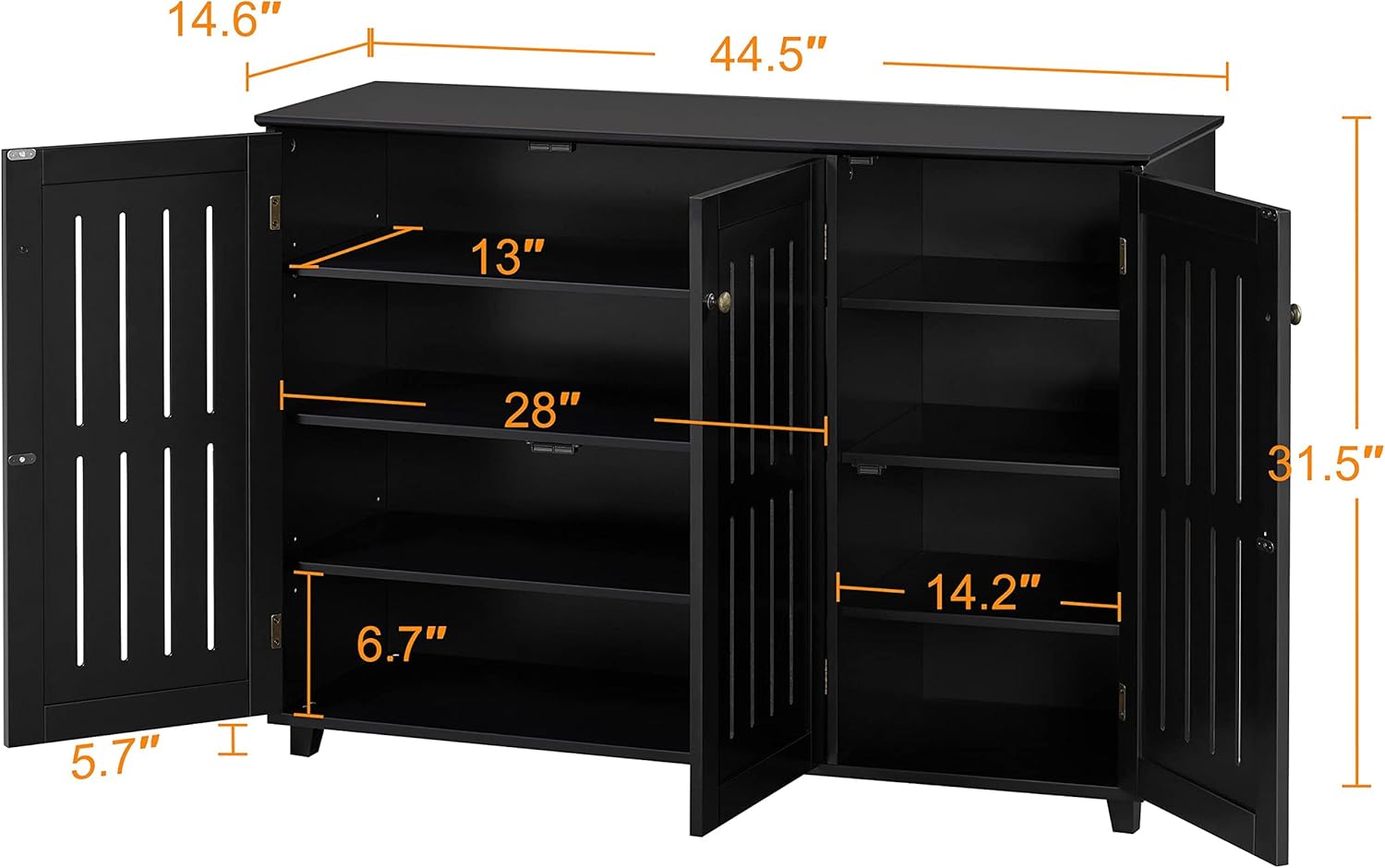
The cabinet features three louvered doors for ventilation and adjustable shelves to accommodate various shoe sizes and types, including boots. Constructed from durable CARB P2 compliant MDF, it offers a sturdy and functional storage solution.
2. Safety Information
- Always follow the assembly instructions carefully.
- Ensure all parts are securely fastened before use.
- Do not exceed the maximum weight capacity of 88 pounds (40 kg) to prevent accidents.
- Keep the area around the cabinet clear to avoid potential hazards.
- This product is designed for indoor use only.
3. Parts List
A complete and detailed parts list, including all hardware and components, is provided within the product packaging. Please verify all parts are present and undamaged before beginning assembly. If any parts are missing or damaged, please contact customer support.

4. Setup and Assembly Instructions
Assembly of the Yaheetech Shoe Storage Cabinet is required. Please follow the step-by-step instructions provided in the included manual. For visual guidance, refer to the official assembly video below.
Video 1: Official assembly guide for the Yaheetech Shoe Storage Cabinet.
Key Assembly Steps:
- Prepare Components: Lay out all panels and hardware on a clean, soft surface to prevent scratches.
- Assemble Base Structure: Connect the bottom panel to the side panels using the provided cam locks and dowels.
- Install Dividers: Secure the internal vertical and horizontal dividers to create the shelving compartments.
- Attach Top Panel: Place and secure the top panel to complete the main frame of the cabinet.
- Install Back Panels: Slide the back panels into the grooves and secure them with small nails or screws.
- Attach Feet: Screw the four feet to the bottom of the cabinet.
- Mount Doors: Attach the hinges to the louvered doors and then mount the doors to the cabinet frame. Ensure doors align properly and close smoothly.
- Install Door Handles: Secure the handles to the front of each door.
- Secure Anti-Tipping Hardware: For safety, attach the anti-tipping hardware to the back of the cabinet and to a wall stud.
5. Operating Instructions
Adjustable Shelves:
The cabinet features adjustable shelves, particularly in the left column, with three height options. To adjust a shelf:
- Open the cabinet door to access the interior.
- Remove any items from the shelf you wish to adjust.
- Carefully lift the shelf to disengage it from the support pins.
- Relocate the support pins to the desired height level.
- Place the shelf back onto the support pins, ensuring it is level and secure.

Louvered Doors:
The three louvered doors provide air circulation, which is beneficial for shoe storage. To open, gently pull the handle. To close, push the door until the magnetic catch engages, ensuring it is fully closed.

6. Maintenance
- Cleaning: Wipe the cabinet surfaces with a soft, damp cloth. Avoid using harsh chemicals or abrasive cleaners, as these may damage the finish.
- Dusting: Regularly dust the cabinet to prevent buildup.
- Hardware Check: Periodically check all screws and fasteners to ensure they remain tight. Tighten if necessary.
- Avoid Moisture: Keep the cabinet away from excessive moisture or direct sunlight to prolong its lifespan.

7. Troubleshooting
- Wobbly Cabinet: Ensure all cam locks and screws are fully tightened. Check that the feet are evenly installed and the cabinet is on a level surface.
- Doors Not Closing Properly: Verify that the hinges are correctly installed and tightened. Adjust the hinges if necessary to ensure proper alignment. Check for any obstructions inside the cabinet.
- Missing Parts: If any parts were missing upon delivery, refer to the parts list in your packaging and contact Yaheetech customer support for assistance.
8. Specifications
| Feature | Detail |
|---|---|
| Brand | Yaheetech |
| Model Number | YT-00118604SC |
| Color | Black |
| Material | Painted MDF, Metal Hardware |
| Product Dimensions | 44.5" L × 14.6" W × 31.5" H (113 cm L × 37 cm W × 80 cm H) |
| Item Weight | 71.7 Pounds (32.5 kg) |
| Weight Limit (Top) | 88 Pounds (40 kg) |
| Number of Shelves | 4 (adjustable) |
| Door Style | Louvered |
| Assembly Required | Yes |
9. Warranty and Support
Yaheetech products come with a manufacturer's warranty. For specific warranty details, claims, or technical support, please refer to the warranty card included in your product packaging or visit the official Yaheetech website. You can also contact Yaheetech customer support directly via their Amazon store page: Yaheetech Store.


