
Introduction
This manual provides essential information for the assembly, operation, and maintenance of your VIVO Racing Simulator Cockpit with TV Mount, model STAND-KIT-RACE1B. Please read these instructions thoroughly before use to ensure proper setup and safe operation.
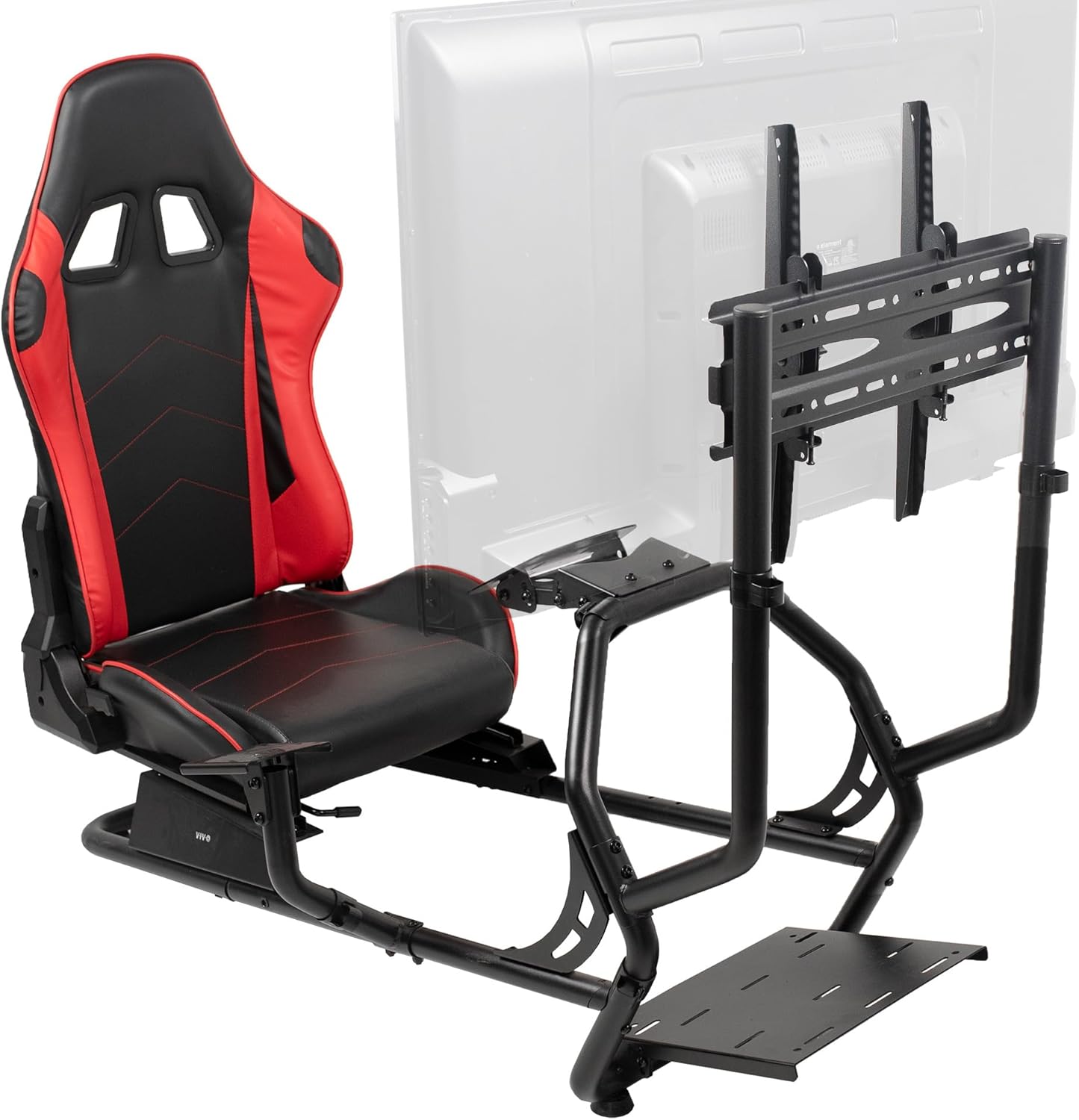
Image: The VIVO Racing Simulator Cockpit, featuring a red and black racing seat, a sturdy black metal frame, a wheel stand, a gear mount, and an integrated TV mounting bracket. Steering wheel, pedals, and shifter are not included.
Safety Information
WARNING: This product can expose you to chemicals including Diisononyl phthalate (DINP) which is known to the State of California to cause cancer and Di(2-ethylhexyl)phthalate (DEHP), which is known to the State of California to cause cancer and birth defects or other reproductive harm. For more information go to www.P65Warnings.ca.gov.
- Ensure all components are securely fastened before use.
- Do not exceed the maximum weight recommendations for the chair (220 lbs) or TV mount (77 lbs).
- Keep children and pets away from the cockpit during assembly and adjustment.
- Use only as intended for racing simulation.
Package Contents
The VIVO Racing Simulator Cockpit (STAND-KIT-RACE1B) includes the following components:
- Racing Seat (Red/Black)
- Main Frame Assembly
- Wheel Stand
- Gear Mount
- TV Mounting Bracket
- All necessary hardware for assembly
Note: Steering wheel, pedals, and shifter are not included with this product.
Setup
Assembly
Detailed assembly instructions are provided in the included installation manual (PDF). Ensure all parts are present and undamaged before beginning assembly. A typical assembly takes approximately one hour. Tools provided include a hex key and a small wrench.
For a complete guide, please refer to the official Installation Manual (PDF).
Compatibility
- Racing Wheels: Universal design fits most racing wheels, including models from Logitech, Thrustmaster, and Fanatec.
- Gaming Platforms: Compatible with most gaming programs for Xbox One, PlayStation, and PC.
- TV Screens: Supports screens from 32" to 50" in size, weighing up to 77 lbs.
- VESA Mounting Patterns: Compatible with VESA 100x100, 200x100, 200x200, 300x200, 400x200, 300x300, 400x300, and 400x400.

Image: Diagram illustrating the dimensions of the racing simulator cockpit (44.5"H x 51.2"L x 14.5" seat length) and specifications for the TV mounting bracket, including supported screen sizes (32"-50"), weight capacity (up to 77 lbs), and VESA patterns.
Operation
Adjusting the Racing Seat
The racing seat is designed for comfort and adjustability to suit various user preferences:
- Sliding Mechanism: The seat slides forward and backward along a track (12.6" range) to optimize distance from the wheel and pedals.
- Recline Function: The seat back can be reclined to your preferred angle for extended gaming sessions.

Image: A close-up view of the racing seat, highlighting its comfortable design and the sliding mechanism located beneath the seat cushion.
Adjusting the Wheel Mount
The wheel mount features a tilting mechanism to allow for optimal steering wheel positioning. This adjustment helps accommodate different driving styles and user heights.
Adjusting the TV Mount
The integrated TV mount offers flexibility for viewing angles:
- Height Adjustment: The TV mount can be adjusted in height to align the screen with your eye level. Center of screen height settings are 32.5" and 35.3".
- Tilt Function: The mount allows for a tool-free tilt of ±10°, reducing glare and improving viewing comfort.

Image: An overview of the cockpit's adjustable features, including the TV mount's height and tilt settings, and the wheel mount's tilt capability.
Gear Shifter Installation
The gear mount can be installed on either the left or right side of the cockpit, depending on your preference and the specific racing setup.
Maintenance
To ensure the longevity and optimal performance of your VIVO Racing Simulator Cockpit, follow these general maintenance guidelines:
- Regularly inspect all bolts and fasteners to ensure they remain tight. Re-tighten as necessary.
- Clean the frame with a soft, damp cloth. Avoid abrasive cleaners.
- Wipe down the racing seat with a mild cleaner suitable for faux leather or vinyl.
- Keep the cockpit in a dry environment to prevent rust or material degradation.
Troubleshooting
If you encounter issues with your racing simulator cockpit, consider the following:
- Stability Issues: Ensure all frame connections are securely tightened. Verify the cockpit is placed on a flat, stable surface.
- Difficulty Adjusting Components: Check for any obstructions or loose parts. Refer to the assembly instructions to confirm correct installation of adjustable mechanisms.
- TV Mount Alignment: If the TV mount seems misaligned or unstable, double-check that all VESA screws are properly seated and tightened. Ensure any necessary washers are used correctly as per the installation manual.
- Wheel/Pedal/Shifter Fit: While designed for universal compatibility, some accessories may require minor adjustments or additional mounting hardware not included with the cockpit. Ensure your accessories are properly secured to their respective mounts.
For persistent issues, please contact VIVO Customer Support.
Specifications
| Feature | Specification |
|---|---|
| Brand | VIVO |
| Model Name | STAND-KIT-RACE1B |
| Product Dimensions (D x W x H) | 51.2" x 21.5" x 44.5" |
| Item Weight | 60.6 pounds |
| Maximum User Weight | 220 Pounds |
| TV Screen Size Compatibility | 32" to 50" |
| TV Mount Weight Capacity | 77 lbs |
| VESA Compatibility | 100x100, 200x100, 200x200, 300x200, 400x200, 300x300, 400x300, 400x400 |
| Seat Back Interior Height | 32 Inches |
| Seat Depth | 19.5 inches |
| Seat Length | 14.5 Inches |
| Material | Metal frame, Foam fill (seat) |
| Color | Red |
| UPC | 810080415300 |
Warranty Information
VIVO products are designed with quality and customer satisfaction in mind. For specific warranty details regarding your STAND-KIT-RACE1B Racing Simulator Cockpit, please refer to the documentation included with your purchase or contact VIVO Customer Support directly. VIVO offers generous product protection and support.
Customer Support
VIVO provides US-based sales and technical support to assist you with any questions or concerns. Our team is dedicated to providing high-quality support and ensuring customer satisfaction.
For assistance, please visit the official VIVO store or contact their customer service department:
- VIVO Store: Visit the VIVO Store on Amazon
- General Inquiries: Refer to the contact information provided on the VIVO website or product packaging.


