
Introduction
Thank you for purchasing the GabbaGoods TrueBuds Chrome Wireless Earbuds. This manual provides essential information for setting up, operating, and maintaining your earbuds. Please read it carefully before use to ensure optimal performance and longevity of your device.

Image: GabbaGoods TrueBuds Chrome Wireless Earbuds and their charging case. The earbuds are black with chrome accents, and the charging case is black with a clear lid, displaying a digital battery percentage.
Package Contents
- GabbaGoods TrueBuds Chrome Wireless Earbuds (Left and Right)
- Charging Case with LED Power Display
- USB-C Charging Cable
- User Manual
Product Overview

Image: Diagram illustrating the components of the GabbaGoods TrueBuds Chrome charging case. Labels point to the Acrylic Cap with magnetic lock, Bluetooth Earbuds, LED Indicator, LCD Display, and USB-C Charging Port.
The TrueBuds Chrome feature a compact design with a clear acrylic cap on the charging case. The case includes an LCD display to show the battery percentage and an LED indicator for charging status. The earbuds are designed for a comfortable and secure fit.
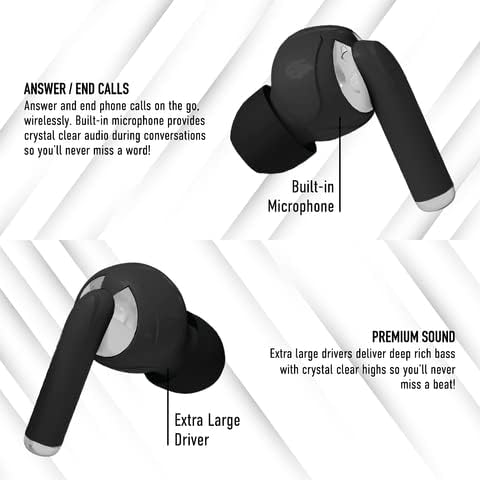
Image: Diagram highlighting key features of the GabbaGoods TrueBuds Chrome earbuds, including the built-in microphone for calls and the extra-large driver for premium sound quality.
Setup
Initial Charging
Before first use, fully charge the earbuds and the charging case. Connect the provided USB-C cable to the charging port on the case and plug the other end into a USB power source (e.g., wall adapter, computer USB port). The LCD display on the case will show the charging progress. A full charge takes less than one hour.
Pairing with Your Device
- Ensure the charging case is charged and your device's Bluetooth is enabled.
- Open the charging case and remove both earbuds. They will automatically power on and enter pairing mode.
- On your device, search for Bluetooth devices and select "GabbaGoods TrueBuds Chrome" from the list.
- Once connected, you will hear a confirmation tone, and the earbuds will be ready for use.
The earbuds feature automatic pairing. Once paired, they will automatically connect to the last paired device when removed from the case. They will also automatically turn off when placed back into the charging cradle.

Image: Illustration showing the automatic pairing process of the earbuds and details about battery life: up to 3.5 hours playback per charge for earbuds, and the case provides multiple full earbud charges for a total playtime of up to 20 hours.
Operating Instructions
Touch Controls
The TrueBuds Chrome feature intuitive touch controls on each earbud:
- Play/Pause: Single tap on either earbud.
- Next Track: Double tap on the Right earbud.
- Previous Track: Double tap on the Left earbud.
- Answer/End Call: Single tap on either earbud during an incoming call.
- Reject Call: Press and hold on either earbud for 2 seconds during an incoming call.
- Activate Voice Assistant: Triple tap on either earbud.
Making and Receiving Calls
The earbuds are equipped with a built-in microphone for clear communication. When a call comes in, you can answer or end it using the touch controls. For optimal call quality, ensure the microphone is not obstructed.
Charging
The TrueBuds Chrome provide up to 3.5 hours of playback time per single charge. The portable charging case offers multiple additional charges, extending the total playtime to approximately 20 hours. The case itself can be fully recharged in less than one hour using the provided USB-C cable.

Image: The GabbaGoods TrueBuds Chrome earbuds resting inside their open charging case, with the digital display showing "100", indicating a full charge.
Maintenance
- Cleaning: Use a soft, dry cloth to clean the earbuds and charging case. Do not use abrasive cleaners or immerse in water.
- Storage: When not in use, store the earbuds in their charging case to protect them and keep them charged.
- Battery Care: To prolong battery life, avoid fully discharging the earbuds and case frequently. Charge them regularly, even if not in constant use.
- Water Resistance: These earbuds are not water resistant. Avoid exposure to water, sweat, or high humidity.
Troubleshooting
| Problem | Solution |
|---|---|
| Earbuds not pairing/connecting |
|
| Only one earbud working |
|
| Earbuds not charging |
|
| Poor sound quality |
|
Specifications
- Model: GG-TBCH
- Bluetooth Version: 5.3
- Bluetooth Range: Up to 35 meters (115 feet)
- Earbud Playtime: Up to 3.5 hours per charge
- Total Playtime (with charging case): Up to 20 hours
- Charging Time (Earbuds & Case): Less than 1 hour
- Frequency Range: 20Hz - 20,000Hz
- Control Type: Touch, Voice Assistant
- Material: Plastic, Metal
- Charging Port: USB-C
- Water Resistance: Not Water Resistant
Safety Information
- Do not disassemble, repair, or modify the product.
- Keep away from extreme temperatures, direct sunlight, and open flames.
- Avoid dropping or subjecting the earbuds to strong impacts.
- Do not expose to water or moisture.
- Use only the provided or certified charging cables.
- Prolonged listening at high volume levels may cause hearing damage.
Warranty and Support
Gabba Goods products are designed with quality and reliability in mind. For warranty information, technical support, or customer service inquiries, please visit the official Gabba Goods website or contact their customer support directly. Please retain your proof of purchase for warranty claims.
Gabba Goods Official Website: Gabba Goods Store on Amazon