
Introduction
This manual provides comprehensive instructions for the safe and effective use of your GE Outdoor Light-Sensing Timer. This device is designed to automate outdoor lighting and seasonal decorations, offering convenience and energy efficiency. It features a built-in light sensor for dusk-to-dawn operation and various countdown timer options.
Please read this manual thoroughly before installation and operation, and retain it for future reference.

Image: The GE Outdoor Light-Sensing Timer automating outdoor string lights and Christmas decorations, demonstrating its versatility for everyday and seasonal use.
Important Safety Information
WARNING: To reduce the risk of electric shock or fire, observe the following precautions:
- Do not immerse in water.
- Do not connect more than the rated electrical load.
- Ensure the timer is plugged into a Ground Fault Circuit Interrupter (GFCI) protected outlet when used outdoors.
- Keep children away from the timer and connected devices.
- Always ensure the plug is fully inserted into the outlet.
- Disconnect power before performing any maintenance or cleaning.
Product Overview
The GE Outdoor Light-Sensing Timer is designed for durability and ease of use. Familiarize yourself with its components:
- Three Grounded Outlets: For connecting multiple devices.
- Light Sensor: Detects ambient light for dusk-to-dawn and countdown functions.
- Control Dial: Selects operating modes (ON, OFF, DUSK-DAWN, 2/4/6/8 hours).
- Mounting Loop: Allows for secure installation near an outlet.
- Weather-Resistant Housing: Protects internal components from outdoor elements.
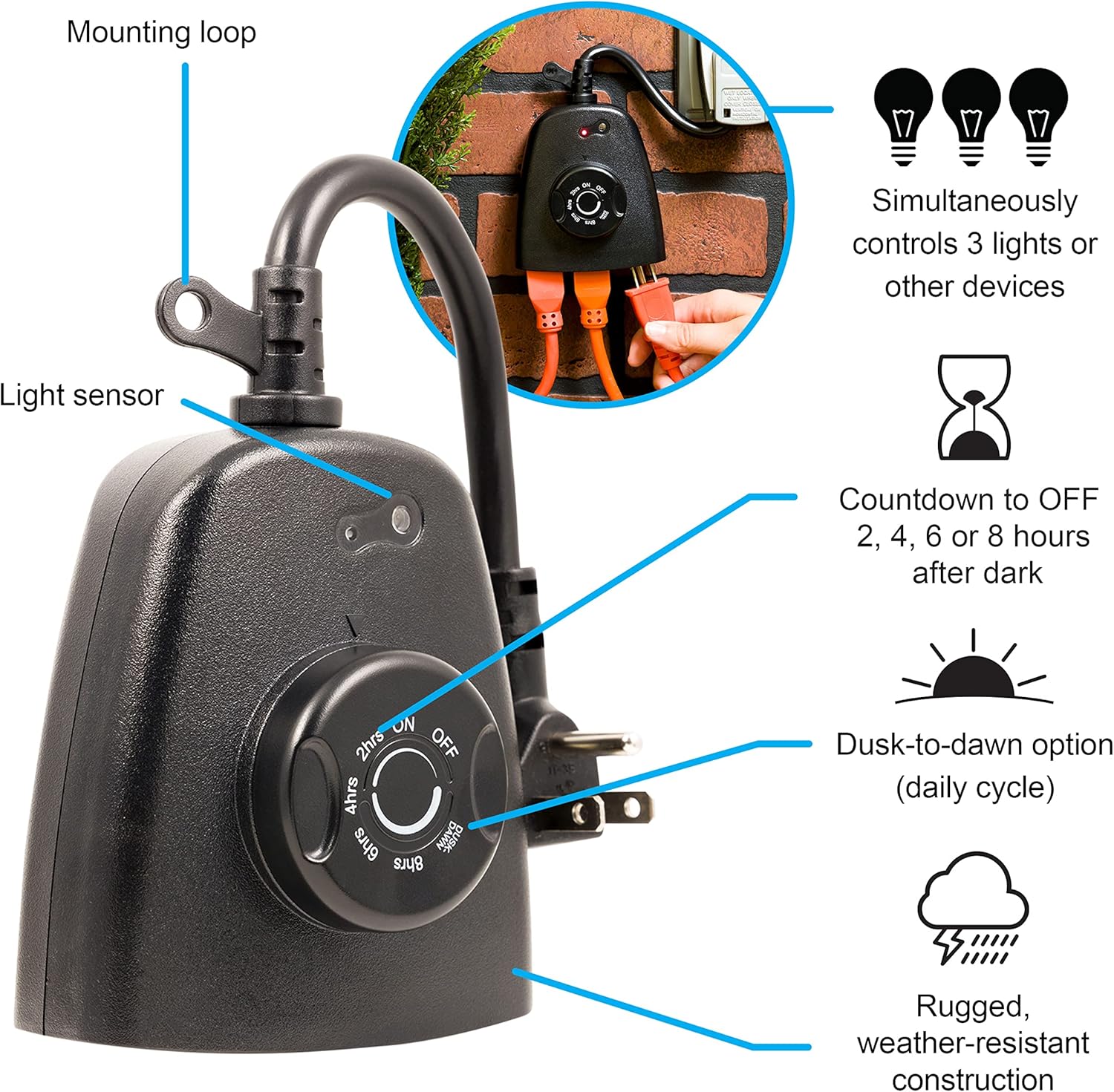
Image: A diagram highlighting the key features of the GE Outdoor Light-Sensing Timer, including the mounting loop, light sensor, control dial, and three grounded outlets.

Image: A close-up view of the light sensor located on the top surface of the timer, which detects ambient light levels.
Setup
- Select Location: Choose an outdoor location with a GFCI-protected outlet. Ensure the light sensor is not obstructed and receives natural light.
- Mount the Timer: Use the integrated mounting loop to secure the timer to a wall or post near the outlet. This helps keep the timer stable and prevents strain on the cord.
- Plug In: Insert the timer's grounded plug into the GFCI-protected outdoor outlet.
- Connect Devices: Plug your outdoor lights or other devices into the three grounded outlets on the timer. Ensure the total wattage does not exceed the timer's maximum rating (1875W).

Image: A visual guide illustrating the simple two-step setup process: 1) Plug the timer into a grounded outlet, and 2) Rotate the dial to the desired setting.

Image: The GE Outdoor Light-Sensing Timer securely mounted and plugged into an outdoor GFCI outlet, with three extension cords connected to its outlets, ready for use.
Operating Instructions
Use the control dial to select your desired operating mode:
- ON: Provides continuous power to the connected devices, bypassing all timer functions.
- OFF: Disables power to all connected devices.
- DUSK-DAWN: The timer will automatically turn on connected devices at dusk and turn them off at dawn.
- 2/4/6/8 Hours: The timer will automatically turn on connected devices at dusk and turn them off after the selected duration (2, 4, 6, or 8 hours).

Image: A detailed view of the timer's control dial, illustrating the settings for Countdown (2, 4, 6, 8 hours), Dusk-Dawn, ON, and OFF modes.

Image: A close-up of the timer's dial, specifically showing the "DUSK-DAWN" setting, which activates the light sensor for automatic operation.
Official Product Video
Video: An official product video from Jasco Products Company demonstrating the features and operation of the GE Outdoor Outlet Timer with Dusk-to-Dawn Sensor.
Maintenance
To ensure optimal performance and longevity of your timer:
- Cleaning: Periodically wipe the timer with a damp cloth to remove dirt and debris. Do not use harsh chemicals or abrasive cleaners.
- Sensor Check: Ensure the light sensor remains clear of obstructions (e.g., leaves, snow) for accurate operation.
- Weather Protection: While weather-resistant, avoid prolonged submersion or direct high-pressure water spray.

Image: The GE Outdoor Light-Sensing Timer with water droplets on its surface, illustrating its weather-resistant construction suitable for outdoor conditions.
Troubleshooting
| Problem | Possible Cause | Solution |
|---|---|---|
| Devices do not turn on. | Timer not plugged in; GFCI tripped; incorrect mode selected; light sensor obstructed. | Ensure timer is securely plugged in. Reset GFCI. Verify dial is set to ON, DUSK-DAWN, or a countdown mode. Clear any obstructions from the light sensor. |
| Devices stay on continuously. | Timer set to ON mode; light sensor not detecting darkness. | Rotate dial to DUSK-DAWN or a countdown mode. Ensure light sensor is not exposed to artificial light at night. |
| Devices turn off too early/late. | Light sensor sensitivity; incorrect countdown duration selected. | Ensure light sensor is in an area that accurately reflects ambient light. Adjust countdown duration as needed. |
Specifications
| Feature | Detail |
|---|---|
| Brand | GE |
| Model Number | 62722 |
| Outlets | 3 Grounded Outlets |
| Timer Functions | Dusk-to-Dawn, 2/4/6/8 Hour Countdown, ON, OFF |
| Material | Plastic |
| Color | Black |
| Product Dimensions | 3.6 x 5.85 x 9.5 inches |
| Item Weight | 8.8 ounces |
| Certifications | ETL |

Image: A diagram showing the physical dimensions of the GE Outdoor Light-Sensing Timer in inches and millimeters.
Warranty
This GE Outdoor Light-Sensing Timer is covered by a 1-year manufacturer's warranty. Please refer to the warranty documentation included with your product for specific terms and conditions.
Support
For further assistance, technical support, or warranty claims, please contact the manufacturer, Jasco Products Company, LLC. Refer to the product packaging or the GE website for current contact information.