
KVSERT S830
S830 LCD Display Screen User Manual
Brand: KVSERT | Model: S830
Universal LCD Display Screen for Electric Bicycle Ebike Meter Panel with USB
1. Product Overview
The KVSERT S830 LCD Display is a versatile control panel designed for electric bicycles. It functions as a driving computer, providing essential ride data, and allows control over various eBike system parameters. This display is compatible with 24V, 36V, and 48V systems and features a waterproof design and a USB port for convenience.
- Displays remaining battery level, current speed, average speed, maximum speed, clock, and trip distance.
- Allows adjustment of auxiliary levels when a PAS (Pedal Assist System) is installed.
- Durable and practical design for reliable use.

Figure 1: Front view of the KVSERT S830 LCD Display Screen, showing the main display unit, connecting cables, and the separate control button unit.
2. Package Contents
Upon opening the package, please ensure all the following components are present:
- 1 x S830 LCD Display (5-pin waterproof connector, compatible only with lithium battery protocol No. 2)
Note: No other products or accessories are included beyond the display unit itself.
3. Installation Guide
Follow these steps to properly install your S830 LCD Display on your electric bicycle:
- Mounting the Display: Securely attach the S830 LCD display unit to your bicycle's handlebars using the integrated mounting brackets. Ensure it is positioned for clear visibility and easy access to the control buttons.
- Connecting the Cables: Connect the 5-pin waterproof connector from the S830 display to the corresponding port on your e-bike controller. Ensure the connection is firm and secure to prevent water ingress.
- Control Button Unit: Mount the separate control button unit near your thumb for convenient operation while riding. Connect its cable to the display unit.

Figure 2: Angled view of the S830 display, highlighting the mounting brackets for handlebar attachment.
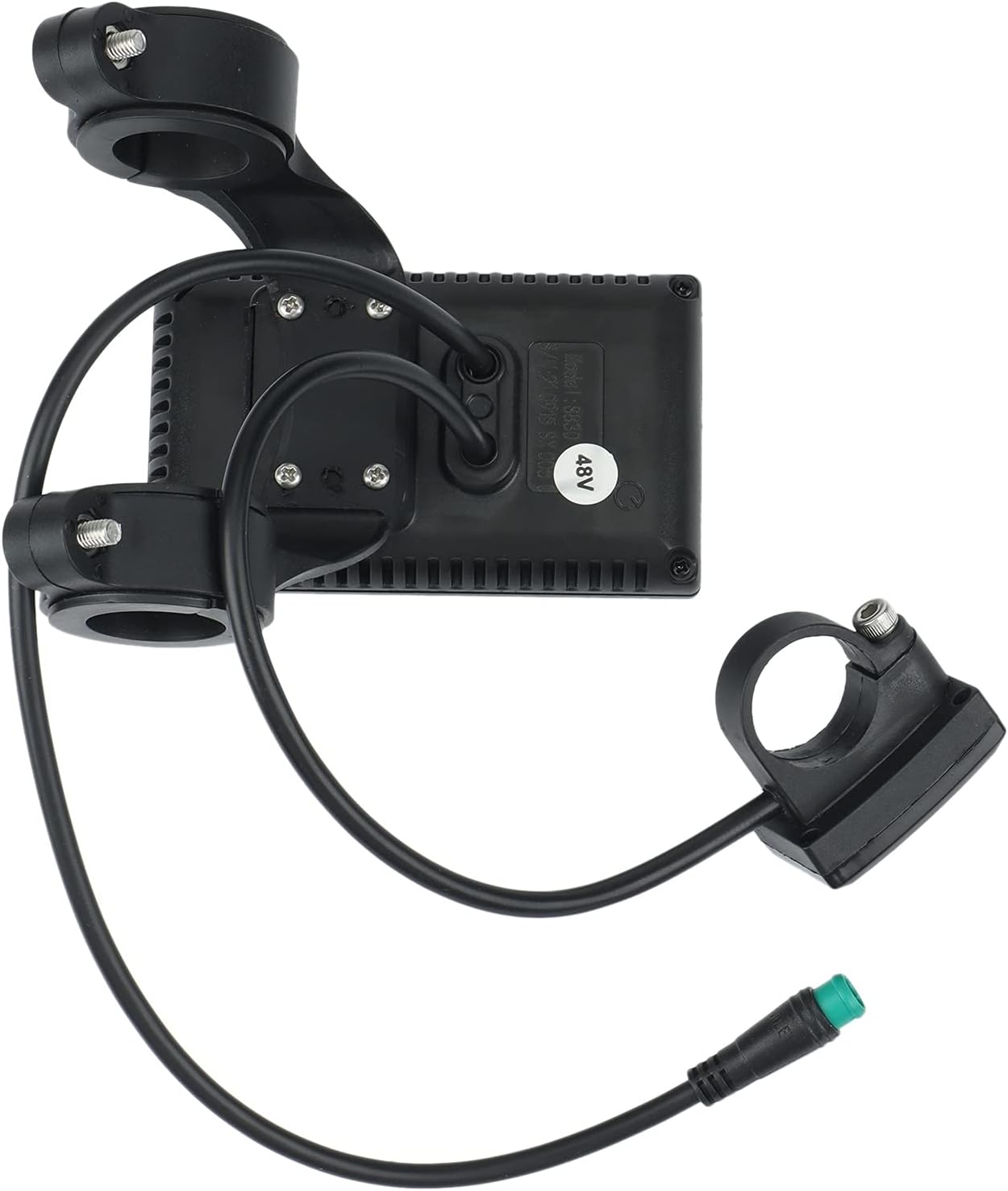
Figure 3: Rear view of the S830 display, illustrating the cable entry points and the 5-pin waterproof connector.
4. Operating Instructions and Parameter Settings
To access and adjust the instrument settings, long-press the up and down buttons simultaneously. The following parameters (P-settings) can be configured:

Figure 4: Front view of the S830 display, showing the screen and the control buttons for navigation and settings adjustment.
| Parameter | Description | Range/Options |
|---|---|---|
| P01 | Backlight brightness | Level 1 (darkest) to Level 3 (brightest) |
| P02 | Mileage unit | 0: KM; 1: MILE |
| P03 | Voltage level | 24V, 36V, 48V |
| P04 | Sleep time | 0: No sleep; 1-60: Sleep time in minutes |
| P05 | Assist gear | 1-9 |
| P06 | Wheel diameter | Unit: inch; Precision: 0.1 |
| P07 | Number of speed magnets | Range: 1-100 |
| P08 | Speed limit | Speed percentage range 0-100%, 100 means 100% speed |
| P09 | Start mode | 0: Zero start; 1: Non-zero start |
| P10 | Drive mode setting | 0: Power-assisted drive (handlebar invalid); 1: Electric drive (via handlebar, assist gear invalid); 2: Power-assisted and electric drive coexist |
| P11 | Assist sensitivity setting | Range: 1-24 |
| P12 | Power-assisted start intensity setting | Range: 0-5 |
| P13 | Power-assisted magnet type setting | 5, 8, or 12 magnets. 5 and 8 for single-Hall sensors; 12 for dual Hall sensors. |
| P14 | No such function temporarily | N/A |
| P15 | No such function temporarily | N/A |
| P16 | ODO reset setting | Long-press the up button for 5 seconds to reset ODO. |
5. Troubleshooting
If you encounter issues with your S830 LCD Display, please review the following common points:
- Communication Protocol: The S830 display uses a 5-pin waterproof connector and is designed to communicate specifically with controllers using lithium battery protocol No. 2. If your e-bike controller uses a different protocol (e.g., E10), the display will not be able to communicate with it, and thus will not function correctly. Ensure your controller's protocol matches.
- Loose Connections: Check all cable connections, especially the 5-pin connector, to ensure they are firmly seated and free from damage or corrosion.
- Power Supply: Verify that your e-bike battery is charged and providing the correct voltage (24V, 36V, or 48V) as configured in P03.
6. Product Specifications
| Feature | Detail |
|---|---|
| Brand | KVSERT |
| Model Number | S830 |
| Product Dimensions | 14 x 10 x 8 cm |
| Item Weight | 179.5 g (approx. 180 g) |
| Colour | Black |
| Display Type | LCD |
| Included Components | Magnet (likely referring to a speed sensor magnet, though the package contents only list the display) |
| Sensor Type | Speed Sensor, Cadence Sensor (implied by P13) |
| Connectivity Technology | Wired |
| Human Interface Input | Buttons |
| First Available Date | November 14, 2022 |
7. Care and Maintenance
To ensure the longevity and optimal performance of your S830 LCD Display, follow these care and maintenance guidelines:
- Cleaning: Use a soft, damp cloth to clean the display screen and housing. Avoid abrasive cleaners or solvents that could damage the surface.
- Water Exposure: While the display is waterproof, avoid submerging it in water or exposing it to high-pressure water jets. Ensure the connector is always securely sealed.
- Temperature: Store and operate the display within recommended temperature ranges. Extreme heat or cold can affect performance and lifespan.
- Physical Damage: Protect the display from impacts and drops. Avoid placing heavy objects on it.
8. Warranty and Support
Specific warranty details for the KVSERT S830 LCD Display are not provided within this manual's product information. For warranty claims, technical support, or further assistance, please refer to the seller or manufacturer's official support channels. Keep your purchase receipt as proof of purchase.
Related Documents - S830
 |
S830 Bone Conduction Headphones User Manual and Features Detailed user manual for the S830 Bone Conduction Headphones, covering setup, operation, features, and FCC compliance. Learn how to connect, play music, and charge your S830 headphones. |
 |
500W 25A Brushless DC Motor Controller for Electric Bikes & Scooters Explore the specifications and connectivity of the Kunray 500W 25A brushless DC motor controller, designed for 24V, 36V, and 48V electric bikes and scooters. This guide details essential parameters and component connections. |
 |
Electric Bike Front and Rear Light Set Specification and Features Technical specifications and feature overview for the Electric Bike Front and Rear Light Set, including compatibility, installation notes, and functional details. |
 |
HITWAY Li-ion Ebike Battery User Manual - Charging, Maintenance & Safety Guide Comprehensive user manual for HITWAY Li-ion ebike batteries. Learn how to charge, use, maintain, and safely store your battery for optimal performance and longevity. Includes warnings and troubleshooting tips. |
 |
Junstar-EU Bottom Bracket Measurement Guide and Battery Fitment A guide from Junstar-EU for measuring bicycle bottom bracket dimensions and determining compatibility with Jumbo Shark battery models. |
 |
350W/500W Electric Bicycle Brushless Motor Controller Instruction Manual Technical specifications and regulatory compliance information for the 36V-64V 350W/500W Electric Bicycle Black Gold Triple Sine Wave Silent Brushless Motor Controller. |
Ask a question about this manual
Ask about setup, troubleshooting, compatibility, parts, safety, or missing instructions. Manuals+ will review the question and use this page’s manual context to help answer it.