
1. Introduction
This manual provides comprehensive instructions for the operation and maintenance of your KOMVOX GT60-G-2P Walkie Talkies. Please read this manual thoroughly before using the device to ensure proper function and safety. These two-way radios are designed for reliable communication in various environments, featuring 36 channels, NOAA weather alerts, and a robust design suitable for outdoor activities.
2. Package Contents
Upon opening your KOMVOX GT60-G-2P Walkie Talkies package, please verify that all the following items are included:
- Two (2) KOMVOX GT60-G-2P Walkie Talkies
- One (1) User Manual
- One (1) USB Type-C Charging Cable
3. Product Overview
The KOMVOX GT60-G-2P Walkie Talkie is a compact and durable two-way radio. It features an intuitive button layout and a clear display for easy operation.
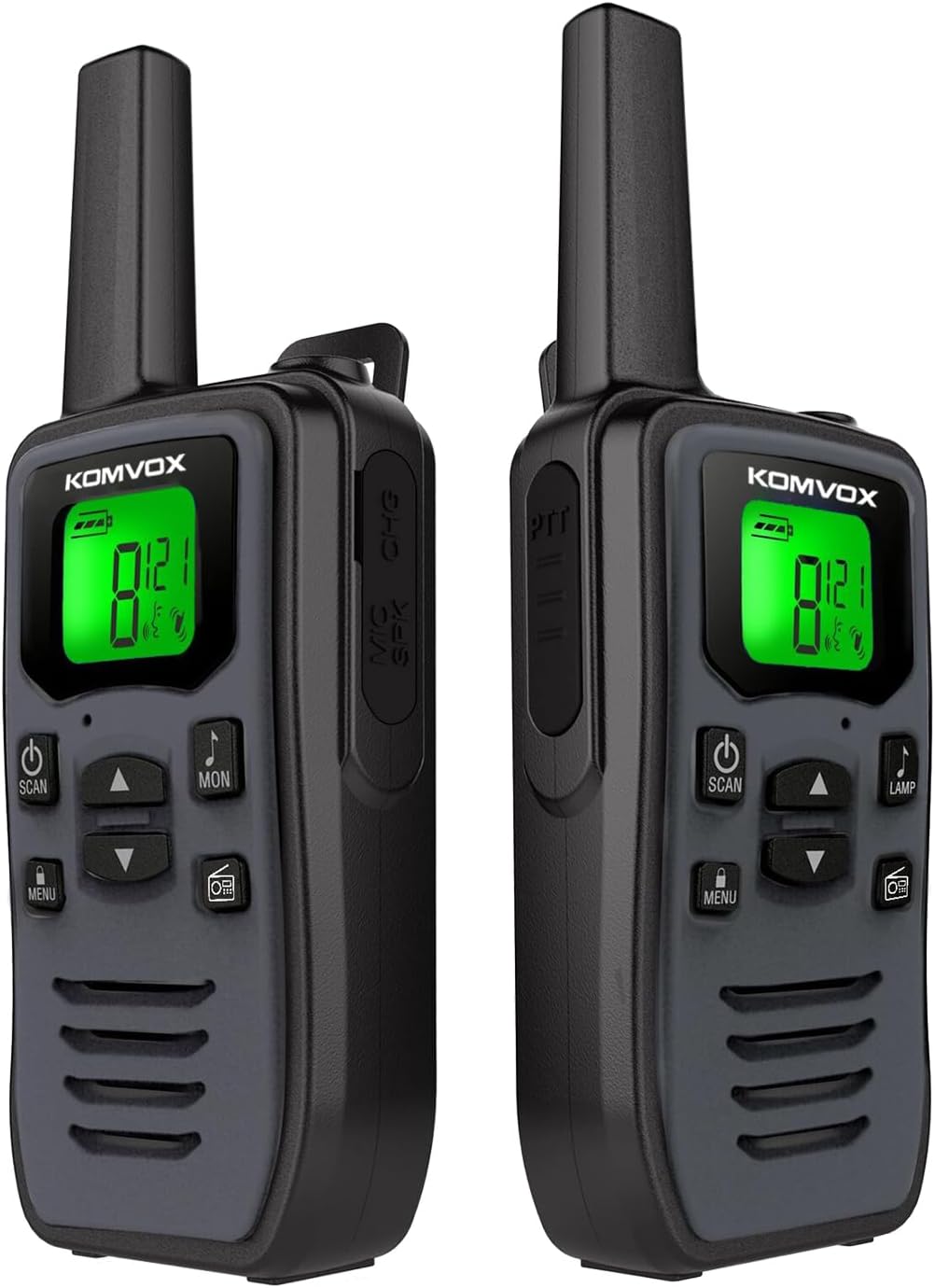
Image 3.1: Front and side view of the KOMVOX GT60-G-2P Walkie Talkies. The devices are grey with a green backlit LCD screen displaying channel information and battery status. Buttons for power, scan, menu, up/down, monitor, and lamp are visible.
Key Components:
- Antenna: For transmitting and receiving signals.
- LCD Display: Shows channel, battery level, and feature indicators.
- Power Button: Turns the device on/off.
- PTT (Push-to-Talk) Button: Activates transmission.
- Menu Button: Accesses settings and features.
- Up/Down Buttons: Navigates menus and adjusts settings.
- Scan Button: Initiates channel scanning.
- Monitor Button: Temporarily disables squelch to listen for weak signals.
- Lamp Button: Activates the built-in LED torch.
- Speaker/Microphone: For audio input and output.
- Type-C Charging Port: For recharging the internal battery.
4. Setup
4.1. Charging the Battery
Your KOMVOX walkie talkies come with a built-in rechargeable Lithium Polymer battery. Before first use, it is recommended to fully charge the device.
- Connect the provided USB Type-C charging cable to the charging port on the side of the walkie talkie.
- Plug the other end of the USB cable into a compatible USB power source (e.g., wall adapter, computer USB port, power bank).
- The battery indicator on the LCD display will show charging status. Once fully charged, the indicator will typically show a full battery icon.
A full charge ensures optimal performance and operating time.
5. Operating Instructions
5.1. Power On/Off
To power on the walkie talkie, press and hold the Power Button until the LCD display illuminates. To power off, press and hold the Power Button again until the display turns off.
5.2. Channel Selection
Your walkie talkie supports 36 channels. To change channels:
- Press the Menu Button once. The channel number on the display will flash.
- Use the Up or Down buttons to select your desired channel (1-36).
- Press the Menu Button again or wait a few seconds for the selection to be saved.
5.3. CTCSS/DCS Privacy Codes
The walkie talkies offer 142 CTCSS (Continuous Tone-Coded Squelch System) tones to minimize interference from other users on the same channel. When a CTCSS code is set, you will only hear transmissions from radios using the same channel and CTCSS code.
- Press the Menu Button twice. The CTCSS code number will flash.
- Use the Up or Down buttons to select your desired CTCSS code (0-142). Code 0 typically means no CTCSS is active.
- Press the Menu Button again or wait for the selection to be saved.
5.4. VOX (Voice Activated Transmission) Function
VOX allows for hands-free operation. When activated, the radio will transmit automatically when it detects your voice.
- Press the Menu Button multiple times until the VOX icon appears and the sensitivity level flashes.
- Use the Up or Down buttons to select a sensitivity level (1-3, where 3 is most sensitive) or turn VOX off.
- Press the Menu Button again or wait for the selection to be saved.
5.5. NOAA Weather Alert
Stay informed about severe weather conditions with the integrated NOAA Weather Scan and Alert feature.
- To activate NOAA Weather Scan, press the Scan Button until the NOAA icon appears on the display.
- The radio will automatically scan through 10 available weather band channels and lock onto the strongest weather channel.
- It will alert you to severe weather updates. To exit NOAA mode, press the Scan Button again.

Image 5.1: The walkie talkie highlighting its NOAA Weather Radio feature, indicating its ability to receive weather alerts.
5.6. Scanning Function
The scan function allows you to search for active channels.
- Press the Scan Button once (not held) to initiate channel scanning. The radio will cycle through all 36 channels.
- When an active signal is detected, the scan will pause on that channel.
- To stop scanning, press the Scan Button again.
5.7. Lamp/Flashlight Function
Your walkie talkie includes a built-in LED torch for illumination.
- To turn on the LED torch, press the Lamp Button.
- To turn off the LED torch, press the Lamp Button again.
5.8. Transmitting and Receiving
To communicate with another walkie talkie:
- Ensure both radios are on the same channel and CTCSS code (if used).
- To transmit, press and hold the PTT (Push-to-Talk) Button. Speak clearly into the microphone.
- Release the PTT Button to stop transmitting and listen for a response.
- When receiving a transmission, the radio will automatically open the squelch and you will hear the incoming audio.
6. Range Information
The effective communication range of your walkie talkies varies significantly based on terrain, obstructions, and atmospheric conditions. The stated maximum ranges are under ideal conditions.
- Up to 10 KM (6.2 miles) at sea: Achieved in open areas with minimal obstruction and clear line of sight.
- Up to 5 KM (3.1 miles) in wooded areas: Range is reduced due to partial obstruction from trees and foliage.
- Up to 2 KM (1.2 miles) in town: Range is significantly reduced due to major obstructions from buildings and urban structures.

Image 6.1: Visual representation of the walkie talkie's maximum communication range in different environments: open sea, wooded areas, and urban settings.
7. Maintenance
To ensure the longevity and optimal performance of your KOMVOX walkie talkies, follow these maintenance guidelines:
- Cleaning: Use a soft, damp cloth to clean the exterior of the radio. Do not use harsh chemicals or abrasive cleaners.
- Storage: Store the radios in a cool, dry place away from direct sunlight and extreme temperatures.
- Battery Care: Recharge the battery regularly, even if the radio is not in frequent use, to maintain battery health. Avoid fully discharging the battery for extended periods.
- Water Resistance: Note that these walkie talkies are not water resistant. Avoid exposure to rain, splashes, or immersion in water.
- Antenna: Do not attempt to remove or modify the antenna, as this can affect performance and void the warranty.
8. Troubleshooting
If you encounter issues with your walkie talkies, refer to the following common problems and solutions:
| Problem | Possible Cause | Solution |
|---|---|---|
| No power | Battery is depleted. | Charge the walkie talkie using the provided USB Type-C cable. |
| Cannot transmit or receive | Different channels or CTCSS codes. Out of range. | Ensure both radios are on the same channel and CTCSS code. Move closer to the other radio. |
| Static or unclear audio | Weak signal. Interference. | Move to an open area. Check for sources of interference. Adjust volume. |
| VOX not working | VOX sensitivity too low or off. | Adjust VOX sensitivity level in the menu. |
| NOAA Weather Alert not activating | Not in NOAA scan mode. No NOAA signal in area. | Ensure the radio is in NOAA scan mode. Move to an area with NOAA coverage. |
If the problem persists after trying these solutions, please contact customer support.
9. Specifications
Detailed technical specifications for the KOMVOX GT60-G-2P Walkie Talkies:
| Feature | Specification |
|---|---|
| Model Number | GT60-G-2P |
| Item Weight | 13.1 ounces |
| Product Dimensions | 1.6 x 2.2 x 6.5 inches |
| Batteries | 1 Lithium Polymer battery (included) |
| Number of Channels | 36 |
| CTCSS Tones | 142 sets |
| Special Features | Dust Proof, Long Range, Rechargeable, Weather Alert (NOAA), VOX, LED Torch |
| Frequency Range | 300-3000 MHz |
| Talking Range Maximum | 10 Kilometer (under ideal conditions) |
| Voltage | 5 Volts |
| Water Resistance Level | Not Water Resistant |
| Manufacturer | KOMVOX |
10. Warranty and Support
Your KOMVOX GT60-G-2P Walkie Talkies are covered by a 1-Year Manufacturer Warranty from the date of purchase. This warranty covers defects in materials and workmanship under normal use.
For warranty claims, technical support, or any questions not addressed in this manual, please contact KOMVOX customer service through the retailer where the product was purchased or visit the official KOMVOX website for contact information.
Please retain your proof of purchase for warranty purposes.