1. Introduction
This manual provides instructions for the installation and use of your Sky Elite V55 Phone Case and Tempered Glass Screen Protector. This product is designed to protect your Sky Elite V55 smartphone from daily wear, drops, and scratches, while offering enhanced functionality.
The case features a durable construction with a hard PC back panel, a soft silicone frame, and integrated shock airbags for impact absorption. It also includes a versatile metal finger ring for secure handling and magnetic car mount compatibility. The accompanying tempered glass screen protector offers high hardness and transparency for optimal screen protection.
2. Package Contents
- Sky Elite V55 Phone Case
- Tempered Glass Screen Protector
- Screen Cleaning Kit (Wet Wipe, Dry Wipe, Dust Absorber)
3. Setup and Installation
3.1 Installing the Tempered Glass Screen Protector
Follow these steps carefully to ensure proper installation and adhesion of the screen protector:
- Step 1: Clean the Screen
Gently clean your phone screen with the included wet wipe (labeled '1'), then dry it thoroughly with the dry wipe (labeled '2'). Ensure no dust or smudges remain. - Step 2: Remove Dust
Use the included dust absorber sticker to remove any remaining fine dust particles from the phone screen. - Step 3: Prepare Protector
Carefully peel off the protective film from the adhesive side of the tempered glass screen protector. Avoid touching the adhesive surface. - Step 4: Align and Apply
Align the screen protector precisely with your phone's screen, ensuring it matches the edges and cutouts. Once aligned, gently press the middle part of the protector with your finger. The adhesive will spread automatically.

Image: Step-by-step guide for installing the tempered glass screen protector.
3.2 Installing the Phone Case
Once the screen protector is installed, gently insert your Sky Elite V55 phone into the case. Ensure all buttons and ports align correctly with the case cutouts. The soft silicone frame allows for easy installation and a snug fit.
4. Operating Instructions
4.1 Using the Integrated Ring Support
The case features an adhesive metal finger ring that can be used for enhanced grip and as a kickstand. You can choose to stick the ring directly to the case or use it separately if preferred.
- One-Hand Operation: Insert your finger through the ring for a more secure grip, allowing you to reach more areas of the screen with one hand.
- Kickstand Function: The ring rotates 360 degrees and can be adjusted to provide a multi-angle stand for hands-free viewing in both portrait and landscape orientations.

Image: Demonstrating one-hand operation with the ring support.
4.2 Magnetic Car Mount Compatibility
The metal ring support is designed to be compatible with magnetic car mounts, allowing you to securely attach your phone in your vehicle. Simply place the metal ring onto a magnetic car mount for hands-free navigation or calls.
Important Note: This case and its ring support do not support wireless charging. Please remove the case or use a wired charger for wireless charging functionality.

Image: Illustration of magnetic car mount compatibility.
5. Maintenance and Care
To maintain the appearance and functionality of your phone case and screen protector, follow these guidelines:
- Cleaning the Case: Wipe the case regularly with a soft, damp cloth. For stubborn dirt, a mild soap solution can be used. Avoid harsh chemicals or abrasive cleaners.
- Cleaning the Screen Protector: Use a microfiber cloth to gently wipe the screen protector. For smudges, a screen cleaner spray designed for electronics can be used.
- Avoid Extreme Conditions: Do not expose the case or screen protector to extreme temperatures or direct sunlight for prolonged periods, as this may affect material integrity.
6. Troubleshooting
- Screen Protector Bubbles: If small bubbles appear after installation, gently push them towards the edges with a soft cloth or a credit card wrapped in cloth. For larger bubbles, you may need to carefully lift a corner of the protector and re-apply, ensuring no dust is trapped.
- Ring Support Stiffness: If the ring feels stiff, ensure there is no debris obstructing its rotation. Avoid forcing the rotation.
- Case Not Fitting Correctly: Double-check that you have the correct case model for the Sky Elite V55. Ensure the phone is inserted correctly and all edges are seated within the case frame.
7. Specifications
| Compatible Phone Model | Sky Elite V55 |
| Case Material | Hard PC back panel, Soft Silicone frame, Metal support finger ring |
| Case Protection Features | Four corners Shock Airbags, Raised edges for camera and screen protection |
| Case Design | Frosted surface, Colorful Reflect Light, 4-layer back panel (solid PC, pattern, special process, clear/scratch-resistant surface) |
| Ring Support Features | 360-degree rotation, Multi-angle stand, Magnetic car mount compatible |
| Screen Protector Type | Tempered Glass |
| Screen Protector Hardness | 9H High Hardness |
| Screen Protector Features | Shatterproof, 99.9% Super Transparency, Perfect Adhesion, Case Friendly, Anti-fingerprint, Scratch Proof |
| Product Dimensions (L x W x H) | 0.39 x 0.39 x 0.39 inches |
| Item Weight | 2.46 ounces |
7.1 Case Protection Details

Image: Detailed view of the shockproof features including shock airbags and raised edges.
7.2 Case Design Details
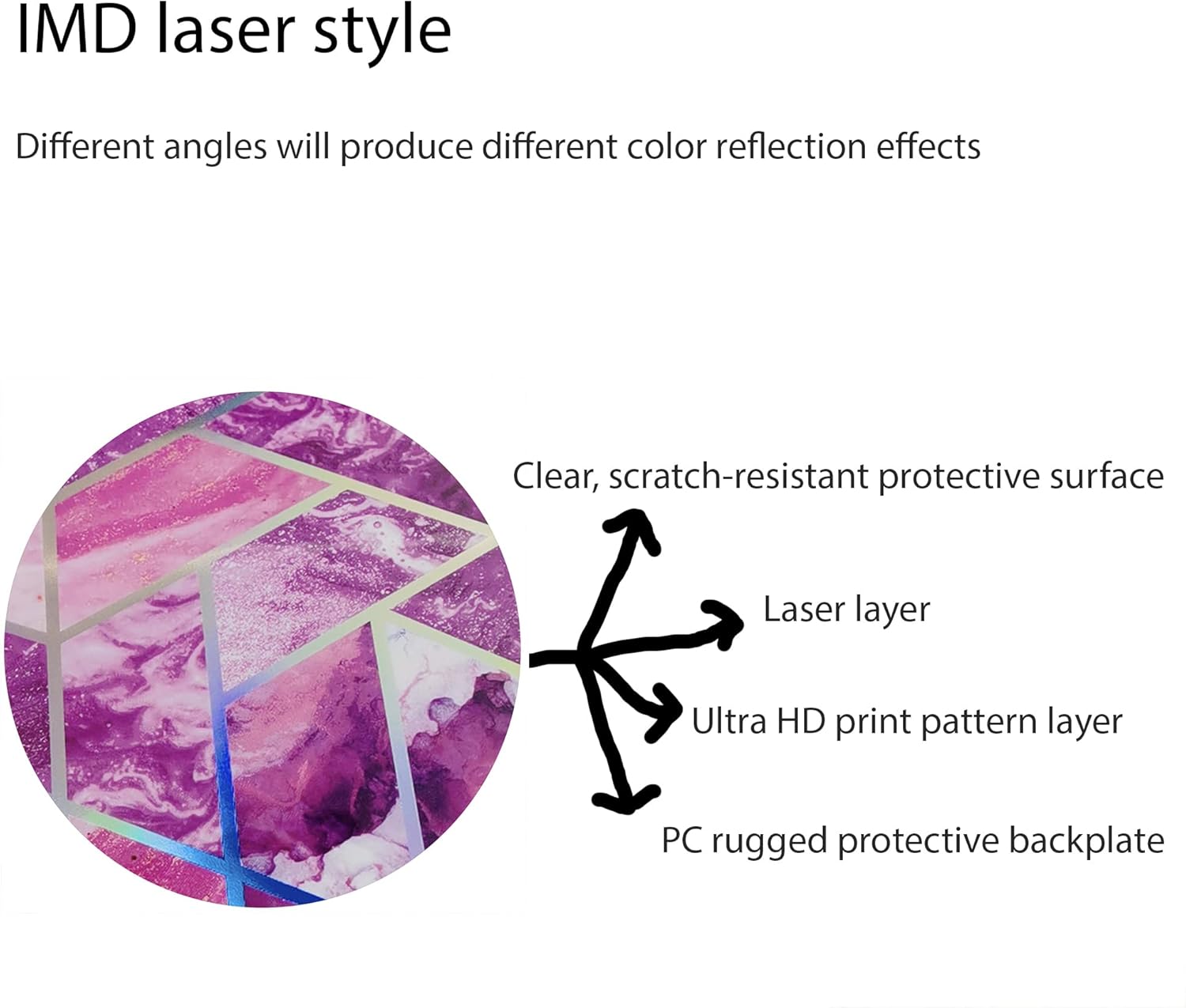
Image: Explanation of the IMD laser style and its multi-layered construction.
7.3 Screen Protector Features

Image: Key features of the tempered glass screen protector.

Image: Demonstration of the screen protector's scratch-proof properties.
8. Warranty Information
Warranty information for this product is provided by the manufacturer or seller. Please refer to the product packaging, the seller's website, or contact customer support for detailed warranty terms and conditions.
9. Customer Support
For any questions, technical assistance, or support regarding your Sky Elite V55 Phone Case and Tempered Glass Screen Protector, please contact the seller or manufacturer through the platform where the product was purchased.


