
Remotes Remade MFPV1
Master Remote for Panasonic Air Conditioners - Instruction Manual
Brand: Remotes Remade | Model: MFPV1
Introduction
This manual provides comprehensive instructions for the operation and maintenance of your Remotes Remade Master Remote for Panasonic Air Conditioners, model MFPV1. This remote is designed as a direct replacement for various Panasonic air conditioner models, offering full functionality for temperature control, mode selection, fan speed adjustment, and timer settings. Please read this manual carefully to ensure proper use and to maximize the lifespan of your remote control.
Setup
Battery Installation
The remote control requires two AAA batteries (not included). Follow these steps to install the batteries:
- Locate the battery compartment cover on the back of the remote control.
- Slide the cover downwards to open the compartment.
- Insert two AAA batteries, ensuring the positive (+) and negative (-) terminals align correctly with the markings inside the compartment.
- Slide the battery compartment cover back into place until it clicks securely.
Note: Remove batteries if the remote will not be used for an extended period to prevent leakage and damage.
Operating Instructions
The Master Remote provides intuitive control over your Panasonic Air Conditioner. Below are the primary functions and their usage:

Front view of the Master Remote for Panasonic Air Conditioners, showing the display and various control buttons.
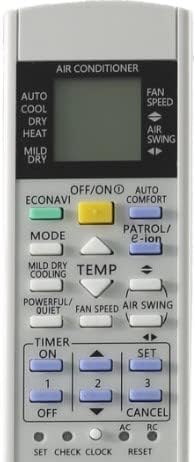
Detailed view of the remote's display and main function buttons.
Basic Functions
- OFF/ON Button: Press this button to turn the air conditioner on or off.
- MODE Button: Cycles through available operating modes: Auto, Cool, Dry, Heat (if supported by your AC unit). The current mode is displayed on the remote's screen.
- TEMP ▲/▼ Buttons: Adjusts the desired temperature setting. The temperature is displayed in Celsius only.
- FAN SPEED Button: Changes the fan speed. Options typically include Auto, Low, Medium, and High.
- AIR SWING Button: Controls the air swing (louver movement) function, allowing you to direct airflow.
Timer Functions
- TIMER ON/OFF Buttons: Sets a timer for the air conditioner to turn on or off automatically.
- SET Button: Confirms timer settings.
- CANCEL Button: Cancels any active timer settings.
- Clock Button: Used to set the current time on the remote's display.
Compatibility
This Master Remote is compatible with a wide range of Panasonic Air Conditioners. It is specifically designed to replace original remotes for the following models (and many others not explicitly listed):
- U50TKR, CU-U71TKR, CU-U80TKR, CU-E18GKR, CU-E21GKR, CU-E24GKR, CU-E28GKR, CU-E7NKR, CU-E9NKR, CU-E12NKR, CU-E15NKR, CS-S24MKR, CS-S28MKR, CU-S24MKR, CU-S28MKR, CS-E18NKR, CS-E21NKR, CS-E24NKR, CS-E28NKR, CU-RE18NKR, CU-RE24NKR, CU-RE28NKR, CU-RZ9RKR, CU-RZ12RKR, CWA75C4764
- A75C4764, CU-S24PKR, CU-S28PKR, CS-U18RKR, CS-U24RKR, CS-U28RKR, CU-E7MKR, CU-E9MKR, CU-E12MKR, A75C4543, CU-S9PKR, CU-S12PKR, CU-S18PKR, CU-Z7RKR, CU-Z9RKR, CU-Z12RKR, CU-Z15RKR, CU-Z18RKR, CU-Z21RKR, CU-E24MKR, CU-E28MKR, CS-E15MKR, CS-E18MKR, CS-E21MKR, CU-E7LKR, CU-E9LKR
- CU-E12LKR, CU-E15LKR, CS-S9LKR, CS-S12LKR, CS-S24LKR, CS-S28LKR, CU-E15MKR, CU-E18MKR, CU-E21MKR, CS-S18NKR, CS-S24NKR, CS-S28NKR, CU-S9LKR, CU-S12LKR, CU-S24LKR, CU-S28LKR, CS-S9LKR, CS-S12LKR, CS-S24LKR, CS-S28LKR, CS-S18NKR, CS-S24NKR, CS-S28NKR, CS-RZ18RKR, CS-RZ24RKR, CS-RZ28RKR, CU-RZ18RKR, CU-RZ24RKR, CU-RZ28RKR, CU-E18PKR, CU-E21PKR, CU-E24PKR, CU-E28PKR, CU-RE18MKR, CU-RE24MKR, CU-RE28MKR, CWA75C4770, A75C4770, CWA75C3111, A75C3111, CS-E12JKKW, CS-E12NKKW, CS-E9JKKW, CS-E9NKKW, CS-E18JKK, CS-E22JKK, CS-E12NKUAW, CS-E9NKUAW, CS-E12NKUA, CS-E9NKUA, CS-E18JKK, CS-E18NKUA, CS-E22JKK, CS-E24NKUA, CS-E18NKUA, CS-E24NKUA
- A75C3582, CWA75C3582, CS-S12NKUW-1, CS-S18JKU, CS-S18NKU-1, CS-S18NKUA, CS-S22JKU, CS-S22NKU, CS-S22NKU-1, CS-S24NKUA, S12NKU-1, S18NKU-1, S18NKUA
This remote is designed to work with Panasonic air conditioners that originally used a remote with similar button layouts and functions. It displays temperature in Celsius only.
Specifications
| Feature | Detail |
|---|---|
| Brand | Remotes Remade |
| Model Number | MFPV1 |
| Compatible Devices | Panasonic Air Conditioners (various models, see compatibility section) |
| Power Source | 2 x AAA Batteries (not included) |
| Display Type | Digital LCD (Celsius only) |
| Color | Gray |
| Item Weight | 2.39 ounces |
| Package Dimensions | 5.43 x 1.97 x 0.98 inches |
| Special Feature | Universal replacement for specified Panasonic AC remotes |
Troubleshooting
- Remote not responding:
- Ensure batteries are inserted correctly with proper polarity.
- Replace old or depleted batteries with new ones.
- Check for any obstructions between the remote and the air conditioner's receiver.
- Ensure you are within the effective range of the air conditioner's receiver.
- Buttons are sticky or unresponsive:
- This can occur over time due to dust or debris. Gently clean around the buttons with a soft, dry cloth. Avoid using liquids.
- If the issue persists, consider a replacement remote.
- Display is dim or blank:
- This usually indicates low battery power. Replace the batteries.
- Air conditioner not performing desired function:
- Verify that the air conditioner unit itself is powered on and functioning correctly.
- Ensure the remote's mode setting matches the desired operation (e.g., Cool mode for cooling).
- Some advanced functions may require specific air conditioner model support.
Maintenance
- Keep the remote control clean by wiping it with a soft, dry cloth.
- Avoid exposing the remote to direct sunlight, high temperatures, or high humidity.
- Do not drop the remote or subject it to strong impacts.
- If the remote will not be used for an extended period, remove the batteries to prevent corrosion.
Warranty and Support
For warranty information or technical support, please contact Remotes Remade directly through their official website or the retailer from whom you purchased the product. Please have your product model number (MFPV1) and purchase details ready when contacting support.