
RUBEHOOW SD-318
RUBEHOOW SD-318 Portable Bluetooth PA Karaoke System User Manual
Model: SD-318 | Brand: RUBEHOOW
1. Introduction
Thank you for choosing the RUBEHOOW SD-318 Portable Bluetooth PA Karaoke System. This versatile system is designed to provide high-quality audio and an engaging karaoke experience for various occasions, including home parties, meetings, weddings, picnics, and outdoor events. Featuring advanced smart chip technology, a touch screen control panel, and dual wireless microphones, the SD-318 offers exceptional sound clarity and user-friendly operation. This manual provides detailed instructions to help you set up, operate, maintain, and troubleshoot your device, ensuring optimal performance and enjoyment.
2. Product Overview
The RUBEHOOW SD-318 system comprises a main speaker unit and two wireless microphones, designed for portability and ease of use. Key features include:
- Smart Chip & Touch Screen Control: Experience smooth and intuitive control with the new generation intelligent chip and responsive touch screen.
- Dual Wireless Microphones: Two high-quality wireless microphones offer exceptional audio and freedom of movement.
- Voice Modification: Transform your voice into male, female, or child voices for added fun.
- Sound Field Modes: Choose between KTV and Concert sound modes to suit your preference.
- Pure Sound Quality: Equipped with two pure sound quality speakers that deliver immersive audio.
- Multiple Connectivity Options: Easily connect via Bluetooth, AUX cable, USB drive, TF card, Optical, or Coaxial input.
- Integrated Phone/Tablet Holder: A convenient slot on top of the unit allows for secure placement of your mobile device.

Figure 2.1: RUBEHOOW SD-318 Portable Bluetooth PA Karaoke System with two wireless microphones and a tablet in the integrated holder.
2.1 Package Contents
Please check the package contents upon unboxing to ensure all items are present:
- 1 x RUBEHOOW SD-318 Karaoke Speaker Unit
- 2 x Wireless Microphones
- 1 x USB Charging Cable
- 1 x AUX Cable
- 1 x TV Cable (RCA)
- 1 x User Manual (this document)

Figure 2.2: Included accessories: main unit, two wireless microphones, USB charging cable, AUX cable, and TV cable.
3. Setup
3.1 Charging the Unit and Microphones
Before first use, ensure both the main speaker unit and the wireless microphones are fully charged.
- Speaker Unit: Connect the provided USB charging cable to the DC 5V charging port on the speaker unit and plug the other end into a compatible USB power adapter (not included, a standard 5V 2A smartphone charger is recommended). The speaker battery lasts approximately 3 hours on a full charge.
- Microphones: The microphones can be charged by placing them into their designated slots on the speaker unit, or by connecting them directly via a USB Type-C cable (not included, but the speaker's USB charging cable can be used). The microphone battery lasts approximately 2 hours. An LCD display on each microphone monitors battery levels.

Figure 3.1: Charging the main speaker unit and wireless microphones.
3.2 Initial Power On
Press and hold the power button on the main speaker unit to turn it on. The LED display will illuminate. Similarly, power on each wireless microphone using their respective power buttons.
4. Operating Instructions
The RUBEHOOW SD-318 offers multiple playback modes and microphone controls for a comprehensive karaoke experience.
4.1 Selecting Playback Modes
Use the "MODE" button on the main unit's control panel to cycle through the available input sources:
- Bluetooth Mode: For wireless connection to smartphones, tablets, or other Bluetooth-enabled devices.
- TF Card Slot (microSD): Insert a TF card with your music files.
- USB Slot: Insert a USB drive with your music files.
- AUX Line-In (3.5mm): Connect external audio devices using the provided AUX cable.
- Optical Mode: Connect to compatible devices via an optical cable (not included).
- Coaxial Mode (Amplifier): Connect to devices supporting coaxial audio output (e.g., some TVs, amplifiers).
- TV Cable Port: Connect to a TV using the provided TV cable for audio output.

Figure 4.1: Available playback modes and corresponding input ports on the rear panel.
4.2 Bluetooth Connection
To connect your device via Bluetooth:
- Turn on the RUBEHOOW SD-318 speaker unit.
- Press the "MODE" button until "Bluetooth" is displayed on the screen. The unit will enter pairing mode.
- On your smartphone or tablet, enable Bluetooth and search for available devices.
- Select "SD-318" from the list of devices to pair. A confirmation sound will indicate successful pairing.
- You can now play music from your device through the karaoke system.

Figure 4.2: Connecting the system to a larger screen for an enhanced karaoke experience.
4.3 Microphone Controls and Features
Each wireless microphone features its own controls for volume, echo, and equalization (EQ), along with special voice effects.
- Volume Control (VOL +/-): Adjust the microphone's output volume.
- Echo Control (ECH +/-): Increase or decrease the echo effect on your voice.
- EQ Control (EQ): Cycle through different equalization presets for your voice.
- Voice Mode: Change your voice to male, female, or baby voice.
- Scene Mode: Select between KTV and Concert Hall modes for different acoustic environments.
- Music/Orig: This function allows you to reduce or remove the original vocals from a song, making it suitable for karaoke.
- MIC Priority: Lowers the background music volume when you speak into the microphone, prioritizing your voice.
- Original Sounds: Restores the audio to its initial state.

Figure 4.3: Wireless microphone features including LED display, control panel, and charging method.
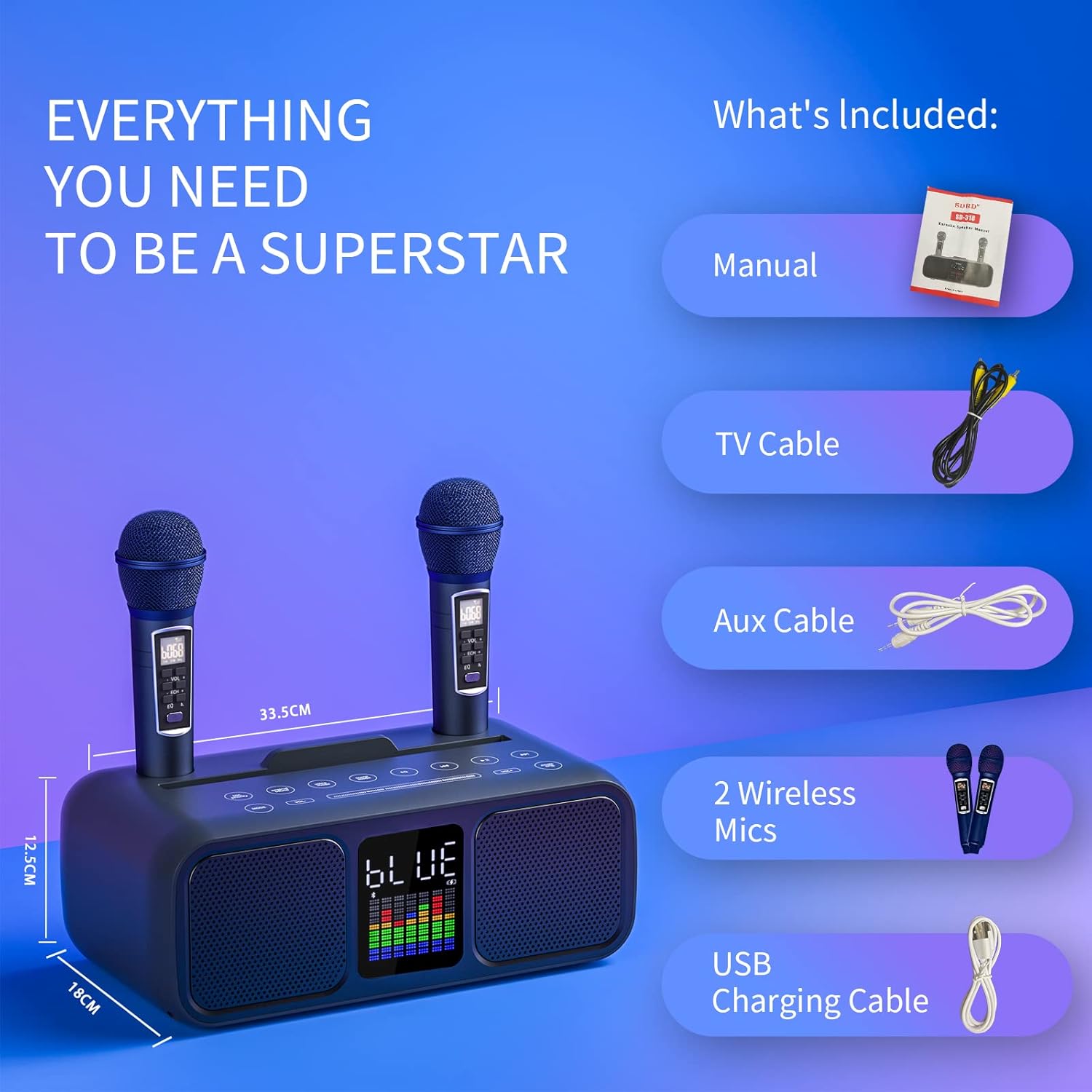
Figure 4.4: Overview of multiple karaoke modes and controls for enhanced user experience.
5. Maintenance
Proper care and maintenance will extend the life of your RUBEHOOW SD-318 Karaoke System.
- Cleaning: Use a soft, dry cloth to clean the surface of the speaker unit and microphones. Do not use abrasive cleaners, waxes, or solvents.
- Storage: When not in use, store the system in a cool, dry place away from direct sunlight and extreme temperatures.
- Battery Care: To maintain battery health, avoid fully discharging the unit frequently. Recharge the unit and microphones regularly, even if not in active use.
- Avoid Liquids: Keep the device away from water and other liquids to prevent damage to internal components.
6. Troubleshooting
If you encounter issues with your RUBEHOOW SD-318, please refer to the following common problems and solutions:
| Problem | Possible Cause | Solution |
|---|---|---|
| No sound from speaker. | Volume too low; incorrect input mode; device not connected. | Increase speaker volume. Ensure correct input mode is selected. Verify Bluetooth connection or cable connection. |
| Microphone not working. | Microphone off; low battery; microphone volume too low. | Ensure microphone is powered on. Recharge microphones. Increase microphone volume. |
| Bluetooth connection unstable or failing. | Device too far; interference; pairing issue. | Move device closer to the speaker. Avoid obstacles. Unpair and re-pair the device. |
| Static noise from microphones. | Interference; microphone too close to speaker; faulty microphone. | Move away from other electronic devices. Maintain a reasonable distance from the speaker. If persistent, contact support. |
| Music volume too loud compared to microphone. | Incorrect balance settings. | Adjust the main unit's volume and microphone volume. Use the "MIC Priority" function if available. |
7. Specifications
| Feature | Detail |
|---|---|
| Brand | RUBEHOOW |
| Model Number | SD-318 |
| Mounting Type | Tabletop |
| Power Source | Battery Powered |
| Output Wattage | 15 Watts |
| Number of Channels | 2 |
| Audio Input | Bluetooth, 3.5mm AUX input, USB drive, TF card, Optical/Coaxial |
| Recommended Use | Home |
| UPC | 765718573399 |
| Product Dimensions (LxWxH) | 23 x 40 x 22 cm (9.06 x 15.75 x 8.66 inches) |
| Item Weight | 3.18 Kilograms (7 lbs) |
| Batteries | 4 Lithium Polymer batteries required (included) |
| Total USB Ports | 1 |
| Color | BLUE |
| Compatible Devices | Speaker |
8. Warranty and Support
RUBEHOOW is committed to providing high-quality products and customer satisfaction. We carefully inspect all goods before shipment to ensure proper product functionality.
- Return/Replacement Policy: You have the right to return or replace the goods within 90 days of purchase.
- Customer Support: If you encounter any problems during use, please contact us. We are dedicated to providing the best solution within 24 hours.
For support, please refer to the contact information provided with your purchase or visit the official RUBEHOOW website.