
Introduction
This user manual provides comprehensive instructions for the Riversong SP09 Bluetooth Speaker. Please read this manual carefully before using the device to ensure proper operation and to maximize its lifespan. Keep this manual for future reference.
Product Overview
The Riversong SP09 is a portable Bluetooth speaker designed for high-quality audio output. It features a compact design and easy connectivity.
Package Contents
- Riversong SP09 Bluetooth Speaker
- Charging Cable (USB)
- Audio Cable (AUX)
- User Manual
Device Layout
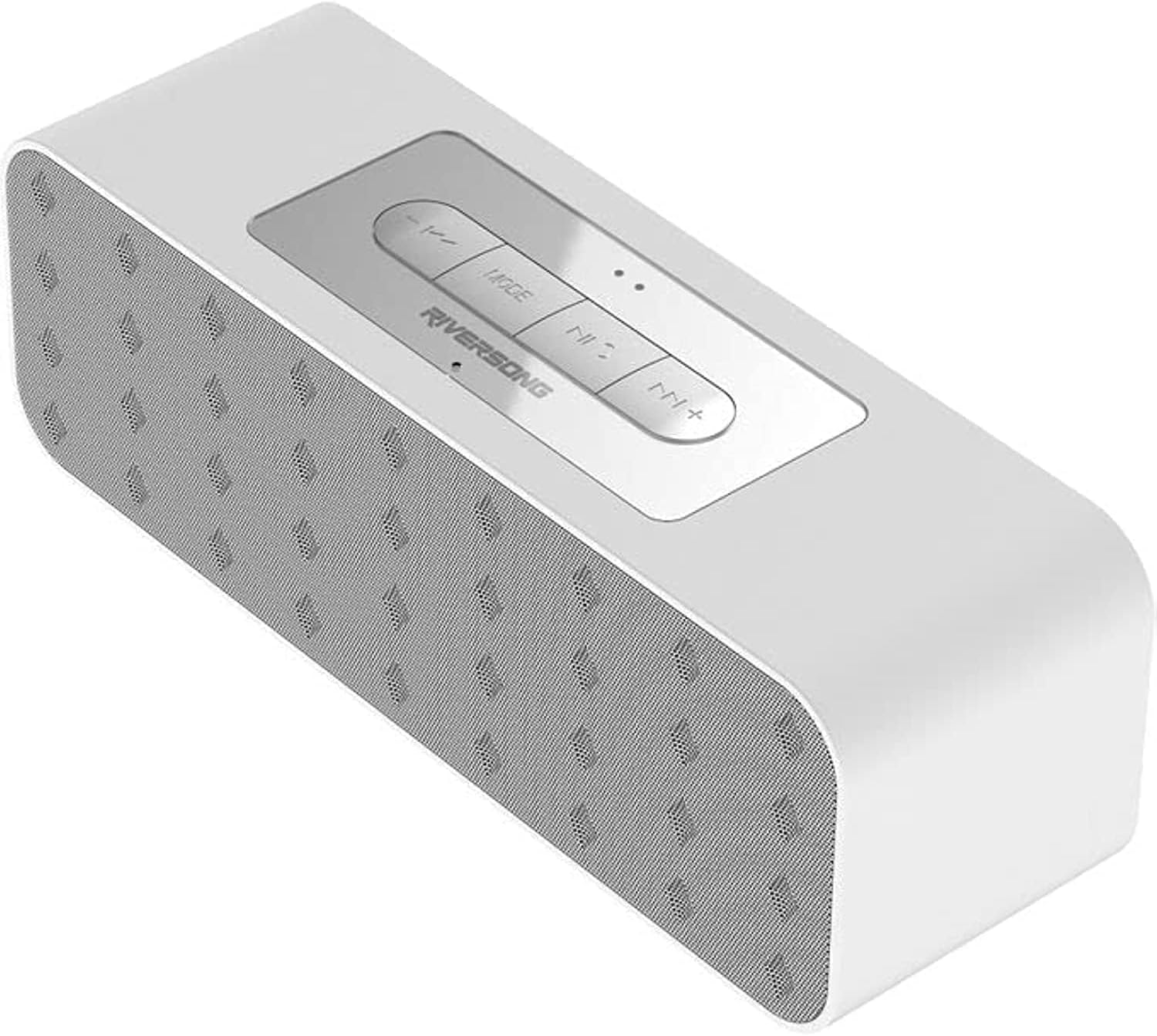
Figure 1: Top view of the Riversong SP09 Bluetooth Speaker, showing the control panel with Mode, Previous/Volume Down, Play/Pause, Next/Volume Up buttons.

Figure 2: Rear view of the Riversong SP09 Bluetooth Speaker, displaying the charging port, AUX input, and memory card slot.
Setup
Charging the Speaker
Before first use, fully charge the speaker.
- Connect the provided USB charging cable to the speaker's charging port.
- Connect the other end of the USB cable to a compatible USB power adapter (not included) or a computer's USB port.
- The charging indicator light will illuminate. It will turn off or change color once charging is complete.
Powering On/Off
To power on the speaker, press and hold the Power button (usually integrated with the Play/Pause button) for approximately 3 seconds. A power-on sound will indicate the device is active. To power off, press and hold the same button for 3 seconds until a power-off sound is heard.
Operating Instructions
Bluetooth Pairing
- Ensure the speaker is powered on and in Bluetooth pairing mode (indicated by a flashing LED light).
- On your device (smartphone, tablet, computer), enable Bluetooth and search for available devices.
- Select "Riversong SP09" from the list of found devices.
- Once paired, the speaker will emit a confirmation sound, and the LED light will stop flashing.
- The speaker is now ready to play audio from your device.
Playing Audio
After successful pairing, you can play audio from your connected device.
- Play/Pause: Press the Play/Pause button once to play or pause audio.
- Volume Control: Press and hold the "Volume Up" (+) button to increase volume, and the "Volume Down" (-) button to decrease volume.
- Next/Previous Track: Short press the "Next Track" (>>) button for the next song, and the "Previous Track" (<<) button for the previous song.
AUX Input Mode
To use the speaker with a non-Bluetooth device, connect it via the AUX input.
- Connect one end of the 3.5mm audio cable (AUX cable) to the speaker's AUX port.
- Connect the other end to the audio output jack of your device.
- The speaker should automatically switch to AUX mode. If not, press the "Mode" button to cycle through modes until AUX mode is activated.
MicroSD Card Playback
The speaker supports audio playback from a MicroSD card.
- Insert a MicroSD card with audio files into the designated slot on the speaker.
- The speaker will automatically switch to MicroSD card mode and begin playing. If not, press the "Mode" button to cycle through modes.
Maintenance
- Clean the speaker with a soft, dry cloth. Do not use abrasive cleaners or solvents.
- Avoid exposing the speaker to extreme temperatures, direct sunlight, or high humidity.
- Do not immerse the speaker in water.
- Store the speaker in a cool, dry place when not in use for extended periods.
- Charge the speaker regularly, even if not in frequent use, to maintain battery health.
Troubleshooting
| Problem | Possible Cause | Solution |
|---|---|---|
| Speaker does not turn on | Low battery | Charge the speaker fully. |
| No sound | Volume too low; Device not paired; Incorrect mode | Increase volume; Re-pair device; Switch to correct mode (Bluetooth/AUX/MicroSD). |
| Cannot pair via Bluetooth | Speaker not in pairing mode; Device Bluetooth off; Interference | Ensure speaker LED is flashing; Turn on device Bluetooth; Move closer to speaker; Turn off other Bluetooth devices. |
| Sound distortion | Volume too high; Low battery; Device too far | Reduce volume; Charge speaker; Move device closer. |
If the issue persists, please contact customer support.
Specifications
| Feature | Detail |
|---|---|
| Brand | Riversong |
| Model | SP09 |
| Speaker Type | Two-sided Speaker |
| Color | White |
| Connectivity Technology | Bluetooth |
| Audio Output Mode | Stereo |
| Mounting Type | Tabletop |
| Special Features | Bluetooth |
| Recommended Uses | For Televisions, For Computers, For Smartphones or Tablets, For Music Players |
| Compatible Devices | Tablet, Laptop, Smartphone |
| Product Dimensions | 5 x 16 x 5 cm |
| Product Weight | 500 grams |
| Woofer Diameter | 10 centimeters |
| ASIN | B0BLWB2DS3 |
Note: Specifications are subject to change without prior notice.
Warranty and Support
This product comes with a standard manufacturer's warranty. For detailed warranty information, please refer to the warranty card included in the package or visit the official Riversong website.
For technical support, troubleshooting assistance, or service inquiries, please contact Riversong customer service through their official channels.