
1. Introduction
The Progenion PR-450C is a quiet, versatile, and professional air purifier equipped with advanced air purification technology and modern sensor capabilities. Designed to provide clean air, this powerful device offers a solution for various indoor environments, including living rooms, bedrooms, offices, smoking areas, bird rooms, and waiting rooms. This manual provides essential information for the safe and effective operation and maintenance of your air purifier.
2. Safety Instructions
Please read all safety instructions carefully before using the appliance. Failure to follow these instructions may result in electric shock, fire, or serious injury.
- Always ensure the power cord is fully inserted into the outlet.
- Do not operate the appliance with a damaged cord or plug.
- Keep the air purifier away from water or other liquids.
- Do not block the air inlets or outlets.
- Unplug the appliance before cleaning or performing any maintenance.
- This appliance is not intended for use by persons (including children) with reduced physical, sensory, or mental capabilities, or lack of experience and knowledge, unless they have been given supervision or instruction concerning use of the appliance by a person responsible for their safety.
- Do not use the appliance in environments with flammable or explosive gases.
3. Product Overview
Familiarize yourself with the components of your Progenion PR-450C air purifier.
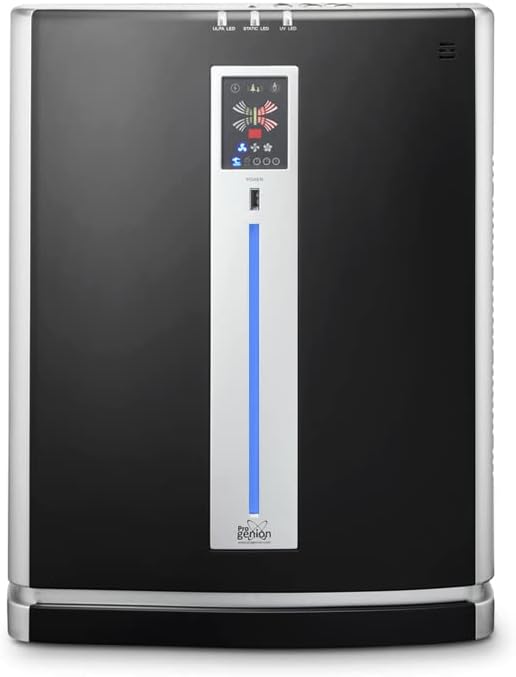
Figure 3.1: Front view of the Progenion PR-450C Air Purifier.

Figure 3.2: Side view of the Progenion PR-450C Air Purifier.
3.1. Control Panel
The main control panel is located on the front of the unit, featuring intuitive touch buttons and an air quality indicator bar.
3.2. Remote Control
The device can also be operated using the included remote control.

Figure 3.3: Remote control for the PR-450C Air Purifier.
4. Setup
- Unpacking: Carefully remove the air purifier from its packaging. Retain the packaging for future storage or transport.
- Placement: Place the air purifier on a flat, stable surface. Ensure there is adequate space (at least 20 cm) around the air inlets and outlets for optimal airflow. Avoid placing it near heat sources or in direct sunlight.
- Filter Installation: The filters are typically pre-installed but may have protective packaging. Open the filter compartment (usually at the back or side) and remove any plastic wrapping from the HEPA, ULPA, and Active-Carbon filters. Reinsert them correctly according to the markings.
- Power Connection: Plug the power cord into a standard electrical outlet.
5. Operating Instructions
The Progenion PR-450C offers both manual and automatic operation modes.
5.1. Power On/Off
Press the POWER button on the control panel or remote control to turn the unit on or off.
5.2. Sensor Mode (Automatic Operation)
Press the SENSOR button to activate sensor technology. An air quality measurement will begin, lasting approximately 5 minutes, during which the indicator bar will be red. Once the measurement is complete, the indicator bar will turn blue, indicating that sensor technology is active. The device will then automatically adjust ventilation levels based on the detected air quality.
5.3. Manual Mode and Timer
Press the MODE button to switch between different operating modes, including manual mode and timer mode. In manual mode, you can control settings independently.
5.4. Fan Speed Control
Press the SPEED button to select from 3 different fan speeds. Note: This function is not active when sensor mode is enabled.
5.5. Anion / Ionizer Function
Press the ANION / IONIZER button to switch the open ionization function on or off. The 4 ionization brushes, located at the upper rear of the device, produce millions of negative ions to neutralize airborne viruses and bacteria.

Figure 5.1: Illustration of negative ion release for air purification.
5.6. Static / Electrostatic Filter Function
Press the STATIC / ELECTROSTATIC FILTER button to switch this section on or off. This filter captures coarse dust particles and ionizes passing air, neutralizing airborne virus particles and bacteria. This filter does not require replacement.

Figure 5.2: Illustration of the electrostatic filter in action.
5.7. UV-C Lamp Function
Press the UV-LIGHT / UV-C Lamp button to switch the UV-C lamp on or off. When activated, passing air is exposed to UV-C light, which neutralizes airborne virus particles and bacteria.

Figure 5.3: Illustration of the UV-C lamp neutralizing microorganisms.
6. Maintenance
Regular maintenance ensures optimal performance and extends the lifespan of your air purifier.
6.1. Electrostatic Filter Cleaning
The electrostatic filter does not require replacement. Clean it once a week using a vacuum cleaner with a brush attachment and a slightly damp cloth to remove accumulated dust and particles.
6.2. HEPA/ULPA and Active-Carbon Filter Replacement
The HEPA/ULPA and Active-Carbon filters have a limited lifespan and will need to be replaced periodically. The frequency depends on usage and air quality. Refer to the indicator on the control panel or consult the manufacturer's guidelines for replacement intervals. Always use genuine Progenion replacement filters.
6.3. General Cleaning
Wipe the exterior of the unit with a soft, dry cloth. Do not use abrasive cleaners or solvents. Ensure the unit is unplugged before cleaning.
7. Troubleshooting
If you encounter issues with your air purifier, refer to the following common problems and solutions:
| Problem | Possible Cause | Solution |
|---|---|---|
| Unit does not turn on | No power; power cord not connected; power outlet malfunction. | Check power cord connection; try a different outlet; ensure power switch is on. |
| Weak airflow | Filters are dirty or clogged; air inlets/outlets blocked. | Clean or replace filters; ensure no obstructions around the unit. |
| Unusual noise | Foreign object inside; unit not on a stable surface; fan issue. | Turn off and unplug, check for foreign objects; place on a stable surface. If noise persists, contact support. |
| Air quality indicator always red/poor | Sensor is dirty; genuinely poor air quality. | Clean the air quality sensor (refer to maintenance section); allow unit to run longer in sensor mode. |
If the problem persists after attempting these solutions, please contact Progenion customer support.
8. Specifications
| Feature | Specification |
|---|---|
| Model Number | PR-450C |
| Filter Type | HEPA, ULPA, Active-Carbon, Electrostatic |
| Coverage Area | Up to 80 m² |
| Ionizer Output | 8,000,000 ions/cm³ |
| UV-C Lamp Life | Approx. 6000 operating hours |
| Dimensions (H x W x D) | 58.5 x 45 x 23.7 cm |
| Maximum Power Consumption | 55 W |
| Minimum Power Consumption (Night Mode) | 35 W |
| Weight | 10.5 kg |
| Noise Level | Up to 55 dB |
| Control Method | Touch Panel, Remote Control |
| Certifications | CE |
9. Warranty and Support
Progenion products are manufactured to high-quality standards. For warranty information, please refer to the warranty card included with your purchase or visit the official Progenion website. For technical support, replacement parts, or service inquiries, please contact Progenion customer service through their official channels.