
1. Introduction
Thank you for choosing the Yisuro Porch Light with GFCI Outlet and Motion Sensor. This outdoor light fixture is designed to provide reliable illumination, enhanced safety with its integrated GFCI outlets, and convenience through its motion-sensing and dusk-to-dawn capabilities. This manual provides detailed instructions for installation, operation, maintenance, and troubleshooting to ensure optimal performance and longevity of your product.

Image 1: Yisuro Porch Light with GFCI Outlet and Motion Sensor.
2. Safety Information
- Electrical Safety: Always turn off power at the circuit breaker before installing, servicing, or cleaning the fixture.
- Qualified Electrician: Installation should be performed by a qualified electrician or a person with electrical knowledge to ensure proper wiring and safety.
- Grounding: Ensure the fixture is properly grounded to prevent electrical shock.
- GFCI Outlets: The built-in GFCI outlets provide ground fault protection. Regularly test the GFCI outlets by pressing the "TEST" button, then the "RESET" button. If the "RESET" button does not pop out, the outlet may be faulty and should be inspected by a qualified electrician.
- Water Protection: The downward-designed GFCI outlets are intended to protect against rain. Ensure the outlet covers are closed when not in use.
- Bulb Compatibility: Use only E26 DIMMABLE LED/incandescent light bulbs with a maximum wattage of 100W. Bulb is NOT included.
- Installation Height: Install the porch light with the outlet at least 4 feet (1.2 meters) from the ground.
3. What's in the Box
Verify that all components are present before beginning installation:
- Yisuro Porch Light Fixture with GFCI Outlet
- Mounting Hardware
- Shade (integrated into fixture)
- Instruction Manual
4. Specifications
| Feature | Detail |
|---|---|
| Brand | Yisuro |
| Model Name | yx-101-2 |
| Color | Black (2 Pack) |
| Material | Aluminum, Glass |
| Product Dimensions | 9"L x 4.64"W x 12"H (23cm L x 11.8cm W x 30.5cm H) |
| Voltage | AC 110-125V |
| Max Load (GFCI) | 1080W |
| Bulb Base | E26 |
| Max Bulb Wattage | 100W (Bulb NOT Included) |
| Light Source Type | Compatible with Dimmable LED/Incandescent |
| Special Feature | Dusk to Dawn, Motion Sensor, GFCI Outlet |
| Water Resistance Level | Waterproof |
| Installation Type | Wall Mount (Hardwired) |
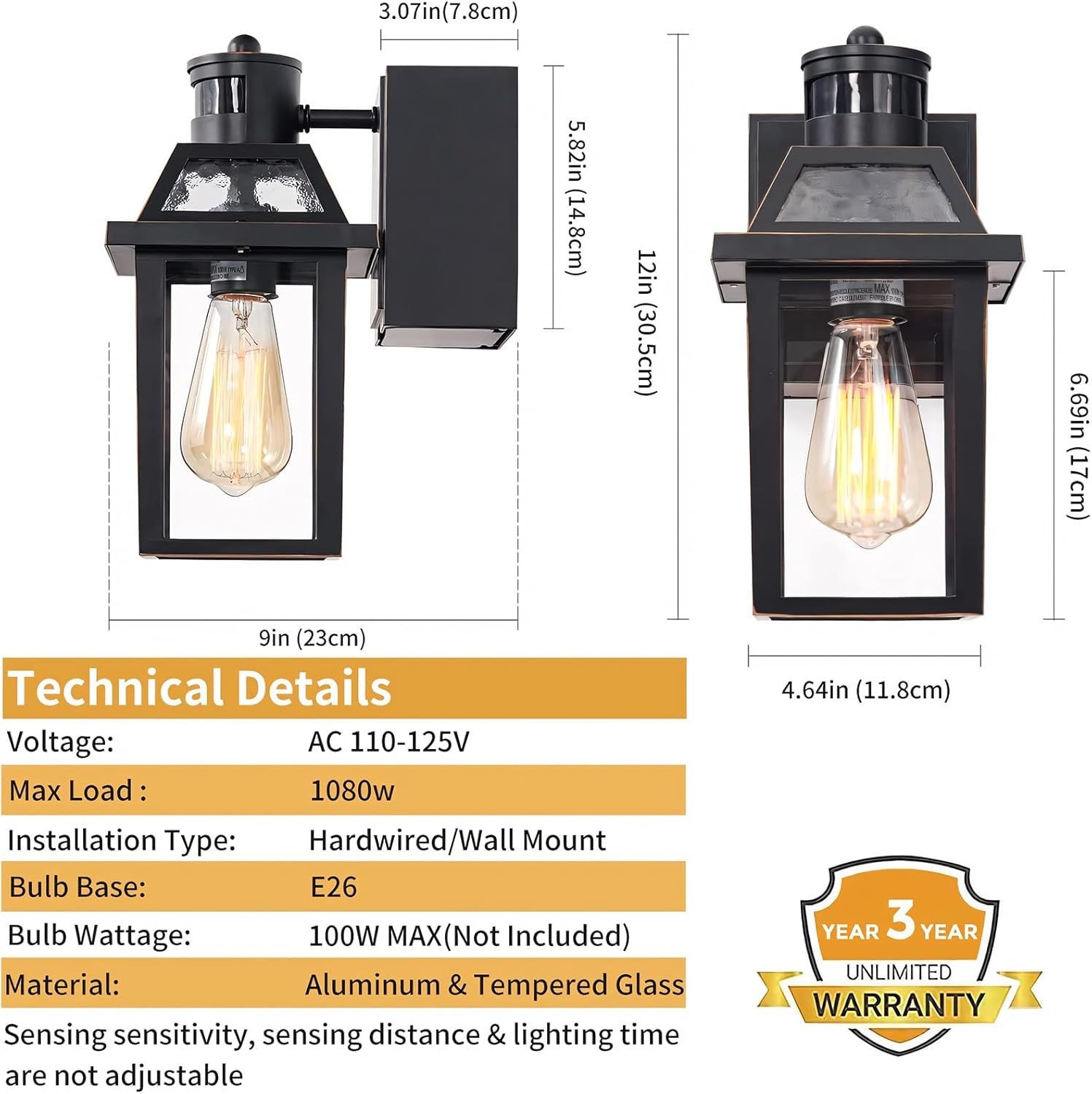
Image 2: Technical details and dimensions of the Yisuro Porch Light.
5. Installation
The Yisuro Porch Light is designed for easy installation. All necessary mounting hardware is included. Please follow these steps carefully:
- Turn Off Power: Before starting, ensure the power to the installation area is turned off at the main circuit breaker to prevent electrical shock.
- Prepare Mounting Surface: Ensure the wall surface is clean and ready for mounting. The fixture should be installed at least 4 feet (1.2 meters) from the ground.
- Connect Wiring: Connect the fixture's wires to your household wiring according to local electrical codes. Typically, this involves connecting live, neutral, and ground wires. Secure all connections with wire nuts.
- Mount the Fixture: Secure the lamp base to the wall using the provided mounting hardware. Ensure it is firmly attached.
- Install Bulb: Insert a compatible E26 DIMMABLE LED/incandescent bulb (Max 100W) into the socket. The bottom of the fixture is open for easy bulb installation and cleaning.
- Reset GFCI Outlets: After installation and before using the GFCI outlets, locate the "RESET" button between the outlets and press it firmly to activate the outlets.
- Restore Power: Turn the power back on at the circuit breaker.

Image 3: Detail of the integrated GFCI outlets, designed for weather protection.

Image 4: Example of the GFCI outlet being used for outdoor power tools.
6. Operating Modes
The Yisuro Porch Light offers three distinct lighting modes, which can be selected using a switch located on the fixture. The light also features a dusk-to-dawn sensor, automatically turning on at dusk and off at dawn.

Image 5: Overview of the three available lighting modes.
6.1. High Mode
- Stays at 30% brightness all night.
- Turns to 100% brightness when motion is detected.
- Returns to 30% brightness after 60 seconds of no motion.
6.2. Low Mode
- 0% brightness (off) without movement at night.
- Turns to 100% brightness when motion is detected.
- Automatically turns off after 60 seconds of no motion.
6.3. Manual Mode
- To activate, switch the power button (wall switch) "on-off-on" within 0.5-2 seconds while in Auto mode.
- The light will turn on and stay on for 8 hours.
- It will remain on until the dusk-to-dawn sensor detects light in the morning.

Image 6: Manual mode operation, allowing continuous illumination for 8 hours.
7. Maintenance
Regular maintenance ensures the longevity and optimal performance of your Yisuro Porch Light.
- Cleaning: Periodically clean the glass panels and exterior with a soft, damp cloth. Avoid abrasive cleaners or solvents that could damage the finish or glass.
- Bulb Replacement: Ensure power is off before replacing the bulb. The open bottom design allows for easy access to the E26 bulb socket.
- GFCI Inspection: Regularly inspect the GFCI outlets for any signs of damage or wear. Test the GFCI function monthly.
- Weather Resistance: The fixture is corrosion-resistant and designed to withstand various weather conditions (rain, snow, ice). However, ensure the GFCI outlet covers are securely closed when not in use to maintain protection.
8. Troubleshooting
If you encounter issues with your Yisuro Porch Light, refer to the following common problems and solutions:
| Problem | Possible Cause | Solution |
|---|---|---|
| Light does not turn on | No power, faulty bulb, sensor obstruction, incorrect mode setting. | Check circuit breaker. Replace bulb. Ensure sensor is clear. Verify mode switch setting. |
| Light stays on continuously | Manual mode active, sensor malfunction, ambient light too low. | Check mode setting. Ensure sensor is not covered. Test sensor function. |
| Motion sensor not detecting | Sensor obstruction, incorrect mode, sensor range issues. | Clear sensor. Check mode setting. Ensure motion is within 270°/33FT sensing angle. |
| GFCI outlets not working | Not reset, tripped, faulty outlet. | Press the "RESET" button. If it trips immediately, unplug devices. If still not working, consult an electrician. |
If these solutions do not resolve the issue, please contact Yisuro customer support.
9. Warranty and Support
Your Yisuro Porch Light comes with a 30-day unconditional return policy and a 3-year warranty. For any questions, technical assistance, or warranty claims, please contact Yisuro customer support through the retailer where the product was purchased or visit the official Yisuro store online.
We are committed to delivering high-quality products and earning trust through sincere, professional after-sales service. From product details to user experience, we promise full support, ensuring peace of mind and satisfaction.