
Hiseeu PK-6YHC98-CT
Hiseeu 4K PoE Security Camera System User Manual
Brand: Hiseeu | Model: PK-6YHC98-CT
1. Introduction
Thank you for choosing the Hiseeu 4K PoE Security Camera System. This system provides advanced surveillance capabilities with high-resolution imaging, intelligent detection features, and robust construction for both indoor and outdoor use. This manual will guide you through the installation, operation, and maintenance of your new security system to ensure optimal performance and longevity.
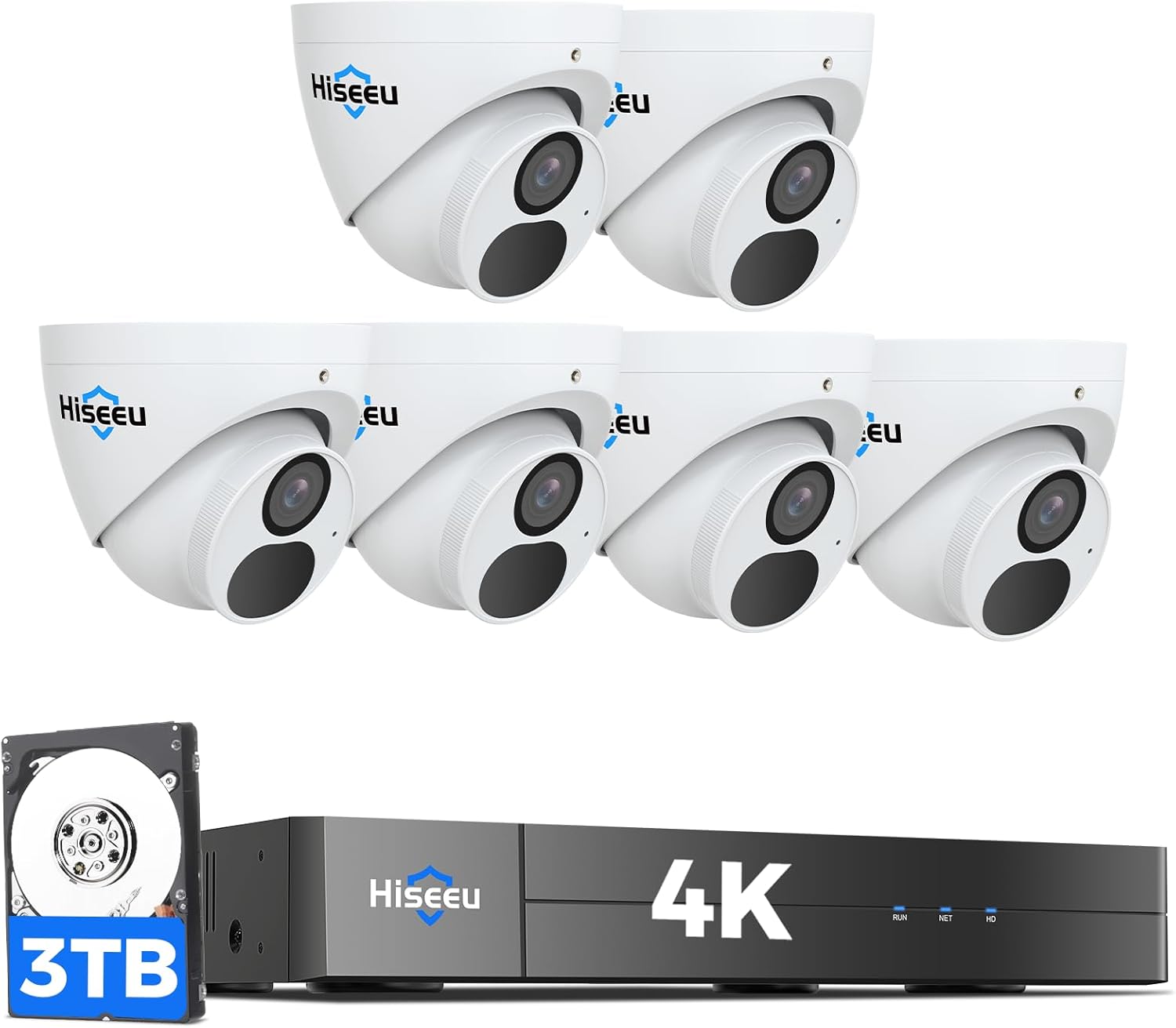
Image: Overview of the Hiseeu 4K PoE Security Camera System components.
2. What's in the Box?
Please verify that all items listed below are included in your package:
- 1 x 8-Port 4K 16CH PoE NVR
- 6 x 8MP Dome Cameras
- 1 x 3TB HDD Pre-installed
- 1 x Power Adapter for NVR
- 3 x 64ft Ethernet Cable
- 3 x 100ft Ethernet Cable
- 1 x 3ft Ethernet Cable
- 1 x HDMI Cable
- 1 x Mouse
- 1 x User Manual
- 2 x Warning Sticker
- 6 x Screws (for camera mounting)

Image: Visual representation of the package contents.
3. Setup Guide
3.1 Physical Installation
The Hiseeu PoE system simplifies installation by providing power and video transmission through a single Ethernet cable.
- Camera Placement: Select strategic locations for your cameras, considering the 121° wide-angle view to maximize coverage. The IP67 waterproof metal housing allows for both indoor and outdoor installation, capable of withstanding various weather conditions.
- NVR Placement: Position the NVR in a secure, central location, ideally near your router and a display monitor. Ensure adequate ventilation around the NVR.
- Connect Cameras to NVR: Connect each PoE camera to an available PoE port on the Hiseeu NVR using the provided Ethernet cables. This connection supplies both power and video data.
- HDD Installation (if applicable): The 3TB HDD is typically pre-installed. If not, follow the NVR's specific instructions for hard drive installation.
3.2 System Connection
- Connect NVR to Monitor: Use the provided HDMI or VGA cable to connect the NVR to a monitor or TV for local viewing and configuration.
- Connect NVR to Router: Connect the NVR's LAN port to your internet router using an Ethernet cable to enable remote access and network features.
- Power On: Connect the NVR to a power outlet using the provided power adapter. The system will power on automatically.
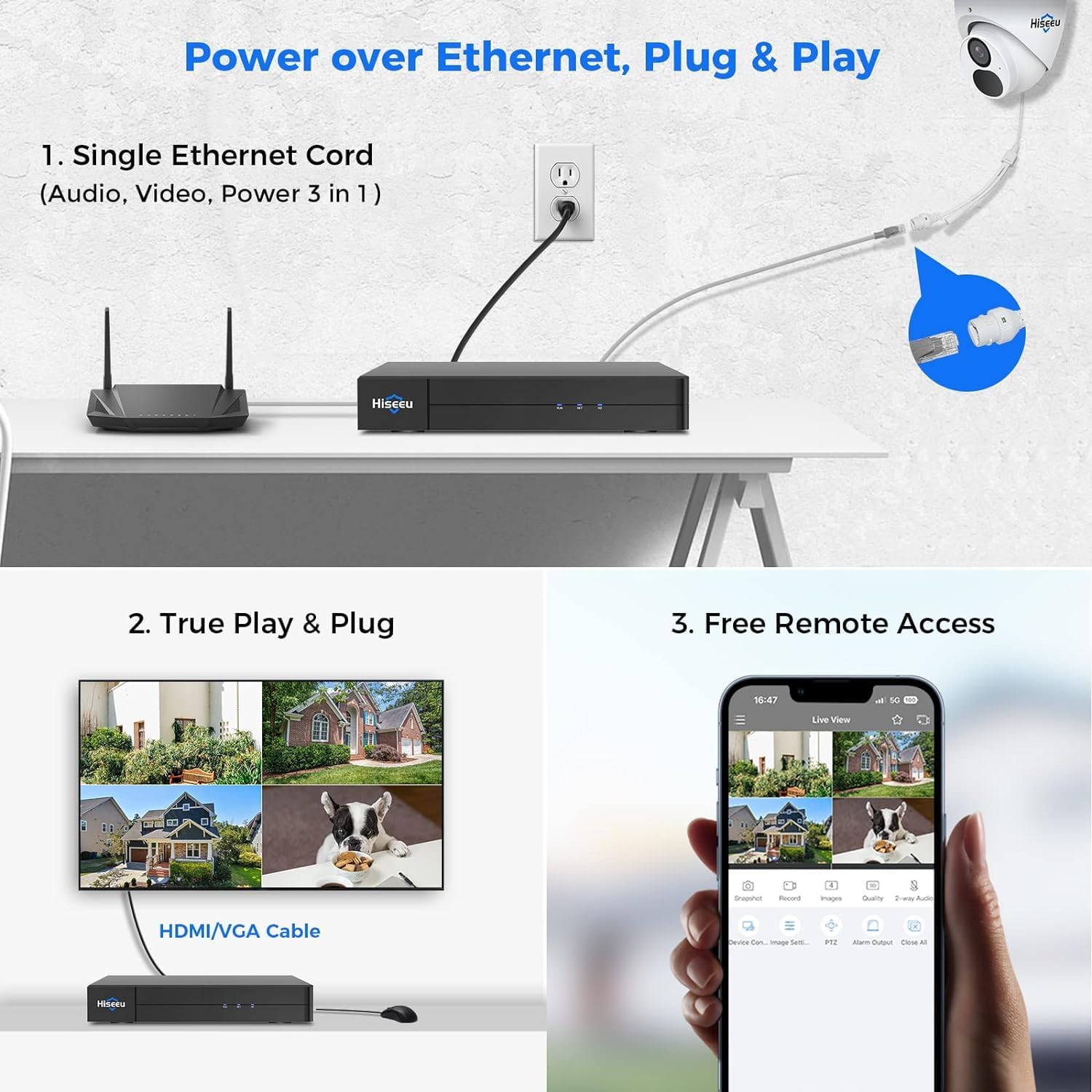
Image: Power over Ethernet connection and system setup overview.
3.3 Initial Setup & Remote Access
- Download the App: Search for the official Hiseeu app on Google Play Store (for Android) or Apple App Store (for iOS).
- Register and Log In: Follow the in-app instructions to create an account and log in.
- Add Device: Scan the QR code displayed on your NVR's monitor or enter the device ID manually to add your security system to the app.
- Live View: Once connected, you can access live video feeds from your cameras and configure settings remotely.

Image: Easy setup steps for mobile app access.

Image: Remote access capabilities and alarm notifications.
4. Operating Instructions
4.1 Live View and Recording
- Access Live View: View real-time footage from all connected cameras on your monitor or through the mobile app.
- 24/7 Recording: The pre-installed 3TB HDD supports continuous 24/7 loop recording for approximately 90 days with 4 cameras. The NVR can support up to 12TB storage for extended recording.
- Scheduled Recording: Configure specific recording schedules based on your needs.

Image: Smart Playback interface and recording options.
4.2 Smart Detection Features
- Smart Motion Detection (SMD): The system's AI-powered cameras can identify human shapes, significantly reducing false alarms from animals, shadows, or environmental factors like leaves and insects.
- Behavior Detection: Advanced algorithms help differentiate between important and non-important objects, enhancing the accuracy of alerts.
- AI WDR Function: Wide Dynamic Range (WDR) technology ensures balanced and clear images in challenging lighting conditions, such as areas with strong backlight or low light.

Image: Human detection and false alarm reduction.

Image: AI WDR function for improved image clarity.
4.3 Playback and Digital Zoom
- Smart Playback: Review recorded footage with advanced search options and playback speeds up to 256X maximum.
- Digital Zoom: Utilize the digital zoom function to enlarge specific areas of interest in live or recorded video for more detailed observation.

Image: Ultra 4K HD digital zoom in action.
5. Maintenance
Regular maintenance ensures the optimal performance and longevity of your Hiseeu security system.
- Camera Cleaning: Periodically clean the camera lenses with a soft, damp cloth to remove dust, dirt, or water spots that may obstruct the view. Avoid abrasive cleaners.
- Connection Check: Regularly inspect all cable connections (Ethernet, HDMI, power) to ensure they are secure and free from damage.
- Hard Drive Health: Monitor the health status of the 3TB HDD through the NVR's interface. While robust, hard drives can fail, and regular checks can help prevent data loss.
- Firmware Updates: Check the Hiseeu official website or app for any available firmware updates for your NVR and cameras. Updates often include performance improvements and security enhancements.

Image: IP67 waterproof design for durability in various weather conditions.
6. Troubleshooting
If you encounter issues with your Hiseeu security system, refer to the following common troubleshooting tips:
- No Video Display:
- Ensure the NVR is powered on and connected to the monitor via HDMI/VGA.
- Check that cameras are properly connected to the NVR's PoE ports and that the Ethernet cables are not damaged.
- Verify the video input source on your monitor is set correctly.
- No Recording:
- Check the NVR's hard drive status to ensure it is detected and functioning correctly.
- Verify recording schedules and motion detection settings are configured properly.
- Ensure the hard drive has sufficient free space.
- Remote Access Issues:
- Confirm the NVR is connected to your router and has internet access.
- Check your mobile device's internet connection.
- Ensure the Hiseeu app is updated to the latest version.
- Verify the device is correctly added to your app account.
- Poor Image Quality:
- Clean camera lenses.
- Ensure cameras are securely mounted and not vibrating.
- Check for strong light sources directly facing the camera, which can cause glare. Utilize the AI WDR function if needed.
For more complex issues or if the problem persists, please contact Hiseeu Technical Support.
7. Specifications
| Feature | Description |
|---|---|
| Brand | Hiseeu |
| Model Number | PK-6YHC98-CT |
| Connectivity Technology | Wired (PoE) |
| Video Capture Resolution | 4K (2160p) / 8MP |
| Lens Type | 2.8mm |
| Viewing Angle | 121 Degrees (Diagonal) |
| Special Features | Motion Sensor, Night Vision, AI WDR Function, Smart Detection (Human/Person) |
| Number of Channels | 8-Port PoE NVR (Expandable up to 16 Channels) |
| Memory Storage Capacity | 3 TB HDD (Built-in), expandable up to 12 TB |
| Video Compression | H.265+ |
| Night Vision Range | Up to 100 Feet |
| Waterproof Rating | IP67 (Cameras) |
| Operating Temperature | -10°C to 55°C (14°F to 131°F) |
| Power Source | AC (for NVR) |
| Item Dimensions (L x W x H) | 14 x 12 x 9 inches |
| Item Weight | 22 pounds |

Image: Key features and specifications of the Hiseeu 4K camera.

Image: 121° wide viewing angle.

Image: High-definition night vision capabilities.

Image: IP67 Waterproof and operating temperature range.

Image: Super metal housing for enhanced durability.
8. Warranty and Support
Hiseeu is committed to providing excellent customer service and support for your security system.
- 12-Month Warranty: Your Hiseeu 4K PoE Security Camera System is covered by a 1-year limited warranty from the date of purchase.
- Lifetime Technical Support: Hiseeu offers lifetime technical support for all its products. If you have any questions or require assistance, please do not hesitate to contact our experienced technical support team.
- 30-Day Free Return & Exchange: Enjoy a 30-day free return and exchange service from the date of purchase.
- 60-Days Money Back Guarantee: A 60-day money-back guarantee is provided for your peace of mind.
For technical assistance or warranty claims, please refer to the contact information provided on the Hiseeu official website or within the product packaging.
Ask a question about this manual
Ask about setup, troubleshooting, compatibility, parts, safety, or missing instructions. Manuals+ will review the question and use this page’s manual context to help answer it.