
KONLEYA P8
KONLEYA P8 Bone Conduction Headphones User Manual
Brand: KONLEYA | Model: P8
1. Introduction
Thank you for choosing the KONLEYA P8 Bone Conduction Headphones. These innovative headphones are designed for active lifestyles, offering IPX8 waterproof protection, Bluetooth 5.3 connectivity, and a generous 32GB built-in memory. Experience open-ear comfort and high-quality sound for swimming, running, gym workouts, and more, while remaining aware of your surroundings.

Image: KONLEYA P8 Bone Conduction Headphones, showcasing their waterproof design.
2. What's in the Box
Carefully unpack your KONLEYA P8 headphones and ensure all items are present:
- KONLEYA P8 Bone Conduction Sports Headphones x 1
- Product Instruction Manual x 1
- Sponge Earplugs x 2
- Size Adjustment String x 1
- Magnetic Charging Cable x 1
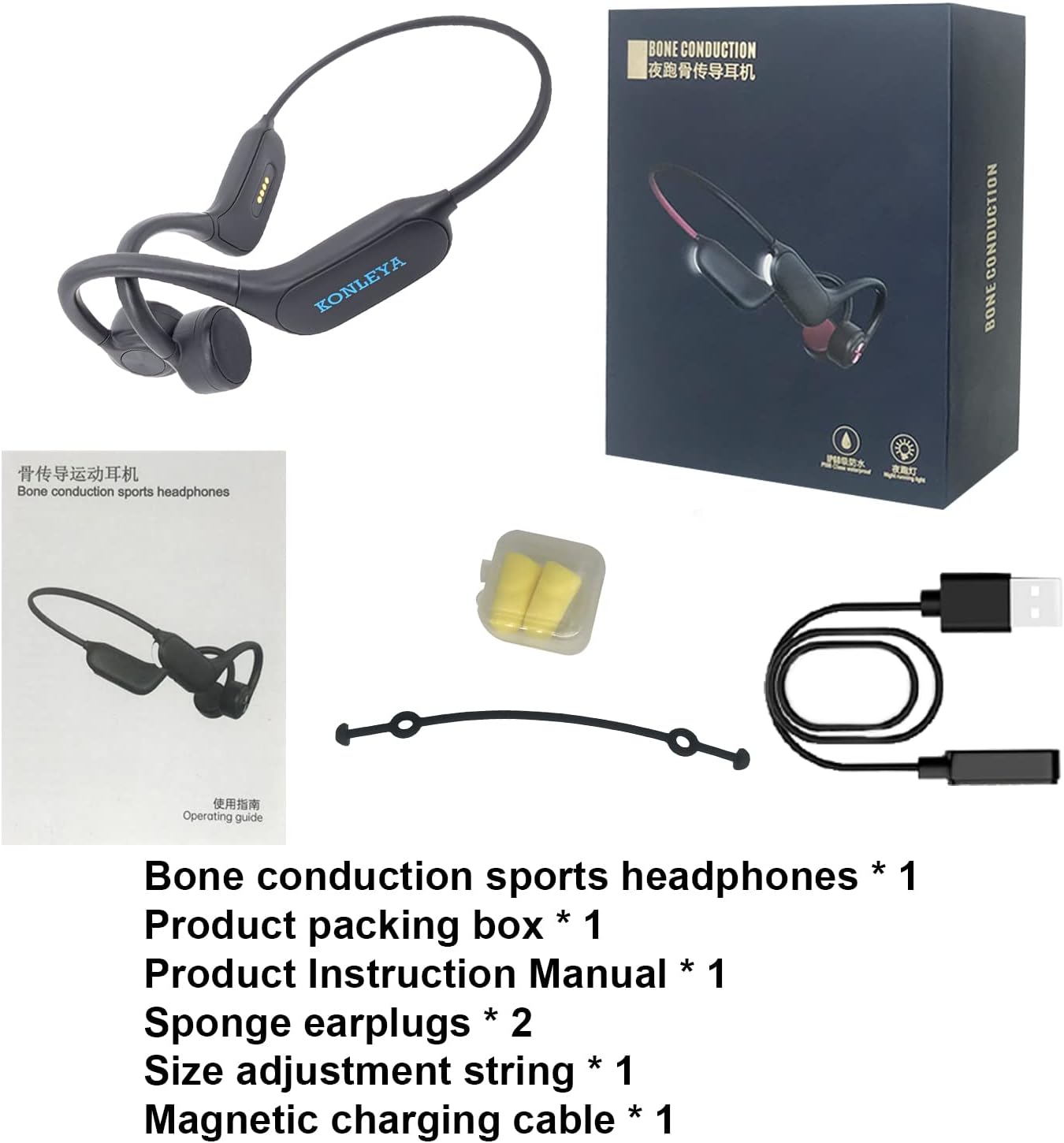
Image: All components included in the KONLEYA P8 headphone package.
Unboxing Video
Video: A demonstration of unboxing the KONLEYA P8 Bone Conduction Headphones and its contents.
3. Product Features
3.1. Built-in 32GB Memory
Store approximately 8000 songs directly on your headphones. Supports MP3, WAV, WMA, AAC, and FLAC formats, allowing you to listen to music without needing a connected device. Ideal for swimming where Bluetooth signals may be interrupted.

Image: Visual representation of the 32GB memory and Bluetooth 5.3 capabilities.
3.2. IPX8 Waterproof Rating
Designed for aquatic activities, these headphones are fully waterproof (IPX8 rated), making them suitable for swimming, snorkeling, and other water sports. The enclosed bone conduction technology ensures sound quality even underwater. Remember to switch to MP3 mode when swimming.

Image: A person using the headphones while surfing, highlighting the IPX8 waterproof feature.
3.3. Bone Conduction Technology
Unlike traditional headphones, the P8 transmits sound through vibrations in your skull bones directly to your inner ear. This open-ear design eliminates ear pain from prolonged use and allows you to hear ambient sounds, enhancing safety during outdoor activities.

Image: An exploded view diagram illustrating how bone conduction technology works.
3.4. Bluetooth 5.3 Connectivity
Equipped with the latest Bluetooth 5.3 chip, the headphones offer improved communication speed, extended transmission distance (up to 10 meters), near-zero latency, and low power consumption for a stable and efficient wireless experience.

Image: A visual representation of the Bluetooth 5.3 chip, emphasizing advanced connectivity.
3.5. Open Ear Comfort & Secure Fit
The ergonomic design ensures comfortable wear for extended periods, preventing ear swelling or pain. A wraparound titanium frame keeps the headphones stable during intense training. An included adjustment strap allows for a customized fit for various head sizes.

Image: Individuals running outdoors, demonstrating the comfortable and secure open-ear fit.
3.6. Night Light Feature
Integrated safety lights provide extra visibility and protection when exercising in low-light conditions or at night, enhancing your safety during evening runs or walks.

Image: A runner at night, illustrating the activated night running lights for safety.
3.7. Ultra-Long Battery Life & Magnetic Charging
The built-in 180mAh battery provides up to 6 hours of playback time (at 80% volume) on a single charge. The convenient magnetic charging cable allows for easy and secure charging anytime, anywhere, via computer, laptop, power bank, or charging adapter.
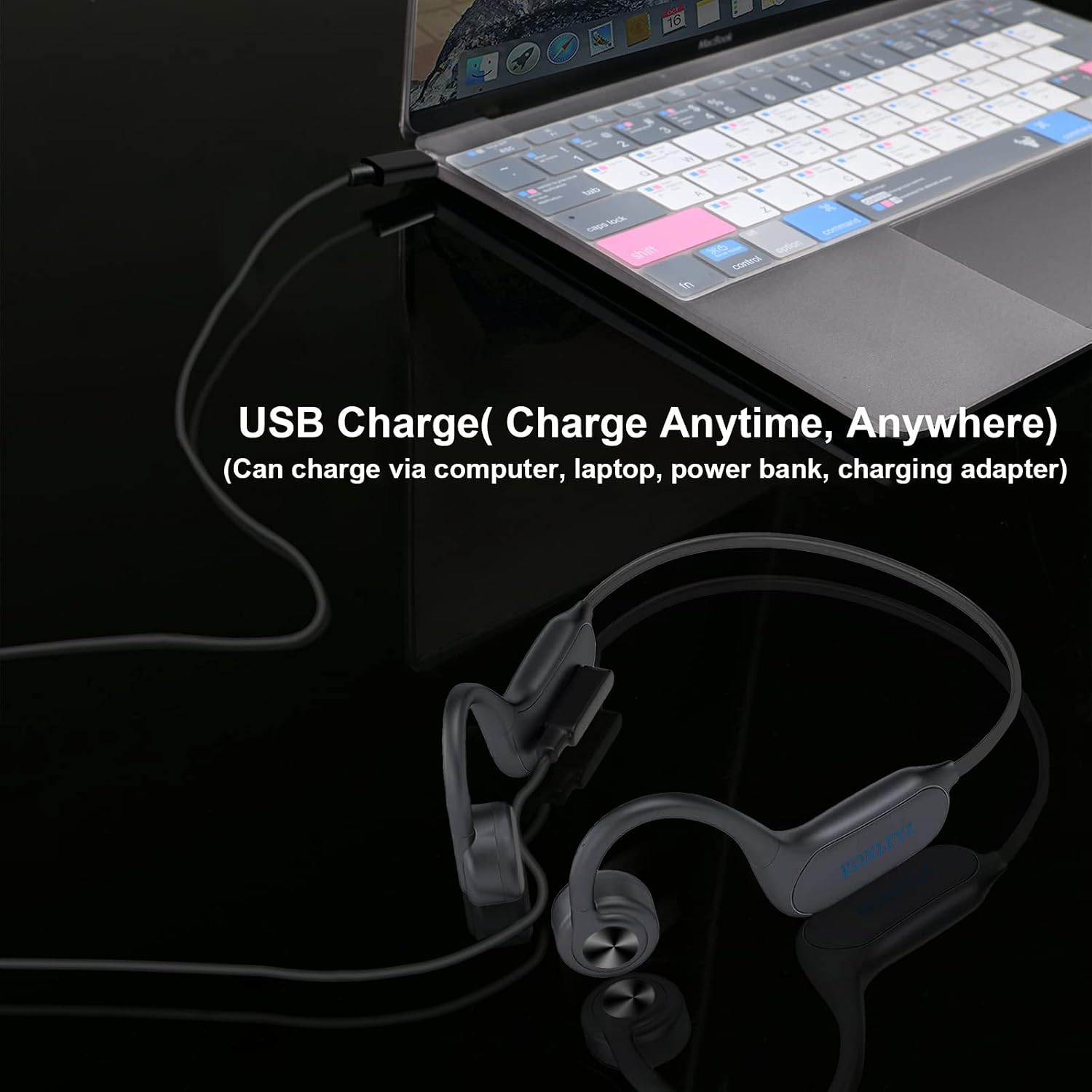
Image: The headphones connected to a laptop via the magnetic charging cable.
4. Setup Guide
4.1. Charging the Headphones
Before first use, fully charge your headphones. Connect the magnetic charging cable to the charging port on the headphones and the USB-A end to a power source (e.g., computer USB port, wall adapter). The charging indicator light will show charging status (refer to LED indicator section for details). A full charge takes approximately 1.5 hours.

Image: Detail of the magnetic charging connection on the headphones.
4.2. Powering On/Off
- Power On: Press and hold the Power/Multi-function button for 3 seconds until the LED indicator flashes blue and you hear a power-on prompt.
- Power Off: Press and hold the Power/Multi-function button for 5 seconds until the LED indicator flashes red and you hear a power-off prompt.
4.3. Bluetooth Pairing
- Ensure the headphones are powered off.
- Press and hold the Power/Multi-function button for 5-7 seconds until the LED indicator flashes red and blue alternately, indicating pairing mode.
- On your device (smartphone, tablet, computer), enable Bluetooth and search for available devices.
- Select "KONLEYA P8" from the list of found devices.
- Once connected, the LED indicator will flash blue slowly, and you will hear a connection confirmation.
The headphones will automatically attempt to reconnect to the last paired device when powered on.
5. Operating Instructions
5.1. Button Functions

Image: Detailed diagram showing the location and function of each button on the headphones.
| Button/Action | Function |
|---|---|
| Power/Multi-function Button (Main Button) |
|
| Volume + / Next Song Button |
|
| Volume - / Previous Song Button |
|
| Night Run Safety Lights Button |
|
5.2. Switching Between Bluetooth and MP3 Mode
The headphones automatically default to Bluetooth mode when powered on. To switch to MP3 mode (for built-in memory playback), quickly double-press the Power/Multi-function button. To switch back to Bluetooth mode, double-press the Power/Multi-function button again.
Note: When swimming underwater, Bluetooth signals are significantly interfered with. Always switch to MP3 mode for uninterrupted audio during swimming.
5.3. Transferring Music to Built-in Memory
- Ensure the headphones are powered off.
- Connect the headphones to your computer using the magnetic charging cable. The computer should recognize the headphones as a removable disk.
- Drag and drop your desired audio files (MP3, WAV, WMA, AAC, FLAC) into the headphone's storage folder.
- Safely eject the removable disk from your computer before disconnecting the cable.
6. Maintenance
- Cleaning: Wipe the headphones with a soft, damp cloth. Do not use harsh chemicals or abrasive cleaners. Ensure the charging contacts are clean and dry before charging.
- Storage: Store the headphones in a cool, dry place away from direct sunlight and extreme temperatures.
- Water Resistance: While IPX8 rated, avoid prolonged submersion beyond recommended depths (up to 2 meters) and durations (up to 2 hours). Always rinse with fresh water after use in chlorinated or saltwater and allow to air dry completely before charging.
- Battery Care: To prolong battery life, avoid fully discharging the battery frequently. Charge regularly, even if not in use for extended periods.
7. Troubleshooting
| Problem | Possible Cause | Solution |
|---|---|---|
| Headphones do not power on. | Low battery. | Charge the headphones fully. |
| Cannot pair with device. | Headphones not in pairing mode; device Bluetooth off; too far from device. | Ensure headphones are in pairing mode (flashing red/blue). Turn device Bluetooth off/on. Move headphones closer to device (within 10m). |
| No sound or distorted sound. | Volume too low; wrong mode (Bluetooth/MP3); water interference (swimming). | Increase volume. Switch to correct mode. If swimming, ensure you are in MP3 mode. |
| Cannot transfer files to memory. | Headphones not recognized as storage device; incorrect file format. | Ensure headphones are powered off before connecting to PC. Check file formats (MP3, WAV, WMA, AAC, FLAC). Try a different USB port or computer. |
| Night light not working. | Light feature is off. | Press the Night Run Safety Lights button to activate. |
8. Technical Specifications

Image: Overview of the KONLEYA P8's technical specifications.
| Specification | Detail |
|---|---|
| Model Name | P8 |
| Connectivity Technology | Wireless (Bluetooth 5.3) |
| Water Resistance Level | IPX8 Waterproof |
| Built-in Memory | 32GB |
| Supported Audio Formats | MP3, WAV, WMA, AAC, FLAC |
| Battery Life | Up to 6 Hours (at 80% volume) |
| Battery Capacity | 180mAh |
| Charging Time | Approx. 1.5 Hours |
| Charging Input | DC 5.0V === 150mA |
| Transmission Distance | 10 Meters |
| Frequency Response Range | 140Hz ~ 15KHz |
| Item Weight | 7.8 ounces (bare metal 33g) |
| Dimensions | 135*101*45mm (Headphone size) |
| Ear Placement | Over Ear |
| Form Factor | True Wireless |
9. Warranty and Support
KONLEYA products are manufactured to the highest quality standards. For information regarding warranty coverage, returns, or technical support, please refer to the product's official listing page on Amazon or contact KONLEYA customer service directly through the Amazon platform. Please retain your proof of purchase for any warranty claims.
For further assistance, visit the KONLEYA Store on Amazon.
Ask a question about this manual
Ask about setup, troubleshooting, compatibility, parts, safety, or missing instructions. Manuals+ will review the question and use this page’s manual context to help answer it.