
NV Nuvance Powerbank 20000
Nuvance 20000mAh Power Bank User Manual
Model: Powerbank 20000
1. Introduction
Thank you for choosing the Nuvance 20000mAh Power Bank. This portable power solution is designed to keep your electronic devices charged on the go. This manual provides essential information for the safe and efficient use of your power bank. Please read it thoroughly before use and retain it for future reference.
2. Product Overview
The Nuvance 20000mAh Power Bank features a high-capacity battery, multiple charging ports, and integrated safety protections. Its compact design makes it an ideal companion for travel and daily use.
2.1 Package Contents
- 1 x Nuvance 20000mAh Portable Power Bank
- 1 x USB Charging Cable
2.2 Key Features
- High Capacity: 20,000 mAh for extended device charging.
- Multiple Ports: 2 x USB-A output ports and 1 x USB-C input/output port.
- Fast Charging: Supports 15W fast charging.
- Simultaneous Charging: Capable of charging two devices concurrently.
- Digital Battery Indicator: LED indicators display remaining battery level.
- Safety Protections: Built-in safeguards against overcharge, overheating, short circuits, and overvoltage.
- Compact Design: Easy to carry for portability.
2.3 Product Diagram
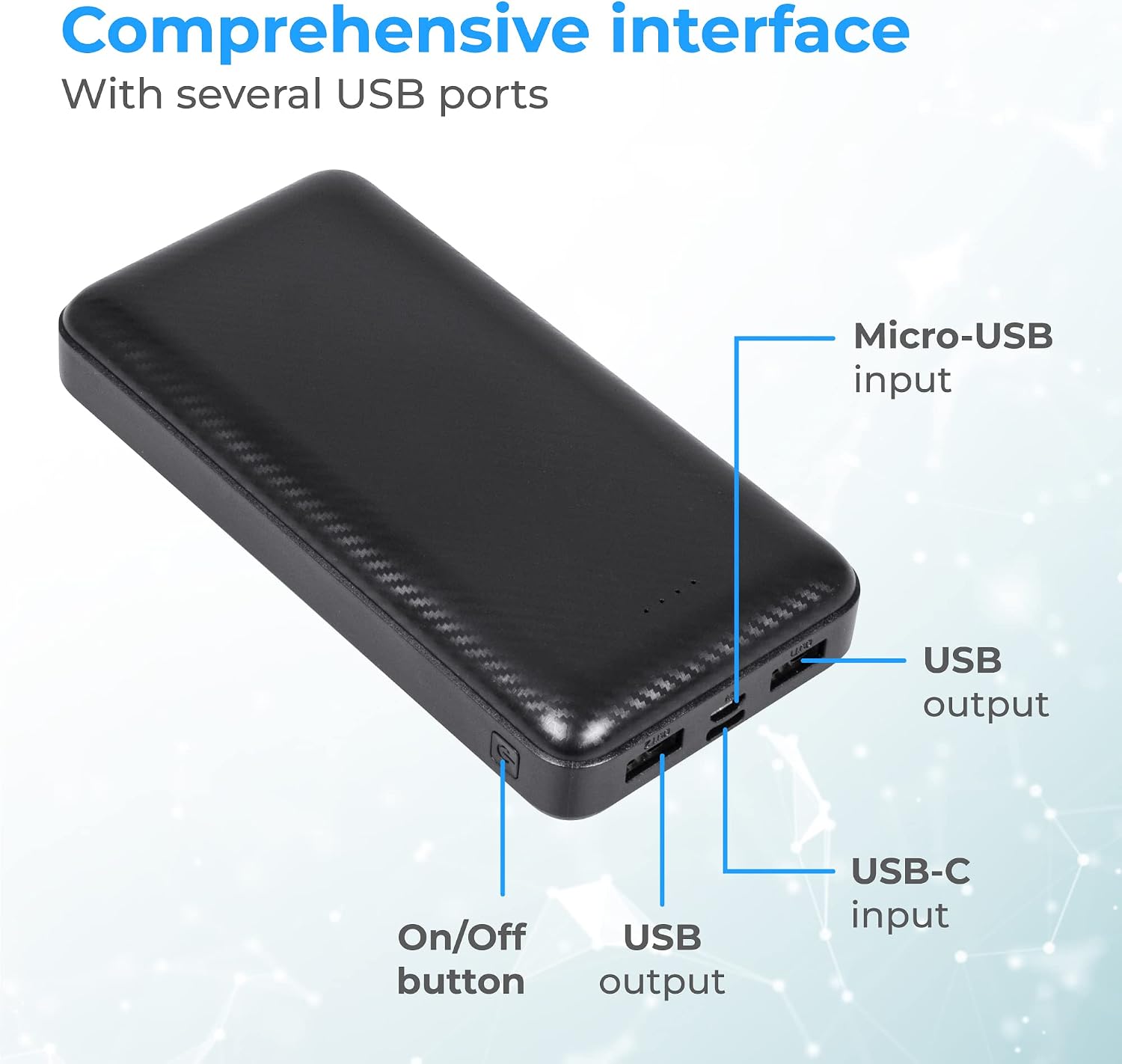
Image Description: An overhead view of the Nuvance Power Bank, highlighting its various ports and controls. Labels point to the Micro-USB input, two USB output ports, a USB-C input/output port, and the On/Off button. This image illustrates the comprehensive interface of the device.
3. Setup
3.1 Charging the Power Bank
- Connect the provided USB charging cable to the Micro-USB input port or the USB-C input/output port on the power bank.
- Connect the other end of the USB cable to a compatible USB wall adapter (not included) or a computer's USB port.
- The LED indicators on the power bank will illuminate to show the charging status. When all LEDs are solid, the power bank is fully charged.
A full charge typically takes approximately 2 hours with a fast-charging adapter.

Image Description: A close-up view of the Nuvance Power Bank showing four illuminated LED indicators, signifying battery level. The image also highlights the device's fiber pattern texture and its powerful internal battery.
4. Operating
4.1 Charging Your Devices
- Connect your device's charging cable to one of the USB-A output ports or the USB-C input/output port on the power bank.
- Connect the other end of the cable to your smartphone, tablet, smartwatch, or other compatible electronic device.
- Press the On/Off button on the power bank to initiate charging. The LED indicators will show the power bank's remaining charge.
- Your device should begin charging automatically.
The power bank can charge two devices simultaneously. The 20,000mAh capacity can provide approximately 3 charges for a tablet, 6 charges for a smartphone, or 8 charges for a smartwatch, depending on the device's battery size.

Image Description: The Nuvance Power Bank is shown actively charging two devices simultaneously via its USB output ports. A 'Fast Charge' icon is prominently displayed, indicating the rapid charging capability of the power bank.
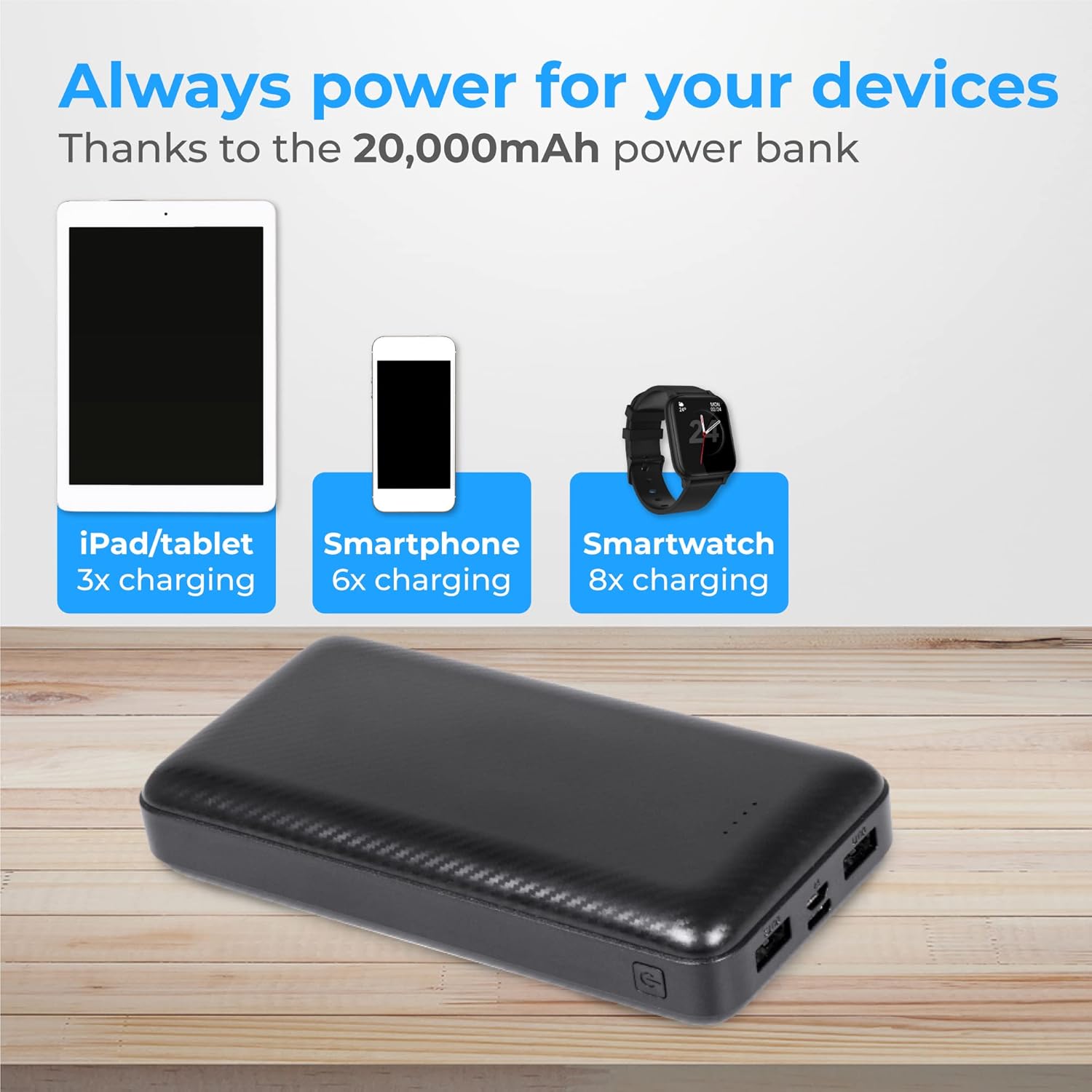
Image Description: An illustration demonstrating the charging capabilities of the 20,000mAh power bank. It shows an iPad/tablet receiving 3 charges, a smartphone receiving 6 charges, and a smartwatch receiving 8 charges, highlighting the versatility for various devices.
5. Maintenance
- Cleaning: Use a soft, dry cloth to clean the power bank. Avoid using harsh chemicals or abrasive materials.
- Storage: Store the power bank in a cool, dry place away from direct sunlight and extreme temperatures.
- Battery Life: To prolong battery life, fully charge the power bank at least once every three months if not in regular use.
- Avoid Drops: Do not drop or subject the power bank to strong impacts.
6. Troubleshooting
| Problem | Possible Cause | Solution |
|---|---|---|
| Power bank not charging | Cable is faulty or not properly connected; charging adapter is not working; power bank is fully charged. | Check cable connections; try a different cable or adapter; verify LED indicators. |
| Device not charging from power bank | Power bank is depleted; cable is faulty or not properly connected; device is incompatible; power bank is off. | Recharge power bank; check cable connections; ensure device is compatible; press On/Off button to activate. |
| Slow charging | Cable or adapter not supporting fast charge; device's charging input limit. | Use a fast-charging compatible cable and adapter; check device specifications. |
7. Specifications
- Model Name: Powerbank 20000
- Brand: NV Nuvance
- Capacity: 20,000 mAh
- Connector Type: USB Type A, USB Type C
- Number of Ports: 3 (2x USB-A Output, 1x USB-C Input/Output)
- Power Source: Cable Electric
- Output: 15W Fast Charge
- Compatible Devices: Computer, Laptop, Smartphone, Smartwatch, Tablet
- Color: Black
- Dimensions: Approximately 14cm x 7cm (Compact Size)

Image Description: A hand holding the Nuvance Power Bank, illustrating its compact size. Dimensions are overlaid on the image, showing a length of 14cm and a width of 7cm, emphasizing its portability.

Image Description: The Nuvance Power Bank is depicted alongside icons representing its multiple protection features: overcharge protection, overheating protection, short circuit protection, and overvoltage protection. This highlights the safety aspects of the device.
8. Warranty and Support
For warranty information or technical support, please refer to the documentation provided at the time of purchase or contact your retailer. Nuvance is committed to providing quality products and customer satisfaction.
Related Documents - Powerbank 20000
 |
Anker Power Bank 20000mAh 15W 2-Port Quick Start Guide A quick start guide for the Anker Power Bank 20000mAh, 15W, 2-Port, covering battery level checking, trickle-charging mode, charging devices, recharging the power bank, and specifications. |
 |
Trust Primo Powerbank User Guide User guide for the Trust Primo powerbank series, detailing charging methods and battery capacities. |
 |
Baseus PPDML-J02 20000mAh 15W Power Bank User Manual Comprehensive user manual for the Baseus PPDML-J02 portable power bank, detailing specifications, usage instructions, safety guidelines, warranty information, and compliance declarations. |
 |
Verbatim Charge 'n' Go Essential Power Bank Magnetic Wireless The Verbatim Charge 'n' Go Essential Power Bank Magnetic Wireless offers up to 20,000mAh capacity with 15W magnetic wireless charging and 35W USB-C PD fast charging. Features dual charging modes, bi-directional USB-C, and 6 essential protection systems for safe and reliable power on the go. |
 |
D10 Rechargeable Fan User Manual User manual for the D10 rechargeable fan, detailing its features, structure, operation, charging, safety precautions, and warranty information. Includes specifications for battery capacity, power, and battery life. |
 |
997104 - Cell Phone Accessories - EUR - 60H Stock Assortment Listing Detailed stock assortment listing for 997104 Cell Phone Accessories (EUR - 60H) from EXCHANGE, featuring a wide range of cables, chargers, power banks, cases, and mounts from various brands. |
Ask a question about this manual
Ask about setup, troubleshooting, compatibility, parts, safety, or missing instructions. Manuals+ will review the question and use this page’s manual context to help answer it.