
1. Safety Information
Always ensure the desk is properly assembled and adjusted for stability. Be cautious when using the electrical components and follow all safety guidelines for electrical devices. Keep the desk away from water and heat sources to prevent damage and potential hazards.
Important: Read all instructions carefully before assembly and use. Keep this manual for future reference.
2. Product Overview
The SZXKT L-Shaped Gaming Desk is designed for versatility and functionality, suitable for gaming, home office, or study. It features a robust metal frame and a rustic brown desktop. Key features include integrated power outlets, LED lighting, a movable monitor stand, and adjustable storage shelves.

Figure 2.1: SZXKT L-Shaped Gaming Desk in a typical setup.
Key Features:
- L-Shaped Design: Maximizes corner space and offers a large work surface.
- Reversible Configuration: Can be assembled with the longer side on either the left or right.
- Built-in Power Outlets: Includes 2 AC outlets and 2 USB charging ports for convenience.
- LED Lights: RGB LED strip with app and remote control for customizable ambiance.
- Movable Monitor Stand: Elevates your monitor for ergonomic viewing.
- Adjustable Storage Shelves: Provides flexible storage options for your CPU, books, or other items.
- Headphone Hooks: Two integrated hooks for easy headphone storage.
3. Assembly Instructions
Before beginning assembly, ensure all parts are present and undamaged. Refer to the included hardware list and diagrams. It is recommended to assemble the desk on a soft, clean surface to prevent scratches.
3.1 Unpacking and Part Identification
Carefully unpack all components from the box. Identify each part by comparing it with the parts list provided in your packaging. If any parts are missing or damaged, contact customer support immediately.
3.2 Reversible Design
This desk features a reversible design, allowing you to configure the L-shape to suit your space. Decide whether you want the longer desk section on the left or right side before starting assembly. The assembly steps will guide you through the options.

Figure 3.1: Desk dimensions and reversible assembly options.
3.3 Step-by-Step Assembly
- Attach the frame components using the provided screws and tools. Ensure all connections are secure but do not overtighten until the desk is fully assembled.
- Mount the desktop panels onto the assembled frame. Align the pre-drilled holes carefully.
- Install the adjustable storage shelves. The height can be customized to fit your needs.
- Secure the recessed power strip into its designated slot on the desktop.
- Attach the headphone hooks to the edge of the desk as desired.
- Place the movable monitor stand on the desktop. It is not fixed and can be positioned freely.
- Connect the LED light strip to the desk and power source.
- Once all components are in place, gently tighten all screws to ensure stability.
Video 3.1: Demonstration of the SZXKT L-Desk features and reversible setup.
4. Operating Instructions
4.1 Power Outlets and USB Ports
The desk includes a built-in power strip with 2 standard AC outlets (120V/12A) and 2 USB charging ports (5V/2A). Plug the desk's power cord into a wall outlet. You can then plug your devices directly into the desk's integrated outlets for convenient power access.

Figure 4.1: Close-up of the recessed power strip and headphone hook.
4.2 LED Lights
The integrated RGB LED light strip can be controlled via a remote control or a dedicated smartphone application. This allows you to customize colors, brightness, and dynamic lighting modes to create your preferred atmosphere.
- Remote Control: Use the provided remote to cycle through colors, adjust brightness, and select preset modes.
- App Control: Download the compatible app (refer to the LED light manual for specific app details) to access advanced features like music synchronization, custom color creation, and scheduling.
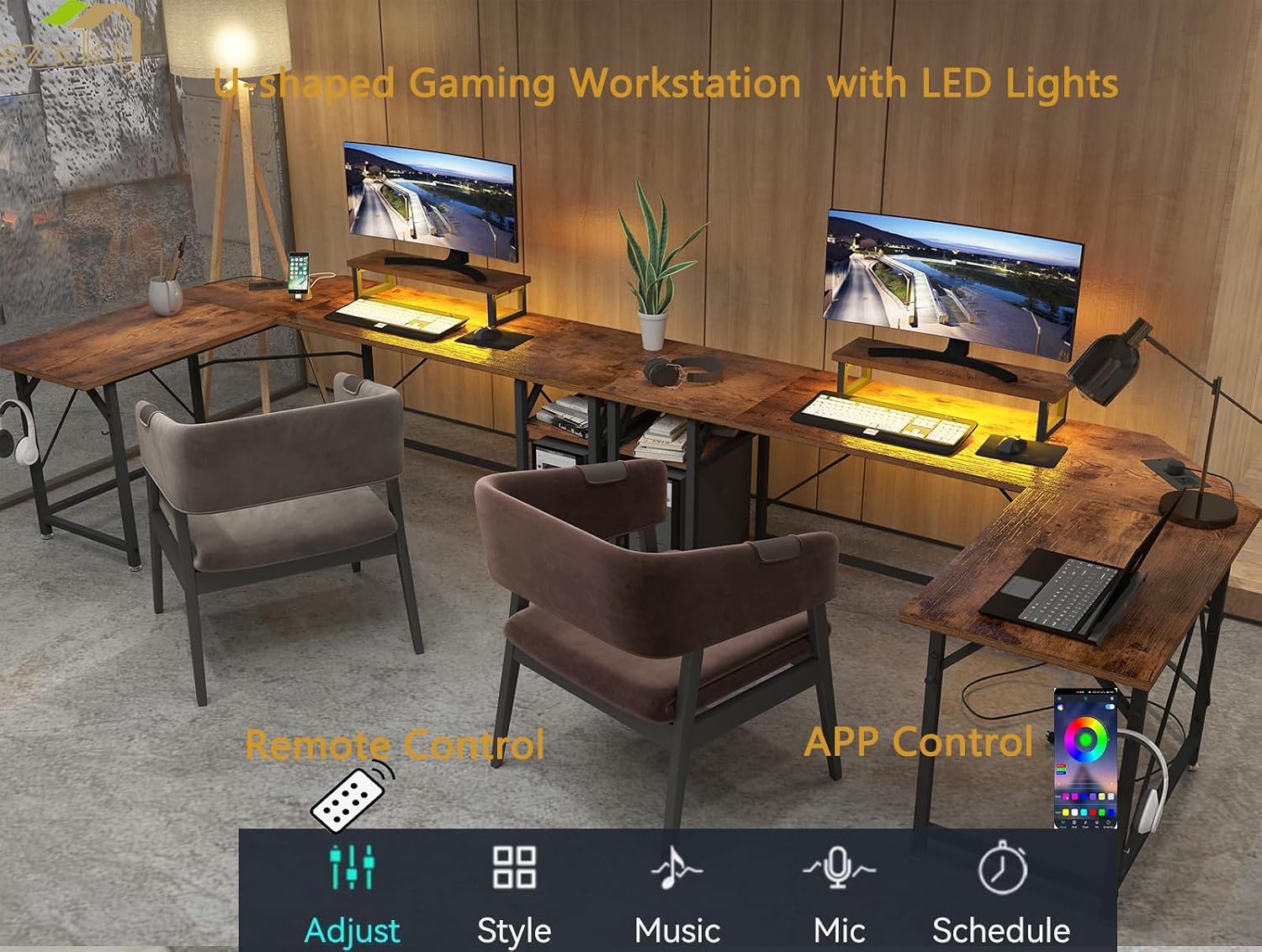
Figure 4.2: LED light control options via remote and smartphone app.
4.3 Movable Monitor Stand
The desk includes a separate, movable monitor stand. Place it on any part of the desktop to elevate your monitor to an ergonomic height, helping to maintain a correct sitting posture and reduce strain on your neck and spine.

Figure 4.3: Proper use of the movable monitor stand for ergonomic posture.
4.4 Headphone Hooks
Utilize the two integrated hooks on the desk's edge to conveniently hang your headphones, keeping your workspace tidy and your headphones easily accessible.
Video 4.1: Example of the L-shaped desk in use, demonstrating its practical applications.
5. Maintenance
Proper maintenance will ensure the longevity and appearance of your SZXKT L-Shaped Gaming Desk.
- Cleaning the Desktop: The MDF desktop is waterproof and scratch-resistant. Wipe with a soft, damp cloth and mild detergent if necessary. Avoid abrasive cleaners or harsh chemicals.
- Cleaning the Frame: The alloy steel frame can be cleaned with a damp cloth. Dry immediately to prevent rust.
- Regular Checks: Periodically check all screws and connections to ensure they remain tight. Retighten if needed to maintain stability.
- Avoid Excessive Weight: Do not place excessively heavy items on the desk or shelves beyond their intended capacity.
6. Troubleshooting
If you encounter any issues with your desk, refer to the following common troubleshooting steps:
- Desk is Unstable/Wobbly:
- Ensure all screws are securely tightened.
- Adjust the table leg pads on uneven ground to stabilize the desk.
- Power Outlets Not Working:
- Verify that the desk's main power cord is securely plugged into a functional wall outlet.
- Check if the wall outlet itself is receiving power (test with another device).
- Ensure the power strip is fully seated in its slot.
- LED Lights Not Responding:
- Check the connection of the LED strip to its power source and controller.
- Ensure the remote control has working batteries and is pointed correctly at the receiver.
- If using app control, ensure Bluetooth or Wi-Fi connection is active and the app is updated.
For issues not covered here, please contact customer support.
7. Specifications
| Feature | Detail |
|---|---|
| Brand | SZXKT |
| Model Number | LX-8 |
| Shape | L-Shape |
| Product Dimensions (L x W x H) | 67"D x 45.2"W x 29"H |
| Color | Rustic Brown |
| Top Material Type | Engineered Wood (MDF) |
| Base Material | Alloy Steel |
| Item Weight | 48 Pounds |
| Power Outlets | 2 AC Outlets (120V/12A), 2 USB Ports (5V/2A) |
| Special Features | Built-In USB, Built-in Outlet, Headphone Hook, Movable Monitor Stand, Reversible, LED Lights |
| Assembly Required | Yes |
| Includes Assembly Tools | Yes |
8. Warranty and Support
SZXKT provides lifelong customer support for this product. If you receive an item that is damaged, scratched, or has missing parts, please contact us directly. We are committed to providing a satisfactory solution within 24 hours.
For assistance, please refer to the contact information provided in your product packaging or visit the official SZXKT website.