
1. Product Overview
This replacement parts kit is designed to maintain the optimal performance of your iHome AutoVac Nova, Nova Pro, Hola, and Orbita Pro robot vacuum cleaners. Regular replacement of these components ensures efficient cleaning and extends the lifespan of your device.
Package Contents:
- 1 x Main Brush Roll
- 6 x Side Brushes
- 4 x HEPA Filters

Image 1.1: Contents of the ZXHUANGOH Replacement Parts Kit.
2. Compatibility Information
This kit is specifically designed for certain iHome robot vacuum models. Please verify your vacuum's model number to ensure compatibility before installation.
Compatible Models:
- iHome Nova (iHRV6)
- iHome Nova Pro (iHRV14)
- iHome Hola (iHRV7)
- iHome Orbita Pro (iHRV16)
Incompatible Models:
- iHome Nova S1 Pro (iHRVS1PRO-3BLK)
- iHome Nova S1 1st Gen (iHRVS1-3BLK)
- iHome Nova S1 2nd Gen (iHRVS1-3BLKS)
- iHome Nova S2 (iHRVS2-3BLK)
- iHome Juno Classic (iHRV4-GRY)

Image 2.1: Compatibility chart for iHome robot vacuum models.

Image 2.2: Locate your vacuum's model number on the label at the bottom of the device.
Visual Comparison for Main Brush:
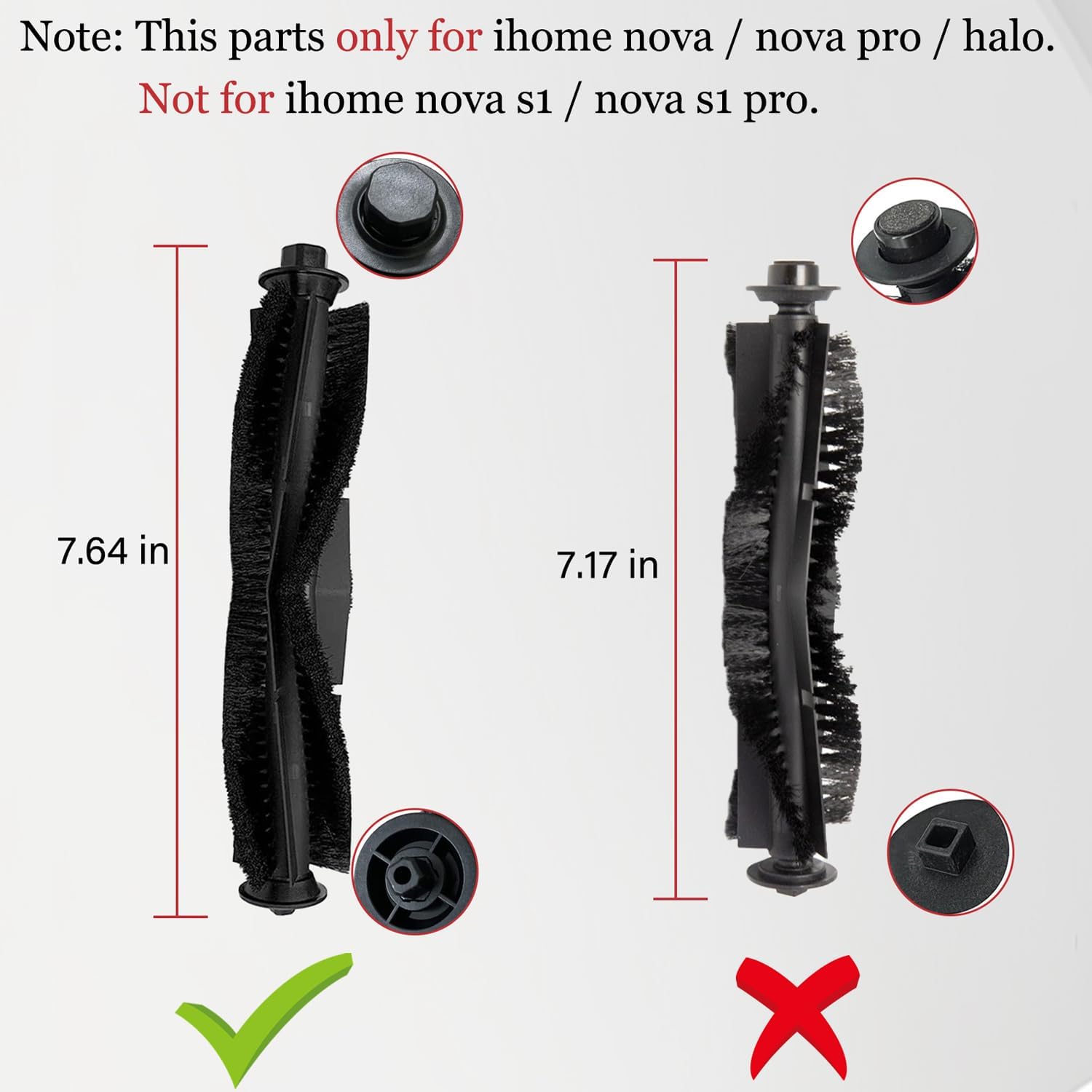
Image 2.3: Ensure your main brush matches the compatible dimensions (7.64 inches).
Visual Comparison for HEPA Filter:

Image 2.4: Confirm your HEPA filter matches the compatible dimensions (4.29 x 1.77 inches).
Visual Comparison for Side Brush:

Image 2.5: Verify your side brush base matches the compatible design.
3. Installation Instructions
Always power off your robot vacuum and disconnect it from any charging base before attempting to replace parts.
3.1. Main Brush Roll Installation
- Turn the robot vacuum upside down.
- Locate the main brush cover, usually secured by clips or screws.
- Unlatch the clips or unscrew the screws to remove the cover.
- Lift out the old main brush roll.
- Clean any debris from the brush compartment.
- Insert the new main brush roll, ensuring it is properly seated in its bearings.
- Replace the main brush cover and secure it with clips or screws.
3.2. Side Brush Installation
- Turn the robot vacuum upside down.
- Locate the side brush(es). These are typically held in place by a single screw.
- Use a screwdriver (often included with the kit) to remove the screw.
- Gently pull off the old side brush.
- Align the new side brush with the post and push it down firmly.
- Secure the new side brush with the screw.
3.3. HEPA Filter Installation
- Open the dustbin compartment on your robot vacuum.
- Remove the dustbin.
- Locate the filter housing within the dustbin.
- Remove the old HEPA filter.
- Clean the dustbin thoroughly before inserting the new filter.
- Insert the new HEPA filter into the filter housing, ensuring it is seated correctly.
- Close the dustbin and reinsert it into the vacuum.
4. Maintenance and Care
Regular maintenance of your replacement parts will ensure optimal cleaning performance and extend their lifespan.
4.1. General Cleaning
- Periodically clean the main brush roll by removing hair and debris tangled around it.
- Wipe down side brushes to remove dust and dirt.
- Tap the HEPA filter gently to dislodge accumulated dust. Do not wash HEPA filters with water unless explicitly stated by the vacuum manufacturer.
4.2. Side Brush Bristle Straightening
If side brush bristles become bent or tangled, they can often be straightened:
- Carefully remove the side brush from the vacuum.
- Prepare a cup of hot (not boiling) water.
- Submerge the bristles of the side brush into the hot water for a few minutes.
- Remove the brush and allow it to air dry completely before reattaching.

Image 4.1: Steps to straighten bent side brush bristles.
4.3. Filter Replacement Frequency
HEPA filters should typically be replaced every 2-3 months, depending on usage and household environment (e.g., pets, allergies). Main brushes and side brushes may require replacement every 3-6 months or when visible wear affects cleaning performance.
5. Troubleshooting
- Issue: Parts do not fit my vacuum.
Solution: Double-check your iHome robot vacuum's model number against the compatibility list in Section 2. These parts are not universally compatible with all iHome models, especially the S1 and S2 series. Refer to Image 2.2 to correctly identify your model. - Issue: Reduced cleaning performance after replacing parts.
Solution: Ensure all parts are installed correctly and securely. Check for any remaining debris in the brush compartments or dustbin. If side brushes are bent, refer to Section 4.2 for straightening instructions. - Issue: Side brush bristles are falling out or wearing quickly.
Solution: This can occur with heavy use or if the brush frequently encounters obstacles. Consider replacing the side brushes more frequently if this is a recurring issue. Ensure the brush is not catching on loose carpets or cords.
6. Specifications
| Feature | Detail |
|---|---|
| Brand | ZXHUANGOH |
| Product Type | Robot Vacuum Replacement Parts Kit |
| Compatible iHome Models | Nova (iHRV6), Nova Pro (iHRV14), Hola (iHRV7), Orbita Pro (iHRV16) |
| Package Contents | 1 Main Brush Roll, 6 Side Brushes, 4 HEPA Filters |
| Filter Type | HEPA |
| Main Brush Dimensions | Approx. 7.64 inches (length) |
| HEPA Filter Dimensions | Approx. 4.29 x 1.77 inches |
| Item Weight | 5.1 ounces (total package) |
| UPC | 726323678510 |
7. Warranty and Support
This product is covered by a standard manufacturer's warranty against defects in materials and workmanship. For specific warranty details, please refer to the product packaging or contact the seller directly.
Customer Support:
If you encounter any issues or have questions regarding the installation or compatibility of these replacement parts, please contact ZXHUANGOH customer service through your purchase platform for assistance.