
1. Introduction
This manual provides essential instructions for the proper setup, operation, and maintenance of your CONTROL INN ZH/JT-03 Universal Remote Control. Designed for compatibility with various minisplit air conditioner brands, including Weatherking, Prime, and Ventoteck, this remote offers a convenient solution for controlling your climate system. Please read this manual thoroughly before use to ensure optimal performance and longevity of your device.
2. Product Overview
The CONTROL INN ZH/JT-03 is a versatile replacement remote control, engineered for ease of use and broad compatibility. Its ergonomic design ensures comfortable handling, while its intuitive layout simplifies navigation through various air conditioner functions. This remote is designed to replace lost or damaged original controls, offering quick synchronization with most compatible devices without complex setup procedures.
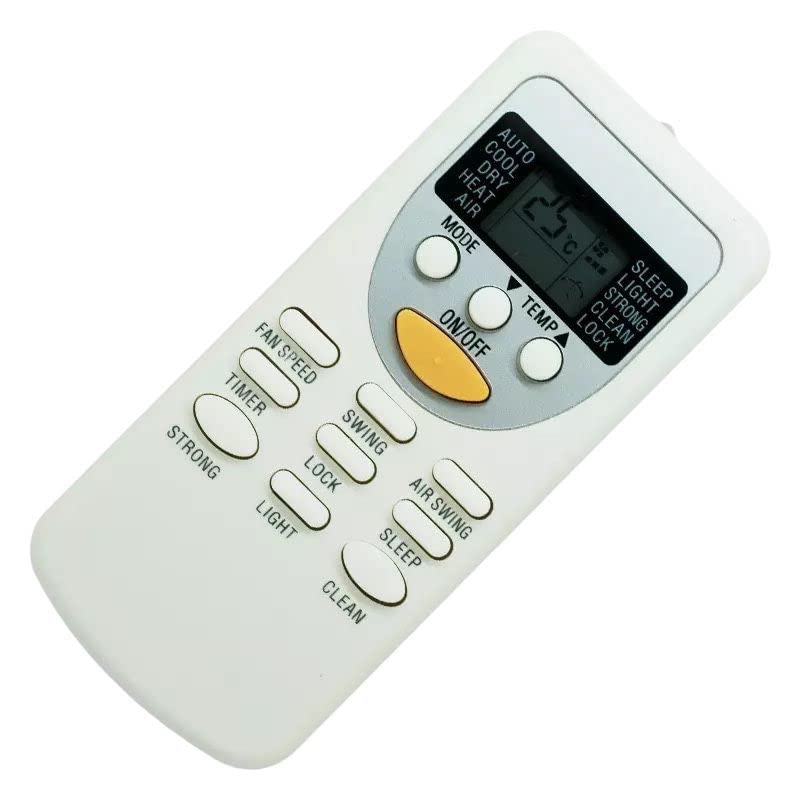
Figure 1: Front view of the CONTROL INN ZH/JT-03 Universal Remote Control. This image displays the primary buttons and display area of the remote.
3. Setup
3.1 Battery Installation
The remote control requires two (2) AAA batteries (not included) to operate. Ensure correct polarity when inserting the batteries.
- Locate the battery compartment cover on the back of the remote control.
- Slide the cover downwards or press the latch to open it.
- Insert two new AAA batteries, matching the (+) and (-) terminals inside the compartment. The remote is rated for 3V DC.
- Replace the battery compartment cover, ensuring it clicks securely into place.

Figure 2: Back view of the CONTROL INN ZH/JT-03 Remote Control. This image highlights the battery compartment and the model number label.
3.2 Initial Pairing/Configuration
This remote control is designed for quick and straightforward compatibility. For most supported minisplit air conditioners, no complex pairing or code entry is required. Simply insert the batteries and point the remote towards your air conditioner. If the air conditioner does not respond, ensure it is powered on and within range. Some air conditioner models may require a brief moment to recognize the new remote.
4. Operating Instructions
Familiarize yourself with the common buttons and their functions:
- Power Button: Turns the air conditioner ON or OFF.
- Mode Button: Cycles through operating modes (e.g., Cool, Heat, Fan, Dry, Auto).
- Temperature Up/Down Buttons (▲/▼): Adjusts the desired temperature setting.
- Fan Speed Button: Changes the fan speed (e.g., Low, Medium, High, Auto).
- Swing/Louvre Button: Controls the direction of the airflow or activates the automatic swing function.
- Timer Button: Sets a timer for the air conditioner to turn ON or OFF automatically.
- Sleep Button: Activates a power-saving mode, often adjusting temperature gradually for comfort during sleep.
Note: Specific button labels and advanced functions may vary slightly depending on the air conditioner model. Refer to your air conditioner's manual for detailed function descriptions.
5. Maintenance
5.1 Battery Replacement
Replace batteries when the remote's display becomes dim or the remote stops responding. Always replace both batteries simultaneously with new AAA batteries. Do not mix old and new batteries, or different types of batteries.
5.2 Cleaning
To clean the remote control, wipe it with a soft, dry cloth. Do not use liquid cleaners, abrasive pads, or chemical solvents, as these can damage the remote's surface or internal components.
5.3 Storage
If the remote control will not be used for an extended period, remove the batteries to prevent leakage and potential damage to the device.
6. Troubleshooting
- Remote not responding:
- Check if the batteries are inserted correctly with the correct polarity.
- Replace old batteries with new ones.
- Ensure there are no obstructions between the remote and the air conditioner's receiver.
- Confirm the remote is pointed directly at the air conditioner.
- Short operating range:
- Replace batteries with new ones.
- Ensure no strong light sources (e.g., direct sunlight, fluorescent lights) are interfering with the remote's signal.
- Air conditioner not responding to specific functions:
- Some advanced functions may not be supported by all compatible air conditioner models. Refer to your air conditioner's original manual.
7. Specifications
| Brand | CONTROL INN |
| Model | ZH/JT-03 |
| Power Supply | 3V DC (2 x AAA batteries) |
| Product Dimensions | 20 x 5 x 30 cm |
| ASIN | B0BLJ7WFC1 |
8. Warranty Information
Specific warranty terms for the CONTROL INN ZH/JT-03 Universal Remote Control may vary depending on the retailer and region of purchase. Please retain your proof of purchase and refer to the warranty information provided by your seller or the marketplace where the product was acquired. For any warranty-related inquiries, contact the original point of sale.
9. Support
For technical assistance, troubleshooting beyond this manual, or general inquiries regarding your CONTROL INN ZH/JT-03 Universal Remote Control, please contact the seller or the customer support service of the marketplace from which you purchased the product. They will be able to provide the most accurate and timely support.
