
Introduction
The METAK Water Leak Detector Sensor Alarm (Model WD61) is designed to provide early warning of water leaks and drips in your home or property. This device helps prevent potential water damage by alerting you with a loud alarm when water is detected. Its simple, wireless design allows for easy placement in various locations prone to water leaks, such as basements, kitchens, bathrooms, and laundry rooms.

Figure 1: Front view of the METAK Water Leak Detector Sensor Alarm.
Key Features
- Drip & Leak Alerts: Equipped with 4 rear water leakage detection probes and 2 front drip probes. An alarm is triggered when any of the three sets of probes detect water.
- Wireless & Easy to Use: No wiring or complex setup required. Simply place the device in the desired location.
- Loud Alarm with Mute: Features a 100dB alarm, audible from a distance, to quickly alert you to the presence of water.
- IP66 Waterproof: Designed with an IP66 super waterproof surface shell, suitable for high humidity environments.
- Long Battery Life & Low Battery Alert: Energy-efficient design allows for over 2 years of battery life under normal usage. Includes a low battery alert (beep and red light flash).
- Note: This sensor does not have Wi-Fi or Bluetooth functions and cannot connect to the METAK W13 WiFi gateway or other smart home systems.

Figure 2: Illustration of drip and leak detection capabilities and IP66 waterproof rating.
Package Contents
- METAK Water Leak Detector Sensor Alarm (Model WD61)
- User Manual (this document)
- Note: 2 AAA batteries are required and are not included.
Setup
1. Battery Installation
- Locate the battery compartment on the underside of the device.
- Gently twist the back cover counter-clockwise to open it. You may need a small flat tool or coin to assist.
- Insert two (2) AAA alkaline batteries, ensuring correct polarity (+/-).
- Replace the back cover and twist clockwise until securely closed.

Figure 3: Illustration of opening the battery compartment for battery installation.
2. Placement
Place the water leak detector flat on the floor or surface where water leaks are most likely to occur. Ensure the detection probes on the bottom of the device are in direct contact with the surface.
- Recommended Locations: Basements, near water heaters, under sinks, next to washing machines, dishwashers, refrigerators with ice makers, toilets, and in utility rooms.
- Important: Do not place the device vertically or on an uneven surface where the probes cannot make proper contact.

Figure 4: Examples of suitable placement locations for the water leak detector.
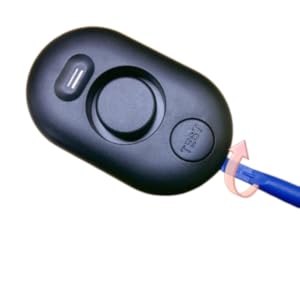
Figure 5: Correct (flat) and incorrect (vertical) placement of the sensor.
Operation
Water Detection and Alarm
When water comes into contact with any of the detection probes on the bottom or front of the device, the alarm will activate immediately. The alarm emits a loud 100dB sound to alert you to the presence of water.

Figure 6: The 100dB alarm is designed to be heard throughout your home.

Figure 7: The sensor detecting a leak on the floor.
Testing the Alarm
To ensure the device is functioning correctly, it is recommended to test it periodically (e.g., every 6 months).
- Place the detector on a flat surface.
- Apply a small amount of water (e.g., a few drops) to the detection probes on the bottom or front of the device.
- The alarm should sound immediately.
- Dry the probes thoroughly after testing.

Figure 8: Close-up of the drip and leak detection probes.
Maintenance
Battery Replacement
When the battery is low, the device will emit a beep and flash a red light. Replace the batteries promptly to ensure continuous protection.
- Follow the battery installation steps outlined in the "Setup" section.
- Dispose of old batteries according to local regulations.

Figure 9: Internal view showing the battery compartment.
Cleaning
Wipe the device with a soft, dry cloth. Do not use abrasive cleaners or immerse the device in water.
Troubleshooting
| Problem | Possible Cause | Solution |
|---|---|---|
| Alarm does not sound when water is detected. |
|
|
| Alarm sounds intermittently or falsely. |
|
|
| Low battery alert (beep/red light) persists after battery replacement. |
|
|
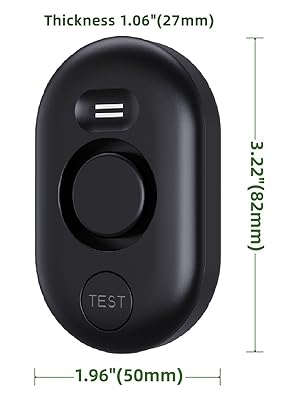
Figure 10: The detector provides an audible alert for leaks.
Specifications
| Attribute | Value |
|---|---|
| Model Number | WD61 |
| Power Source | Battery Powered |
| Battery Type | 2 x AAA Alkaline batteries (not included) |
| Voltage | 3 Volts |
| Noise Level | 100 dB |
| IP Rating | IP66 Waterproof |
| Device Dimensions (L x W x H) | 3.22" x 1.96" x 1.06" (approx. 82mm x 50mm x 27mm) |
| Item Weight | 3.2 ounces (approx. 90.7 grams) |
| Control Method | Manual (no app/Wi-Fi/Bluetooth) |
| Sensor Technology | Contact Sensor |
| Mounting Type | Tabletop Mount |

Figure 11: Approximate dimensions of the METAK Water Leak Detector.
Safety Information
- Do not expose the device to extreme temperatures or direct sunlight.
- Keep out of reach of children and pets.
- Do not attempt to disassemble or repair the device yourself. Refer to qualified personnel for service.
- Ensure batteries are inserted correctly to avoid damage or leakage.
- Dispose of batteries responsibly according to local regulations.
- This device is designed to detect water leaks and provide an audible alarm. It is not a substitute for proper plumbing maintenance or flood prevention measures.
Warranty and Support
METAK products are designed for quality and reliability. For any questions, technical support, or warranty claims, please contact METAK customer service through the retailer where the product was purchased or visit the official METAK store online.
All METAK products typically include a One Year Maintenance & Lifetime Friendly Service. Please refer to your purchase documentation for specific warranty terms.
For more information, visit the METAK Store on Amazon.
