
1. Product Overview
The Nascool Peak Flow Meter with Bluetooth APP Spirometer is a digital device designed for monitoring lung function, specifically Peak Expiratory Flow (PEF) and Forced Expiratory Volume in 1 second (FEV1). It features a digital display with a green backlight for easy viewing and connects to a smartphone application via Bluetooth for real-time data transfer and analysis. This device is suitable for individuals aged 4 and above.

Image 1.1: The Nascool Peak Flow Meter device shown alongside its companion mobile application interface.
Key Features:
- Digital display with green backlight for PEF and FEV1 readings.
- Bluetooth connectivity for real-time data transfer to a smartphone.
- Internal memory for storing up to 300 records.
- Professional management application for data analysis, asthma action plan creation, and diary generation.
- Rechargeable battery for convenience.
- Includes two washable mouthpieces for adaptability.

Image 1.2: Overview of the device's key features and components.
2. Getting Started
2.1 Package Contents
- Nascool Peak Flow Meter (SMPF-2D)
- 2 Washable Mouthpieces
- USB Charging Cable
- AA Battery (pre-installed or included)

Image 2.1: The two types of washable mouthpieces provided with the device.
2.2 Charging the Device
The device is rechargeable. Connect the provided USB cable to the charging port on the device and to a standard USB power adapter (not included) or computer USB port. Ensure the device is fully charged before first use.
2.3 Powering On/Off
- To Power On: Press the Home Button. The device display will show "go-" indicating it is ready for use.
- To Power Off: Press and hold the Home Button for 2 to 3 seconds until the device turns off. The device will also automatically power off after approximately 1 minute of inactivity.
2.4 App Installation and Bluetooth Connection
Download the official management application (ePEF) from your smartphone's app store. Ensure Bluetooth is enabled on your smartphone.
- Launch the ePEF app on your smartphone.
- Press the Bluetooth icon within the app to initiate connection.
- The Peak Flow Meter will display a Bluetooth icon and turn green once the connection is successfully established.
- Press the Bluetooth icon in the app again to sync data from the device to your phone.

Image 2.2: Steps for connecting the device to the smartphone app via Bluetooth.
2.5 Time Setting
The device's date and time will automatically set up according to your phone's time settings once a Bluetooth connection is established. You can also manually adjust the time setting on your device using the home and left/right buttons. Refer to the detailed instructions in the full user manual for manual time setting procedures.

Image 2.3: Information on device portability, memory, and time setting.
3. Operating Instructions
3.1 Performing a Measurement
- Power On: Press the Home Button. The device will display "go-".
- Prepare: Sit or stand upright. Take a deep breath. Cover the mouthpiece completely with your mouth, ensuring a tight seal. Do not place your tongue or teeth against the mouthpiece. Do not cover the back of the mouthpiece with your hand.
- Start: Blow out as fast and as hard as you can. Continue blowing until you hear 2 beeps from the device. You can then read the result on the display.
- Repeat: For best results, repeat steps 2 and 3 at least three times. The device will automatically store the highest reading.

Image 3.1: Step-by-step guide for taking a measurement.
4. Understanding Your Readings
4.1 PEF and FEV1 Definitions
- PEF (Peak Expiratory Flow): Also known as Peak Expiratory Flow Rate (PEFR), this measures a person's maximum speed of expiration. It indicates the airflow through the bronchi of the lungs and the degree of obstruction in the airway.
- FEV1 (Forced Expiratory Volume in 1 second): This calculates the amount of air a person can force out of their lungs in 1 second. It is an indicator of the reversibility of airway obstruction and a primary indicator of impaired lung function.

Image 4.1: Definitions of PEF and FEV1.
4.2 Smart Risk Indicator
The device and app provide a Smart Risk Indicator, displaying results in green, yellow, or red zones based on your PEF readings. This helps in understanding your lung function control condition.
- Green Zone (PEF ≥ 80%): Indicates that lung function management is under good control.
- Yellow Zone (50% ≤ PEF% < 80%): Indicates caution; your peak flow reading suggests a need for attention.
- Red Zone (PEF% < 50%): Indicates a medical emergency; immediate medical attention may be required.
Note: No red, yellow, or green Risk Indicators will be displayed on the device without properly setting your personal expected value in the app.
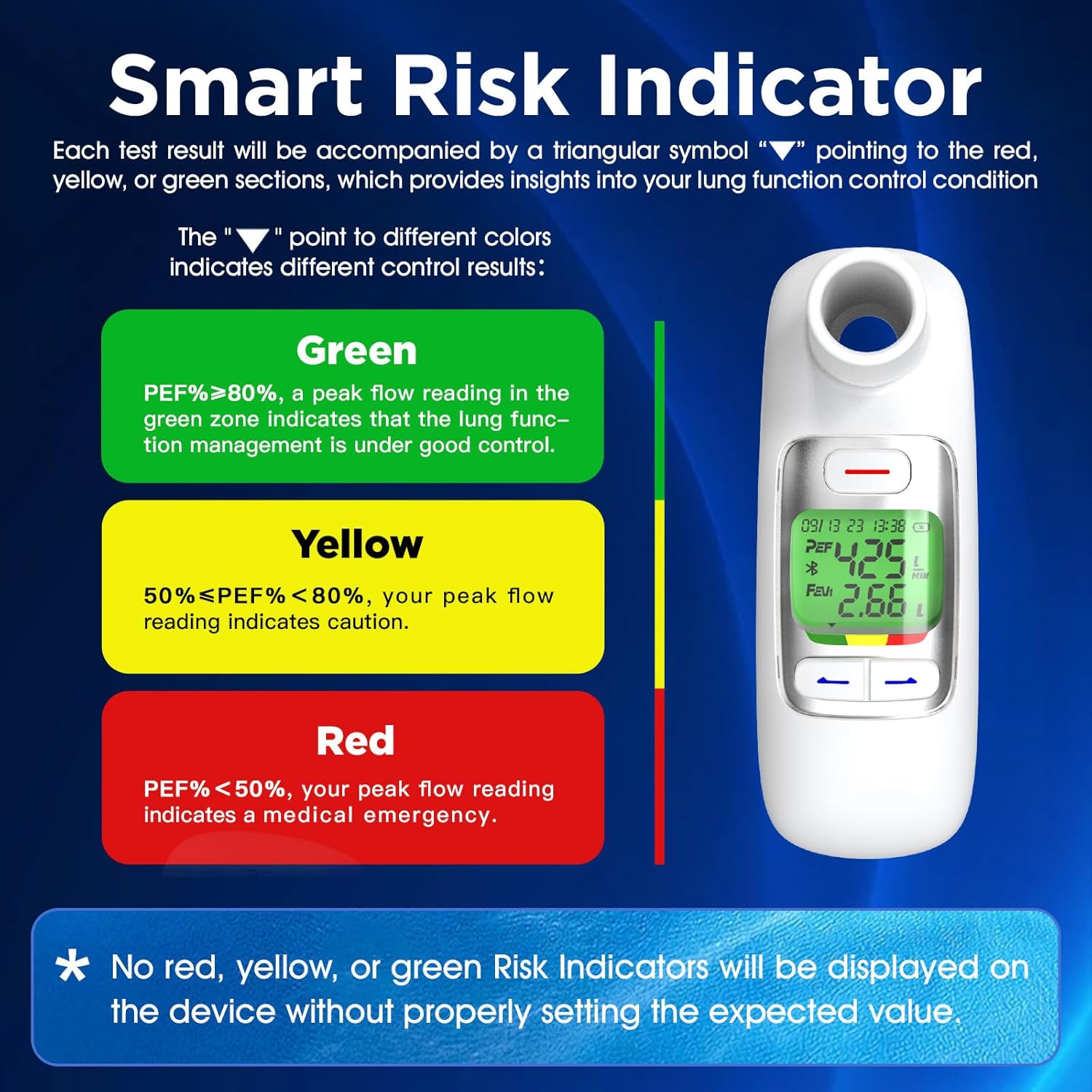
Image 4.2: Explanation of the Smart Risk Indicator zones.
5. Using the Companion Application
The professional management application (ePEF) enhances the functionality of your Peak Flow Meter by providing advanced data management and analysis tools.
5.1 Data Transfer and Storage
Once connected via Bluetooth, the app allows you to transfer data in real-time. The device itself stores up to 300 records, which can be synced to your phone at any time when connected.

Image 5.1: The app's data storage and analysis features.
5.2 Asthma Action Plan and Diary
- The app allows you to input triggers, symptoms, and medications to create a personalized Asthma Action Plan.
- It automatically generates an asthma diary chart based on your recorded data, providing a visual overview of your lung function trends.
5.3 ACT Values and Predicted Values
- The app provides Asthma Control Test (ACT) values for both children and adults, aiding in better monitoring of asthma control.
- It offers predicted PEF/FEV1 values and allows you to input your personal predicted values for comparison.
6. Maintenance and Care
6.1 Cleaning the Device and Mouthpieces
- The mouthpieces are washable. After each use, detach the mouthpiece and wash it with mild soap and warm water. Rinse thoroughly and allow it to air dry completely before reattaching.
- Wipe the main body of the device with a soft, damp cloth. Do not immerse the device in water or use abrasive cleaners.
6.2 Battery Care
The device uses a rechargeable battery. To prolong battery life, avoid fully discharging the battery frequently. Charge the device when the battery indicator shows low power.
7. Troubleshooting
7.1 Common Issues and Solutions
- Device not powering on: Ensure the device is charged. If it's a new device, check if the battery is properly inserted (if applicable).
- Bluetooth connection issues: Ensure Bluetooth is enabled on your phone and the device is powered on. Try restarting both the device and the app. Make sure the device is within range of your phone.
- Inaccurate readings: Ensure the mouthpiece is properly attached and sealed during measurement. Follow the blowing technique precisely (blow as fast and hard as possible).
- No risk indicator displayed: Ensure you have set your personal expected PEF value in the companion application.
- App not syncing data: Ensure a stable Bluetooth connection. Try closing and reopening the app.
For any persistent issues with the app or device, please contact customer support.
8. Specifications
| Specification | Detail |
|---|---|
| Model Number | SMPF-2D |
| Dimensions | 7.48 x 2.87 x 2.36 inches |
| Weight | 6.38 ounces |
| Battery | 1 AA battery required (included), rechargeable |
| Data Storage | 300 records on device |
| Connectivity | Bluetooth 4.0 |
| Suitable Age | 4 years and above |

Image 8.1: Illustration of the device's internal differential pressure sensor for accurate measurements.
9. Customer Support
If you encounter any problems with the app usage or the device, please contact Nascool customer support. We are committed to providing assistance and support for our products.
Please refer to the product packaging or the official Nascool website for specific contact information.


