
Introduction
This manual provides detailed instructions for the assembly, operation, and maintenance of your VIVO DESK-E3CVC Electric 2-Tier Corner L-Shaped Standing Desk. This desk, featuring a light wood top and white frame with light gray drawers, is designed to offer a versatile and ergonomic workspace with electric height adjustment and integrated storage. Please read this manual thoroughly before assembly and use to ensure safe and efficient operation.
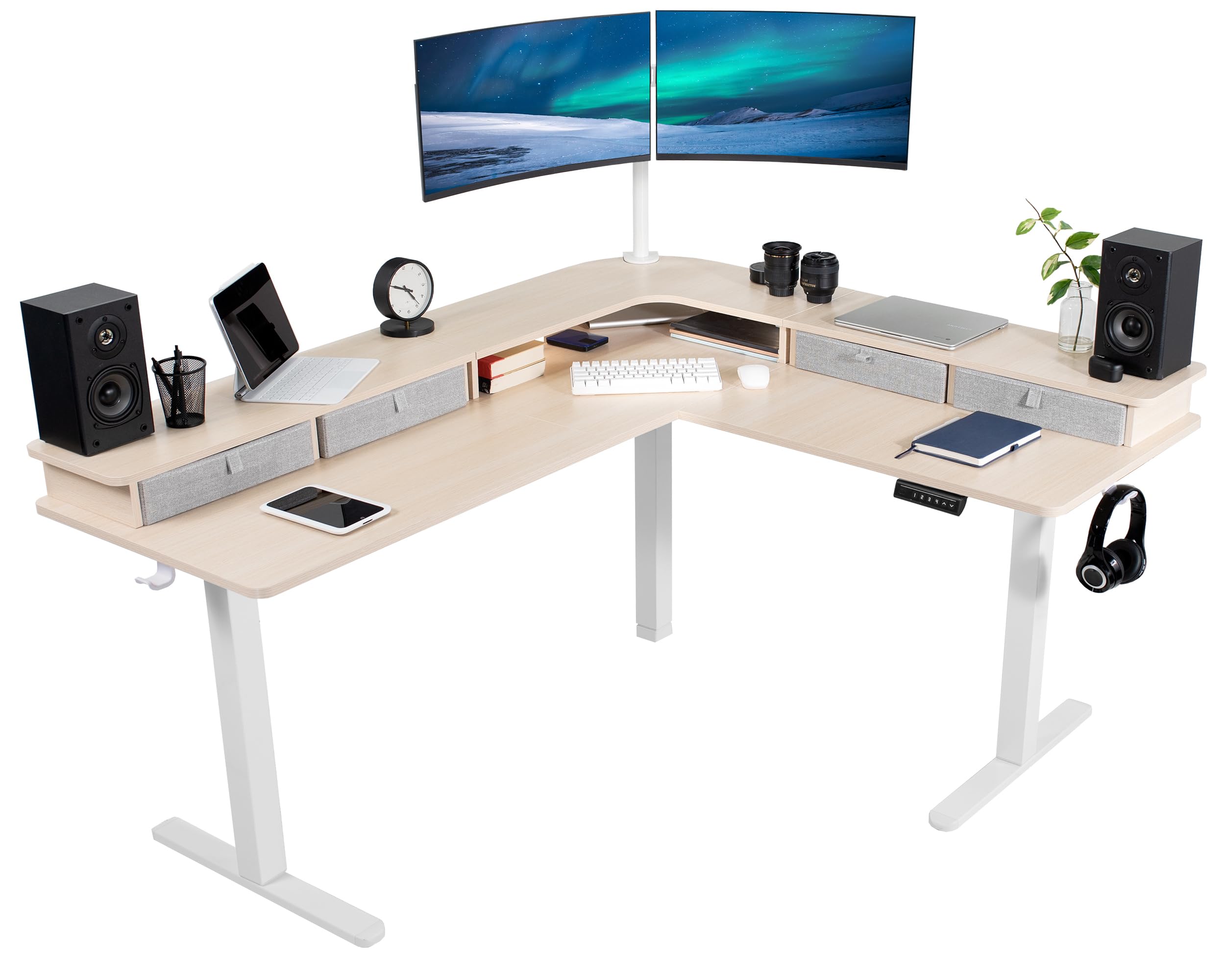
Image: The VIVO DESK-E3CVC Electric 2-Tier Corner L-Shaped Standing Desk in a light wood finish with a white frame, shown in a modern office setting.
Safety Information
Always ensure the desk is properly assembled and the casters are securely attached. When adjusting the height, use the memory controller carefully to maintain stability. Keep the desk away from heat sources and do not place heavy objects on the desk that could cause it to tip over. Always follow the manufacturer's instructions for assembly, use, and maintenance.
- Ensure all components are securely fastened before use.
- Do not overload the desk; the maximum weight capacity is 225 lbs.
- Keep children and pets away from the desk during height adjustments.
- Avoid placing liquids directly on the desk surface to prevent damage to electronic components.
- Disconnect power before cleaning or performing any maintenance.
Package Contents
Verify that all components are present and undamaged before beginning assembly. The package includes:
- L-Shaped 3-Part Desktop (Light Wood Top)
- Electric Desk Frame (White)
- Memory Controller
- 4 x Storage Drawers (Light Gray)
- 4 x 2" Casters
- 2 x Cable Clips
- 2 x Accessory Hooks
- Assembly Hardware and Tools

Image: Close-up view of the included accessories: four light gray storage drawers, four 2-inch casters, two cable clips, and two accessory hooks.
Assembly Instructions
Assembly requires two people for optimal safety and ease. Follow the included printed instructions for detailed steps. An official assembly video is also available to guide you through the process.
Video: Official VIVO assembly guide for the 2-Tier 63 x 55 Inch Corner Electric Desk with Storage (DESK-E3CVB, similar to DESK-E3CVC). This video demonstrates the step-by-step process for setting up the desk frame and attaching the desktop sections.
- Unpack Components: Carefully remove all parts from the packaging and lay them out on a clean, soft surface to prevent scratches.
- Assemble Desk Frame: Follow the instructions to connect the leg columns, feet, and crossbars to form the electric desk frame. Ensure all screws are tightened securely.
- Attach Desktop Sections: Position the L-shaped desktop sections onto the assembled frame. Secure them using the provided screws. Note that some holes may require self-tapping.
- Install Control Panel: Mount the memory controller to the underside of the desk in an easily accessible location. Connect the motor and power cables as directed.
- Add Accessories: Attach the storage drawers, casters (if desired), cable clips, and accessory hooks according to your preference.
- Cable Management: Use the included cable clips to organize and secure power cords and other cables, preventing entanglement during height adjustments.
Recommendation: It is often easier to assemble the desk right-side-up and then carefully attach the top sections, even if it requires lying on your back for some steps, rather than assembling upside-down and attempting to flip the heavy desk.
Operating Instructions
Height Adjustment
The VIVO DESK-E3CVC features a powerful electric motor for smooth height adjustments. The desk can be adjusted from a minimum height of 30.4 inches to a maximum height of 48.5 inches (main desktop).
- Use the Up (▲) and Down (▼) arrows on the memory controller to manually adjust the desk height.
- The digital display will show the current height.

Image: Diagram illustrating the height adjustment range of the VIVO standing desk, from 30.4 inches to 48.5 inches, highlighting the powerful motor and collision protection.
Memory Presets
The memory controller allows you to save up to four preferred height settings for quick adjustments.

Image: Close-up of the desk's control panel, showing the digital height display and four numbered memory preset buttons, along with up and down adjustment arrows.
- To Save a Preset:
- Adjust the desk to your desired height using the Up/Down arrows.
- Press the "S" button (Set). The display will flash.
- Immediately press one of the numbered preset buttons (1, 2, 3, or 4) to save the current height to that position.
- To Use a Preset:
- Simply press the corresponding numbered preset button (1, 2, 3, or 4). The desk will automatically move to the saved height.
Collision Protection
The desk is equipped with a collision protection feature. If the desk encounters an obstruction during height adjustment, it will automatically stop and reverse slightly to prevent damage.
Maintenance
- Cleaning: Wipe the desk surface with a soft, damp cloth. Avoid abrasive cleaners or harsh chemicals. For the frame, use a mild detergent if necessary.
- Regular Checks: Periodically check all screws and connections to ensure they remain tight. Retighten if any looseness is detected.
- Cable Management: Ensure cables are neatly organized and not pinched or stretched during height adjustments.
- Motor Care: The electric motor is designed for long-term use and requires minimal maintenance. Avoid obstructing the motor or forcing adjustments.
Troubleshooting
| Problem | Possible Cause | Solution |
|---|---|---|
| Desk does not move. | Power cable disconnected; motor overload; control panel issue. | Check power connections. Reduce weight on the desk. Reset the system by unplugging for 10 seconds and plugging back in. |
| Uneven height adjustment. | Uneven weight distribution; loose connections. | Distribute weight evenly. Check and tighten all frame connections. |
| Desk stops during adjustment. | Collision detection activated; motor overheating. | Remove any obstructions. Allow motor to cool down for 20 minutes before resuming operation. |
| Memory presets not working. | Incorrect saving procedure. | Refer to the "Memory Presets" section for correct saving steps. |
Specifications
| Feature | Detail |
|---|---|
| Model Number | DESK-E3CVC |
| Desk Shape | L-Shape, 2-Tier |
| Desktop Dimensions | 63"W x 55.2"D |
| Height Adjustment Range | 30.4" to 48.5" (main desktop) |
| Weight Capacity | 225 lbs |
| Motor Type | Electric Single Motor |
| Memory Presets | 4 |
| Top Material | Engineered Wood (Light Wood Finish) |
| Frame Material | Alloy Steel (White Finish) |
| Included Storage | 4 Light Gray Drawers |
| Assembly Required | Yes (Recommended 2 people) |

Image: Overhead diagram of the L-shaped desk, showing key dimensions such as 63" and 55.2" lengths, 23.5" depth, and 27.8" corner depth. Also indicates the 225 lbs weight capacity.
Warranty and Support
The VIVO DESK-E3CVC Electric 2-Tier Corner L-Shaped Standing Desk comes with a 3-year limited warranty covering parts and labor. For technical assistance, troubleshooting, or warranty claims, please contact VIVO customer support.
- Manufacturer: VIVO
- Warranty Type: Limited (3 years)
- Contact Support: Refer to the VIVO official website or the contact information provided with your purchase for customer service details.