
1. Introduction
1.1 Product Overview
The Sinressphic FM YXHT-TW 600W/LIGHT stereo FM radio transmitter is an integrated high-quality FM transmitter designed for professional broadcasting. It efficiently stereo-encodes input left and right channel audio signals and modulates them to the broadcast band. The unit then amplifies the RF signal to a powerful 600W output for wireless transmission. Incorporating the most advanced software radio technology, including a large-scale Field-Programmable Gate Array (FPGA) and Direct Digital Frequency Synthesis (DDS) at up to 5G, this product delivers industry-leading technical specifications, ensuring a high-fidelity, CD-like sound experience for listeners.
The transmitter's robust design includes an audio interface unit, digital processing and frequency modulation unit, RF power amplifier unit, human-machine interface unit, communication interface unit, clock synchronization unit, and power supply unit. Housed in a compact 19-inch 2U standard chassis, it is designed for high reliability, enabling continuous and stable long-term operation.
1.2 Key Features
- Overheat Protection: The transmitter automatically switches to protection mode with an alarm message and beep sound if the working temperature exceeds the normal range.
- Over SWR Protection: In case of poor antenna system connection leading to a high SWR (Standing Wave Ratio) value, the transmitter activates automatic protection mode, displaying an alarm message and emitting a beeping sound.
- Fan Error Alarm: An alarm message will be displayed on the screen if the cooling fan stops operating.
- Adjustable Power Output: The RF output power of this 600W FM transmitter is continuously adjustable from 0 to 600 watts, with a stepping of 0.1 watt. This allows for precise power tuning from 1W up to 600W, providing versatility for various broadcasting needs.
- FCC Compliant: The FCC ID is 2A6BQ-YXHT, ensuring compliance with Title 47 SECTION 15.205 Restricted bands of operation, making it legal for use.
2. Package Contents
Upon opening the package, please verify that all the following items are included and in good condition:
- FM YXHT-TW 600W Transmitter ×1
- AC Power Cable ×1
- Power Supply Cable ×1
- Audio Line ×1

Image: The package contents, including the FM transmitter unit, user manual, audio cable, and power cable.
3. Setup
3.1 Unpacking and Inspection
Carefully remove the transmitter and all accessories from the packaging. Inspect all components for any signs of damage during transit. If any damage is found, do not proceed with installation and contact customer support immediately.
3.2 Connecting the Transmitter
Before powering on the device, ensure all connections are secure and correct. Refer to the diagrams below for port identification.

Image: Top view showing the front panel with display and controls, and bottom view showing the rear panel with various input/output ports.

Image: A close-up view of the rear panel, highlighting the AC power input (100-240V), fan vents, RF output (L29KL, NK), XLR audio inputs (Left, Right), and RS-232 port.
- Antenna Connection: Connect your broadcast antenna to the RF OUTPUT port on the rear panel. Important: Ensure the antenna is properly connected before powering on the transmitter to prevent damage.
- Audio Input: Connect your audio source to the XLR Audio Input ports (Left and Right) on the rear panel using the provided audio line.
- Power Connection: Connect the AC power cable to the AC Power: 100-240V input on the rear panel, and then plug it into a suitable power outlet.
- Grounding: Ensure the unit is properly grounded for safety and optimal performance.
4. Operating Instructions
4.1 Powering On
After all connections are made, press the power button on the front panel to turn on the transmitter. The display will illuminate, and the system will initiate its startup sequence.
4.2 Navigating the Interface
The Sinressphic FM YXHT-TW 600W features a user-friendly touch screen interface for configuration and monitoring.

Image: Several Sinressphic FM Transmitters stacked, emphasizing the touch screen display on the front panel.

Image: The transmitter's front panel, illustrating the advanced all-digital DSP+DDS technologies and five kinds of protection features for enhanced security and performance.
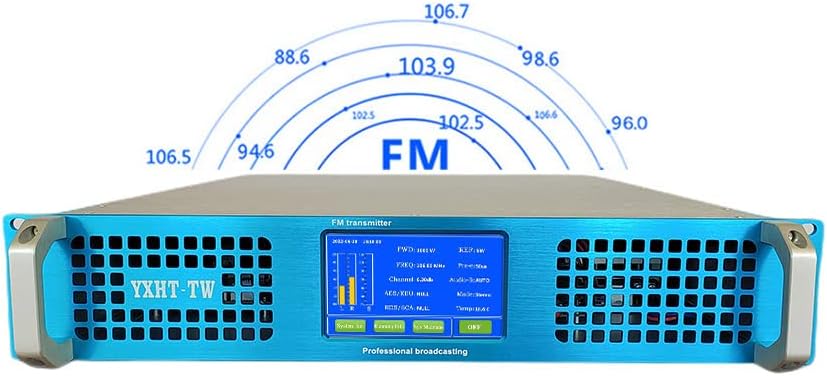
Image: The transmitter's front panel with a graphic representation of the FM frequency range (87.5 MHz to 108 MHz).
Use the touch screen to access various settings and monitor operational parameters. The main display provides real-time information such as Forward Power (FWD), Reflected Power (REF), Frequency (FREQ), Channel, Audio Source (AES/EBU, RDS/SCA), Mode (Stereo), and Temperature (Temp).
4.3 Adjusting Power Output
The RF output power can be adjusted from 0 to 600 watts in 0.1-watt increments directly from the touch screen interface. Navigate to the power settings menu and use the controls to set your desired output power.
4.4 Monitoring Performance
The transmitter's display provides critical performance metrics. Pay attention to the FWD (Forward Power) and REF (Reflected Power) readings to ensure optimal transmission and antenna matching. The temperature display helps monitor the unit's thermal status, while audio level indicators (L, R, S) show the input audio signal strength.
Video: A demonstration of the Sinressphic FM Transmitter in a testing environment. The video shows the unit's display indicating forward power (FWD) and frequency, along with a power meter showing the output wattage, confirming its operational capabilities.
5. Maintenance
5.1 Cleaning
Regularly clean the exterior of the transmitter with a soft, dry cloth. Do not use liquid cleaners or aerosols, as they may damage the unit. Ensure ventilation openings are free from dust and debris to maintain proper airflow.
5.2 Fan Maintenance
The internal cooling fans are crucial for maintaining optimal operating temperature. If a "Fan Error Alarm" appears on the display, inspect the fans for obstructions or malfunction. Ensure the area around the transmitter allows for adequate ventilation.
6. Troubleshooting
6.1 Common Issues and Solutions
| Issue | Alarm Message / Indication | Possible Cause | Solution |
|---|---|---|---|
| Overheating | Alarm message and beep sound, high temperature reading. | Insufficient ventilation, blocked fan vents, high ambient temperature. | Ensure adequate airflow around the unit. Clear any obstructions from fan vents. Operate in a cooler environment. |
| High SWR | Alarm message and beep sound, high REF (Reflected Power) reading. | Poor antenna connection, damaged antenna cable, antenna mismatch. | Check all antenna connections. Inspect antenna cable for damage. Verify antenna is tuned correctly for the operating frequency. |
| Fan Error | Alarm message on screen. | Fan malfunction, fan obstructed. | Check if the fan is spinning freely. Clear any dust or debris. If the fan is faulty, contact customer support for replacement. |
| No Audio Output | No sound from receiver, audio level indicators (L, R, S) show no signal. | Incorrect audio cable connection, faulty audio source, incorrect audio input settings. | Verify audio cables are securely connected. Check the audio source for proper operation. Ensure correct audio input is selected on the transmitter. |
7. Specifications
- Model: FM YXHT-TW 600W/LIGHT
- Brand: Sinressphic
- Output Power: 0-600W (Adjustable)
- Wireless Communication Standard: Radio Frequency
- Material: Aluminum
- Special Feature: Automatic protection mechanisms (Overheat, Over SWR, Fan Error)
- Compatible Devices: Smartphone, Speaker (for audio input)
- Manufacturer: Sinressphic
- FCC ID: 2A6BQ-YXHT
8. Safety Information
This device is designed with multiple safety features, including overheat protection, over SWR protection, and fan error alarms, to ensure safe and reliable operation. Always ensure proper ventilation and follow all connection instructions to prevent damage to the unit or injury. Do not operate the transmitter without a properly connected antenna or dummy load. Refer to local regulations and guidelines for broadcast equipment usage.
9. Warranty and Support
For warranty information, technical support, or service inquiries, please contact Sinressphic customer support through the vendor's official channels or the platform where the product was purchased. Please have your product model and purchase date available when contacting support.


