
ZIYOU LANG K87
ZIYOU LANG K87 Wireless Gaming Mechanical Keyboard User Manual
Model: K87
Brand: ZIYOU LANG
1. Product Overview
The ZIYOU LANG K87 is an 87-key wireless mechanical keyboard designed for gaming and general use. It offers flexible connectivity options, customizable backlighting, and a comfortable typing experience. Its compact design saves desk space while providing full functionality.
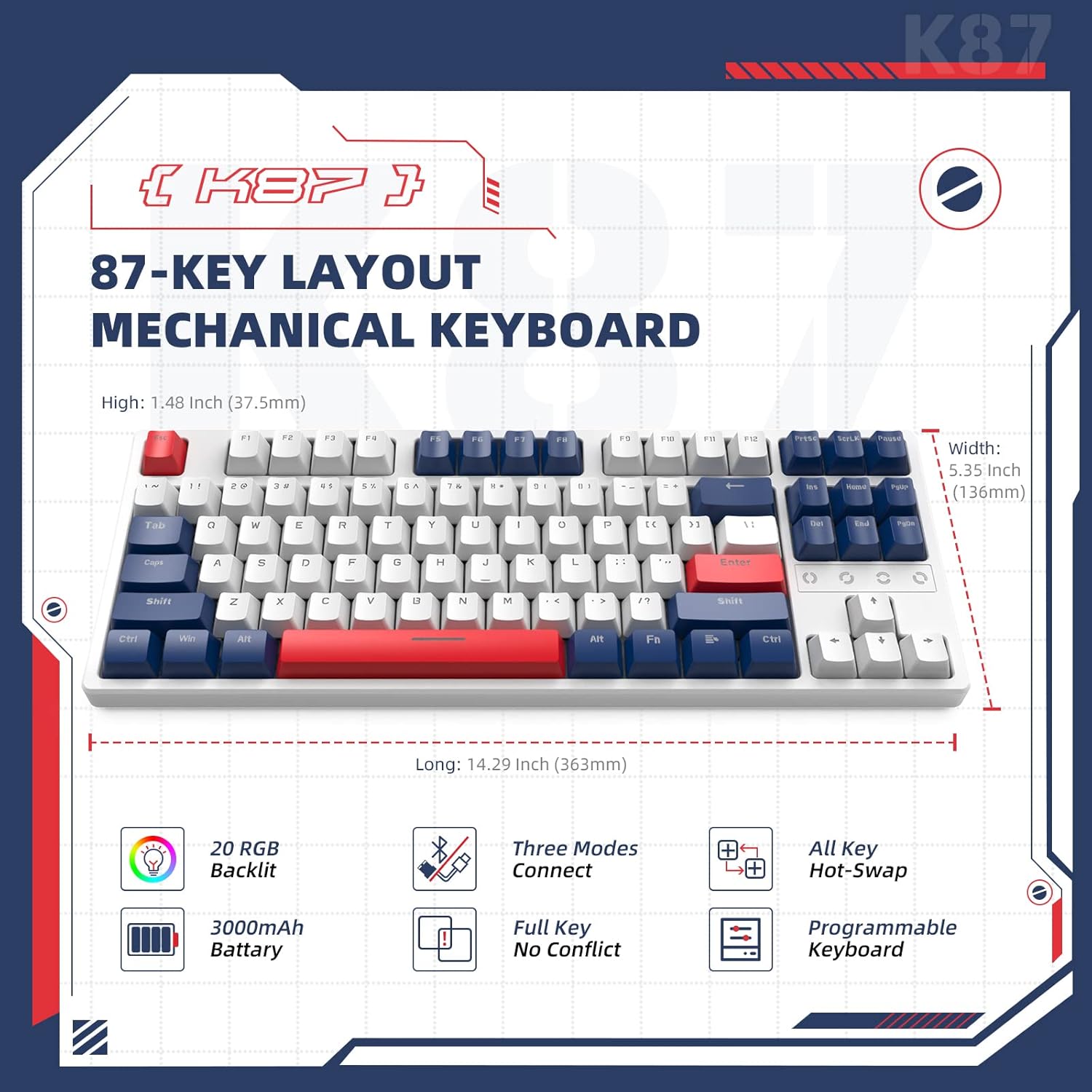
Image: K87 87-key layout highlighting dimensions, 20 RGB backlight effects, 3000mAh battery, three connection modes, full key no conflict, and hot-swappable programmable keys.
- Triple Mode Connectivity: Supports USB-C wired, 2.4GHz wireless, and Bluetooth 5.0 connections for versatile use across various devices.
- Hot-Swappable Switches: Equipped with red switches, designed for smooth and responsive keystrokes, and supports 3-pin or 5-pin switch replacement.
- RGB Backlighting: Features 16.8 million RGB lighting colors with 20 pre-set effects and music synchronization mode.
- Gasket Structure: Incorporates a double-layer soundproof cotton structure to reduce cavity sounds and enhance typing feel.
- Wide Compatibility: Compatible with Win8/Win10/MAC/IOS/Android systems, suitable for PCs, laptops, and other devices.
2. Package Contents
Verify that all items are present in the package:
- ZIYOU LANG K87 Wireless Gaming Mechanical Keyboard
- USB-C to USB-A Coiled Aviator Cable
- 2.4GHz USB Receiver Dongle
- 2-in-1 Keycap and Switch Puller
- Spare Switch (Red Switch)

Image: The ZIYOU LANG K87 keyboard shown with its included accessories: a coiled USB-C aviator cable, a 2.4GHz USB receiver, a keycap/switch puller, and a spare red switch.
3. Setup
3.1 Wired Connection
To use the keyboard in wired mode, connect the provided USB-C coiled aviator cable to the keyboard's USB-C port and the USB-A end to your computer's USB port. The keyboard will automatically be recognized and ready for use.

Image: A detailed view of the durable USB-C aviator cable, highlighting its reinforced tail and over 5000 plug life, designed for reliable wired connection.
3.2 2.4GHz Wireless Connection
For 2.4GHz wireless mode, locate the USB receiver dongle. Plug the dongle into an available USB port on your computer. Turn on the keyboard using the switch located on the back or side. Press Fn + R to activate 2.4GHz mode. The keyboard should connect automatically.
3.3 Bluetooth Connection
To connect via Bluetooth, turn on the keyboard. Press Fn + Q, Fn + W, or Fn + E to select one of the three available Bluetooth channels. The keyboard will enter pairing mode (indicator light will flash). On your device, search for Bluetooth devices and select "ZIYOU LANG K87" to pair. You can connect up to three different Bluetooth devices and switch between them using the corresponding Fn key combinations.

Image: An overhead view of the keyboard illustrating its three connectivity modes: Bluetooth (Fn+Q/W/E), 2.4GHz (Fn+R), and Wired (USB-C coiled cable).
4. Operating Instructions
4.1 Power Management
The keyboard is equipped with a 3000mAh high-capacity battery. It features two sleep-saving modes to conserve power. When the battery is low, a red light will flash to indicate that charging is required. To turn the backlight on or off, press Fn + X.

Image: Diagram showing the 3000mAh battery capacity and indicators for sleep modes and low power warning (red light flashes).
4.2 RGB Backlighting
The K87 keyboard offers 16.8 million RGB lighting colors and 20 pre-set lighting effects. You can cycle through various lighting effects by pressing Fn + Ins. Additional lighting adjustments, such as brightness and speed, can be made using combinations like Fn + Home, Fn + PgUp, Fn + Del, and Fn + PgDn. Software is available for full keyboard backlight customization and music mode synchronization.

Image: The keyboard displaying its RGB backlighting, with callouts for Fn key combinations to control lighting effects and highlighting the high-precision satellite shaft for stable performance.
4.3 Key Functions and Combinations
The keyboard supports full key no conflict (N-key rollover) and is programmable. Specific function key combinations (Fn + F1-F12) may vary depending on your operating system or software configuration. Refer to your device's documentation for specific multimedia or system control functions.
5. Maintenance
5.1 Hot-Swappable Switches
The K87 keyboard features a hot-swappable base, allowing you to easily replace switches without soldering. It supports both 3-pin and 5-pin mechanical switches. Use the provided 2-in-1 keycap and switch puller to carefully remove keycaps and switches. When inserting new switches, ensure the pins are aligned correctly to avoid bending.
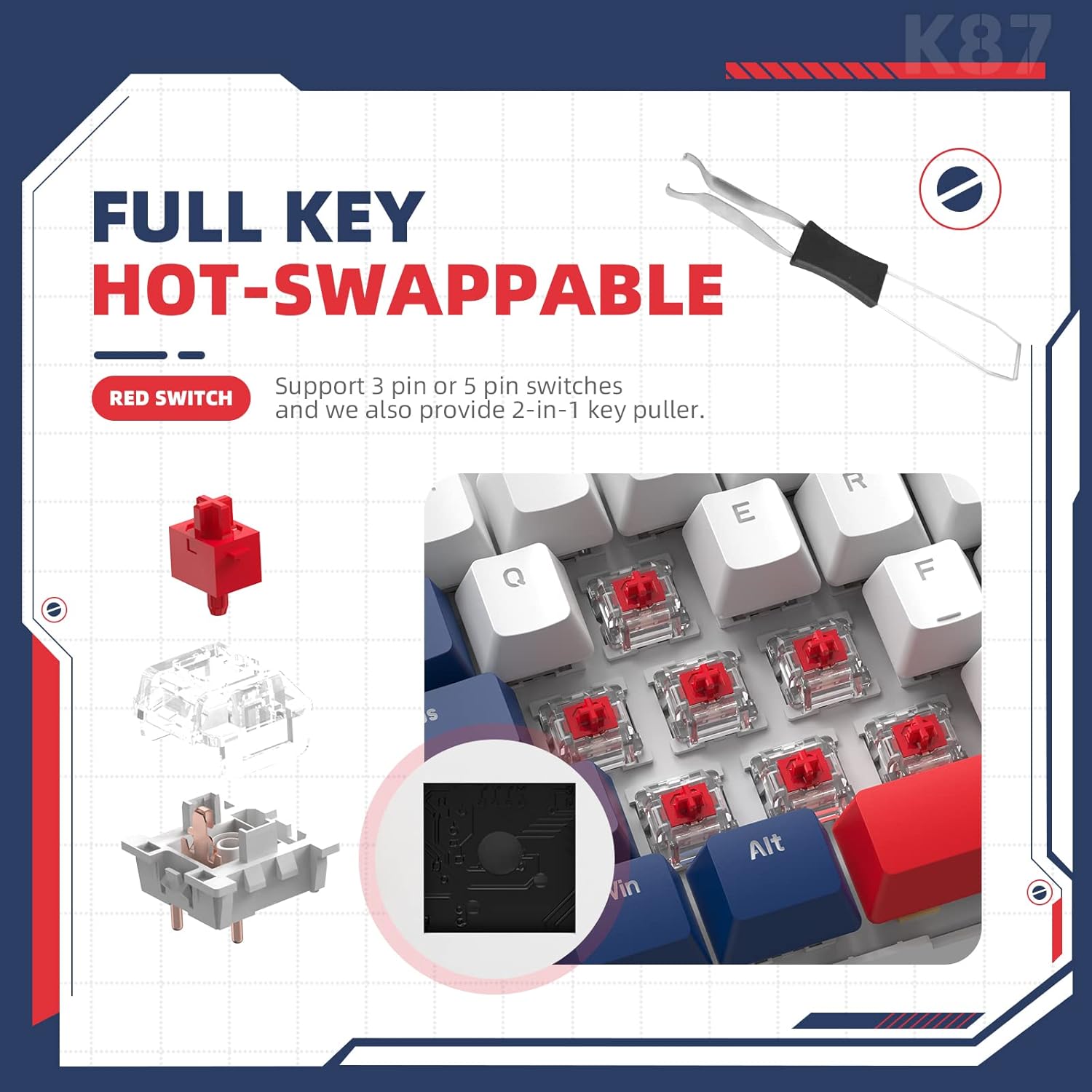
Image: A close-up view demonstrating the hot-swappable feature, showing a red switch being removed with the included key puller, and illustrating 3-pin and 5-pin switch compatibility.
5.2 Cleaning
To clean the keyboard, first disconnect it from your device. Use a soft, dry cloth to wipe down the keycaps and chassis. For deeper cleaning, you may remove the keycaps using the provided puller and use compressed air to clear debris from underneath. Avoid using harsh chemicals or abrasive materials.
6. Troubleshooting
- Keyboard not responding:
Ensure the keyboard is charged. Check the connection mode (wired, 2.4GHz, or Bluetooth) and ensure it matches your device's connection. For wireless modes, verify the dongle is properly inserted or Bluetooth is paired. Try restarting your computer. - Wireless connection issues (lag/disconnection):
Ensure the keyboard is within range of the receiver/device. Avoid interference from other wireless devices. For 2.4GHz, try plugging the dongle into a different USB port. For Bluetooth, try re-pairing the device. - Backlighting not working or incorrect:
Press Fn + X to toggle the backlight. Cycle through effects with Fn + Ins. Ensure the keyboard has sufficient battery charge. - Keys not registering or double-typing:
This could indicate a faulty switch. Use the switch puller to remove the affected switch and replace it with a spare or a new compatible switch. Ensure the switch is fully seated. - Keyboard not recognized by system:
For wired connection, try a different USB port or cable. For wireless, ensure drivers are up to date on your computer (usually automatic).
7. Specifications
| Brand | ZIYOU LANG |
| Model | K87 |
| Connectivity Technology | USB-C (Wired), 2.4GHz Wireless, Bluetooth 5.0 |
| Keyboard Description | Compact Ergonomic Mechanical |
| Number of Keys | 87 |
| Special Feature | RGB Backlit, Hot-Swappable Switches |
| Color | Blue/Red Switch (as per current product variant) |
| Material | Metal |
| Item Weight | 2.77 pounds |
| Package Dimensions | 16.65 x 7.2 x 2.52 inches |
| Battery Capacity | 3000mAh |
Note: Specifications are subject to change without prior notice.
8. Warranty and Support
For warranty information and technical support, please refer to the documentation included with your product or contact ZIYOU LANG customer service directly. Warranty terms and conditions may vary by region and retailer.
For further assistance, please visit the official ZIYOU LANG website or contact their support channels.