
1. Introduction
The YOREK YK-903 is a compact and portable AM/FM/SW radio designed for high sensitivity reception. This battery-operated device includes stereo earphones for personal listening and features an intuitive interface for easy operation. This manual provides essential information for setting up, operating, and maintaining your radio.
2. Safety Information
- Do not expose the unit to extreme temperatures, direct sunlight, or high humidity.
- Use only specified battery types (2 x AA batteries).
- Keep the radio out of reach of children.
- Avoid dropping the unit or subjecting it to strong impacts.
- Do not attempt to disassemble or modify the radio. Refer all servicing to qualified personnel.
3. Package Contents
- YOREK YK-903 Portable Radio
- Stereo Earphones
- Owner's Manual (this document)
4. Product Overview

This image displays the YOREK YK-903 portable radio, highlighting its compact design. The front panel features a clear LCD screen, a speaker grille, and various control buttons including CH01, CH02, CH03, ALARM, TIME/DEL, SLEEP, M-, M+, SCAN, and BAND. The extendable antenna is shown rotated 360 degrees, and dimensions are indicated as 117mm width, 70mm height, and 31mm depth.
Controls and Display
- LCD Display: Shows frequency, time, band, stereo indicator, and battery level.
- Power Switch: Located on the top right side.
- Volume Knob: Located on the right side for adjusting audio output.
- Tuning Dial: Located on the right side for manual frequency selection.
- BAND Button: Cycles through AM, FM, and SW bands.
- SCAN Button: Initiates automatic station scanning.
- CH01, CH02, CH03 Buttons: Quick access to favorite preset stations.
- M+, M- Buttons: Navigate through saved preset stations.
- ALARM Button: Activates and sets the alarm function.
- TIME/DEL Button: Sets time and deletes auto-presets.
- SLEEP Button: Activates and sets the sleep timer.
- Antenna: Extendable telescopic antenna for improved reception.
- 3.5mm Audio Jack: For connecting stereo earphones.
5. Setup
Battery Installation
- Locate the battery compartment cover on the back of the radio.
- Slide or open the cover to access the battery compartment.
- Insert 2 AA batteries (not included) into the compartment, ensuring correct polarity (+/-) as indicated inside.
- Close the battery compartment cover securely.
Note: To prevent loss of clock settings and stored stations, replace batteries quickly, ideally within a few seconds.
6. Operating Instructions
Power On/Off
Slide the power switch located on the top right side of the radio to the 'ON' position to turn on the device. Slide it to 'OFF' to power down.
Volume Adjustment
Rotate the volume knob on the right side of the radio clockwise to increase the volume and counter-clockwise to decrease it.
Band Selection (AM/FM/SW)

This image illustrates the YOREK YK-903's high sensitivity reception capabilities, featuring a high-performance DSP digital tuner. The radio supports AM step (9KHz/10KHz) for international use. The frequency ranges are specified as FM: 76-108MHz, AM: 522-1710KHz, and SW: 3.0-21.85MHz. An antenna icon symbolizes radio wave reception.
Press the BAND button repeatedly to cycle through the available frequency bands: FM, AM, and SW (Shortwave).
Tuning Stations

This image highlights the YOREK YK-903's user-friendly operation. It shows the tuning dial for manual frequency selection and the SCAN button. Pressing and holding the SCAN button for 2 seconds initiates automatic station scanning, capable of saving up to 35 stations across FM, AM, and SW bands. Dedicated CH01, CH02, CH03 buttons allow quick access to favorite stations, and the TIME/DEL button can delete unwanted auto-presets.
- Manual Tuning: Rotate the Tuning Dial on the right side of the radio to manually search for desired frequencies.
- Automatic Scan: Press and hold the SCAN button for approximately 2 seconds. The radio will automatically scan and store up to 35 available stations for the current band.
Preset Stations
- Accessing Presets: Press CH01, CH02, or CH03 buttons for quick access to your three favorite stations.
- Navigating Presets: Use the M+ and M- buttons to cycle through all stored preset stations.
- Deleting Presets: Use the TIME/DEL button to delete unwanted automatically stored presets.
Alarm Function

The image shows the YOREK YK-903 radio in a bedroom setting, emphasizing its alarm and sleep timer features. The sleep timer allows users to set an automatic power-off time for the radio, adjustable from 10 to 120 minutes. The alarm function uses the radio's audio as an alarm sound, automatically turning on the radio at the set time to play the chosen channel.
Press the ALARM button to set the alarm time. When the set alarm time is reached, the radio will automatically power on and play the last tuned station, ensuring you don't miss your preferred channel.
Sleep Timer
Press the SLEEP button to activate the sleep timer function. You can set the radio to automatically turn off after a specified duration, adjustable from 10 to 120 minutes. This is ideal for listening before sleeping.
Earphone Use
Connect the included stereo earphones to the 3.5mm audio jack on the side of the radio for private listening. When earphones are connected, the internal speaker will be muted.
7. Maintenance
- Cleaning: Clean the radio's exterior with a soft, dry cloth. Do not use liquid cleaners, abrasive pads, or chemical solvents.
- Battery Care: Remove batteries if the radio will not be used for an extended period to prevent leakage and damage.
- Antenna Care: Extend the telescopic antenna fully for optimal reception. Retract it gently when not in use to prevent bending or breakage.
8. Troubleshooting
No Power
- Ensure the power switch is in the 'ON' position.
- Check battery installation for correct polarity.
- Replace old batteries with fresh AA batteries.
Poor Reception
- Fully extend the telescopic antenna.
- Try repositioning the radio to a different location, away from electronic devices that may cause interference.
- For AM reception, rotate the radio itself to find the best signal.
- For FM and SW reception, adjust the angle and direction of the antenna.
No Sound
- Check the volume level and ensure it is not set to minimum.
- If using earphones, ensure they are fully plugged into the 3.5mm audio jack.
- If no earphones are connected, ensure the internal speaker is not muted (e.g., by a faulty earphone connection).
Clock/Presets Reset
- This can occur if batteries are removed for an extended period. Re-enter the current time and reprogram your desired preset stations.
9. Specifications

A detailed view of the YOREK YK-903's large STN LCD display, designed for clarity from multiple angles. The display shows time/frequency, band indicators (AM FM SW), STEREO icon, and KHz/MHz units. It features a bright backlight for improved visibility.
- Brand: YOREK
- Model: YK-903
- Dimensions (LxWxH): 12.4 x 2.8 x 7.3 cm (4.88 x 1.10 x 2.87 inches)
- Weight: Approximately 160 g (without batteries)
- Tuner Technology: AM, FM, SW
- Frequency Range:
- FM: 76 - 108 MHz
- AM: 522 - 1710 KHz
- SW: 3.0 - 21.85 MHz
- Power Source: 2 x AA Batteries (not included)
- Hardware Interface: 3.5mm Audio Jack
- Display: LCD with backlight
- Special Features: Portable, Alarm Function, Sleep Timer, Preset Stations
10. Portability
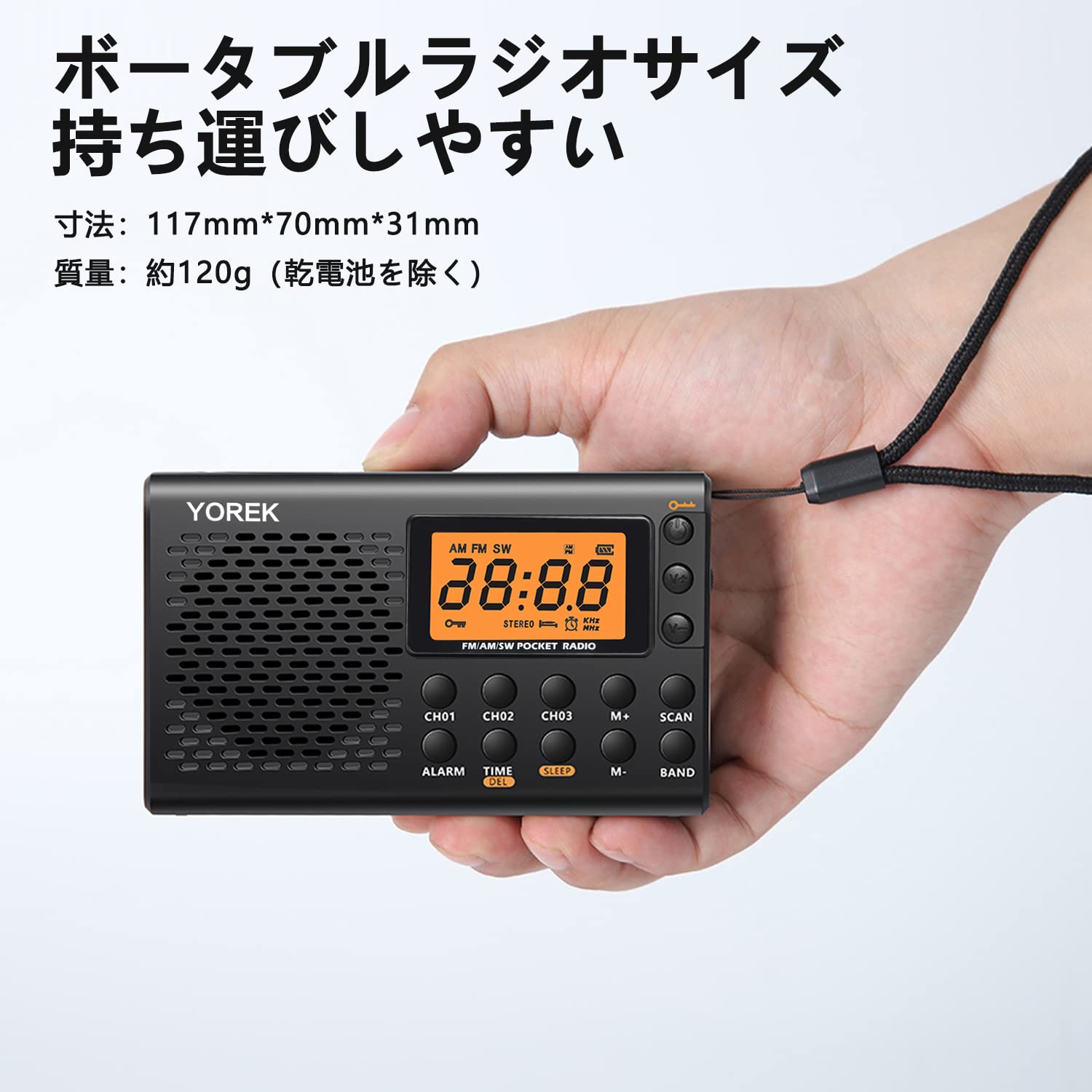
This image demonstrates the YOREK YK-903's portability, showing it held comfortably in a hand. Its compact dimensions (117mm x 70mm x 31mm) and light weight (approx. 120g excluding batteries) make it easy to carry.

The image shows a person hiking with the YOREK YK-903 radio attached to their backpack, illustrating its suitability for outdoor activities and travel due to its portable size and lightweight design.
The YOREK YK-903 is designed for maximum portability. Its compact size and lightweight construction make it easy to carry in your hand, pocket, or attach to a backpack, making it an ideal companion for travel, outdoor activities, or everyday use.
11. Warranty and Support
For warranty information and customer support, please refer to the documentation provided at the time of purchase or contact YOREK customer service through their official channels. Specific warranty terms may vary by region and retailer.