
Stealth Cam STC-WV14-3PK
Stealth Cam Wildview 14 Trail Camera - 3 Pack User Manual
Model: STC-WV14-3PK | Brand: Stealth Cam
Introduction
The Stealth Cam Wildview 14 Trail Camera is designed for scouting and monitoring wildlife. This 3-pack provides multiple units for comprehensive coverage of your desired area. Each camera captures crystal clear 14 MP images and video, featuring a rapid 0.7-second trigger speed to ensure minimal missed activity. The cameras are built for outdoor use and come with a tree strap for easy placement.
Safety Information
- Always handle the camera with care to prevent damage.
- Do not expose the camera to extreme temperatures or direct sunlight for prolonged periods.
- Ensure the battery compartment is securely closed to prevent water ingress.
- Use only the specified battery type (4AA batteries per camera).
- Dispose of batteries responsibly according to local regulations.
- Keep the camera out of reach of children.
Package Contents
Verify that all items are present in your package:
- 3 x Stealth Cam Wildview 14 Trail Cameras
- 3 x Tree Straps
- User Manual (this document)
Note: SD memory cards and 4AA batteries per camera are not included and must be purchased separately.

Image: Three Wildview 14 Trail Cameras included in the package.
Components Overview
Familiarize yourself with the key components of your Wildview 14 Trail Camera.

Image: Front view of the Wildview 14 Trail Camera, showing the lens, IR emitters, and motion sensor.
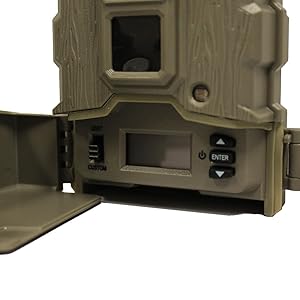
Image: Internal display and control buttons for camera setup and programming.
The camera features a robust outer casing, a central lens, infrared (IR) emitters for night vision, and a motion sensor. Inside, a small display and control buttons allow for easy setup and Quick Set Programming.
Setup
1. Battery Installation
- Open the camera's side latch to access the battery compartment.
- Insert 4 AA batteries into the designated slots, ensuring correct polarity (+/-).
- Close the battery compartment securely until the latch clicks into place.
2. SD Card Installation
- Locate the SD card slot, typically near the battery compartment.
- Insert a compatible SD memory card (up to 32 GB, sold separately) into the slot until it clicks.
- Ensure the card is inserted correctly to avoid damage.
3. Mounting the Camera
- Select a suitable tree or post for mounting.
- Thread the provided tree strap through the mounting slots on the back of the camera.
- Securely fasten the strap around the tree, ensuring the camera is stable and pointed towards the desired area.
- Adjust the camera angle as needed for optimal coverage.

Image: Wildview 14 Trail Camera securely mounted to a tree using the included strap.
Operating Instructions
Powering On/Off
To power on the camera, slide the power switch to the 'ON' position. To power off, slide the switch to 'OFF'.
Quick Set Programming
The Wildview 14 features Quick Set Programming for rapid deployment. Access the internal display and use the navigation buttons (up/down/enter) to select pre-configured settings for common scenarios. Refer to the on-screen prompts for guidance.
Setting Date and Time
To ensure accurate timestamps on your images and videos, it is crucial to set the correct date and time. Navigate through the menu using the internal display and buttons. Select the 'Date/Time' option and adjust the year, month, day, hour, and minute. Confirm your selections to save. Note: Some users have reported difficulty with the responsiveness of the menu buttons when setting the time and date. Ensure firm presses and allow a moment for the camera to register input.
Photo and Video Modes
The camera supports both still image capture (14 MP resolution) and video recording (480p resolution). You can configure the camera to take photos, videos, or both. Video clips can be set to durations of 5, 10, or 20 seconds.
Trigger Speed
The camera boasts a fast 0.7-second trigger speed, minimizing the chance of missing fast-moving subjects. This setting is fixed for optimal performance.
Viewing Images and Videos
To view captured media, remove the SD card from the camera and insert it into a compatible device (e.g., computer, card reader). Alternatively, some cameras may allow basic playback on the internal display, though this is primarily for setup and not detailed review.

Image: Example of a still image captured by the Wildview 14 Trail Camera.
Maintenance
Cleaning
Periodically clean the camera lens and motion sensor window with a soft, lint-free cloth. Do not use abrasive cleaners or solvents. Ensure no debris obstructs the lens or sensor.
Battery Replacement
Replace batteries when the low battery indicator appears on the display or when performance degrades. Always replace all 4 AA batteries at the same time with new ones to ensure consistent power.
Storage
When not in use for extended periods, remove the batteries from the camera to prevent leakage. Store the camera in a cool, dry place away from direct sunlight and extreme temperatures.
Troubleshooting
| Problem | Possible Cause | Solution |
|---|---|---|
| Camera not powering on | Batteries inserted incorrectly or depleted; Power switch not fully engaged. | Check battery polarity and replace with fresh batteries. Ensure power switch is firmly in 'ON' position. |
| No images/videos captured | SD card full or corrupted; Camera not in active mode; Motion sensor obstructed or range too far. | Format or replace SD card. Verify camera is in photo/video mode. Clear sensor path and adjust camera placement. |
| Poor image/video quality | Lens dirty; Low light conditions; Subject too far or too close. | Clean the lens. Ensure adequate lighting or use night vision. Adjust camera distance to subject. |
| Difficulty setting date/time | Buttons not registering input. | Press buttons firmly and allow a brief pause for the camera to respond. |
Specifications
| Feature | Detail |
|---|---|
| Model Name | Wildview 14 |
| Model Number | STC-WV14-3PK |
| Effective Still Resolution | 14 MP |
| Video Capture Resolution | 480p |
| Video Capture Format | MPEG-4 |
| Trigger Speed | 0.7 seconds |
| Power Source | 4 AA Batteries (not included) |
| Memory Card Support | SD up to 32 GB (sold separately) |
| Mounting Type | Tree Strap |
| Color | Gray |
| Item Dimensions (L x W x H) | 2.28 x 3.86 x 5.35 inches |
| Item Weight | 1 Pound (per camera) |
| Low Light Technology | Night Color |
| Indoor/Outdoor Usage | Outdoor |
Warranty Information
For specific warranty details regarding your Stealth Cam Wildview 14 Trail Camera, please refer to the warranty card included with your purchase or visit the official Stealth Cam website. Warranty terms typically cover manufacturing defects for a specified period from the date of purchase.
Customer Support
Should you require further assistance or have questions not covered in this manual, please contact Stealth Cam customer support. Visit the official Stealth Cam website for contact information, including phone numbers and email support. You can also find additional resources and FAQs online.
Visit the Stealth Cam Store on Amazon for more product information.
Ask a question about this manual
Ask about setup, troubleshooting, compatibility, parts, safety, or missing instructions. Manuals+ will review the question and use this page’s manual context to help answer it.